
 Pyroquad Game Engine
This is a Python game engine based on macroquad.
- Install via
pip install pyroquad - Requires Python >= 3.9
- Supported Platforms: windows, linux, mac, and the browser (WebAssembly via Pyodide - see docs/WASM.md)
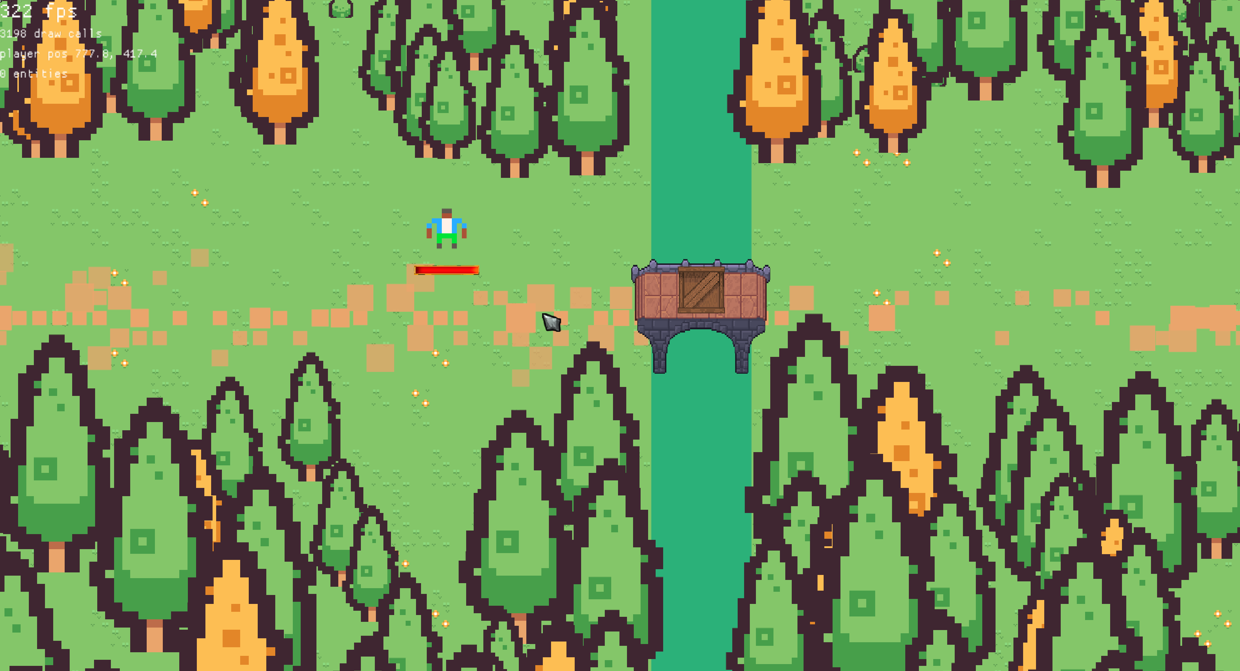
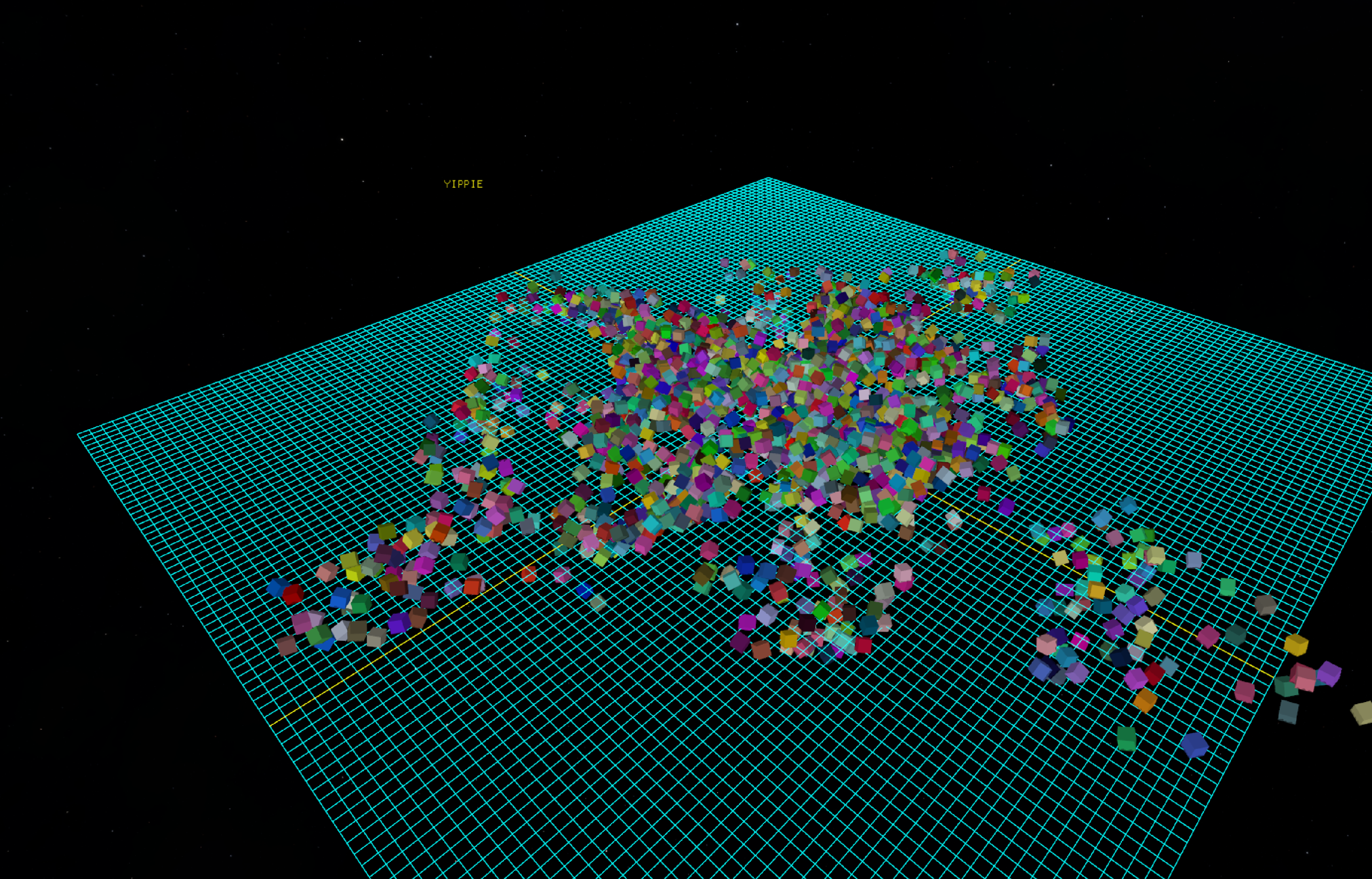
Featuring 2D:
and 3D:
How to build:
Prerequesites:
Python >= 3.9 ( python >= 3.14 is recommended)
Rust Compiler >= 1.85.0 (Required for the Rust 2024 Edition)
System libraries if using Linux (required for X11, OpenGL, and audio bindings):
Ubuntu / Debian:
sudo apt-get install -y libasound2-dev libx11-dev libxi-dev libgl1-mesa-dev libxcursor-dev libxinerama-dev libxrandr-devFedora:
sudo dnf install alsa-lib-devel libX11-devel libXi-devel mesa-libGL-devel libXcursor-devel libXinerama-devel libXrandr-develArch Linux:
sudo pacman -S alsa-lib libx11 libxi mesa libxcursor libxinerama libxrandrCreate and activate a Python virtual environment:
macOS / Linux:
python3 -m venv .venv
source .venv/bin/activateWindows:
python -m venv .venv
.venv\Scripts\activateInstall the maturin build tool using
pip install maturinCompilation:
run
maturin build --release --features abi_39 --generate-stubsfor python >= 3.9run
maturin build --release --features abi_310 --generate-stubsfor python >= 3.10run
maturin build --release --features abi_314 --generate-stubsfor python >= 3.14(Note: Older ABIs offer better backward compatibility, but newer versions yield performance improvements)
Installation:
- The generated package can be found at:
/target/wheels/- Install the package:
pip install \path\to\your\file.whl --force-reinstall
How to build for the browser (WebAssembly):
The web build is a single WebAssembly module that runs inside Pyodide (CPython compiled with Emscripten). Nothing is forked or patched - macroquad, miniquad, quad-snd and Pyodide are all stock. docs/WASM.md explains how and why it works.
Prerequesites (in addition to the ones above):
The
wasm32-unknown-emscriptenRust target:
rustup target add wasm32-unknown-emscriptenThe Emscripten SDK. If you do not already have one, put it in the project root - the build script looks for
emccunder$EMCC, then$EMSDK, then the project-localemsdk/, thenPATH, so noemsdk_envactivation step is needed:
git clone https://github.com/emscripten-core/emsdk.git
./emsdk/emsdk install latest
./emsdk/emsdk activate latest(on Windows, use
emsdk\emsdk.batin place of./emsdk/emsdk)A browser with JSPI (JavaScript Promise Integration): Chrome 137+. This is what lets synchronous Python (
while True: ... next_frame()) hand the page back to the browser between frames. Firefox and Safari have not shipped it yet.Fetch the Pyodide runtime into
web/pyodide/(once):
python web/get_pyodide.pyThis is the stock
pyodide-corerelease, unpacked and otherwise untouched - the web build deliberately runs on an unmodified Pyodide.(Pyodide releases are versioned after the CPython they ship: the pinned 314.0.7 is CPython 3.14.2, which is what
--features abi_314targets.python web/get_pyodide.py <version>takes a different one.)Compilation:
RUSTFLAGSis what turns the crate into an Emscripten side module - the same thing Pyodide builds every other extension module as.
macOS / Linux:
RUSTFLAGS="-C link-arg=-sSIDE_MODULE=2" PYO3_CROSS_PYTHON_VERSION=3.14 cargo build --target wasm32-unknown-emscripten --release --features abi_314Windows (PowerShell):
$env:RUSTFLAGS="-C link-arg=-sSIDE_MODULE=2"; $env:PYO3_CROSS_PYTHON_VERSION="3.14"
cargo build --target wasm32-unknown-emscripten --release --features abi_314(
maturinis not used here: the browser loads the module directly, so there is no wheel to build. Also remember to clearRUSTFLAGSagain before building natively in the same shell - it applies to every target.)Bundle the module together with the pure-Python half of the package:
python web/build_web.pyThis writes
web/pyroquad_pkg.zip, which the page unpacks into Pyodide. Re-run it after everycargo build.Check the build (optional, but it catches the one failure mode that is otherwise only visible as a cryptic
dlopenerror in the browser):
python web/check_imports.pyIt cross-references every symbol the module imports against what Pyodide actually provides, and exits non-zero if anything is unresolved.
Run it:
python web/serve.pythen open
http://127.0.0.1:8000/web/index.html?script=tests/test_rec.py
For any Agents reading this:
Please refer to AI.md for best practice and an entrypoint into the engine.
Example Code:
Hello rectangle
from pyroquad import *

activate_engine()

while True:
    draw_rectangle(x=100, y=100, w=600, h=300, color=Color.GREEN)
    draw_text(text="Hello rectangle", x=200, y=200, font_size=50, color=Color.RED)
    next_frame()
    examples.limit_fps(60)
Textures
from pyroquad import *

activate_engine()

texture =  Loading.download_file(
    "https://raw.githubusercontent.com/Ludwig-000/pyroquad/main/docs/PyroquadLogo.png"
).to_Texture2D()

while True:
    draw_texture(texture)
    next_frame()
    examples.limit_fps(60)
Cube
from pyroquad import *

activate_engine()

cube = Cube(
    position=Vec3.ZERO,
    rotation=Vec3.ZERO,
    scale=Vec3.ONE,
    color=Color.RED)

cam = Camera3D(position=Vec3.splat(2), target=Vec3.ZERO)

while True:
    cam.set_camera()
    cube.rot += get_delta_time()
    draw_all_objects()
    next_frame()
    examples.limit_fps(60)
Skybox
from pyroquad import *

activate_engine()


skybox_tex = examples.loading_screen_future(
    lambda a: download_file_future(a),
    ["https://raw.githubusercontent.com/Ludwig-000/pyroquad/main/tests/HDR_blue_nebulae_2.png"],
    show_rotating_square=True
)[0].to_Texture2D()

player = examples.PlayerCamera(position=Vec3.ONE)

while True:
    if KeyCode.Escape in get_keys_pressed():
        break

    player.update()
    draw_skybox(skybox_tex)
    draw_grid(
        slices=1_000,
        spacing=1.0,
        axes_color=Color.YELLOW,
        other_color=Color.GREEN)

    next_frame()
    examples.limit_fps(60)
Multiple windows
import multiprocessing
from pyroquad import *

def task(message, color_name):
    activate_engine()
    prevent_quit()
    color = getattr(Color, color_name)

    while not is_quit_requested():
        clear_background(color)
        draw_text(message, 200, 200, Color.GREEN, 60)
        next_frame()
        examples.limit_fps(60)

if __name__ == "__main__":
    seq_data = [("multiple", "YELLOW"), ("windows", "BRICK"), ("using", "ORANGE")]
    for msg, color in seq_data:
        p = multiprocessing.Process(target=task, args=(msg, color))
        p.start()
        p.join()

    procs = [multiprocessing.Process(target=task, args=("multiprocessing", "BLUE")) for _ in range(5)]
    for p in procs: p.start()
    for p in procs: p.join()
Rectangle deletes itself (heartbreaking)
from pyroquad import *

activate_engine()

re = Rectangle(Vec2.splat(200), 0, Vec2.splat(100), Color.WHITE)

timer  = 120
def t(rec: Rectangle):
    global timer, re
    timer-= 1
    if timer == 0:
        del(re)
    rec.draw()

re.tick(t)

while True:
    next_frame()
    examples.limit_fps(60)
1 maintainer

Metadata
1 maintainer
Release files for pyroquad 0.1.5
For a detailed explanation of source distributions (sdists) and built distributions (wheels), please see the package formats documentation.
Built distributions (wheels)
| File | Reset | |||
|---|---|---|---|---|
| pyroquad-0.1.5-cp314-abi3-win_amd64.whl | CPython 3.14 | abi3 | Windows x86-64 | Details |
| pyroquad-0.1.5-cp314-abi3-manylinux_2_38_x86_64.whl | CPython 3.14 | abi3 | Linux glibc 2.38+ x86-64 | Details |
| pyroquad-0.1.5-cp314-abi3-macosx_11_0_arm64.whl | CPython 3.14 | abi3 | macOS 11.0+ ARM64 | Details |
| pyroquad-0.1.5-cp310-abi3-win_amd64.whl | CPython 3.10 | abi3 | Windows x86-64 | Details |
| pyroquad-0.1.5-cp310-abi3-manylinux_2_38_x86_64.whl | CPython 3.10 | abi3 | Linux glibc 2.38+ x86-64 | Details |
| pyroquad-0.1.5-cp310-abi3-macosx_11_0_arm64.whl | CPython 3.10 | abi3 | macOS 11.0+ ARM64 | Details |
| pyroquad-0.1.5-cp39-abi3-win_amd64.whl | CPython 3.9 | abi3 | Windows x86-64 | Details |
| pyroquad-0.1.5-cp39-abi3-manylinux_2_38_x86_64.whl | CPython 3.9 | abi3 | Linux glibc 2.38+ x86-64 | Details |
| pyroquad-0.1.5-cp39-abi3-macosx_11_0_arm64.whl | CPython 3.9 | abi3 | macOS 11.0+ ARM64 | Details |
Total release size: 49.2 MB
Release files / pyroquad-0.1.5-cp314-abi3-win_amd64.whl
| Download URL | pyroquad-0.1.5-cp314-abi3-win_amd64.whl |
|---|---|
| Size | 5.0 MB |
| Tags | CPython 3.14 Windows x86-64 abi3 |
|
SHA-256 checksum How to use checksums |
3521e3d4dd48dff5687a85693ccc3471ca1842895e92d163f327476cbf205aeb
|
|
BLAKE2b-256 checksum How to use checksums |
1b53831eee3874fded4e4faa5db625b9ed4f3138bcf7477874b92a1f620e8dd1
|
| Upload date | |
|
Uploaded using Trusted Publishing? What is trusted publishing? |
Yes |
| Uploaded via |
maturin/1.15.0
|
Release files / pyroquad-0.1.5-cp314-abi3-manylinux_2_38_x86_64.whl
| Download URL | pyroquad-0.1.5-cp314-abi3-manylinux_2_38_x86_64.whl |
|---|---|
| Size | 6.2 MB |
| Tags | CPython 3.14 Linux glibc 2.38+ x86-64 abi3 |
|
SHA-256 checksum How to use checksums |
8741b6a3b4fa015a9e1dc4025bdf88e57860061a2d74542f12a0942c37d64d59
|
|
BLAKE2b-256 checksum How to use checksums |
259bc61bbcd0eba70700d78a171977ed9c2892d2ff72d376c082d7cad6ed270d
|
| Upload date | |
|
Uploaded using Trusted Publishing? What is trusted publishing? |
Yes |
| Uploaded via |
maturin/1.15.0
|
Release files / pyroquad-0.1.5-cp314-abi3-macosx_11_0_arm64.whl
| Download URL | pyroquad-0.1.5-cp314-abi3-macosx_11_0_arm64.whl |
|---|---|
| Size | 5.2 MB |
| Tags | CPython 3.14 abi3 macOS 11.0+ ARM64 |
|
SHA-256 checksum How to use checksums |
e1767525411a52aff3ffca4fcfae1727354269a6083ebd4670e2f448ca76dff6
|
|
BLAKE2b-256 checksum How to use checksums |
85f08c895fc1527a0bd397d2eb5c36c6ee1bcddc1aabca04063ed9429c1ba03e
|
| Upload date | |
|
Uploaded using Trusted Publishing? What is trusted publishing? |
Yes |
| Uploaded via |
maturin/1.15.0
|
Release files / pyroquad-0.1.5-cp310-abi3-win_amd64.whl
| Download URL | pyroquad-0.1.5-cp310-abi3-win_amd64.whl |
|---|---|
| Size | 5.0 MB |
| Tags | CPython 3.10 Windows x86-64 abi3 |
|
SHA-256 checksum How to use checksums |
238ad6f710bafc05ed790c9230d740b7f16ee3bda80b4e9274562d989d7b0dbc
|
|
BLAKE2b-256 checksum How to use checksums |
ed7f85eabf2e3b641118b3ac46d15e20567f7f3f73887c45de5656b47ee3d56b
|
| Upload date | |
|
Uploaded using Trusted Publishing? What is trusted publishing? |
Yes |
| Uploaded via |
maturin/1.15.0
|
Release files / pyroquad-0.1.5-cp310-abi3-manylinux_2_38_x86_64.whl
| Download URL | pyroquad-0.1.5-cp310-abi3-manylinux_2_38_x86_64.whl |
|---|---|
| Size | 6.2 MB |
| Tags | CPython 3.10 Linux glibc 2.38+ x86-64 abi3 |
|
SHA-256 checksum How to use checksums |
f775d2b2ee2b68c7053281cf6a5e66c4f8ae37de5d1d18f62e7edbf928a4d31f
|
|
BLAKE2b-256 checksum How to use checksums |
a77246c0fe19022c3c5d0b360acc7b41a3f132be94cfbf677b4a1e55e9445f8b
|
| Upload date | |
|
Uploaded using Trusted Publishing? What is trusted publishing? |
Yes |
| Uploaded via |
maturin/1.15.0
|
Release files / pyroquad-0.1.5-cp310-abi3-macosx_11_0_arm64.whl
| Download URL | pyroquad-0.1.5-cp310-abi3-macosx_11_0_arm64.whl |
|---|---|
| Size | 5.2 MB |
| Tags | CPython 3.10 abi3 macOS 11.0+ ARM64 |
|
SHA-256 checksum How to use checksums |
b2681bac81a4dbd7aff49349a92814f1160cf5f1c66f51e002f141e3296dbe44
|
|
BLAKE2b-256 checksum How to use checksums |
87d9157c004c4301ad6ca5699ea5254c85dfcb4d817cbdb986f4db4ace7d5347
|
| Upload date | |
|
Uploaded using Trusted Publishing? What is trusted publishing? |
Yes |
| Uploaded via |
maturin/1.15.0
|
Release files / pyroquad-0.1.5-cp39-abi3-win_amd64.whl
| Download URL | pyroquad-0.1.5-cp39-abi3-win_amd64.whl |
|---|---|
| Size | 5.0 MB |
| Tags | CPython 3.9 Windows x86-64 abi3 |
|
SHA-256 checksum How to use checksums |
69ea8cd9d78c1f8ac39e16a8ada9bef74a9686c2f133a120a1c0945dc903d462
|
|
BLAKE2b-256 checksum How to use checksums |
4a41e53d7503d524e64791337e9315b07de70248f440f9ed744ca303ced46164
|
| Upload date | |
|
Uploaded using Trusted Publishing? What is trusted publishing? |
Yes |
| Uploaded via |
maturin/1.15.0
|
Release files / pyroquad-0.1.5-cp39-abi3-manylinux_2_38_x86_64.whl
| Download URL | pyroquad-0.1.5-cp39-abi3-manylinux_2_38_x86_64.whl |
|---|---|
| Size | 6.2 MB |
| Tags | CPython 3.9 Linux glibc 2.38+ x86-64 abi3 |
|
SHA-256 checksum How to use checksums |
698277a4e3804b7dcb0ece78a57686fbc776b95c7c67469cfb2d1c87439790c3
|
|
BLAKE2b-256 checksum How to use checksums |
022eb317d9bc97f400749086ed99a69f18ff3958ce830e24ea12bec2d7dec209
|
| Upload date | |
|
Uploaded using Trusted Publishing? What is trusted publishing? |
Yes |
| Uploaded via |
maturin/1.15.0
|
Release files / pyroquad-0.1.5-cp39-abi3-macosx_11_0_arm64.whl
| Download URL | pyroquad-0.1.5-cp39-abi3-macosx_11_0_arm64.whl |
|---|---|
| Size | 5.2 MB |
| Tags | CPython 3.9 abi3 macOS 11.0+ ARM64 |
|
SHA-256 checksum How to use checksums |
06b9d749bf72bdd9cbf84ee1648e5aa68754baee51286fb27790fe4a6968d543
|
|
BLAKE2b-256 checksum How to use checksums |
8d9bba091e9a1193b47d4f924b64f8f0939901367af40f8dd8c6168fc0ada628
|
| Upload date | |
|
Uploaded using Trusted Publishing? What is trusted publishing? |
Yes |
| Uploaded via |
maturin/1.15.0
|














