
 Pyroquad Game Engine
This is a Python game engine based on macroquad.
- Install via
pip install pyroquad(in the browser:micropip.install("pyroquad")) - Requires Python >= 3.9
- Supported Platforms: windows, linux, mac, and the browser (WebAssembly via Pyodide - see docs/WASM.md)
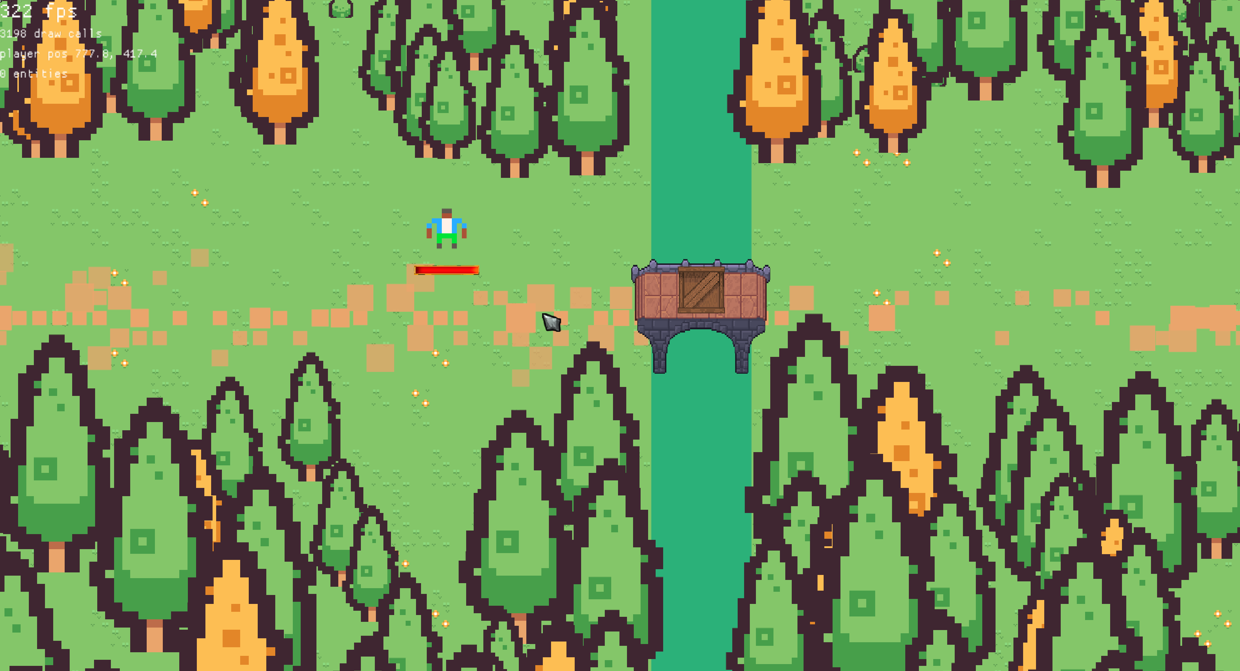
Featuring 2D:
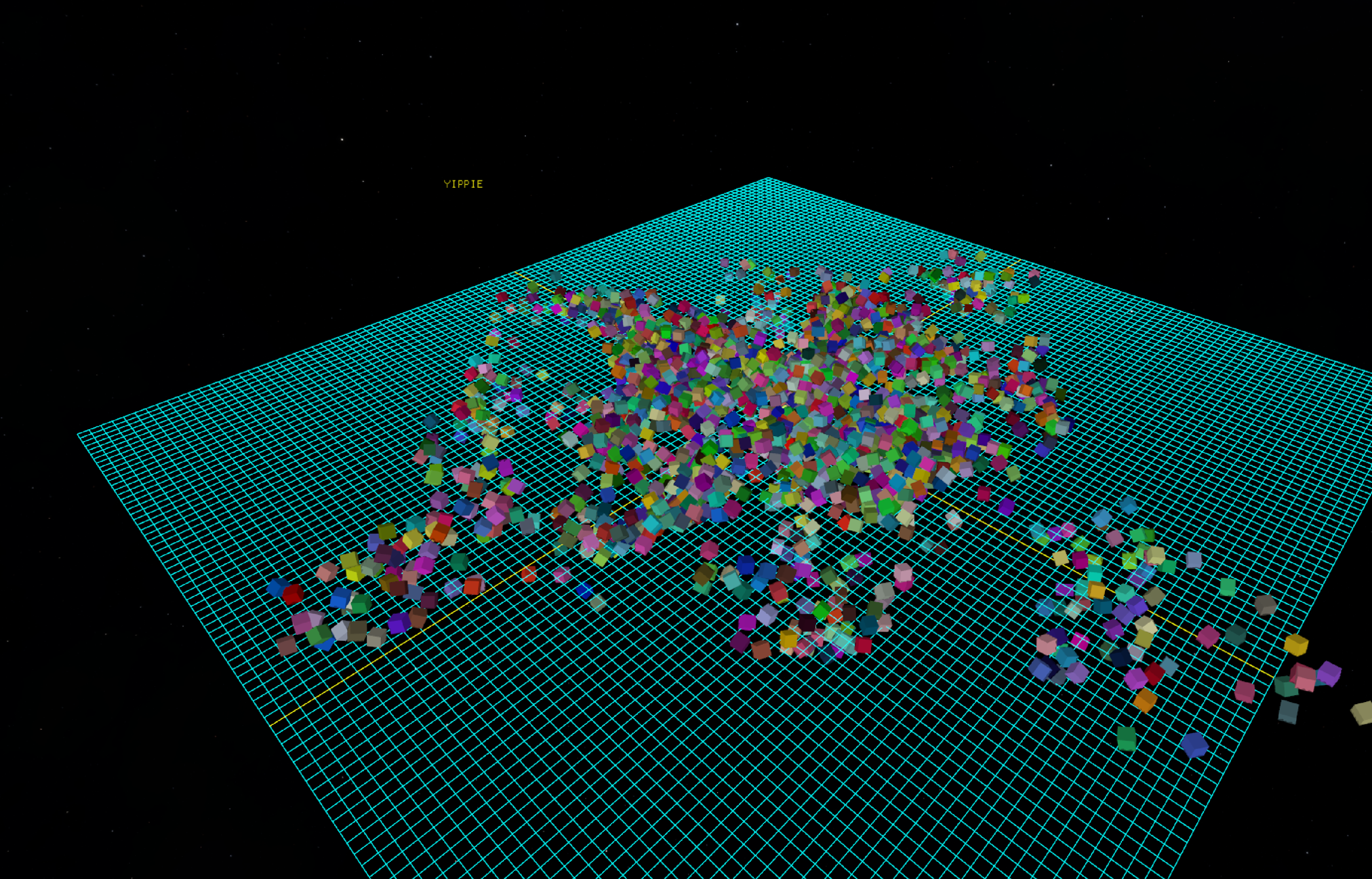
and 3D:
How to build:
Prerequesites:
Python >= 3.9 ( python >= 3.14 is recommended)
Rust Compiler >= 1.85.0 (Required for the Rust 2024 Edition)
System libraries if using Linux (required for X11, OpenGL, and audio bindings):
Ubuntu / Debian:
sudo apt-get install -y libasound2-dev libx11-dev libxi-dev libgl1-mesa-dev libxcursor-dev libxinerama-dev libxrandr-devFedora:
sudo dnf install alsa-lib-devel libX11-devel libXi-devel mesa-libGL-devel libXcursor-devel libXinerama-devel libXrandr-develArch Linux:
sudo pacman -S alsa-lib libx11 libxi mesa libxcursor libxinerama libxrandrCreate and activate a Python virtual environment:
macOS / Linux:
python3 -m venv .venv
source .venv/bin/activateWindows:
python -m venv .venv
.venv\Scripts\activateInstall the maturin build tool using
pip install maturinCompilation:
run
maturin build --release --features abi_39 --generate-stubsfor python >= 3.9run
maturin build --release --features abi_310 --generate-stubsfor python >= 3.10run
maturin build --release --features abi_314 --generate-stubsfor python >= 3.14(Note: Older ABIs offer better backward compatibility, but newer versions yield performance improvements)
Installation:
- The generated package can be found at:
/target/wheels/- Install the package:
pip install \path\to\your\file.whl --force-reinstall
How to build for the browser (WebAssembly):
The web build is a single WebAssembly module that runs inside Pyodide (CPython compiled with Emscripten). Nothing is forked or patched - macroquad, miniquad, quad-snd and Pyodide are all stock. docs/WASM.md explains how and why it works.
Since PEP 783 the browser build is published to PyPI like any other wheel, so most people never need to build it at all - see Running in the browser below. The rest of this section is for building it yourself.
Prerequesites (in addition to the ones above):
The
wasm32-unknown-emscriptenRust target:
rustup target add wasm32-unknown-emscripten
pyodide-buildand a recentmaturin:
pip install "pyodide-build>=0.39" "maturin>=1.13.2"
pyodide-buildowns the cross-build environment: it decides the Emscripten version, the linker flags and the wheel's platform tag, so that what you build matches the Pyodide that will load it.maturin1.13.2 is the first release that emits the PEP 783 tag.
pyodide-builddoes not run natively on Windows. Build the wheel on Linux, macOS or WSL. For local iteration on Windows there is a wheel-less path - see Developing on the module itself below.The Emscripten SDK, at the version Pyodide was built with (step 3 prints it). The build script looks for
emccunder$EMCC, then$EMSDK, then the project-localemsdk/, thenPATH, so noemsdk_envactivation step is needed:
git clone https://github.com/emscripten-core/emsdk.git
./emsdk/emsdk install <version>
./emsdk/emsdk activate <version>(on Windows, use
emsdk\emsdk.batin place of./emsdk/emsdk)A browser with JSPI (JavaScript Promise Integration): Chrome 137+. This is what lets synchronous Python (
while True: ... next_frame()) hand the page back to the browser between frames. Firefox and Safari have not shipped it yet.Fetch the Pyodide runtime into
web/pyodide/(once):
python web/get_pyodide.pyThis is the stock
pyodide-corerelease, unpacked and otherwise untouched - the web build deliberately runs on an unmodified Pyodide. It is what the local test page loads, and whatcheck_imports.pyresolves symbols against.(Pyodide releases are versioned after the CPython they ship: the pinned 314.0.7 is CPython 3.14.2, which is what
--features abi_314targets.python web/get_pyodide.py <version>takes a different one.)Install the matching cross-build environment:
pyodide xbuildenv install 314.0.7Then read back what it wants - these are the values the build uses, and
emscripten_versionis the emsdk version to install in step 1:
pyodide config get emscripten_version
pyodide config get rustflags
pyodide config get pyodide_abi_versionBuild the wheel (macOS / Linux / WSL):
CARGO_TARGET_WASM32_UNKNOWN_EMSCRIPTEN_RUSTFLAGS="$(pyodide config get rustflags)" \
MATURIN_PYEMSCRIPTEN_PLATFORM_VERSION="$(pyodide config get pyodide_abi_version)" \
PYO3_CROSS_PYTHON_VERSION=3.14 \
maturin build --release --target wasm32-unknown-emscripten --out dist --features abi_314
This writes
dist/pyroquad-<version>-cp314-abi3-pyemscripten_<year>_<n>_wasm32.whl.
pyodide config get rustflagsis what turns the crate into an Emscripten side module - the same thing Pyodide builds every other extension module as. It is passed asCARGO_TARGET_<TARGET>_RUSTFLAGSrather than as a bareRUSTFLAGSon purpose: this crate has abuild.rs, which is compiled for the host, and bareRUSTFLAGSwould apply the side-module flags to it as well and break it.Check the build (optional, but it catches the one failure mode that is otherwise only visible as a cryptic
dlopenerror in the browser):python -m zipfile -e dist/*.whl wheel_unpacked/ python web/check_imports.py wheel_unpacked/pyroquad/_pyroquad*.soIt cross-references every symbol the module imports against what Pyodide actually provides, and exits non-zero if anything is unresolved.
Stage the wheel for the test page, then run it:
python web/build_web.py
python web/serve.pythen open
http://127.0.0.1:8000/web/index.html?script=tests/test_rec.py
build_web.pycopies the newestdist/*wasm32.whltoweb/pyroquad.whl, and the page installs it with micropip - the same pathmicropip.install("pyroquad")takes for a real user, so a mis-tagged wheel is rejected here rather than in the wild.Running in the browser:
Install it inside Pyodide with micropip - the
pyemscripten_*_wasm32wheel comes straight from PyPI, exactly like the desktop ones:<script type="module"> import { loadPyodide } from "./pyodide/pyodide.mjs"; const pyodide = await loadPyodide(); await pyodide.loadPackage("micropip"); const micropip = pyodide.pyimport("micropip"); await micropip.install("pyroquad"); // runPythonAsync, not runPython: pyroquad yields to the browser between // frames through JSPI, which needs the async entry point. await pyodide.runPythonAsync(` from pyroquad import * activate_engine() while True: draw_rectangle(x=100, y=100, w=600, h=300, color=Color.GREEN) next_frame() examples.limit_fps(60) `); </script>The page needs a
<canvas>for the engine to draw into, and Chrome 137+ for JSPI.web/index.htmlis a complete working example of both.A plain static server is enough - this port uses JSPI rather than
SharedArrayBuffer, so no COOP/COEP headers are required.Developing on the module itself:
For iterating on the Rust side there is a shorter loop that skips the wheel (and works on Windows, where
pyodide-builddoes not run). It builds the side module directly and hands it to the test page as a zip:
macOS / Linux:
RUSTFLAGS="-C link-arg=-sSIDE_MODULE=2" PYO3_CROSS_PYTHON_VERSION=3.14 cargo build --target wasm32-unknown-emscripten --release --features abi_314Windows (PowerShell):
$env:RUSTFLAGS="-C link-arg=-sSIDE_MODULE=2"; $env:PYO3_CROSS_PYTHON_VERSION="3.14"
cargo build --target wasm32-unknown-emscripten --release --features abi_314then
python web/build_web.py. With no wheel indist/it falls back to zipping the module together with the pure-Python half of the package intoweb/pyroquad_pkg.zip, whichweb/index.htmlunpacks directly instead of going through micropip. Re-run it after everycargo build.Only ever one of the two is staged -
build_web.pydeletes the other - so the page cannot quietly load a stale artifact of the kind you are not testing.(Remember to clear
RUSTFLAGSagain before building natively in the same shell - it applies to every target. This path uses whatever emsdk you have rather than the one Pyodide was built with; that skew is usually fine, for the reason given in docs/WASM.md §3, but the wheel build in step 4 is the one that matches the shipped artifact.)
For any Agents reading this:
Please refer to AI.md for best practice and an entrypoint into the engine.
Example Code:
Hello rectangle
from pyroquad import *

activate_engine()

while True:
    draw_rectangle(x=100, y=100, w=600, h=300, color=Color.GREEN)
    draw_text(text="Hello rectangle", x=200, y=200, font_size=50, color=Color.RED)
    next_frame()
    examples.limit_fps(60)
Textures
from pyroquad import *

activate_engine()

texture =  Loading.download_file(
    "https://raw.githubusercontent.com/Ludwig-000/pyroquad/main/docs/PyroquadLogo.png"
).to_Texture2D()

while True:
    draw_texture(texture)
    next_frame()
    examples.limit_fps(60)
Cube
from pyroquad import *

activate_engine()

cube = Cube(
    position=Vec3.ZERO,
    rotation=Vec3.ZERO,
    scale=Vec3.ONE,
    color=Color.RED)

cam = Camera3D(position=Vec3.splat(2), target=Vec3.ZERO)

while True:
    cam.set_camera()
    cube.rot += get_delta_time()
    draw_all_objects()
    next_frame()
    examples.limit_fps(60)
Skybox
from pyroquad import *

activate_engine()


skybox_tex = examples.loading_screen_future(
    lambda a: download_file_future(a),
    ["https://raw.githubusercontent.com/Ludwig-000/pyroquad/main/tests/HDR_blue_nebulae_2.png"],
    show_rotating_square=True
)[0].to_Texture2D()

player = examples.PlayerCamera(position=Vec3.ONE)

while True:
    if KeyCode.Escape in get_keys_pressed():
        break

    player.update()
    draw_skybox(skybox_tex)
    draw_grid(
        slices=1_000,
        spacing=1.0,
        axes_color=Color.YELLOW,
        other_color=Color.GREEN)

    next_frame()
    examples.limit_fps(60)
Multiple windows
import multiprocessing
from pyroquad import *

def task(message, color_name):
    activate_engine()
    prevent_quit()
    color = getattr(Color, color_name)

    while not is_quit_requested():
        clear_background(color)
        draw_text(message, 200, 200, Color.GREEN, 60)
        next_frame()
        examples.limit_fps(60)

if __name__ == "__main__":
    seq_data = [("multiple", "YELLOW"), ("windows", "BRICK"), ("using", "ORANGE")]
    for msg, color in seq_data:
        p = multiprocessing.Process(target=task, args=(msg, color))
        p.start()
        p.join()

    procs = [multiprocessing.Process(target=task, args=("multiprocessing", "BLUE")) for _ in range(5)]
    for p in procs: p.start()
    for p in procs: p.join()
Rectangle deletes itself (heartbreaking)
from pyroquad import *

activate_engine()

re = Rectangle(Vec2.splat(200), 0, Vec2.splat(100), Color.WHITE)

timer  = 120
def t(rec: Rectangle):
    global timer, re
    timer-= 1
    if timer == 0:
        del(re)
    rec.draw()

re.tick(t)

while True:
    next_frame()
    examples.limit_fps(60)
1 maintainer

Metadata
1 maintainer
Release files for pyroquad 0.1.6
For a detailed explanation of source distributions (sdists) and built distributions (wheels), please see the package formats documentation.
Built distributions (wheels)
Total release size: 51.4 MB
Release files / pyroquad-0.1.6-cp314-abi3-win_amd64.whl
| Download URL | pyroquad-0.1.6-cp314-abi3-win_amd64.whl |
|---|---|
| Size | 5.0 MB |
| Tags | CPython 3.14 Windows x86-64 abi3 |
|
SHA-256 checksum How to use checksums |
913dbd63ce416d35e5541677501eea6f6650e4e9afafe6354df1182183ee8a3d
|
|
BLAKE2b-256 checksum How to use checksums |
b48976e4be1263b9139aa6f536e64e41feef380489f490a602bf26ff8eb567e7
|
| Upload date | |
|
Uploaded using Trusted Publishing? What is trusted publishing? |
Yes |
| Uploaded via |
maturin/1.15.0
|
Release files / pyroquad-0.1.6-cp314-abi3-pyemscripten_2026_0_wasm32.whl
| Download URL | pyroquad-0.1.6-cp314-abi3-pyemscripten_2026_0_wasm32.whl |
|---|---|
| Size | 2.2 MB |
| Tags | CPython 3.14 PyEmscripten 2026.0+ WebAssembly abi3 |
|
SHA-256 checksum How to use checksums |
1e0508d995721f3c3fa1ab394641a4d58a6741bb23be7355261e630c091f5553
|
|
BLAKE2b-256 checksum How to use checksums |
c595c9a07d5959c94c190aa58814678cbab6d8340587bf28a877450ccdfccac7
|
| Upload date | |
|
Uploaded using Trusted Publishing? What is trusted publishing? |
Yes |
| Uploaded via |
maturin/1.15.0
|
Release files / pyroquad-0.1.6-cp314-abi3-manylinux_2_38_x86_64.whl
| Download URL | pyroquad-0.1.6-cp314-abi3-manylinux_2_38_x86_64.whl |
|---|---|
| Size | 6.2 MB |
| Tags | CPython 3.14 Linux glibc 2.38+ x86-64 abi3 |
|
SHA-256 checksum How to use checksums |
f3eeea52940eb27bbcf7a60132c585ae7e0bce97c2a30111095901ba10c0f0d5
|
|
BLAKE2b-256 checksum How to use checksums |
ad0654ecdfe36e50de0fe0110a94e9b4b44d7b8342fc346e8207b298518b131c
|
| Upload date | |
|
Uploaded using Trusted Publishing? What is trusted publishing? |
Yes |
| Uploaded via |
maturin/1.15.0
|
Release files / pyroquad-0.1.6-cp314-abi3-macosx_11_0_arm64.whl
| Download URL | pyroquad-0.1.6-cp314-abi3-macosx_11_0_arm64.whl |
|---|---|
| Size | 5.2 MB |
| Tags | CPython 3.14 abi3 macOS 11.0+ ARM64 |
|
SHA-256 checksum How to use checksums |
3e7e69578f7b9cf01ad4332502443f048994fcaf97117b56a5c3da5db0e08ad3
|
|
BLAKE2b-256 checksum How to use checksums |
9f6408d9fdf5f387e30de2fecca6e0e41564cbf87688f0c4622dd4d1eb3a30a4
|
| Upload date | |
|
Uploaded using Trusted Publishing? What is trusted publishing? |
Yes |
| Uploaded via |
maturin/1.15.0
|
Release files / pyroquad-0.1.6-cp310-abi3-win_amd64.whl
| Download URL | pyroquad-0.1.6-cp310-abi3-win_amd64.whl |
|---|---|
| Size | 5.0 MB |
| Tags | CPython 3.10 Windows x86-64 abi3 |
|
SHA-256 checksum How to use checksums |
4522031be71ef37d1d9ecbf53cc080f6c6a35ab2f4aff7e7f290c3e074ae57d7
|
|
BLAKE2b-256 checksum How to use checksums |
f530d03e5fb75a467e453b9f7d4de8cfd2c37d908d94a804c28d446aaf82daed
|
| Upload date | |
|
Uploaded using Trusted Publishing? What is trusted publishing? |
Yes |
| Uploaded via |
maturin/1.15.0
|
Release files / pyroquad-0.1.6-cp310-abi3-manylinux_2_38_x86_64.whl
| Download URL | pyroquad-0.1.6-cp310-abi3-manylinux_2_38_x86_64.whl |
|---|---|
| Size | 6.2 MB |
| Tags | CPython 3.10 Linux glibc 2.38+ x86-64 abi3 |
|
SHA-256 checksum How to use checksums |
cff8253987cf8eda196fe72e9e0bfe07e095b6a7fab44dd038d6e1ebf4948dbb
|
|
BLAKE2b-256 checksum How to use checksums |
06c0b2da83d23b0f86fb79a30c01e2c108befbc3cf6acb59a7fba751ad3bbb54
|
| Upload date | |
|
Uploaded using Trusted Publishing? What is trusted publishing? |
Yes |
| Uploaded via |
maturin/1.15.0
|
Release files / pyroquad-0.1.6-cp310-abi3-macosx_11_0_arm64.whl
| Download URL | pyroquad-0.1.6-cp310-abi3-macosx_11_0_arm64.whl |
|---|---|
| Size | 5.2 MB |
| Tags | CPython 3.10 abi3 macOS 11.0+ ARM64 |
|
SHA-256 checksum How to use checksums |
03dc85335f6b804164c355b188b8188221dafd01dc9fed8727a7246075ca44e5
|
|
BLAKE2b-256 checksum How to use checksums |
2e61d0625369dfa77e4418053b187bf57983322868932a61e08df3d98b7d5f96
|
| Upload date | |
|
Uploaded using Trusted Publishing? What is trusted publishing? |
Yes |
| Uploaded via |
maturin/1.15.0
|
Release files / pyroquad-0.1.6-cp39-abi3-win_amd64.whl
| Download URL | pyroquad-0.1.6-cp39-abi3-win_amd64.whl |
|---|---|
| Size | 5.0 MB |
| Tags | CPython 3.9 Windows x86-64 abi3 |
|
SHA-256 checksum How to use checksums |
73a59d66340e49b31c3d6c97b693e3b61e982d98b7afa8c363e019184f141729
|
|
BLAKE2b-256 checksum How to use checksums |
61a0ef7eb956576c5857120c85866ae3583c9d9ec9da968563cf2f9699e28293
|
| Upload date | |
|
Uploaded using Trusted Publishing? What is trusted publishing? |
Yes |
| Uploaded via |
maturin/1.15.0
|
Release files / pyroquad-0.1.6-cp39-abi3-manylinux_2_38_x86_64.whl
| Download URL | pyroquad-0.1.6-cp39-abi3-manylinux_2_38_x86_64.whl |
|---|---|
| Size | 6.2 MB |
| Tags | CPython 3.9 Linux glibc 2.38+ x86-64 abi3 |
|
SHA-256 checksum How to use checksums |
76cee26142f386e1fa5734d43a3ec79a220082b899877d756a64a75d5ed17f4a
|
|
BLAKE2b-256 checksum How to use checksums |
6c6f876fce3ea2a9112f668e3cfcb0d93900ca1fafd5172180c5f74c516a37ca
|
| Upload date | |
|
Uploaded using Trusted Publishing? What is trusted publishing? |
Yes |
| Uploaded via |
maturin/1.15.0
|
Release files / pyroquad-0.1.6-cp39-abi3-macosx_11_0_arm64.whl
| Download URL | pyroquad-0.1.6-cp39-abi3-macosx_11_0_arm64.whl |
|---|---|
| Size | 5.2 MB |
| Tags | CPython 3.9 abi3 macOS 11.0+ ARM64 |
|
SHA-256 checksum How to use checksums |
55653a228d995bd665d07eca8951d83f29f771b8c3e3aafbd252c3c2e2b576bb
|
|
BLAKE2b-256 checksum How to use checksums |
35c24478f12001607b0ec1a35a06896535472aed10ee270fdba5f55d6d83f42e
|
| Upload date | |
|
Uploaded using Trusted Publishing? What is trusted publishing? |
Yes |
| Uploaded via |
maturin/1.15.0
|














