




Generates a light-weight static html report based on pytest framework

Features
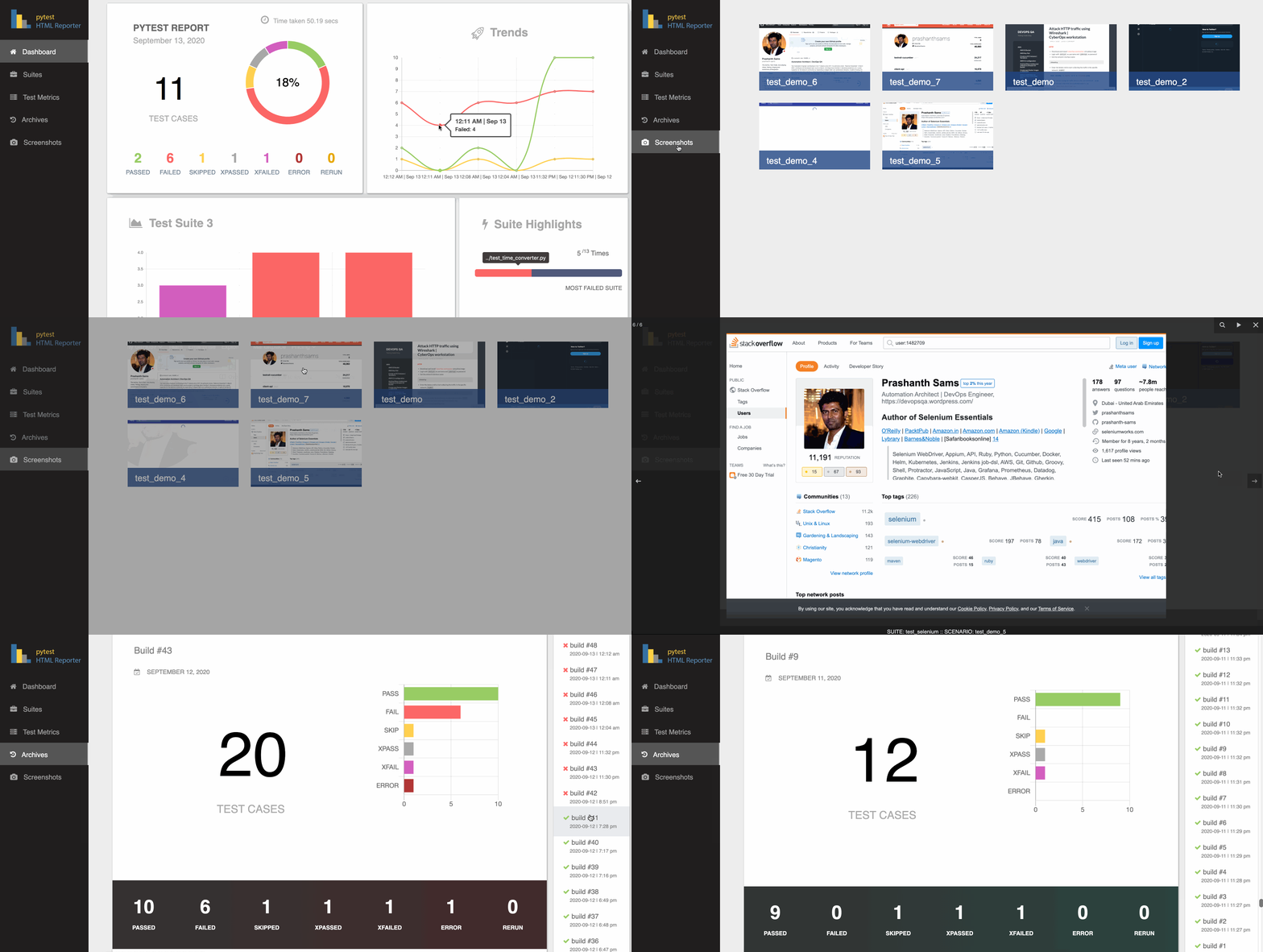
Generic information
Overview
Environment
Trends
Suite Highlights
Test suite details
Archives / History
Screenshots on failure
Test Rerun support
Parallel run support (pytest-xdist)
Installation
$ pip3 install pytest-html-reporterUsage
By default, the filename used is pytest_html_reporter.html and path chosen is report; you can skip both or either one of them if not needed:
$ pytest tests/
Custom path, filename, and title
Add --html-report tag followed by path location and filename to customize the report location and filename:
$ pytest tests/ --html-report=./report
$ pytest tests/ --html-report=./report/report.html
Add --title tag followed by the report title; it is capped at 20 characters and the cut tail fades out, with the full title kept as the heading’s tooltip:
$ pytest tests/ --html-report=./report --title='PYTEST REPORT'
Add --archive-count tag followed by an integer to limit showing the number of builds in the Archives section:
$ pytest tests/ --archive-count 7
$ pytest tests/ --html-report=./report --archive-count 7
Environment and build details
Add --environment tag followed by the environment under test; it shows as a badge beside the report title. The badge is capped at 10 characters and the cut tail fades out, with the full name kept in the Environment panel and in the badge’s tooltip:
$ pytest tests/ --environment=staging
Add --build-info tag followed by key=value to add any other detail to the Environment panel; repeat it as often as you like:
$ pytest tests/ --environment=prod --build-info branch=main --build-info sha=$GITHUB_SHA
pytest.ini
Alternate option is to add this snippet in the pytest.ini file:
[pytest]
addopts = -vs -rf --html-report=./report --title='PYTEST REPORT'
environment = staging
build_info =
    branch=main
    team=payments
Note: --environment overrides the environment ini value; --build-info entries are added to the ones set in the ini file rather than replacing them
Note: If you fail to provide --html-report tag, it consider your project’s home directory as the base
screenshots on failure
Import attach from the library and call it with the selenium command as given below:
from pytest_html_reporter import attach

...
attach(data=self.driver.get_screenshot_as_png())

parallel runs
Runs distributed with pytest-xdist are gathered into a single report. Every worker sends its results back to the controller, which merges them and writes one report - one build in Archives, one set of totals, one row per test - whichever way the tests were distributed:
$ pytest tests/ -n 2 --html-report=./report
$ pytest tests/ -n auto --dist loadfile --html-report=./report
Tests are listed in collection order rather than the order the workers happened to finish them in, so a parallel report reads the same as a serial one. Nothing needs to be configured, and running without -n is unaffected.
Note: results are handed over when a worker finishes, so tests from a worker that crashes outright (rather than failing) are not in the report - pytest reports the crash itself
Is there a demo available for this gem?
Yes, you can use this demo as an example, https://github.com/prashanth-sams/pytest-html-reporter:
$ pytest tests/functional/
1 maintainer

Download files
Download the file for your platform. If you're not sure which to choose, learn more about installing packages.
Source Distribution
Built Distribution
Filter files by name, interpreter, ABI, and platform.
If you're not sure about the file name format, learn more about wheel file names.
Copy a direct link to the current filters
File details
Details for the file pytest_html_reporter-0.3.2.tar.gz.
File metadata
- Download URL: pytest_html_reporter-0.3.2.tar.gz
- Upload date:
- Size: 50.4 kB
- Tags: Source
- Uploaded using Trusted Publishing? No
- Uploaded via:
twine/7.0.0 CPython/3.14.6
File hashes
| Algorithm | Hash digest | |
|---|---|---|
| SHA256 |
26668d5028a8a16d6d05ebe8304e137fab12b13347ab63447bc7feb11af4ac90
|
|
| MD5 |
cf8667fd09dbc34edc1f50a5471329de
|
|
| BLAKE2b-256 |
7bb42f89a1dd7468acc3f776e39fa1416a4f526af87e0a2966eba3fcac27a641
|
File details
Details for the file pytest_html_reporter-0.3.2-py3-none-any.whl.
File metadata
- Download URL: pytest_html_reporter-0.3.2-py3-none-any.whl
- Upload date:
- Size: 53.2 kB
- Tags: Python 3
- Uploaded using Trusted Publishing? No
- Uploaded via:
twine/7.0.0 CPython/3.14.6
File hashes
| Algorithm | Hash digest | |
|---|---|---|
| SHA256 |
64be3e31aaa9ec489ba24a2fa39cd3ee755db96ab59f27dd459074a43598683b
|
|
| MD5 |
7f812ac6ec96802e9f12ad264c54e969
|
|
| BLAKE2b-256 |
79d4e8f8fa513f1ca76a575d9e5f57e53321fab75b18b13a64d8895a294b735d
|














