




Generates a light-weight static html report based on pytest framework

Features
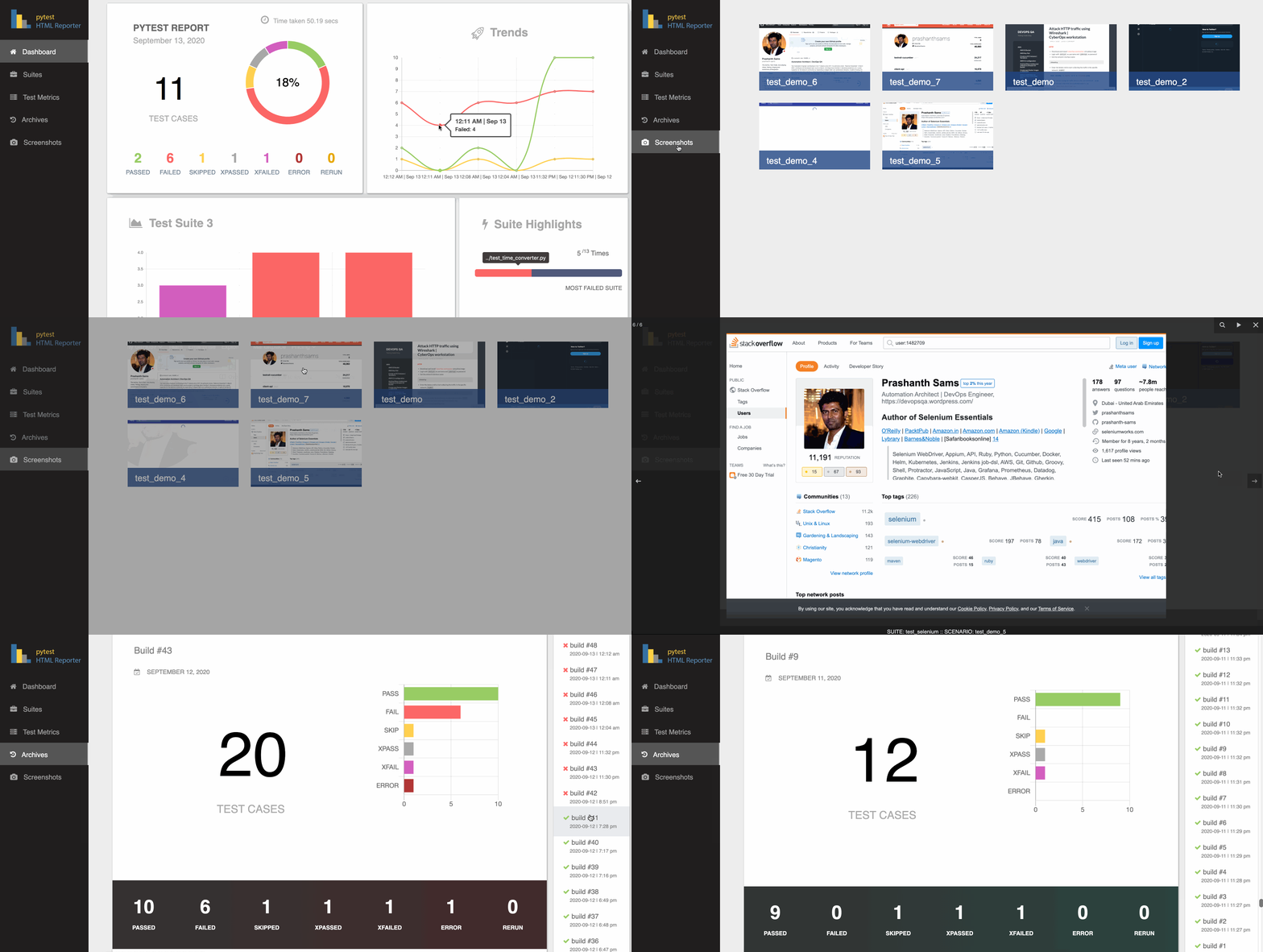
Generic information
Overview
Environment
Trends
Suite Highlights
Test suite details
Archives / History
Screenshots - works with Selenium, Playwright, or anything else that can produce a PNG
Captured logs per test (stdout, stderr and logging)
Test Rerun support
Parallel run support (pytest-xdist)
Installation
$ pip3 install pytest-html-reporterUsage
By default, the filename used is pytest_html_reporter.html and path chosen is report; you can skip both or either one of them if not needed:
$ pytest tests/
Custom path, filename, and title
Add --html-report tag followed by path location and filename to customize the report location and filename:
$ pytest tests/ --html-report=./report
$ pytest tests/ --html-report=./report/report.html
The path is run through strftime, so date and time placeholders (%Y, %m, %d, %H, %M, …) give each run a folder or a filename of its own:
$ pytest tests/ --html-report=./reports/%Y%m%d/report_%H%M.html
They are expanded once, when the run starts, so a parallel run and a run that crosses a minute boundary still write a single report. Write %% for a literal percent sign in front of a letter; a % that is not a placeholder, as in 100% pass, is left as it is.
Add --title tag followed by the report title; it is capped at 20 characters and the cut tail fades out, with the full title kept as the heading’s tooltip:
$ pytest tests/ --html-report=./report --title='PYTEST REPORT'
Add --archive-count tag followed by an integer to limit showing the number of builds in the Archives section:
$ pytest tests/ --archive-count 7
$ pytest tests/ --html-report=./report --archive-count 7
Environment and build details
Add --environment tag followed by the environment under test; it shows as a badge beside the report title. The badge is capped at 10 characters and the cut tail fades out, with the full name kept in the Environment panel and in the badge’s tooltip:
$ pytest tests/ --environment=staging
Add --build-info tag followed by key=value to add any other detail to the Environment panel; repeat it as often as you like:
$ pytest tests/ --environment=prod --build-info branch=main --build-info sha=$GITHUB_SHA
Captured logs
Everything pytest captures while a test runs - stdout, stderr and logging output, from setup, call and teardown alike - is kept against that test. The Test Metrics table gains a Logs column showing how many lines a test produced; clicking it opens the output, section by section, with a Copy button. Tests that produced nothing show a dash.
This is on by default. No flag is needed - the command you already run is enough:
$ pytest tests/ --html-report=./report
Three things a test writes end up in that column, and two things that look like they should do not:
What the test does |
Where it shows up |
|---|---|
print(...) |
Captured stdout section |
sys.stderr.write(...) |
Captured stderr section |
log.info(...), log.warning(...) |
Captured log section, subject to --log-level below |
an assertion failure or traceback |
not here - the Error Message column already has it |
warnings.warn(...) |
not here - pytest keeps its own warnings summary |
So a test that only asserts has nothing to show and correctly gets a dash, even when it fails. If you are seeing stdout sections and nothing else, it is because nothing in the suite is calling a logger - not because logging is being dropped.
--report-logs narrows what is kept, which is worth doing when a large suite would otherwise make the report file big:
--report-logs |
What is kept |
|---|---|
all (default) |
Every test’s captured output |
failed |
Only tests that failed or errored; everything else shows a dash |
none |
Nothing - no Logs column content and no size cost at all |
$ pytest tests/ --report-logs=failed
$ pytest tests/ --report-logs=none
$ pytest tests/ --report-logs=all # default
--report-log-limit caps how much of one test’s output is kept, so a single chatty test cannot outweigh the rest of the report. What survives is the end of the output - the lines next to the failure - cut back to a whole line, with a note saying how much was dropped:
--report-log-limit |
What it means |
|---|---|
10000 (default) |
Characters per test |
any positive integer |
Characters per test |
0 |
No limit; keep everything the test produced |
$ pytest tests/ --report-log-limit=50000
$ pytest tests/ --report-log-limit=0
what pytest itself has to be capturing
The reporter can only keep what pytest hands it, and two of pytest’s own options decide that. Neither needs setting for the defaults to work - but if the Logs column is emptier than expected, one of these is why.
Capture. -s (short for --capture=no) sends stdout and stderr straight to the terminal, so pytest never takes them in and no reporter can show them. logging output is unaffected and still appears:
--capture |
Effect on the Logs column |
|---|---|
fd (default) |
Everything, including output written by subprocesses and C extensions |
sys |
Everything Python itself writes; a subprocess’s output is not captured |
tee-sys |
As sys, and it still prints live to the terminal |
no (same as -s) |
logging only - stdout and stderr are gone |
Log level. logging output is captured from WARNING up unless told otherwise, so log.info(...) and log.debug(...) calls will not be in the report until the level is lowered:
--log-level |
Logging captured |
|---|---|
unset (default) |
Whatever the root logger emits - WARNING and above |
DEBUG |
Everything |
INFO |
INFO and above |
WARNING |
WARNING and above |
ERROR / CRITICAL |
Only the levels named and above |
$ pytest tests/ --log-level=INFO
Already running with -s? Just remove it. Capture is on by default, so nothing needs to be added in its place:
[pytest]
addopts = -v
The one thing -s gave you that plain capture does not is seeing output in the terminal while the tests run - with capture on, pytest only replays it afterwards, for the tests that failed. If you want both, --capture=tee-sys streams it live and keeps it for the report:
[pytest]
addopts = -v --capture=tee-sys
(Stay on -s if you drop into pdb. And note tee-sys only tees Python’s own sys.stdout / sys.stderr, so if the output you want comes from a subprocess or a C extension, plain fd capture is the one that keeps it.)
the Logs column is empty
Work down this list; the first one that applies is the answer:
Is the run using -s or --capture=no? Check addopts in pytest.ini / pyproject.toml / tox.ini, not just the command you typed - a flag set there applies to every run. This is the most common cause, and the report says so above the Test Metrics table when it is happening. Removing the flag is the whole fix; there is no replacement flag to add.
Are you on --report-logs=failed while the tests that produce output are passing? That mode keeps output for failed and errored tests only; a passing test shows a dash however much it printed.
Is the output logging below WARNING? log.info(...) and log.debug(...) are not recorded until you pass --log-level=INFO or --log-level=DEBUG.
Do the tests actually produce any output? A suite of plain assertions prints nothing, and a dash is then the correct answer - a failed test included, since its message is in the Error Message column, not here. Add a print(...) to one test and re-run to confirm the column is working.
The Environment panel states what the run kept and from which log level - e.g. all tests: stdout, stderr and logging, logging from WARNING - so you can always tell which of these you are in.
pytest.ini
Alternate option is to add this snippet in the pytest.ini file:
[pytest]
addopts = -v -rf --capture=tee-sys --title='PYTEST REPORT'
html_report = ./reports/%Y%m%d/report_%H%M.html
environment = staging
build_info =
    branch=main
    team=payments
report_logs = all
report_log_limit = 10000
report_logs takes the same values as --report-logs (all / failed / none) and report_log_limit the same as --report-log-limit (a character count, or 0 for no limit).
html_report takes the same value as --html-report, placeholders included, and is the way to set the report location without going through addopts.
Note: --html-report overrides the html_report ini value; --environment overrides the environment ini value; --build-info entries are added to the ones set in the ini file rather than replacing them; --report-logs and --report-log-limit override their ini values
Note: If you fail to provide --html-report tag, it consider your project’s home directory as the base
screenshots
Import attach from the library and hand it the PNG bytes of a screenshot. It takes the image itself rather than a browser, so it works with Selenium, Playwright, or anything else that can produce a PNG:
from pytest_html_reporter import attach

attach(data=self.driver.get_screenshot_as_png())   # Selenium
attach(data=page.screenshot())                     # Playwright
attach(data=await page.screenshot())               # Playwright, async API
Note: every image you attach is kept, whatever the test did - a screenshot of a pass is a baseline worth having. Only the tests that actually called attach appear in the gallery, so capturing on failure alone is a matter of deciding when to call it.
attach can be called from anywhere in the test’s lifecycle: the test body, a unittest tearDown, a pytest fixture’s teardown, or a pytest_runtest_makereport hook. Capturing on failure only - the usual want - is the rep_call.failed test in the fixture below; drop it to photograph every test:
# conftest.py
import pytest
from pytest_html_reporter import attach

@pytest.fixture(autouse=True)
def screenshot_on_failure(page, request):
    yield
    if request.node.rep_call.failed:
        attach(data=page.screenshot())

@pytest.hookimpl(tryfirst=True, hookwrapper=True)
def pytest_runtest_makereport(item, call):
    outcome = yield
    rep = outcome.get_result()
    setattr(item, "rep_" + rep.when, rep)
Or skip the fixture and attach straight from the hook, which already has the browser in item.funcargs:
# conftest.py
import pytest
from pytest_html_reporter import attach

@pytest.hookimpl(hookwrapper=True)
def pytest_runtest_makereport(item, call):
    outcome = yield
    rep = outcome.get_result()

    if rep.when == "call" and rep.failed:
        driver = item.funcargs.get("driver")
        if driver is not None:
            attach(data=driver.get_screenshot_as_png())
Note: hooks have to live in conftest.py. pytest only registers conftest files as plugins, so a pytest_runtest_makereport written at the top of a test module is silently never called.
The same hook covers Playwright by reaching for pytest-playwright’s page fixture instead:
page = item.funcargs.get("page")
if page is not None:
    attach(data=page.screenshot())
Note: the hook is synchronous, so Playwright’s async API cannot be photographed from it - there is nowhere to await. With async tests, call attach from the test body instead.

parallel runs
Runs distributed with pytest-xdist are gathered into a single report. Every worker sends its results back to the controller, which merges them and writes one report - one build in Archives, one set of totals, one row per test - whichever way the tests were distributed:
$ pytest tests/ -n 2 --html-report=./report
$ pytest tests/ -n auto --dist loadfile --html-report=./report
Tests are listed in collection order rather than the order the workers happened to finish them in, so a parallel report reads the same as a serial one. Nothing needs to be configured, and running without -n is unaffected.
Note: results are handed over when a worker finishes, so tests from a worker that crashes outright (rather than failing) are not in the report - pytest reports the crash itself
Is there a demo available for this gem?
Yes, you can use this demo as an example, https://github.com/prashanth-sams/pytest-html-reporter:
$ pytest tests/functional/
1 maintainer

Download files
Download the file for your platform. If you're not sure which to choose, learn more about installing packages.
Source Distribution
Built Distribution
Filter files by name, interpreter, ABI, and platform.
If you're not sure about the file name format, learn more about wheel file names.
Copy a direct link to the current filters
File details
Details for the file pytest_html_reporter-0.3.4.tar.gz.
File metadata
- Download URL: pytest_html_reporter-0.3.4.tar.gz
- Upload date:
- Size: 64.4 kB
- Tags: Source
- Uploaded using Trusted Publishing? No
- Uploaded via:
twine/7.0.0 CPython/3.14.6
File hashes
| Algorithm | Hash digest | |
|---|---|---|
| SHA256 |
9aa06ffa67a827ab555e88703adc94685fa1204eb49c91a2a9c4e76f23ecdc7f
|
|
| MD5 |
e3f6cfc514113772ad0bcbce3713ea29
|
|
| BLAKE2b-256 |
e310c08bfe550d982b8bce0ebaca1f2ae724892f0f18555b364676420eaaaac9
|
File details
Details for the file pytest_html_reporter-0.3.4-py3-none-any.whl.
File metadata
- Download URL: pytest_html_reporter-0.3.4-py3-none-any.whl
- Upload date:
- Size: 64.8 kB
- Tags: Python 3
- Uploaded using Trusted Publishing? No
- Uploaded via:
twine/7.0.0 CPython/3.14.6
File hashes
| Algorithm | Hash digest | |
|---|---|---|
| SHA256 |
86917639a61f61ca71116c118e4b0fd9c5cb8532c5cd3517be6041e757ab974c
|
|
| MD5 |
4b3b8590df3388f29bce478bade15943
|
|
| BLAKE2b-256 |
66da1e0f249dc18e234b2b2b1043019b19aee032ada6ccc5d33c06c47ea1072a
|














