
python-lucide







A Python package that provides easy access to all Lucide icons as SVG strings. Just import and use any Lucide icon in your Python projects, with no javascript in sight.
Features
- 🎨 Access 1600+ Lucide icons directly from Python
- 🔍 Semantic search - find icons by meaning, in the terminal or in the browser
- 🛠 Customize icons with classes, sizes, colors, and other SVG attributes
- 🚀 Framework-friendly with examples for FastHTML, Flask, Django, and more
- 📦 Lightweight with minimal dependencies
- 🔧 Customizable icon sets - include only the icons you need
Installation
pip install python-lucide
This installs the package with a pre-built database of all Lucide icons, ready to use immediately.
Python 3.10–3.14 are supported. Python 3.15 support is experimental: core rendering, aliases, and SQL-backed package builds pass tests on 3.15 RC2 and have a dedicated CI job, but semantic search is currently unsupported because ONNX Runtime does not yet provide compatible wheels. Core installation remains available on 3.15; full support will be advertised once search is validated too. Use Python 3.10–3.14 for search and full development tooling. HDBSCAN and UMAP's dependencies affect cluster generation during development, not ordinary searches.
To run the core tests on Python 3.15 from a source checkout:
uv sync --python 3.15 --no-dev --group test-core
uv run --no-sync python -m pytest tests/core_test.py tests/db_source_test.py
Quick Start
from lucide import lucide_icon

# Get an icon
svg = lucide_icon("house")

# Add CSS classes
svg = lucide_icon("settings", cls="icon icon-settings")

# Customize size
svg = lucide_icon("arrow-up", width="32", height="32")

# Customize colors (stroke for outline, fill for interior)
svg = lucide_icon("heart", stroke="red", fill="pink")

# Customize stroke properties
svg = lucide_icon("chart-line", stroke_width="3", stroke_linecap="round")
Icon Customization
All Lucide icons use stroke for their outline color and fill for their interior color:
# Looking for how to change colors? Use stroke and fill:
lucide_icon("user", stroke="blue")        # Blue outline
lucide_icon("user", fill="currentColor")  # Inherit color from CSS
lucide_icon("user", stroke="#ff6b6b")     # Hex colors work too
Renamed icons and aliases
Every database build imports Lucide's alias mappings and deprecation metadata
from the selected upstream release. For example, lucide_icon("album") resolves
to square-bookmark, while keeping the requested name in its CSS classes.
Canonical names take precedence over aliases.
Prefer the current canonical name in new code:
lucide_icon("square-bookmark")  # Preferred name
lucide_icon("album")            # Still works; deprecated upstream alias
Aliases marked deprecated by Lucide emit a standard Python DeprecationWarning
with the recommended replacement. Ordinary aliases do not warn. Warnings occur
on uncached renders and follow Python's warning filters; they are normally hidden
outside __main__. To see them during development, run your application with
python -W default::DeprecationWarning app.py. Existing databases without
deprecation metadata still resolve aliases without warnings.
Database source and builds
The repository tracks src/lucide/data/lucide-icons.sql: a deterministic SQL
export with sorted tables and rows. The generated .db is ignored by Git.
The volatile created_at build timestamp is omitted from SQL; the upstream
version and all icon content, tags, categories, and alias metadata are retained.
uv sync reconstructs the local database as part of the editable build.
After changing branches or SQL, run uv sync again; SQL changes invalidate uv's
editable-build cache. make restore-db also restores a missing local database
without downloading icons. Source-only development via PYTHONPATH=src can
bootstrap it with python build_support.py restore before importing the package.
make lucide-db TAG=1.45.0 downloads the selected upstream release, rebuilds
SQLite, and exports the updated SQL for review. Commit the SQL file alongside
the version and generated search-data changes. Use this target rather than
editing SQL or committing a generated database.
Packaging uses a Hatchling build hook: source distributions contain SQL and the build helpers; wheels contain the reconstructed, validated SQLite database. Wheel installation and runtime need no reconstruction, writes, downloads, or additional dependencies. The separate search database remains a release asset.
Semantic Search
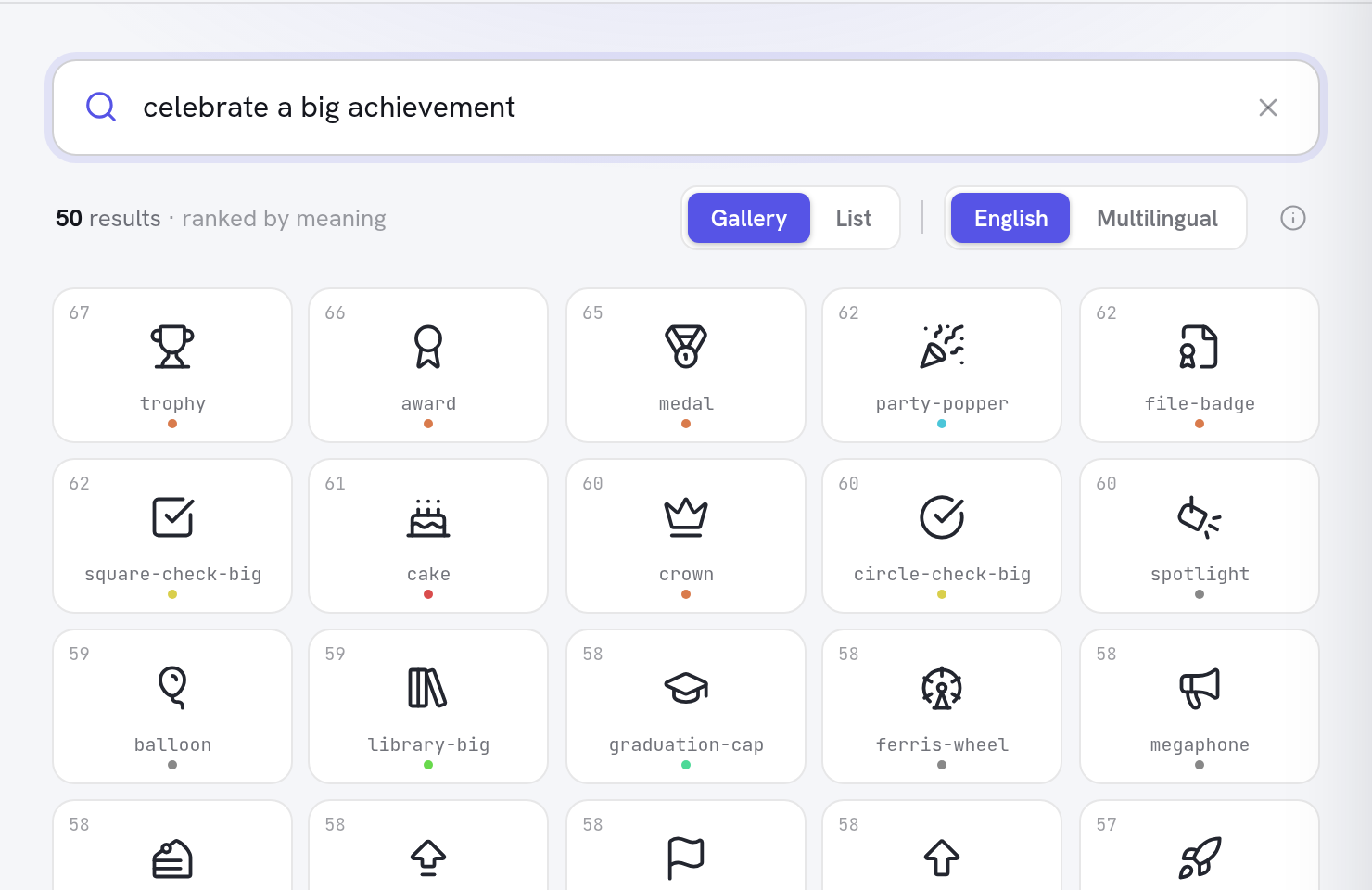
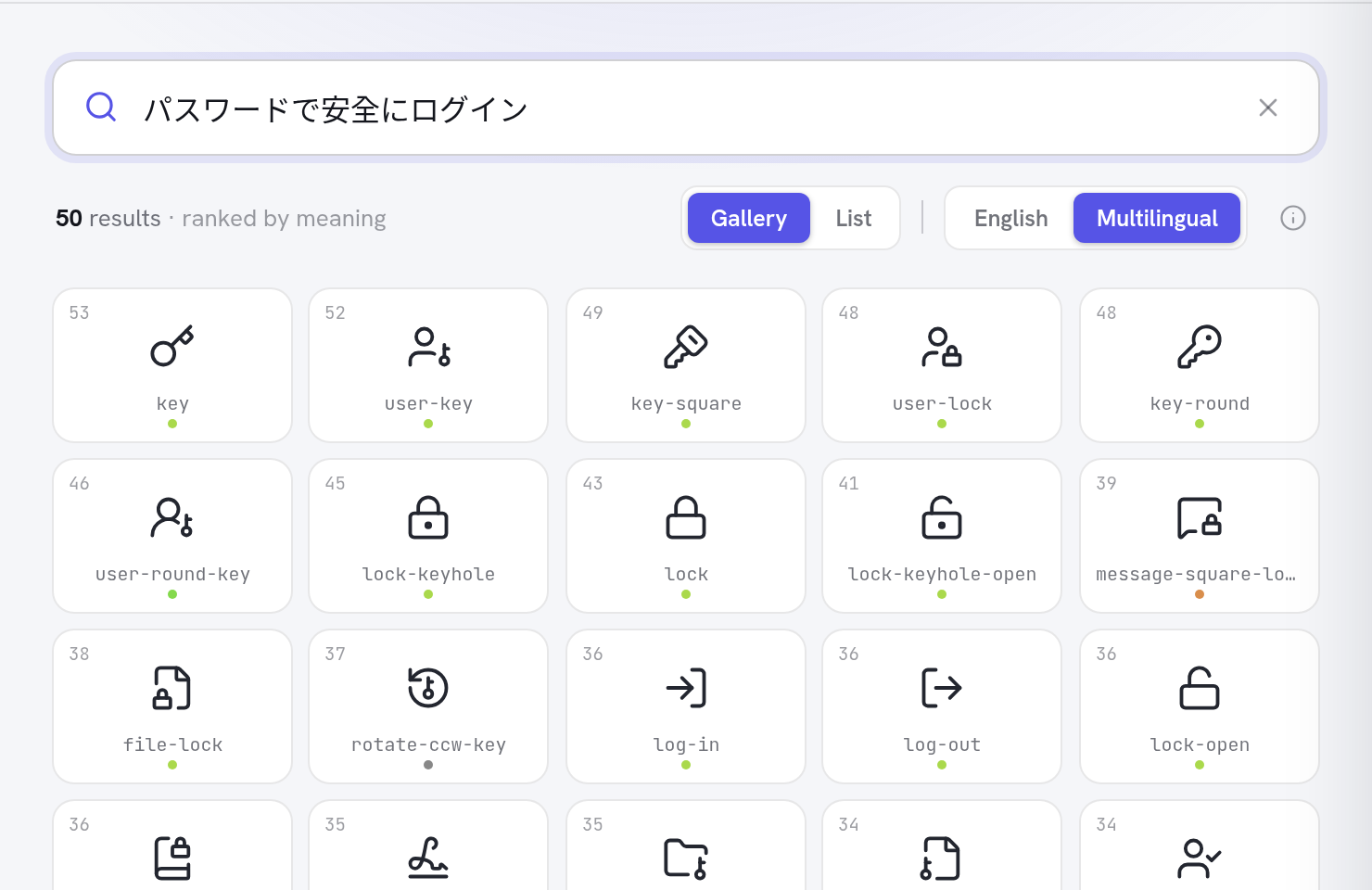
Find icons by describing what you mean, not what they're called — in English or 50+ languages:
# One-off, no install (requires uv)
uvx --from "python-lucide[search]" lucide search "waiting for a download"

# Or install the search extra
pip install "python-lucide[search]"
lucide search "celebrate a big achievement"
If your application uses Python 3.15, run the search CLI separately under Python 3.14, or use the browser search:
uvx --python 3.14 --from "python-lucide[search]" lucide search "payment"
This runs the CLI in a separate environment; calling search_icons() from your
application still requires a supported Python version with the search extra.
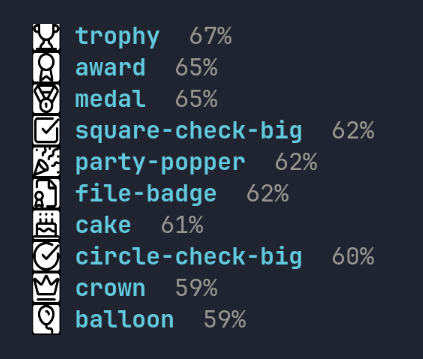
In terminals supporting the Kitty graphics protocol (kitty, Ghostty,
WezTerm), the icons render inline as above — inside tmux too, with
tmux set -g allow-passthrough on. Elsewhere you get the plain text
list. (Rendering uses the cairo system library; if it's missing, the
CLI prints a hint.)
Icons are matched against AI-generated descriptions using the same embedding model the web app uses, so descriptive phrases ("an idea just occurred to me") work better than keywords. Options:
--model multilingual— search in 50+ languages (defaultbge-smallranks best for English)--limit N— number of results;--verbose— include each icon's description
The first search downloads the embedding model (~67 MB) and the pre-built search index (11 MB); both are cached, and every search after that runs locally in well under a second.
The same search is available as a Python API:
from lucide.search import search_icons

for r in search_icons("secure login", limit=5):
    print(r.name, r.score)
Prefer not to install anything? The browser version runs the whole pipeline client-side.
Framework Integration Examples
Starlette
from starlette.applications import Starlette
from starlette.responses import Response
from starlette.routing import Route
from lucide import lucide_icon

def icon(request):
    icon_name = request.path_params["icon_name"]
    svg = lucide_icon(icon_name, cls="icon", stroke="currentColor")
    return Response(svg, media_type="image/svg+xml")

app = Starlette(routes=[Route("/icons/{icon_name}", icon)])
FastAPI
from fastapi import FastAPI
from fastapi.responses import Response
from lucide import lucide_icon

app = FastAPI()

@app.get("/icons/{icon_name}")
def get_icon(icon_name: str, size: int = 24, color: str = "currentColor"):
    svg = lucide_icon(icon_name, width=size, height=size, stroke=color)
    return Response(content=svg, media_type="image/svg+xml")
FastHTML
from fasthtml.common import *
from lucide import lucide_icon

app, rt = fast_app()

@rt('/')
def get():
    return Titled("Hello Icons",
        H1("Welcome"),
        # Wrap icon output in NotStr to prevent HTML escaping
        NotStr(lucide_icon("house", cls="icon")),
        P("This is a simple FastHTML app with Lucide icons.")
    )

serve()
Flask
from flask import Flask
from lucide import lucide_icon

app = Flask(__name__)

@app.route('/icons/<icon_name>')
def serve_icon(icon_name):
    svg = lucide_icon(icon_name, cls="icon", stroke="currentColor")
    return svg, 200, {'Content-Type': 'image/svg+xml'}
Django
# In your views.py
from django.http import HttpResponse
from lucide import lucide_icon

def icon_view(request, icon_name):
    svg = lucide_icon(icon_name, cls="icon-lg", width="32", height="32")
    return HttpResponse(svg, content_type='image/svg+xml')

# In your templates (as a template tag)
from django import template
from django.utils.safestring import mark_safe
from lucide import lucide_icon

register = template.Library()

@register.simple_tag
def icon(name, **kwargs):
    return mark_safe(lucide_icon(name, **kwargs))
API Reference
lucide_icon()
Retrieves and customizes a Lucide icon.
lucide_icon(
    icon_name: str,
    cls: str = "",
    fallback_text: str | None = None,
    width: str | int | None = None,
    height: str | int | None = None,
    fill: str | None = None,
    stroke: str | None = None,
    stroke_width: str | int | None = None,
    stroke_linecap: str | None = None,
    stroke_linejoin: str | None = None,
) -> str
Parameters:
icon_name: Name of the Lucide icon to retrievecls: CSS classes to add to the SVG element (space-separated)fallback_text: Text to display if the icon is not foundwidth: Width of the SVG elementheight: Height of the SVG elementfill: Fill color for the iconstroke: Stroke color for the icon (outline color)stroke_width: Width of the strokestroke_linecap: How the ends of strokes are rendered ("round", "butt", "square")stroke_linejoin: How corners are rendered ("round", "miter", "bevel")
Returns: SVG string
Example:
# Full customization example
icon = lucide_icon(
    "activity",
    cls="icon icon-activity animated",
    width=48,
    height=48,
    stroke="rgb(59, 130, 246)",
    stroke_width=2.5,
    stroke_linecap="round",
    stroke_linejoin="round"
)
get_icon_list()
Returns a list of all available icon names.
from lucide import get_icon_list

icons = get_icon_list()
print(f"Available icons: {len(icons)}")
print(icons[:5])  # ['activity', 'airplay', 'alarm-check', ...]
Advanced Usage
Building a Custom Icon Set
If you want to include only specific icons or use a different version of Lucide:
# Build with specific icons only
lucide-db -i home,settings,user,heart,star -o custom-icons.db

# Use a specific Lucide version
lucide-db -t 0.350.0 -o lucide-v0.350.0.db

# Build from a file listing icon names
echo -e "home\nsettings\nuser" > my-icons.txt
lucide-db -f my-icons.txt -o my-icons.db
Using a Custom Database
Set the LUCIDE_DB_PATH environment variable:
export LUCIDE_DB_PATH=/path/to/custom-icons.db
python your-app.py
Or configure it in your Python code:
import os
os.environ['LUCIDE_DB_PATH'] = '/path/to/custom-icons.db'

from lucide import lucide_icon
# Will now use your custom database
Development
This project uses uv for fast dependency management and pre-commit for code quality.
Setup
# Clone the repository
git clone https://github.com/mmacpherson/python-lucide.git
cd python-lucide

# Create a virtual environment and install dependencies
make env
source .venv/bin/activate  # On Windows: .venv\Scripts\activate

# Install pre-commit hooks
make install-hooks

# Run tests
make test
Rebuilding the Icon Database
# Rebuild with latest Lucide icons
make lucide-db

# Rebuild with specific version
make lucide-db TAG=0.350.0

# Check if version updates are available
make check-lucide-version
Version Checking and Automation
The project includes automated version checking and update capabilities:
# Check for Lucide version updates and artifact status
make check-lucide-version

# Alternative: Use the CLI command directly
uv run check-lucide-version
Weekly Automation: The repository automatically checks for new Lucide releases every Monday and creates update PRs when new versions are available.
Release Process
This project follows a manual release process:
-
Update version in
pyproject.toml:# Create release branch git checkout -b release/v0.2.0 # Edit pyproject.toml to bump version # version = "0.2.0" # Commit and push git add pyproject.toml git commit -m "Bump version to 0.2.0" git push -u origin release/v0.2.0
-
Create and merge PR for the version bump
-
Trigger publishing workflow:
- Go to Actions
- Click "Run workflow"
- Select the main branch
- Click "Run workflow"
-
Automatic publishing: The
publish.ymlworkflow builds and publishes the package to PyPI using trusted publishing.
How It Works
The package comes with a pre-built SQLite database containing all Lucide icons. When you call lucide_icon(), it fetches the icon's SVG from the database and applies your customizations. This approach means:
- Fast: Icons are loaded from an efficient SQLite database
- Offline: No internet connection required at runtime
- Customizable: Build your own database with just the icons you need
- Maintainable: Update to newer Lucide versions by rebuilding the database
License
This project is licensed under the MIT License - see the LICENSE file for details. The Lucide icons themselves are also MIT licensed - see Lucide's license.
1 maintainer

Metadata
1 maintainer
Release files for python-lucide 0.5.9
For a detailed explanation of source distributions (sdists) and built distributions (wheels), please see the package formats documentation.
Source distribution (sdist)
| File | Size | Uploaded | |
|---|---|---|---|
| python_lucide-0.5.9.tar.gz | 522.2 kB | Details |
Built distribution (wheel)
| File | Interpreter | ABI | Platform | Reset |
|---|---|---|---|---|
| python_lucide-0.5.9-py3-none-any.whl | Python 3 | none | any | Details |
Total release size: 1.3 MB
Release files / python_lucide-0.5.9.tar.gz
| Download URL | python_lucide-0.5.9.tar.gz |
|---|---|
| Size | 522.2 kB |
| Tags | Source |
|
SHA-256 checksum How to use checksums |
db30ad8ca4489aaf9648b4aa427831150e099991234d8624b09b54dc36008833
|
|
BLAKE2b-256 checksum How to use checksums |
326dcbee5641a5db8aca3ebc9444660d528115889c56a63af678e6f61b46e612
|
| Upload date | |
|
Uploaded using Trusted Publishing? What is trusted publishing? |
Yes |
| Uploaded via |
uv/0.12.23 {"installer":{"name":"uv","version":"0.12.23","subcommand":["publish"]},"python":null,"implementation":{"name":null,"version":null},"distro":{"name":"Ubuntu","version":"24.04","id":"noble","libc":null},"system":{"name":null,"release":null},"cpu":null,"openssl_version":null,"setuptools_version":null,"rustc_version":null,"ci":true}
|
Release files / python_lucide-0.5.9-py3-none-any.whl
| Download URL | python_lucide-0.5.9-py3-none-any.whl |
|---|---|
| Size | 809.6 kB |
| Tags | Python 3 |
|
SHA-256 checksum How to use checksums |
5e162a9aabe1719a5002fd9b40228149e388aa692f3b542140db4079585d4463
|
|
BLAKE2b-256 checksum How to use checksums |
3863104f8e657a7c6f8a2aabae00fc46ba33f12bdafc44272dfd31e5ad950085
|
| Upload date | |
|
Uploaded using Trusted Publishing? What is trusted publishing? |
Yes |
| Uploaded via |
uv/0.12.23 {"installer":{"name":"uv","version":"0.12.23","subcommand":["publish"]},"python":null,"implementation":{"name":null,"version":null},"distro":{"name":"Ubuntu","version":"24.04","id":"noble","libc":null},"system":{"name":null,"release":null},"cpu":null,"openssl_version":null,"setuptools_version":null,"rustc_version":null,"ci":true}
|














