
python-lucide







A Python package that provides easy access to all Lucide icons as SVG strings. Just import and use any Lucide icon in your Python projects, with no javascript in sight.
Features
- 🎨 Access 1600+ Lucide icons directly from Python
- 🔍 Semantic search - find icons by meaning, in the terminal or in the browser
- 🛠 Customize icons with classes, sizes, colors, and other SVG attributes
- 🚀 Framework-friendly with examples for FastHTML, Flask, Django, and more
- 📦 Lightweight with minimal dependencies
- 🔧 Customizable icon sets - include only the icons you need
Installation
pip install python-lucide
This installs the package with a pre-built database of all Lucide icons, ready to use immediately.
Quick Start
from lucide import lucide_icon

# Get an icon
svg = lucide_icon("house")

# Add CSS classes
svg = lucide_icon("settings", cls="icon icon-settings")

# Customize size
svg = lucide_icon("arrow-up", width="32", height="32")

# Customize colors (stroke for outline, fill for interior)
svg = lucide_icon("heart", stroke="red", fill="pink")

# Customize stroke properties
svg = lucide_icon("chart-line", stroke_width="3", stroke_linecap="round")
Icon Customization
All Lucide icons use stroke for their outline color and fill for their interior color:
# Looking for how to change colors? Use stroke and fill:
lucide_icon("user", stroke="blue")        # Blue outline
lucide_icon("user", fill="currentColor")  # Inherit color from CSS
lucide_icon("user", stroke="#ff6b6b")     # Hex colors work too
Renamed icons and aliases
Every database build imports Lucide's alias mappings and deprecation metadata
from the selected upstream release. For example, lucide_icon("album") resolves
to square-bookmark, while keeping the requested name in its CSS classes.
Canonical names take precedence over aliases.
Aliases marked deprecated by Lucide emit a standard Python DeprecationWarning
with the recommended replacement. Ordinary aliases do not warn. Warnings occur
on uncached renders and follow Python's warning filters; they are normally hidden
outside __main__. To see them during development, run your application with
python -W default::DeprecationWarning app.py. Existing databases without
deprecation metadata still resolve aliases without warnings.
Semantic Search
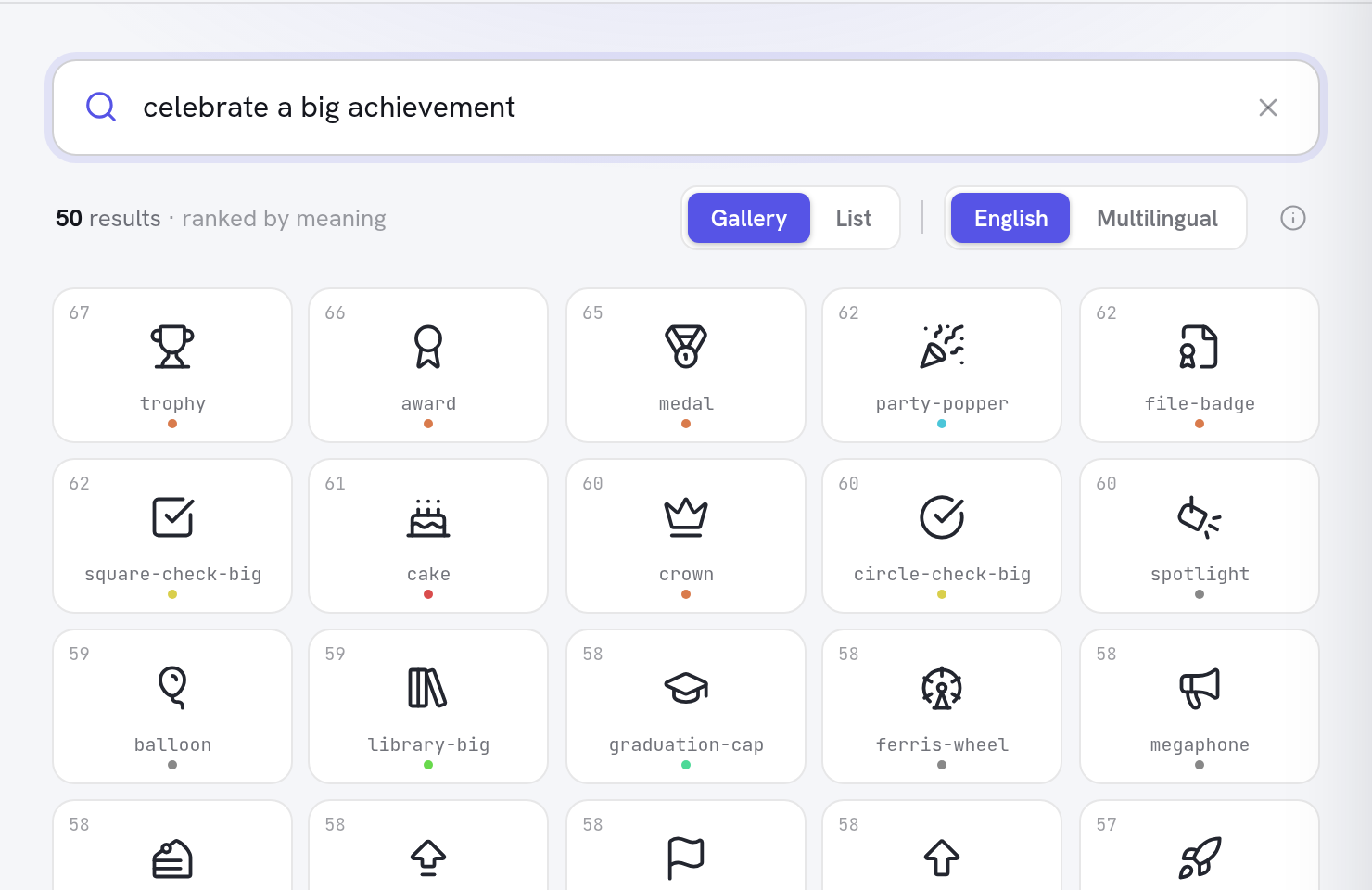
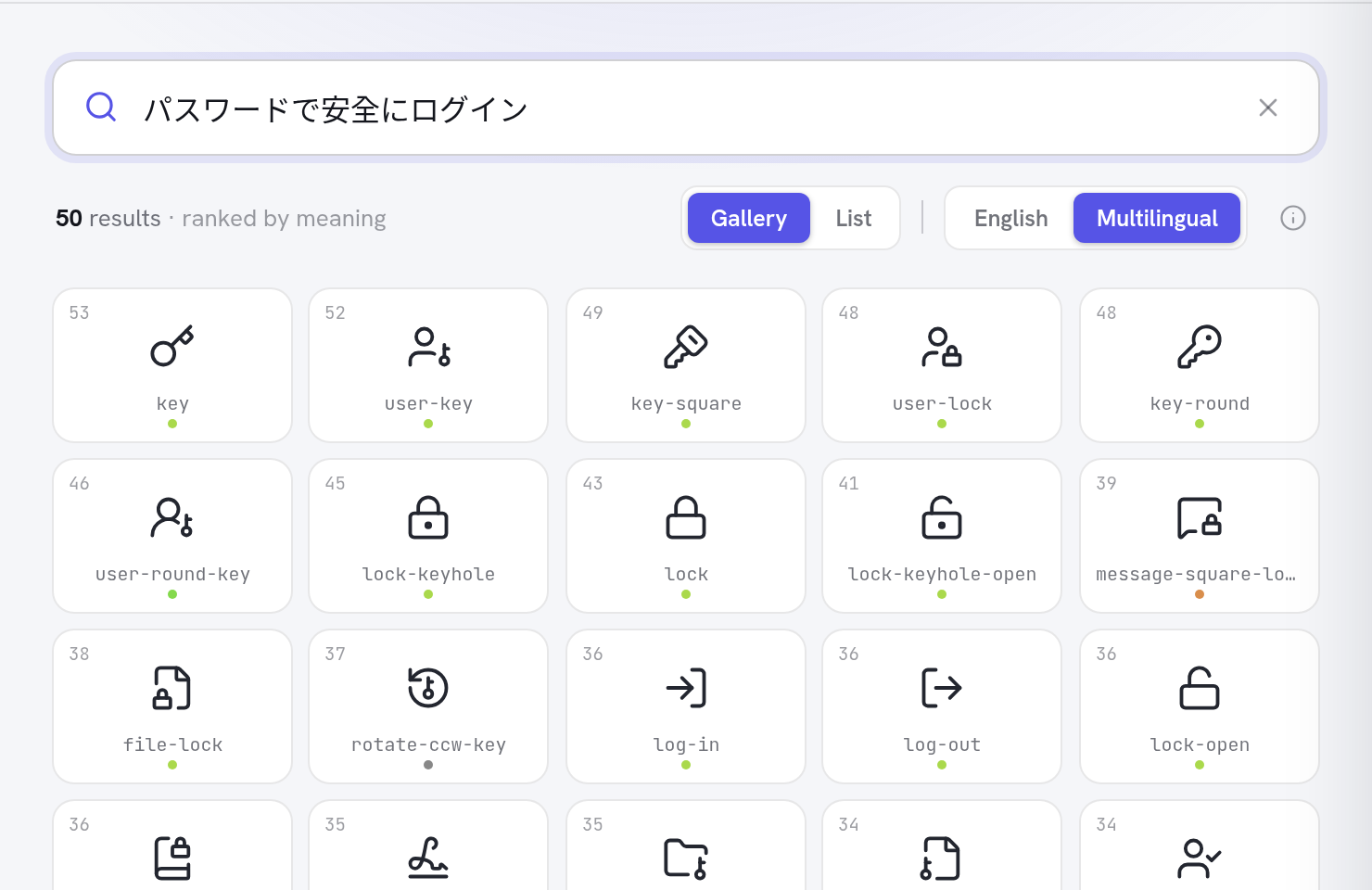
Find icons by describing what you mean, not what they're called — in English or 50+ languages:
# One-off, no install (requires uv)
uvx --from "python-lucide[search]" lucide search "waiting for a download"

# Or install the search extra
pip install "python-lucide[search]"
lucide search "celebrate a big achievement"
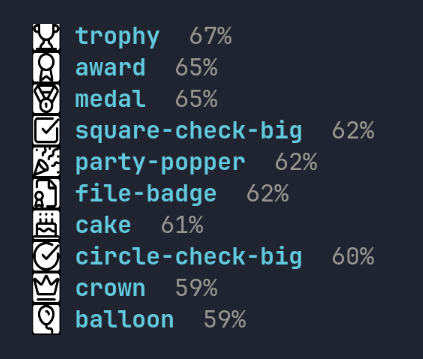
In terminals supporting the Kitty graphics protocol (kitty, Ghostty,
WezTerm), the icons render inline as above — inside tmux too, with
tmux set -g allow-passthrough on. Elsewhere you get the plain text
list. (Rendering uses the cairo system library; if it's missing, the
CLI prints a hint.)
Icons are matched against AI-generated descriptions using the same embedding model the web app uses, so descriptive phrases ("an idea just occurred to me") work better than keywords. Options:
--model multilingual— search in 50+ languages (defaultbge-smallranks best for English)--limit N— number of results;--verbose— include each icon's description
The first search downloads the embedding model (~67 MB) and the pre-built search index (11 MB); both are cached, and every search after that runs locally in well under a second.
The same search is available as a Python API:
from lucide.search import search_icons

for r in search_icons("secure login", limit=5):
    print(r.name, r.score)
Prefer not to install anything? The browser version runs the whole pipeline client-side.
Framework Integration Examples
Starlette
from starlette.applications import Starlette
from starlette.responses import Response
from starlette.routing import Route
from lucide import lucide_icon

def icon(request):
    icon_name = request.path_params["icon_name"]
    svg = lucide_icon(icon_name, cls="icon", stroke="currentColor")
    return Response(svg, media_type="image/svg+xml")

app = Starlette(routes=[Route("/icons/{icon_name}", icon)])
FastAPI
from fastapi import FastAPI
from fastapi.responses import Response
from lucide import lucide_icon

app = FastAPI()

@app.get("/icons/{icon_name}")
def get_icon(icon_name: str, size: int = 24, color: str = "currentColor"):
    svg = lucide_icon(icon_name, width=size, height=size, stroke=color)
    return Response(content=svg, media_type="image/svg+xml")
FastHTML
from fasthtml.common import *
from lucide import lucide_icon

app, rt = fast_app()

@rt('/')
def get():
    return Titled("Hello Icons",
        H1("Welcome"),
        # Wrap icon output in NotStr to prevent HTML escaping
        NotStr(lucide_icon("house", cls="icon")),
        P("This is a simple FastHTML app with Lucide icons.")
    )

serve()
Flask
from flask import Flask
from lucide import lucide_icon

app = Flask(__name__)

@app.route('/icons/<icon_name>')
def serve_icon(icon_name):
    svg = lucide_icon(icon_name, cls="icon", stroke="currentColor")
    return svg, 200, {'Content-Type': 'image/svg+xml'}
Django
# In your views.py
from django.http import HttpResponse
from lucide import lucide_icon

def icon_view(request, icon_name):
    svg = lucide_icon(icon_name, cls="icon-lg", width="32", height="32")
    return HttpResponse(svg, content_type='image/svg+xml')

# In your templates (as a template tag)
from django import template
from django.utils.safestring import mark_safe
from lucide import lucide_icon

register = template.Library()

@register.simple_tag
def icon(name, **kwargs):
    return mark_safe(lucide_icon(name, **kwargs))
API Reference
lucide_icon()
Retrieves and customizes a Lucide icon.
lucide_icon(
    icon_name: str,
    cls: str = "",
    fallback_text: str | None = None,
    width: str | int | None = None,
    height: str | int | None = None,
    fill: str | None = None,
    stroke: str | None = None,
    stroke_width: str | int | None = None,
    stroke_linecap: str | None = None,
    stroke_linejoin: str | None = None,
) -> str
Parameters:
icon_name: Name of the Lucide icon to retrievecls: CSS classes to add to the SVG element (space-separated)fallback_text: Text to display if the icon is not foundwidth: Width of the SVG elementheight: Height of the SVG elementfill: Fill color for the iconstroke: Stroke color for the icon (outline color)stroke_width: Width of the strokestroke_linecap: How the ends of strokes are rendered ("round", "butt", "square")stroke_linejoin: How corners are rendered ("round", "miter", "bevel")
Returns: SVG string
Example:
# Full customization example
icon = lucide_icon(
    "activity",
    cls="icon icon-activity animated",
    width=48,
    height=48,
    stroke="rgb(59, 130, 246)",
    stroke_width=2.5,
    stroke_linecap="round",
    stroke_linejoin="round"
)
get_icon_list()
Returns a list of all available icon names.
from lucide import get_icon_list

icons = get_icon_list()
print(f"Available icons: {len(icons)}")
print(icons[:5])  # ['activity', 'airplay', 'alarm-check', ...]
Advanced Usage
Building a Custom Icon Set
If you want to include only specific icons or use a different version of Lucide:
# Build with specific icons only
lucide-db -i home,settings,user,heart,star -o custom-icons.db

# Use a specific Lucide version
lucide-db -t 0.350.0 -o lucide-v0.350.0.db

# Build from a file listing icon names
echo -e "home\nsettings\nuser" > my-icons.txt
lucide-db -f my-icons.txt -o my-icons.db
Using a Custom Database
Set the LUCIDE_DB_PATH environment variable:
export LUCIDE_DB_PATH=/path/to/custom-icons.db
python your-app.py
Or configure it in your Python code:
import os
os.environ['LUCIDE_DB_PATH'] = '/path/to/custom-icons.db'

from lucide import lucide_icon
# Will now use your custom database
Development
This project uses uv for fast dependency management and pre-commit for code quality.
Setup
# Clone the repository
git clone https://github.com/mmacpherson/python-lucide.git
cd python-lucide

# Create a virtual environment and install dependencies
make env
source .venv/bin/activate  # On Windows: .venv\Scripts\activate

# Install pre-commit hooks
make install-hooks

# Run tests
make test
Rebuilding the Icon Database
# Rebuild with latest Lucide icons
make lucide-db

# Rebuild with specific version
make lucide-db TAG=0.350.0

# Check if version updates are available
make check-lucide-version
Version Checking and Automation
The project includes automated version checking and update capabilities:
# Check for Lucide version updates and artifact status
make check-lucide-version

# Alternative: Use the CLI command directly
uv run check-lucide-version
Weekly Automation: The repository automatically checks for new Lucide releases every Monday and creates update PRs when new versions are available.
Release Process
This project follows a manual release process:
-
Update version in
pyproject.toml:# Create release branch git checkout -b release/v0.2.0 # Edit pyproject.toml to bump version # version = "0.2.0" # Commit and push git add pyproject.toml git commit -m "Bump version to 0.2.0" git push -u origin release/v0.2.0
-
Create and merge PR for the version bump
-
Trigger publishing workflow:
- Go to Actions
- Click "Run workflow"
- Select the main branch
- Click "Run workflow"
-
Automatic publishing: The
publish.ymlworkflow builds and publishes the package to PyPI using trusted publishing.
How It Works
The package comes with a pre-built SQLite database containing all Lucide icons. When you call lucide_icon(), it fetches the icon's SVG from the database and applies your customizations. This approach means:
- Fast: Icons are loaded from an efficient SQLite database
- Offline: No internet connection required at runtime
- Customizable: Build your own database with just the icons you need
- Maintainable: Update to newer Lucide versions by rebuilding the database
License
This project is licensed under the MIT License - see the LICENSE file for details. The Lucide icons themselves are also MIT licensed - see Lucide's license.
1 maintainer

Metadata
1 maintainer
Release files for python-lucide 0.5.5
For a detailed explanation of source distributions (sdists) and built distributions (wheels), please see the package formats documentation.
Source distribution (sdist)
| File | Size | Uploaded | |
|---|---|---|---|
| python_lucide-0.5.5.tar.gz | 981.6 kB | Details |
Built distribution (wheel)
| File | Interpreter | ABI | Platform | Reset |
|---|---|---|---|---|
| python_lucide-0.5.5-py3-none-any.whl | Python 3 | none | any | Details |
Total release size: 1.7 MB
Release files / python_lucide-0.5.5.tar.gz
| Download URL | python_lucide-0.5.5.tar.gz |
|---|---|
| Size | 981.6 kB |
| Tags | Source |
|
SHA-256 checksum How to use checksums |
0a5d7ef2d2272ea44dc0689a93408086ea65530e39579f1eedb7b8345ea0cc5f
|
|
BLAKE2b-256 checksum How to use checksums |
bb35d1a324d0066c8890bf0bec1de5ec0642732afb626a7f7b1090bd7a540f3a
|
| Upload date | |
|
Uploaded using Trusted Publishing? What is trusted publishing? |
Yes |
| Uploaded via |
uv/0.12.15 {"installer":{"name":"uv","version":"0.12.15","subcommand":["publish"]},"python":null,"implementation":{"name":null,"version":null},"distro":{"name":"Ubuntu","version":"24.04","id":"noble","libc":null},"system":{"name":null,"release":null},"cpu":null,"openssl_version":null,"setuptools_version":null,"rustc_version":null,"ci":true}
|
Release files / python_lucide-0.5.5-py3-none-any.whl
| Download URL | python_lucide-0.5.5-py3-none-any.whl |
|---|---|
| Size | 725.3 kB |
| Tags | Python 3 |
|
SHA-256 checksum How to use checksums |
da547df19fed75fc929db32100e3094dcd67a5ac3e75ea04e700868a23553756
|
|
BLAKE2b-256 checksum How to use checksums |
0628e0c927a0f555692c7b8c99bf5592d53567fec2ed1e7acf0be121fbff3ec4
|
| Upload date | |
|
Uploaded using Trusted Publishing? What is trusted publishing? |
Yes |
| Uploaded via |
uv/0.12.15 {"installer":{"name":"uv","version":"0.12.15","subcommand":["publish"]},"python":null,"implementation":{"name":null,"version":null},"distro":{"name":"Ubuntu","version":"24.04","id":"noble","libc":null},"system":{"name":null,"release":null},"cpu":null,"openssl_version":null,"setuptools_version":null,"rustc_version":null,"ci":true}
|














