
Simple Python HTTP Exec Server

Project description





pywebexec
Simple Python HTTP(S) API/Web Command Launcher
Install
$ pip install pywebexec
Quick start
- put in a directory the scripts/commands/links to commands you want to expose
- start http server serving current directory executables listening on 0.0.0.0 port 8080
$ pywebexec
- Launch commands with params/view live output/Status using browser
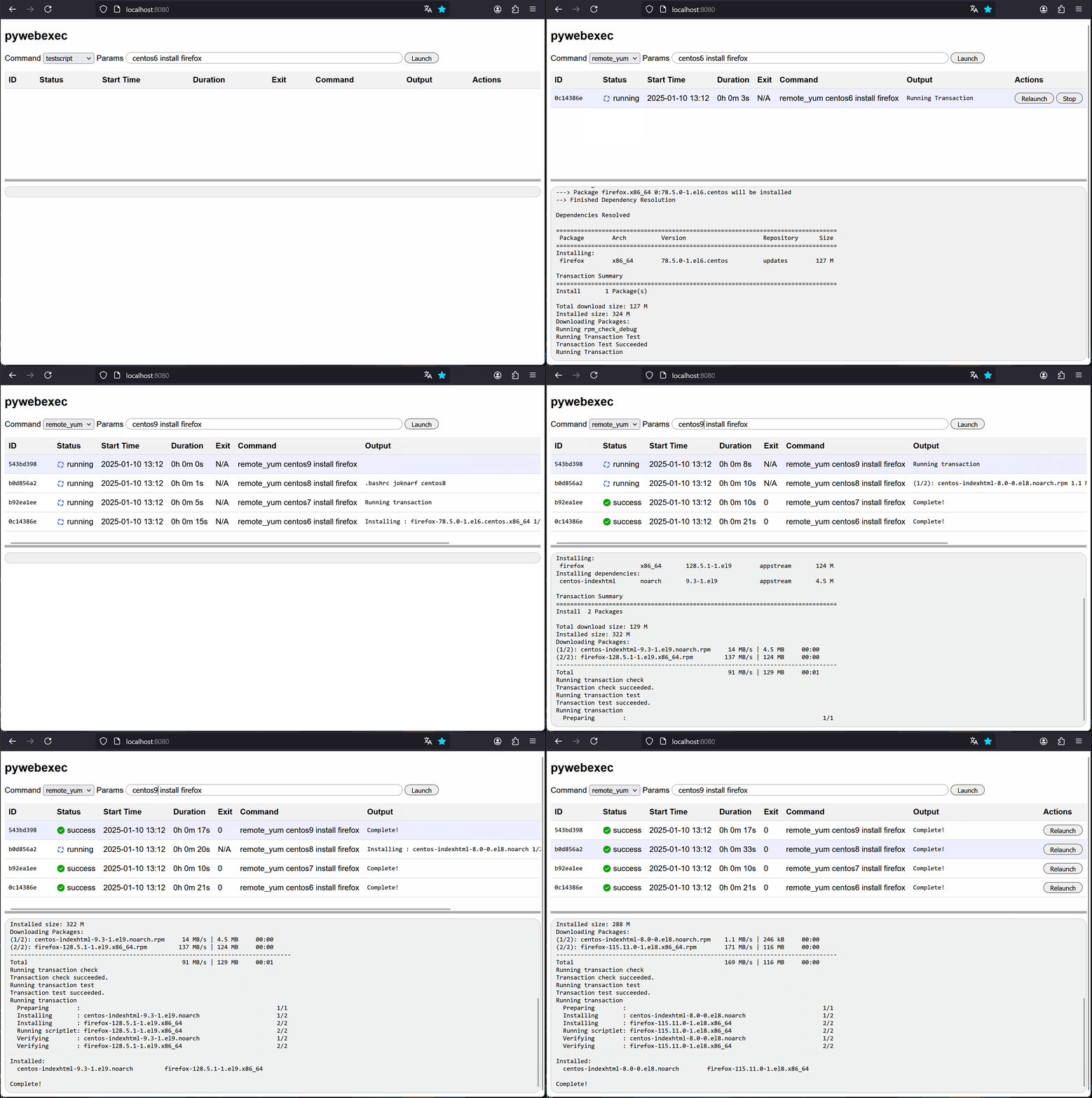
features
- Serve executables in a directory
- Launch commands with params from web browser or API call
- Follow live output
- Stop command
- Relaunch command
- HTTPS support
- HTTPS self-signed certificate generator
- Basic Auth
- LDAP(S)
- Can be started as a daemon (POSIX)
- uses gunicorn to serve http/https
- compatible Linux/MacOS
Customize server
$ pywebexec --dir ~/myscripts --listen 0.0.0.0 --port 8080
$ pywebexec -d ~/myscripts -l 0.0.0.0 -p 8080
Basic auth
- single user/password
$ pywebexec --user myuser [--password mypass]
$ pywebexec -u myuser [-P mypass]
Generated password is given if no --pasword option
- ldap(s) password check / group member
$ export PYWEBEXEC_LDAP_SERVER=ldap.forumsys.com
$ export PYWEBEXEC_LDAP_USE_SSL=0
$ export PYWEBEXEC_LDAP_BIND_DN="cn=read-only-admin,dc=example,dc=com"
$ export PYWEBEXEC_LDAP_BIND_PASSWORD="password"
$ export PYWEBEXEC_LDAP_GROUPS=mathematicians,scientists
$ export PYWEBEXEC_LDAP_USER_ID="uid"
$ export PYWEBEXEC_LDAP_BASE_DN="dc=example,dc=com"
$ pywebexec
HTTPS server
- Generate auto-signed certificate and start https server
$ pywebfs --gencert
$ pywebfs --g
- Start https server using existing certificate
$ pywebfs --cert /pathto/host.cert --key /pathto/host.key
$ pywebfs -c /pathto/host.cert -k /pathto/host.key
Launch server as a daemon
$ pywebexec start
$ pywebexec status
$ pywebexec stop
- log of server are stored in directory
[.config/].pywebexec/pywebexec_<listen>:<port>.log
Launch command through API
$ curl http://myhost:8080/run_script -H 'Content-Type: application/json' -X POST -d '{ "script_name":"myscript", "param":["param1", ...]}
API reference
| method | route | params/payload | returns |
|---|---|---|---|
| POST | /run_command | command: str params: array[str] |
command_id: uuid message: str |
| POST | /stop_command/command_id | message: str | |
| GET | /command_status/command_id | command_id: uuid command: str params: array[str] start_time: isotime end_time: isotime status: str exit_code: int |
|
| GET | /command_output/command_id | output: str status: str |
|
| GET | /commands | array of command_id: uuid command: str start_time: isotime end_time: isotime status: str exit_code: int |
|
| GET | /executables | array of str |
Release history Release notifications | RSS feed


Download files
Download the file for your platform. If you're not sure which to choose, learn more about installing packages.
Source Distribution
pywebexec-1.1.0.tar.gz
(20.7 kB
view details)
Built Distribution
Filter files by name, interpreter, ABI, and platform.
If you're not sure about the file name format, learn more about wheel file names.
Copy a direct link to the current filters
pywebexec-1.1.0-py3-none-any.whl
(19.6 kB
view details)
File details
Details for the file pywebexec-1.1.0.tar.gz.
File metadata
- Download URL: pywebexec-1.1.0.tar.gz
- Upload date:
- Size: 20.7 kB
- Tags: Source
- Uploaded using Trusted Publishing? No
- Uploaded via: twine/6.0.1 CPython/3.9.21
File hashes
| Algorithm | Hash digest | |
|---|---|---|
| SHA256 |
c52fedbfc4f6b31f32d7a8227a958865b443116313557f76298af44609da7741
|
|
| MD5 |
d6f8b376e69b6ccf9c5feda284c0a311
|
|
| BLAKE2b-256 |
211ea7a28945ba928a0115ee4dc7d9d00b57e48351ef4f8ae9041e848ac2c888
|
File details
Details for the file pywebexec-1.1.0-py3-none-any.whl.
File metadata
- Download URL: pywebexec-1.1.0-py3-none-any.whl
- Upload date:
- Size: 19.6 kB
- Tags: Python 3
- Uploaded using Trusted Publishing? No
- Uploaded via: twine/6.0.1 CPython/3.9.21
File hashes
| Algorithm | Hash digest | |
|---|---|---|
| SHA256 |
4385919c9530ece8372567620e6c1fac383dc4c4a08f32d66750a8a827864227
|
|
| MD5 |
632bdd8a31a96b5c556591a405eca0d0
|
|
| BLAKE2b-256 |
80cde46a1b481c2bf7890baaf87dab246317421d1886ba65e0f414296fa44c0a
|






