
Simple Python HTTP Exec Server

Project description





pywebexec
Simple Python HTTP(S) API/Web Command Launcher and Terminal sharing
Install
$ pip install pywebexec
Quick start
- share terminal
$ pywebexec shareterm
- serve executables
- put in a directory the scripts/commands/links to commands you want to expose
- start http server serving current directory executables listening on 0.0.0.0 port 8080
$ pywebexec -d <dir>
- Launch commands with params/view live output/Status using browser
- Share your terminal output using
pywebexec -d <dir> term
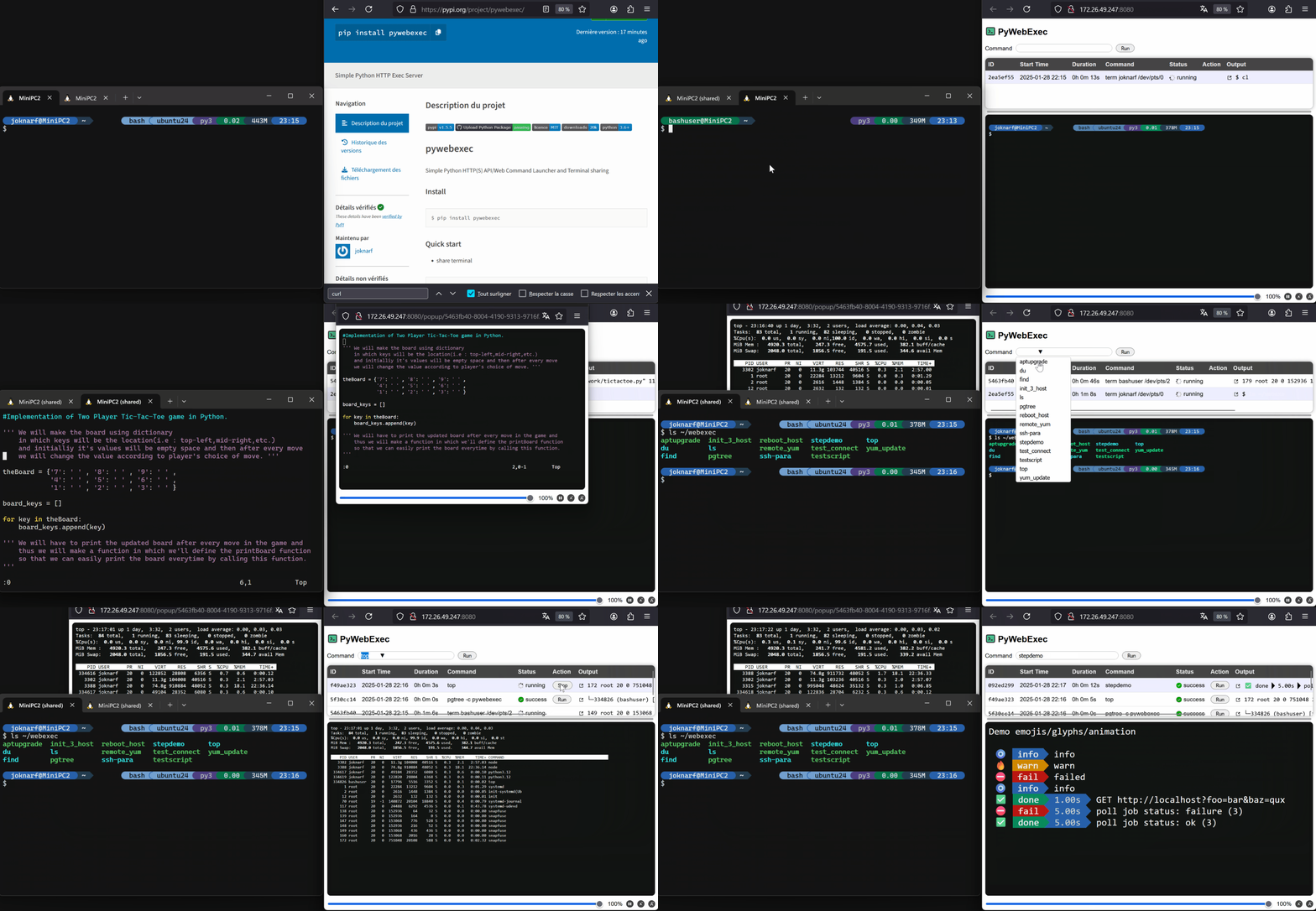
all commands output / statuses are available in the executables directory in subdirectory .web_status
features
- Serve executables in a directory
- Launch commands with params from web browser or API call
- multiple share terminal output
- Follow live output
- Replay terminal history
- Stop command
- Relaunch command
- HTTPS support
- HTTPS self-signed certificate generator
- Basic Auth
- LDAP(S) password check/group member
- Safe url token generation
- Can be started as a daemon (POSIX)
- Uses gunicorn to serve http/https
- Linux/MacOS compatible
Customize server
$ pywebexec --dir ~/myscripts --listen 0.0.0.0 --port 8080 --title myscripts
$ pywebexec -d ~/myscripts -l 0.0.0.0 -p 8080 -t myscripts
Sharing terminals
- start server and share tty in one command
$ pywebexec -d ~/webshare shareterm
- share tty with an already pywebexec server started
$ pywebexec -d ~/webshare term
if another user need to share his terminal, he need to have write permission on <dir>/.web_status directory.
Safe url token
- generate safe url, use the url to access the server
$ pywebexec -T
$ pywebexec --tokenurl
Starting server:
http://<host>:8080?token=jSTWiNgEVkddeEJ7I97x2ekOeaiXs2mErRSKNxm3DP0
http://x.x.x.x:8080?token=jSTWiNgEVkddeEJ7I97x2ekOeaiXs2mErRSKNxm3DP0
Basic auth
- single user/password
$ pywebexec --user myuser [--password mypass]
$ pywebexec -u myuser [-P mypass]
Generated password is given if no --pasword option
- ldap(s) password check / group member ldap server must accept memberOf attribute for group members
$ export PYWEBEXEC_LDAP_SERVER=ldaps://ldap.mydomain.com:389
$ export PYWEBEXEC_LDAP_BIND_DN="cn=read-only-admin,dc=example,dc=com"
$ export PYWEBEXEC_LDAP_BIND_PASSWORD="password"
$ export PYWEBEXEC_LDAP_BASE_DN="dc=example,dc=com"
$ export PYWEBEXEC_LDAP_USER_ID="uid" # sAMAccountName for AD
$ export PYWEBEXEC_LDAP_GROUPS="ou=mathematicians,dc=example,dc=com ou=scientists,dc=example,dc=com"
$ pywebexec
HTTPS server
- Generate auto-signed certificate and start https server
$ pywebexec --gencert
$ pywebexec --g
- Start https server using existing certificate
$ pywebexec --cert /pathto/host.cert --key /pathto/host.key
$ pywebexec -c /pathto/host.cert -k /pathto/host.key
Launch server as a daemon
$ pywebexec start
$ pywebexec status
$ pywebexec stop
- log of server are stored in directory
~/[.config/].pywebexec/pywebexec_<listen>:<port>.log
Launch command through API
$ curl http://myhost:8080/run_command -H 'Content-Type: application/json' -X POST -d '{ "command":"myscript", "params":["param1", ...]}'
$ curl http://myhost:8080/command_status/<command_id>
$ curl http://myhost:8080/command_output/<command_id> -H "Accept: text/plain"
API reference
| method | route | params/payload | returns |
|---|---|---|---|
| GET | /executables | array of str | |
| GET | /commands | array of command_id: uuid command: str start_time: isotime end_time: isotime status: str exit_code: int last_output_line: str |
|
| GET | /commands/{id} | command_id: uuid command: str params: array[str] start_time: isotime end_time: isotime status: str exit_code: int last_output_line: str |
|
| GET | /commands/{id}/output | offset: int | output: str status: str links: { next: str } |
| GET | /commands/{id}/output_raw | offset: int | output: stream raw output until end of command curl -Ns http://srv/commands/{id}/output_raw |
| POST | /commands | command: str params: array[str] rows: int cols: int |
command_id: uuid message: str |
| PATCH | /commands/{id}/stop | message: str |
Release history Release notifications | RSS feed


Download files
Download the file for your platform. If you're not sure which to choose, learn more about installing packages.
Source Distribution
Built Distribution
Filter files by name, interpreter, ABI, and platform.
If you're not sure about the file name format, learn more about wheel file names.
Copy a direct link to the current filters
File details
Details for the file pywebexec-1.9.3.tar.gz.
File metadata
- Download URL: pywebexec-1.9.3.tar.gz
- Upload date:
- Size: 1.8 MB
- Tags: Source
- Uploaded using Trusted Publishing? No
- Uploaded via: twine/6.1.0 CPython/3.9.21
File hashes
| Algorithm | Hash digest | |
|---|---|---|
| SHA256 |
f9a375fce66a5029f5aee824ce2f16caaa98ad9e361f4b51c347c29b980305f6
|
|
| MD5 |
ee145163b5a842fe1a12b7e93d5347ed
|
|
| BLAKE2b-256 |
6f0dd4be3f6a04ae54fe677958ad95a0ec0f15dd0eee5f65be37867aca869964
|
File details
Details for the file pywebexec-1.9.3-py3-none-any.whl.
File metadata
- Download URL: pywebexec-1.9.3-py3-none-any.whl
- Upload date:
- Size: 1.8 MB
- Tags: Python 3
- Uploaded using Trusted Publishing? No
- Uploaded via: twine/6.1.0 CPython/3.9.21
File hashes
| Algorithm | Hash digest | |
|---|---|---|
| SHA256 |
797d8a663ce98d01e7bf79ce901fe12aab575543bfa712380ad0464be6e1ce7b
|
|
| MD5 |
c83b76e5ccb9a495dd37156e70d1721d
|
|
| BLAKE2b-256 |
9eb92cb2567b19b6a2eec514a7b26aa6f4d9905ca86d923bfe39c73bccd5c286
|






