
PyWhatKit is a Python library for Sending whatsapp message at certain time, it has several other features too.


Project description

Project description
PyWhatKit is a Python library for Sending whatsapp message at certain time, it has several other features too. It is one of the safest tools for scheduling WhatsApp messages.
Links
Read detailed description here - https://pywhatkit.herokuapp.com/
Request new feature here - https://pywhatkit.herokuapp.com/request-feature
Have some query or suggestions, join our discord server - Discord invite link
Download

Installation
pip install pywhatkit
Usage
Import the library using the following command.
import pywhatkit
This will open web.whatsapp.com at 14:59:40 and message will be sent at exactly 15:00:00
pywhatkit.sendwhatmsg("+919876543210","This is a message",15,00)
This will open web.whatsapp.com at 14:59:40 and message to a group will be sent at exactly 15:00:00
pywhatkit.sendwhatmsg_to_group("Group_ID","This is a message",15,00)
This will give wikipedia summary about the topic using the Wikipedia API
pywhatkit.info("Python",lines=3)
This will convert any given image to ASCII art, see my profile picture
pywhatkit.image_to_ascii_art(path_to_image,output_file)
This will convert that text to handwritten font with color combination 0,0,0 in RGB form
pywhatkit.text_to_handwriting(text,rgb=[0,0,0])
Something like this
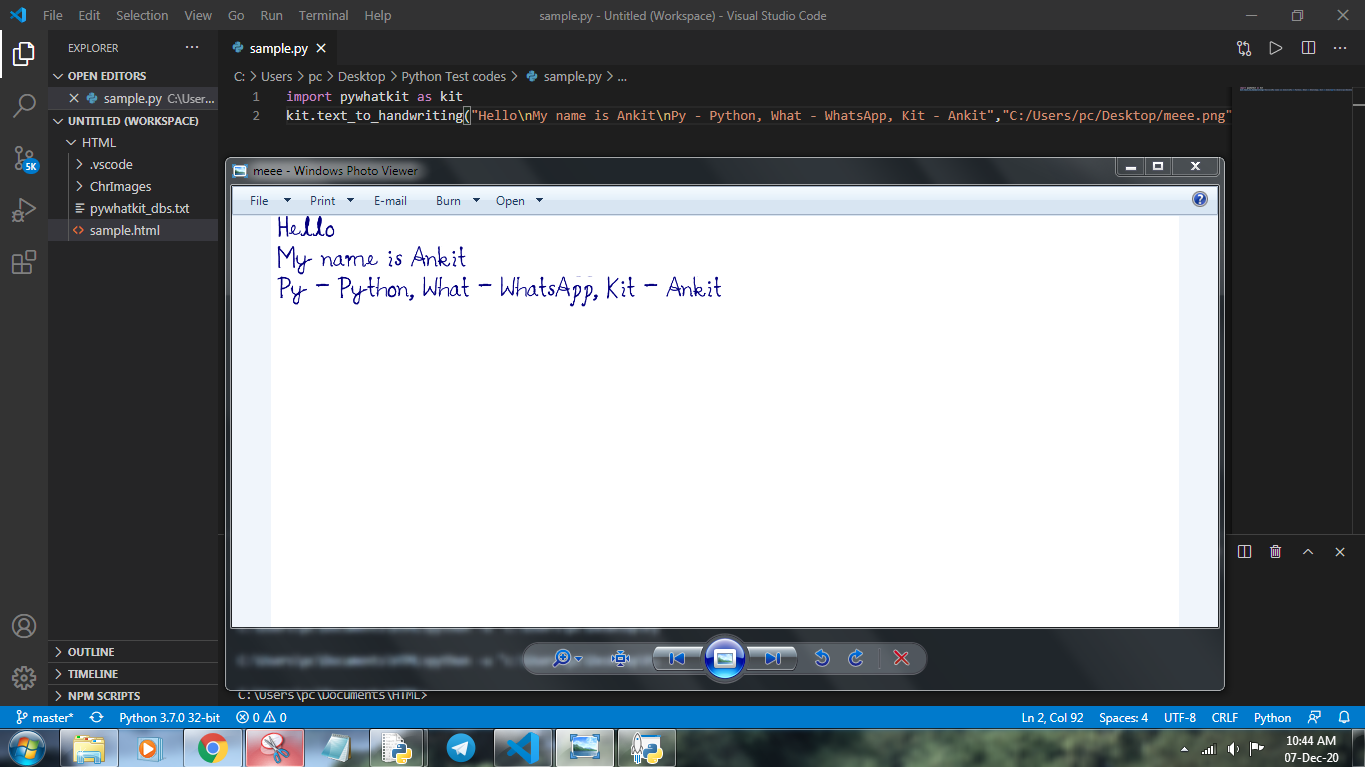
This will play the first video that appears upon searching "Python" on YouTube
pywhatkit.playonyt("Python")
This will perform a Google search about Python
pywhatkit.search("Python")
Some other functions
pywhatkit.showHistory()#Will show information of all the messages sent using this library

pywhatkit.shutdown(time=100)#Will shutdown the system in 100 seconds

pywhatkit.cancelShutdown()#Will cancel the scheduled shutdown

pywhatkit.watch_tutorial_in_english/hindi()#Will open a tutorial on how to use this library on YouTube in respective language

pywhatkit.sendMail(my_mail, my_pass, mail_to, content):  #to send a mail to anybody.

pywhatkit.help.function_name() #For more information about that function
Contributing
Pull requests are welcome. For major changes, please open an issue first to discuss what you would like to change.
License
MIT
Release history Release notifications | RSS feed


Download files
Download the file for your platform. If you're not sure which to choose, learn more about installing packages.
Source Distribution
Built Distribution
Filter files by name, interpreter, ABI, and platform.
If you're not sure about the file name format, learn more about wheel file names.
Copy a direct link to the current filters
File details
Details for the file pywhatkit-4.2.tar.gz.
File metadata
- Download URL: pywhatkit-4.2.tar.gz
- Upload date:
- Size: 7.2 kB
- Tags: Source
- Uploaded using Trusted Publishing? No
- Uploaded via: twine/3.4.1 importlib_metadata/3.10.0 pkginfo/1.7.0 requests/2.24.0 requests-toolbelt/0.9.1 tqdm/4.60.0 CPython/3.7.9
File hashes
| Algorithm | Hash digest | |
|---|---|---|
| SHA256 |
9e2f534420e2072d62796c05468c73419d8c930ed852108065b365bdf897f2e7
|
|
| MD5 |
98ee46a94dc3cb1686f17422f3f8644c
|
|
| BLAKE2b-256 |
9e0d2ca5c15a809b8ce2f7eb2275fb2b986c7bf8461346d14df1e2189a450ecb
|
File details
Details for the file pywhatkit-4.2-py3-none-any.whl.
File metadata
- Download URL: pywhatkit-4.2-py3-none-any.whl
- Upload date:
- Size: 9.1 kB
- Tags: Python 3
- Uploaded using Trusted Publishing? No
- Uploaded via: twine/3.4.1 importlib_metadata/3.10.0 pkginfo/1.7.0 requests/2.24.0 requests-toolbelt/0.9.1 tqdm/4.60.0 CPython/3.7.9
File hashes
| Algorithm | Hash digest | |
|---|---|---|
| SHA256 |
f4eaa9f50067a1f7090d239d235ba5bdddb2594d8f67ce4b0779c25f41a179a3
|
|
| MD5 |
e67cc35faad3325d1734690af11aade0
|
|
| BLAKE2b-256 |
35f417e205222df4a7c89ad69622f04cd8fea0fbebbcba73b0e25db22edce85a
|






