
This release is a pre-release and may not be stable for production use.








The qBraid-SDK is a Python toolkit for cross-framework abstraction, transpilation, and execution of quantum programs.

Features
- Unified quantum frontend interface. Transpile quantum circuits between supported packages. Leverage the capabilities of multiple frontends through simple, consistent protocols.
- Build once, target many. Create quantum programs using your preferred circuit-building package, and execute on any backend that interfaces with a supported frontend.
- Benchmark, compare, interpret results. Built-in compatible post-processing enables comparing results between runs and across backends.
Installation & Setup

For the best experience, install the qBraid-SDK environment on lab.qbraid.com. Login (or create an account) and follow the steps to install an environment.
Using the SDK on qBraid Lab means direct, pre-configured access to all Amazon Braket supported devices with no additional access keys or API tokens required. See qBraid Quantum Jobs for more.
Local install
The qBraid-SDK, and all of its dependencies, can also be installed using pip:
pip install qbraid
You can also install from source by cloning this repository and running a pip install command in the root directory of the repository:
git clone https://github.com/qBraid/qBraid.git
cd qBraid
pip install -e '.[all]'
Note: The qBraid-SDK requires Python 3.9 or greater.
If using locally, follow linked instructions to configure your qBraid, AWS, and IBMQ credentials.
Check version
You can view the version of the qBraid-SDK you have installed within Python using the following:
In [1]: import qbraid

In [2]: qbraid.__version__
Documentation & Tutorials
qBraid documentation is available at docs.qbraid.com.
See also:
Quickstart
Transpiler
Construct a quantum program of any supported program type.
Below, SUPPORTED_QPROGRAMS maps shorthand identifiers for supported quantum programs, each corresponding to a type in the typed QPROGRAM Union.
For example, 'qiskit' maps to qiskit.QuantumCircuit in QPROGRAM. Notably, 'qasm2' and 'qasm3' both represent raw OpenQASM strings.
This arrangement simplifies targeting and transpiling between different quantum programming frameworks.
>>> from qbraid import SUPPORTED_QPROGRAMS, QPROGRAM
>>> SUPPORTED_QPROGRAMS
{'cirq': 'cirq.circuits.circuit.Circuit',
 'qiskit': 'qiskit.circuit.quantumcircuit.QuantumCircuit',
 'pyquil': 'pyquil.quil.Program',
 'pytket': 'pytket._tket.circuit.Circuit',
 'braket': 'braket.circuits.circuit.Circuit',
 'openqasm3': 'openqasm3.ast.Program',
 'qasm2': 'str',
 'qasm3': 'str'}
Pass any quantum program of type QPROGRAM to the circuit_wrapper() and specify a target package
from SUPPORTED_QPROGRAMS to "transpile" your circuit to a new program type:
>>> from qbraid import circuit_wrapper
>>> from qbraid.interface import random_circuit
>>> qiskit_circuit = random_circuit("qiskit")
>>> cirq_circuit = circuit_wrapper(qiskit_circuit).transpile("cirq")
>>> print(qiskit_circuit)
          ┌────────────┐
q_0: ──■──┤ Rx(3.0353) ├
     ┌─┴─┐└───┬────┬───┘
q_1: ┤ H ├────┤ √X ├────
     └───┘    └────┘
>>> print(cirq_circuit)
0: ───@───Rx(0.966π)───
      │
1: ───H───X^0.5────────
The same functionality can be achieved using the underlying convert_to_package() function directly:
>>> from qbraid import convert_to_package
>>> cirq_circuit = convert_to_package(qiskit_circuit, "cirq")
Behind the scenes, the qBraid-SDK uses networkx to create a directional graph that maps all possible conversions between supported program types:
from qbraid.transpiler import ConversionGraph
from qbraid.visualization import plot_conversion_graph

graph = ConversionGraph()
plot_conversion_graph(graph)

You can use the native conversions supported by qBraid, or define your own custom nodes and/or edges. See example.
Devices & Jobs
Search for quantum backend(s) on which to execute your program.
>>> from qbraid import get_devices
>>> get_devices()
Device status updated 0 minutes ago

Device ID                           Status
---------                           ------
aws_oqc_lucy                        ONLINE
aws_ionq_aria2                      OFFLINE
aws_rigetti_aspen_m3                ONLINE
ibm_q_brisbane                      ONLINE
...
Apply the device_wrapper(), and send quantum jobs to any supported backend,
from any supported program type:
>>> from qbraid import device_wrapper, get_jobs
>>> aws_device = device_wrapper("aws_oqc_lucy")
>>> ibm_device = device_wrapper("ibm_q_brisbane")
>>> aws_job = aws_device.run(qiskit_circuit, shots=1000)
>>> ibm_job = ibm_device.run(cirq_circuit, shots=1000)
>>> get_jobs()
Displaying 2 most recent jobs:

Job ID                                              Submitted                  Status
------                                              ---------                  ------
aws_oqc_lucy-exampleuser-qjob-zzzzzzz...            2023-05-21T21:13:47.220Z   QUEUED
ibm_q_brisbane-exampleuser-qjob-xxxxxxx...          2023-05-21T21:13:48.220Z   RUNNING
...
Compare results in a consistent, unified format:
>>> aws_result = aws_job.result()
>>> ibm_result = ibm_job.result()
>>> aws_result.measurement_counts()
{'00': 483, '01': 14, '10': 486, '11': 17}
>>> ibm_result.measurement_counts()
{'00': 496, '01': 12, '10': 479, '11': 13}
Local account setup
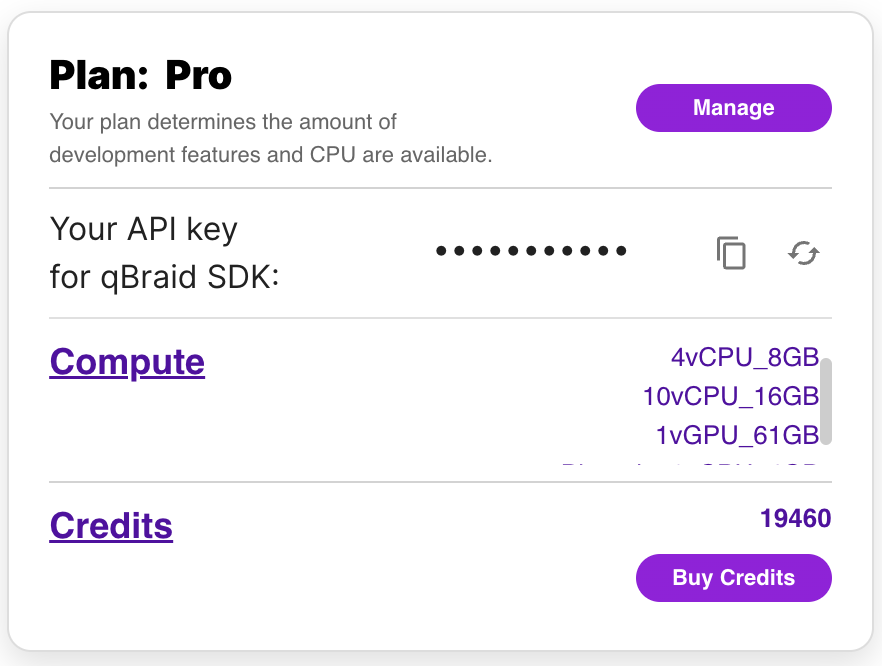
To use the qBraid-SDK locally (outside of qBraid Lab), you must add your account credentials:
-
Create a qBraid account or log in to your existing account by visiting account.qbraid.com
-
Copy your API Key token from the left side of your account page:
-
Save your API key from step 2 by calling
QbraidSession.save_config():
from qbraid.api import QbraidSession

session = QbraidSession(api_key='API_KEY')
session.save_config()
The command above stores your credentials locally in a configuration file ~/.qbraid/qbraidrc,
where ~ corresponds to your home ($HOME) directory. Once saved, you can then connect to the
qBraid API and leverage functions such as get_devices() and get_jobs().
Load Account from Environment Variables
Alternatively, the qBraid-SDK can discover credentials from environment variables:
export JUPYTERHUB_USER='USER_EMAIL'
export QBRAID_API_KEY='QBRAID_API_KEY'
Then instantiate the session without any arguments
from qbraid.api import QbraidSession

session = QbraidSession()
Launch on qBraid
The "Launch on qBraid" button (below) can be added to any public GitHub
repository. Clicking on it automaically opens qBraid Lab, and performs a
git clone of the project repo into your account's home directory. Copy the
code below, and replace YOUR-USERNAME and YOUR-REPOSITORY with your GitHub
info.
Use the badge in your project's README.md:
[<img src="https://qbraid-static.s3.amazonaws.com/logos/Launch_on_qBraid_white.png" width="150">](https://account.qbraid.com?gitHubUrl=https://github.com/YOUR-USERNAME/YOUR-REPOSITORY.git)
Use the badge in your project's README.rst:
.. image:: https://qbraid-static.s3.amazonaws.com/logos/Launch_on_qBraid_white.png
    :target: https://account.qbraid.com?gitHubUrl=https://github.com/YOUR-USERNAME/YOUR-REPOSITORY.git
    :width: 150px
Contributing
-
Interested in contributing code, or making a PR? See CONTRIBUTING.md
-
For feature requests and bug reports: Submit an issue
-
For discussions, and specific questions about the qBraid SDK, qBraid Lab, or other topics, join our discord community
-
For questions that are more suited for a forum, post to Quantum Computing Stack Exchange with the
qbraidtag. -
Want your open-source project featured as its own runtime environment on qBraid Lab? Fill out our New Environment Request Form
License


Release files for qbraid 0.5.1.dev20240131023547
For a detailed explanation of source distributions (sdists) and built distributions (wheels), please see the package formats documentation.
Source distribution (sdist)
| File | Size | Uploaded | |
|---|---|---|---|
| qbraid-0.5.1.dev20240131023547.tar.gz | 2.0 MB | Details |
Built distribution (wheel)
| File | Interpreter | ABI | Platform | Reset |
|---|---|---|---|---|
| qbraid-0.5.1.dev20240131023547-py3-none-any.whl | Python 3 | none | any | Details |
Total release size: 2.2 MB
Release files / qbraid-0.5.1.dev20240131023547.tar.gz
| Download URL | qbraid-0.5.1.dev20240131023547.tar.gz |
|---|---|
| Size | 2.0 MB |
| Tags | Source |
|
SHA-256 checksum How to use checksums |
d21ff2cf9404a61ba98625cd93442194fd9d07f7ebf845935c94bbf2bd03ba8b
|
|
BLAKE2b-256 checksum How to use checksums |
30be890ac3a7f4b5988a17490062a20dd96d2429007334c634cebaaa93776fe4
|
| Upload date | |
|
Uploaded using Trusted Publishing? What is trusted publishing? |
No |
| Uploaded via |
twine/4.0.2 CPython/3.11.7
|
Release files / qbraid-0.5.1.dev20240131023547-py3-none-any.whl
| Download URL | qbraid-0.5.1.dev20240131023547-py3-none-any.whl |
|---|---|
| Size | 229.5 kB |
| Tags | Python 3 |
|
SHA-256 checksum How to use checksums |
23147eb036a77bce8a22a662c677438bca41242ceadedc4b8055f2963a19d051
|
|
BLAKE2b-256 checksum How to use checksums |
235c2f84211772decd952d29f17da631034fc57aaff8320e85b355c95429cc6f
|
| Upload date | |
|
Uploaded using Trusted Publishing? What is trusted publishing? |
No |
| Uploaded via |
twine/4.0.2 CPython/3.11.7
|














