

Python Client library for the Qdrant vector search engine.





Python Qdrant Client
Client library and SDK for the Qdrant vector search engine.
Library contains type definitions for all Qdrant API and allows to make both Sync and Async requests.
Client allows calls for all Qdrant API methods directly. It also provides some additional helper methods for frequently required operations, e.g. initial collection uploading.
See QuickStart for more details!
Installation
pip install qdrant-client
Features
- Type hints for all API methods
- Local mode - use same API without running server
- REST and gRPC support
- Minimal dependencies
- Extensive Test Coverage
Local mode
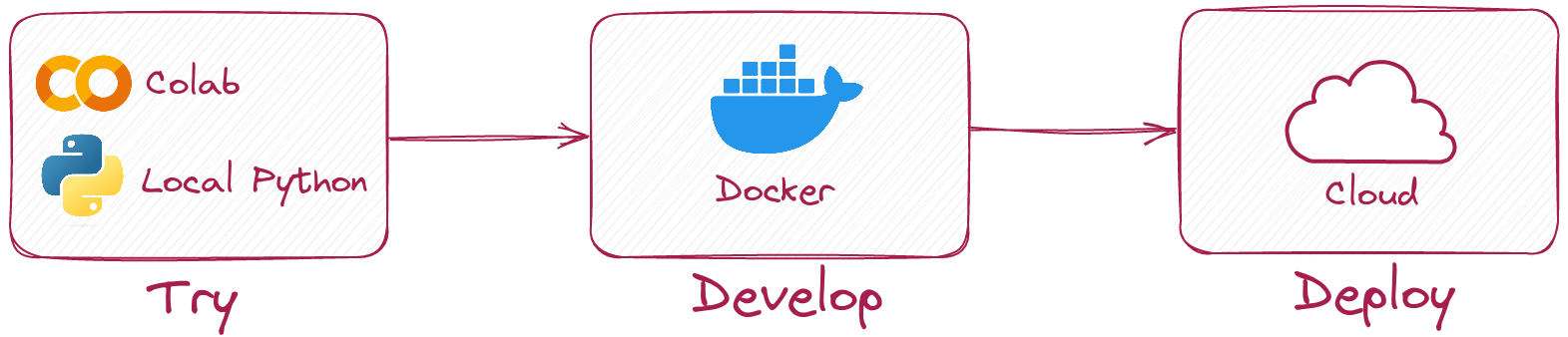
Python client allows you to run same code in local mode without running Qdrant server.
Simply initialize client like this:
from qdrant_client import QdrantClient

client = QdrantClient(":memory:")
# or
client = QdrantClient(path="path/to/db")  # Persists changes to disk
Local mode is useful for development, prototyping and testing.
- You can use it to run tests in your CI/CD pipeline.
- Run it in Colab or Jupyter Notebook, no extra dependencies required. See an example
- When you need to scale, simply switch to server mode.
Connect to Qdrant server
To connect to Qdrant server, simply specify host and port:
from qdrant_client import QdrantClient

client = QdrantClient(host="localhost", port=6333)
# or
client = QdrantClient(url="http://localhost:6333")
You can run Qdrant server locally with docker:
docker run -p 6333:6333 qdrant/qdrant:latest
See more launch options in Qdrant repository.
Connect to Qdrant cloud
You can register and use Qdrant Cloud to get a free tier account with 1GB RAM.
Once you have your cluster and API key, you can connect to it like this:
from qdrant_client import QdrantClient

qdrant_client = QdrantClient(
    url="https://xxxxxx-xxxxx-xxxxx-xxxx-xxxxxxxxx.us-east.aws.cloud.qdrant.io:6333",
    api_key="<your-api-key>",
)
Inference API
Qdrant Client has Inference API that allows to seamlessly create embeddings and use them in Qdrant. Inference API can be used locally with FastEmbed or remotely with models available in Qdrant Cloud.
Local Inference with FastEmbed
pip install qdrant-client[fastembed]
FastEmbed is a library for creating fast vector embeddings on CPU. It is based on ONNX Runtime and allows to run inference both on CPU and GPU.
Qdrant Client can use FastEmbed to create embeddings and upload them to Qdrant. This allows to simplify API and make it more intuitive.
from qdrant_client import QdrantClient, models

# running qdrant in local mode suitable for experiments
client = QdrantClient(":memory:")  # or QdrantClient(path="path/to/db") for local mode and persistent storage

model_name = "sentence-transformers/all-MiniLM-L6-v2"
payload = [
    {"document": "Qdrant has Langchain integrations", "source": "Langchain-docs", },
    {"document": "Qdrant also has Llama Index integrations", "source": "LlamaIndex-docs"},
]
docs = [models.Document(text=data["document"], model=model_name) for data in payload]
ids = [42, 2]

client.create_collection(
    "demo_collection",
    vectors_config=models.VectorParams(
        size=client.get_embedding_size(model_name), distance=models.Distance.COSINE)
)

client.upload_collection(
    collection_name="demo_collection",
    vectors=docs,
    ids=ids,
    payload=payload,
)

search_result = client.query_points(
    collection_name="demo_collection",
    query=models.Document(text="This is a query document", model=model_name)
).points
print(search_result)
FastEmbed can also utilise GPU for faster embeddings. To enable GPU support, install
pip install 'qdrant-client[fastembed-gpu]'
In order to set GPU, extend documents from the previous example with options.
models.Document(text="To be computed on GPU", model=model_name, options={"cuda": True})
Note:
fastembed-gpuandfastembedare mutually exclusive. You can only install one of them.If you previously installed
fastembed, you might need to start from a fresh environment to installfastembed-gpu.
Remote inference with Qdrant Cloud
Qdrant Cloud provides a set of predefined models that can be used for inference without a need to install any additional libraries or host models locally. (Currently available only on paid plans.)
Inference API is the same as in the local mode, but the client has to be instantiated with cloud_inference=True:
from qdrant_client import QdrantClient
client = QdrantClient(
    url="https://xxxxxx-xxxxx-xxxxx-xxxx-xxxxxxxxx.us-east.aws.cloud.qdrant.io:6333",
    api_key="<your-api-key>",
    cloud_inference=True,  # Enable remote inference
)
Note: remote inference requires images to be provided as base64 encoded strings or urls
Examples
Create a new collection
from qdrant_client.models import Distance, VectorParams

client.create_collection(
    collection_name="my_collection",
    vectors_config=VectorParams(size=100, distance=Distance.COSINE),
)
Insert vectors into a collection
import numpy as np

from qdrant_client.models import PointStruct

vectors = np.random.rand(100, 100)
# NOTE: consider splitting the data into chunks to avoid hitting the server's payload size limit
# or use `upload_collection` or `upload_points` methods which handle this for you
# WARNING: uploading points one-by-one is not recommended due to requests overhead
client.upsert(
    collection_name="my_collection",
    points=[
        PointStruct(
            id=idx,
            vector=vector.tolist(),
            payload={"color": "red", "rand_number": idx % 10}
        )
        for idx, vector in enumerate(vectors)
    ]
)
Search for similar vectors
query_vector = np.random.rand(100)
hits = client.query_points(
    collection_name="my_collection",
    query=query_vector,
    limit=5  # Return 5 closest points
)
Search for similar vectors with filtering condition
from qdrant_client.models import Filter, FieldCondition, Range

hits = client.query_points(
    collection_name="my_collection",
    query=query_vector,
    query_filter=Filter(
        must=[  # These conditions are required for search results
            FieldCondition(
                key='rand_number',  # Condition based on values of `rand_number` field.
                range=Range(
                    gte=3  # Select only those results where `rand_number` >= 3
                )
            )
        ]
    ),
    limit=5  # Return 5 closest points
)
See more examples in our Documentation!
gRPC
To enable (typically, much faster) collection uploading with gRPC, use the following initialization:
from qdrant_client import QdrantClient

client = QdrantClient(host="localhost", grpc_port=6334, prefer_grpc=True)
Async client
Starting from version 1.6.1, all python client methods are available in async version.
To use it, just import AsyncQdrantClient instead of QdrantClient:
import asyncio

import numpy as np

from qdrant_client import AsyncQdrantClient, models


async def main():
    # Your async code using QdrantClient might be put here
    client = AsyncQdrantClient(url="http://localhost:6333")

    await client.create_collection(
        collection_name="my_collection",
        vectors_config=models.VectorParams(size=10, distance=models.Distance.COSINE),
    )

    await client.upsert(
        collection_name="my_collection",
        points=[
            models.PointStruct(
                id=i,
                vector=np.random.rand(10).tolist(),
            )
            for i in range(100)
        ],
    )

    res = await client.query_points(
        collection_name="my_collection",
        query=np.random.rand(10).tolist(),  # type: ignore
        limit=10,
    )

    print(res)

asyncio.run(main())
Both, gRPC and REST API are supported in async mode. More examples can be found here.
Development
This project uses git hooks to run code formatters.
Set up hooks with pre-commit install before making contributions.
1 maintainer

Download files
Download the file for your platform. If you're not sure which to choose, learn more about installing packages.
Source Distribution
Built Distribution
Filter files by name, interpreter, ABI, and platform.
If you're not sure about the file name format, learn more about wheel file names.
Copy a direct link to the current filters
File details
Details for the file qdrant_client-1.19.0.tar.gz.
File metadata
- Download URL: qdrant_client-1.19.0.tar.gz
- Upload date:
- Size: 351.0 kB
- Tags: Source
- Uploaded using Trusted Publishing? No
- Uploaded via: twine/6.1.0 CPython/3.13.13
File hashes
| Algorithm | Hash digest | |
|---|---|---|
| SHA256 |
365395a04b0a26c309b25b7d8b1c99ef2071ec9a2b74bc8a5fd3b7a3642fe963
|
|
| MD5 |
2dd7f5fb9bd6fab432e2085b7cc67c13
|
|
| BLAKE2b-256 |
3a33c6e4ec45b4fca5a0b808e8804e60be54a6d7505b68b53c0b1d0d62ba86c1
|
File details
Details for the file qdrant_client-1.19.0-py3-none-any.whl.
File metadata
- Download URL: qdrant_client-1.19.0-py3-none-any.whl
- Upload date:
- Size: 396.2 kB
- Tags: Python 3
- Uploaded using Trusted Publishing? No
- Uploaded via: twine/6.1.0 CPython/3.13.13
File hashes
| Algorithm | Hash digest | |
|---|---|---|
| SHA256 |
13602a2b3478a95ecdf42f97b93d7f703b63a3361cd912a04495a33a5ac14121
|
|
| MD5 |
7d5cc17bbbacf6c0f488780d2337fce7
|
|
| BLAKE2b-256 |
fc3c480c61cc8d5a3e76bb44e86231f408c93643e5498beadbbeb381ab55d02b
|







