
qt_liquid_pool
Manages port connections for instances of LiquidSFZ using JackConnectionManager.
Purpose
I found myself using the same blocks of code in several projects, and decided to break these out into a new project which could be generally reused.
This library:
-
Instantiates any number of instances of LiquidSFZ from the "liquiphy" package.
-
Creates a connection to the JACK audio connection kit and monitors changes in clients and ports for the purpose of managing the ports created by the above-mentioned LiquidSFZ instances.
-
Optionally fills and updates two instances of QComboBox, which may be used in your project for allowing a user to select input and output devices to connect to the LiquidSFZ instance(s).
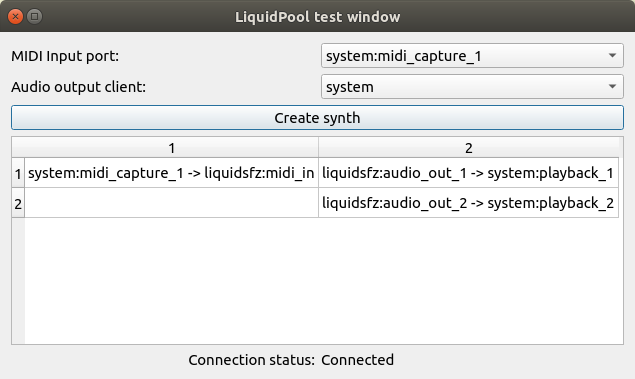
Here's a screenshot of the test window, showing two combo boxes for source/sink selection, and a table displaying instantiated synth ports and their connections:
Installation
Install from the pypi repository:
$ pip install qt_liquid_pool
You'll need both JACK audio connection kit and liquidsfz.
To install JACK:
$ sudo apt install jackd
...or...
$ sudo dnf install jackd
To install liquidsfz:
$ git clone https://github.com/swesterfeld/liquidsfz.git
... and follow the instructions found in the liquidsfz README to install it.
Usage:
Import
from qt_liquid_pool import LiquidPool
Here's an excerpt from the test window shown above, demonstrating some basic usage:
class Dialog(QDialog):

	def __init__(self):
		super().__init__()
		self.liquid_pool = LiquidPool()
		self.midi_in_combo = self.liquid_pool.midi_in_combo_box(self)
		self.audio_out_combo = self.liquid_pool.audio_out_combo_box(self)
		[...]
		hlo.addWidget(self.midi_in_combo)
		hlo.addWidget(self.audio_out_combo)
		[...]
		self.liquid_pool.sig_jack_ready.connect(self.slot_jack_ready)
		self.liquid_pool.sig_connections_changed.connect(self.slot_connections_changed)
		QTimer.singleShot(0, self.liquid_pool.connect)

	@pyqtSlot(bool)
	def slot_jack_ready(self, state):
		self.connection_status_label.setText(CONNECTED if state else NOT_CONNECTED)

	@pyqtSlot()
	def slot_connections_changed(self):
		[...]
Extending for custom features
You can write your own class which inherits from LiquidPool in order to provide additional features. In particular, the "connect_midi_source" and "connect_audio_sinks" methods have been broken out for the specific purpose of making them extensible. The same goes for the "get/set_preferred_midi_source" and "get/set_preferred_audio_sink" methods.
The following two examples show how these methods can be overriden to provide new capabilities:
Additional devices
The following class connects and disconnects a soundfile player alongside the built-in instances of LiquidSFZ:
class Audio(LiquidPool):

	def __init__(self):
		super().__init__()
		self.audio_player = None

	def slot_jack_ready(self, state):
		if state:
			self.audio_player = JackAudioPlayer('my-audio-player')

	def disconnect_audio_sinks(self, ports):
		"""
		Disconnects the currently connected audio sink ports from all synths.
		"ports" is a list of currently connected audio sink ports, (usually two).
		"""
		super().disconnect_audio_sinks(ports)
		for src, tgt in zip(self.audio_player.output_ports, ports):
			self.conn_man.disconnect(src, tgt)

	def connect_audio_sinks(self, ports):
		"""
		Connects all synths to the given audio sink ports.
		"ports" is a list of audio sink ports to connect to, (usually two).
		"""
		super().connect_audio_sinks(ports)
		for src, tgt in zip(self.audio_player.output_ports, ports):
			self.conn_man.connect(src, tgt)

	def play_soundfile(self, soundfile):
		soundfile.seek(0)
		self.audio_player.play_python_soundfile(soundfile)

	def stop_playing(self):
		self.audio_player.stop()
Saving preferred connections
There is no persistent storage mechanism built in which can save and restore your preferred midi input and audio output devices. The following example shows you you can save and restore these values to a QSettings settings object:
class Audio(LiquidPool):

	def __init__(self):
		super().__init__()
		self.settings = QSettings('developer', 'app')

	def get_preferred_midi_source(self):
		"""
		Returns (str) the name of the port you prefer to connect to.
		"""
		return settings.value('MIDISource')

	def set_preferred_midi_source(self, value):
		"""
		Sets (str) the name of the port you prefer to connect to.
		"""
		settings.setValue('MIDISource', value)
		super().set_preferred_midi_source(value)

	def get_preferred_audio_sink(self):
		"""
		Returns (str) the name of the client you prefer to connect to.
		"""
		return settings.value('AudioSink')

	def set_preferred_audio_sink(self, value):
		"""
		Sets (str) the name of the client you prefer to connect to.
		"""
		settings.setValue('AudioSink', value)
		super().set_preferred_audio_sink(value)
1 maintainer

Metadata
1 maintainer
Release files for qt-liquid-pool 1.5.0
For a detailed explanation of source distributions (sdists) and built distributions (wheels), please see the package formats documentation.
Source distribution (sdist)
| File | Size | Uploaded | Provenance | |
|---|---|---|---|---|
| qt_liquid_pool-1.5.0.tar.gz | 19.9 kB | Without provenance | Details |
Built distribution (wheel)
| File | Interpreter | ABI | Platform | Reset |
|---|---|---|---|---|
| qt_liquid_pool-1.5.0-py2.py3-none-any.whl | Python 3, Python 2 | none | any | Details |
Total release size: 38.6 kB
Release files / qt_liquid_pool-1.5.0.tar.gz
| Download URL | qt_liquid_pool-1.5.0.tar.gz |
|---|---|
| Size | 19.9 kB |
| Tags | Source |
|
SHA-256 checksum How to use checksums |
8cd6d2a4753a872eda954ba2b2d60152513c5d1eddfff746aaad0bbb95ec33cc
|
|
BLAKE2b-256 checksum How to use checksums |
918233454e655dda6c2c32ff093f7af07135d07c961922fc76278b673f6b1f22
|
| Upload date | |
|
Uploaded using Trusted Publishing? What is trusted publishing? |
No |
| Uploaded via |
twine/6.2.0 CPython/3.14.4
|
Release files / qt_liquid_pool-1.5.0-py2.py3-none-any.whl
| Download URL | qt_liquid_pool-1.5.0-py2.py3-none-any.whl |
|---|---|
| Size | 18.8 kB |
| Tags | Python 2 Python 3 |
|
SHA-256 checksum How to use checksums |
28fcdde72da8c542e02daaca55f444a0c2cfc6278a5e69ff21ba6b53d321e0fb
|
|
BLAKE2b-256 checksum How to use checksums |
435e6726a2a8c8acaf92c9e430a46c639bcdd8e5f8847609ff9086cbec668a04
|
| Upload date | |
|
Uploaded using Trusted Publishing? What is trusted publishing? |
No |
| Uploaded via |
twine/6.2.0 CPython/3.14.4
|
Security for qt-liquid-pool 1.5.0
Provenance
Provenance describes where a file came from. On PyPI, provenance is shared via attestations, which provide a verifiable record of the build or publishing details. View details, limitations and caveats.
No provenance found
None of the files in this release were uploaded with provenance metadata.
A note on package security
PyPI is a repository for distributing packages, not a service for auditing them. While third-party security researchers and our staff do their best to detect and remove malicious packages, PyPI cannot guarantee the quality, security or suitability of any given package.
To learn more about protecting yourself from malicious actors, visit our package security documentation.














