
This release has been yanked by its maintainers, and will be ignored by installers, except when explicitly specified.
Consider using release 1.5.0 instead.
Reason given by maintainers: Deprecated
qt_liquid_pool
Manages port connections for instances of LiquidSFZ using JackConnectionManager.
Purpose
I found myself using the same blocks of code in several projects, and decided to break these out into a new project which could be generally reused.
This library:
-
Instantiates any number of instances of LiquidSFZ from the "liquiphy" package.
-
Creates a connection to the JACK audio connection kit and monitors changes in clients and ports for the purpose of managing the ports created by the above-mentioned LiquidSFZ instances.
-
Optionally fills and updates two instances of QComboBox, which may be used in your project for allowing a user to select input and output devices to connect to the LiquidSFZ instance(s).
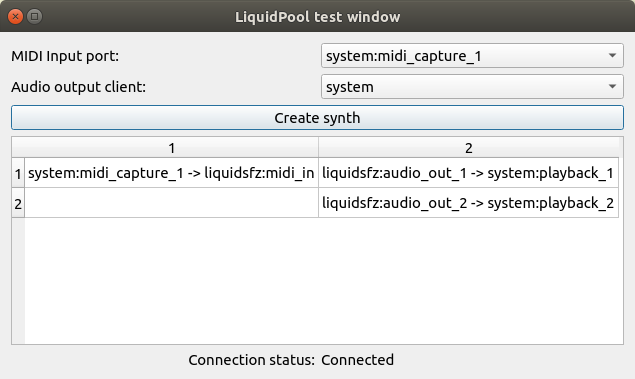
Here's a screenshot of the test window, showing two combo boxes for source/sink selection, and a table displaying instantiated synth ports and their connections:
Installation
Install from the pypi repository:
$ pip install qt_liquid_pool
You'll need both JACK audio connection kit and liquidsfz.
To install JACK:
$ sudo apt install jackd
...or...
$ sudo dnf install jackd
To install liquidsfz:
$ git clone https://github.com/swesterfeld/liquidsfz.git
... and follow the instructions found in the liquidsfz README to install it.
Usage:
Import
from qt_liquid_pool import LiquidPool
Here's an excerpt from the test window shown above, demonstrating some basic usage:
class Dialog(QDialog):

	def __init__(self):
		super().__init__()
		self.liquid_pool = LiquidPool()
		self.midi_in_combo = self.liquid_pool.midi_in_combo_box(self)
		self.audio_out_combo = self.liquid_pool.audio_out_combo_box(self)
		[...]
		hlo.addWidget(self.midi_in_combo)
		hlo.addWidget(self.audio_out_combo)
		[...]
		self.liquid_pool.sig_jack_ready.connect(self.slot_jack_ready)
		self.liquid_pool.sig_connections_changed.connect(self.slot_connections_changed)
		QTimer.singleShot(0, self.liquid_pool.connect)

	@pyqtSlot(bool)
	def slot_jack_ready(self, state):
		self.connection_status_label.setText(CONNECTED if state else NOT_CONNECTED)

	@pyqtSlot()
	def slot_connections_changed(self):
		[...]
Extending for custom features
You can write your own class which inherits from LiquidPool in order to provide additional features. In particular, the "connect_midi_source" and "connect_audio_sinks" methods have been broken out for the specific purpose of making them extensible. The same goes for the "get/set_preferred_midi_source" and "get/set_preferred_audio_sink" methods.
The following two examples show how these methods can be overriden to provide new capabilities:
Additional devices
The following class connects and disconnects a soundfile player alongside the built-in instances of LiquidSFZ:
class Audio(LiquidPool):

	def __init__(self):
		super().__init__()
		self.audio_player = None

	def slot_jack_ready(self, state):
		if state:
			self.audio_player = JackAudioPlayer('my-audio-player')

	def disconnect_audio_sinks(self, ports):
		"""
		Disconnects the currently connected audio sink ports from all synths.
		"ports" is a list of currently connected audio sink ports, (usually two).
		"""
		super().disconnect_audio_sinks(ports)
		for src, tgt in zip(self.audio_player.output_ports, ports):
			self.conn_man.disconnect(src, tgt)

	def connect_audio_sinks(self, ports):
		"""
		Connects all synths to the given audio sink ports.
		"ports" is a list of audio sink ports to connect to, (usually two).
		"""
		super().connect_audio_sinks(ports)
		for src, tgt in zip(self.audio_player.output_ports, ports):
			self.conn_man.connect(src, tgt)

	def play_soundfile(self, soundfile):
		soundfile.seek(0)
		self.audio_player.play_python_soundfile(soundfile)

	def stop_playing(self):
		self.audio_player.stop()
Saving preferred connections
There is no persistent storage mechanism built in which can save and restore your preferred midi input and audio output devices. The following example shows you you can save and restore these values to a QSettings settings object:
class Audio(LiquidPool):

	def __init__(self):
		super().__init__()
		self.settings = QSettings('developer', 'app')

	def get_preferred_midi_source(self):
		"""
		Returns (str) the name of the port you prefer to connect to.
		"""
		return settings.value('MIDISource')

	def set_preferred_midi_source(self, value):
		"""
		Sets (str) the name of the port you prefer to connect to.
		"""
		settings.setValue('MIDISource', value)
		super().set_preferred_midi_source(value)

	def get_preferred_audio_sink(self):
		"""
		Returns (str) the name of the client you prefer to connect to.
		"""
		return settings.value('AudioSink')

	def set_preferred_audio_sink(self, value):
		"""
		Sets (str) the name of the client you prefer to connect to.
		"""
		settings.setValue('AudioSink', value)
		super().set_preferred_audio_sink(value)
1 maintainer

Download files
Download the file for your platform. If you're not sure which to choose, learn more about installing packages.
Source Distribution
Built Distribution
Filter files by name, interpreter, ABI, and platform.
If you're not sure about the file name format, learn more about wheel file names.
Copy a direct link to the current filters
File details
Details for the file qt_liquid_pool-1.3.1.tar.gz.
File metadata
- Download URL: qt_liquid_pool-1.3.1.tar.gz
- Upload date:
- Size: 19.5 kB
- Tags: Source
- Uploaded using Trusted Publishing? No
- Uploaded via:
twine/6.1.0 CPython/3.13.3
File hashes
| Algorithm | Hash digest | |
|---|---|---|
| SHA256 |
48a24b01048cbd92f95d11c12b46caf81779e3f8ca31eaf7b3930027ceeeccdb
|
|
| MD5 |
2c59d58ef075f73ccd7239aa73635da0
|
|
| BLAKE2b-256 |
0e7930bd248c545e9d507725476f116aa749aca4f3b6b6847c74b9ee54af9fa0
|
File details
Details for the file qt_liquid_pool-1.3.1-py2.py3-none-any.whl.
File metadata
- Download URL: qt_liquid_pool-1.3.1-py2.py3-none-any.whl
- Upload date:
- Size: 18.4 kB
- Tags: Python 2, Python 3
- Uploaded using Trusted Publishing? No
- Uploaded via:
twine/6.1.0 CPython/3.13.3
File hashes
| Algorithm | Hash digest | |
|---|---|---|
| SHA256 |
063826b9a25f329da5f983203e3bdd338e90f21e662f4a85babd5098433eee01
|
|
| MD5 |
adf3ae52452048bc9fbe02d70f87f82b
|
|
| BLAKE2b-256 |
5c0dac68c2b0af50b2a82db99e47b86ba4219f006f7d8f0f26ee771f0213d498
|














