
ramify
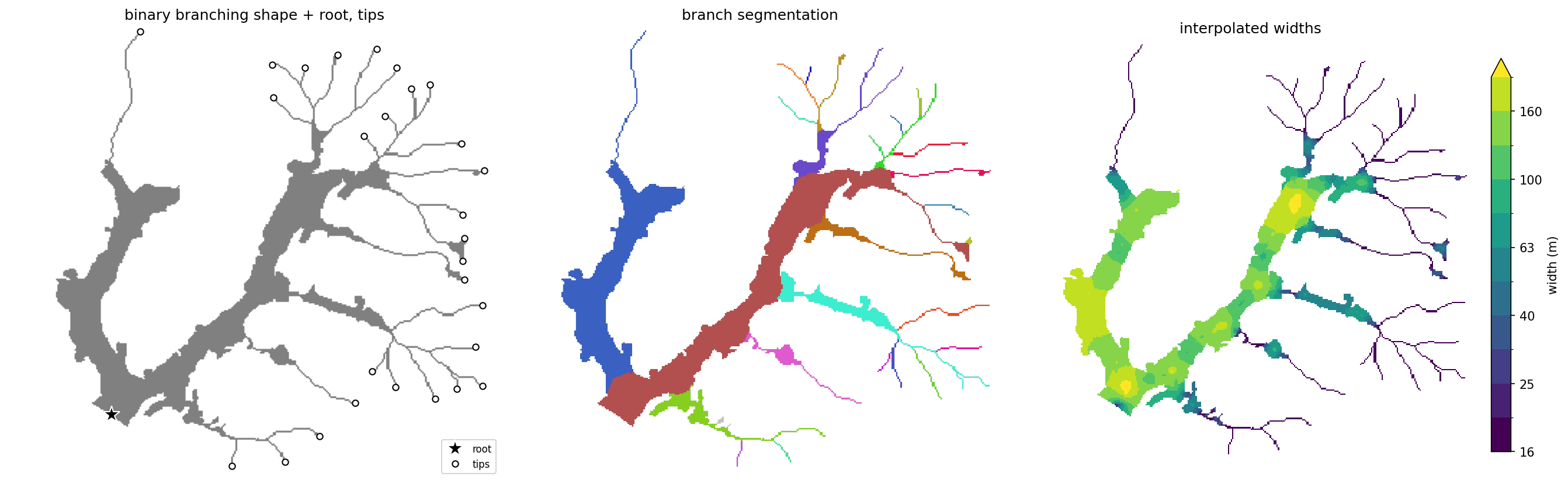
Split a branched shape into its branches, and measure the length, area, and width of each one.
ramify takes a mask of a branching shape, such as a river network, a
floodplain, a glacier, a root system, or a leaf's veins, and divides it into one
region per branch. Each region gets its own centerline, so each branch can be
measured separately. For a shape with no branches, see Single shapes.
Install
pip install ramify
Quickstart
import ramify
from ramify.data import load

mask, root, tips = load()   # bundled toy dataset

labels, net, lines = ramify.partition_priority(mask, root, tips=tips)
lines has one row per branch, with its centerline, length, and area:
len(lines)                                   # 28
lines[["region_id", "length", "area"]].head()
 region_id  length     area
         1  3356.8 395885.7
         2  2538.2 282902.2
         3  1519.3  59523.3
         4   934.4  29133.2
         5  1081.2  42812.4
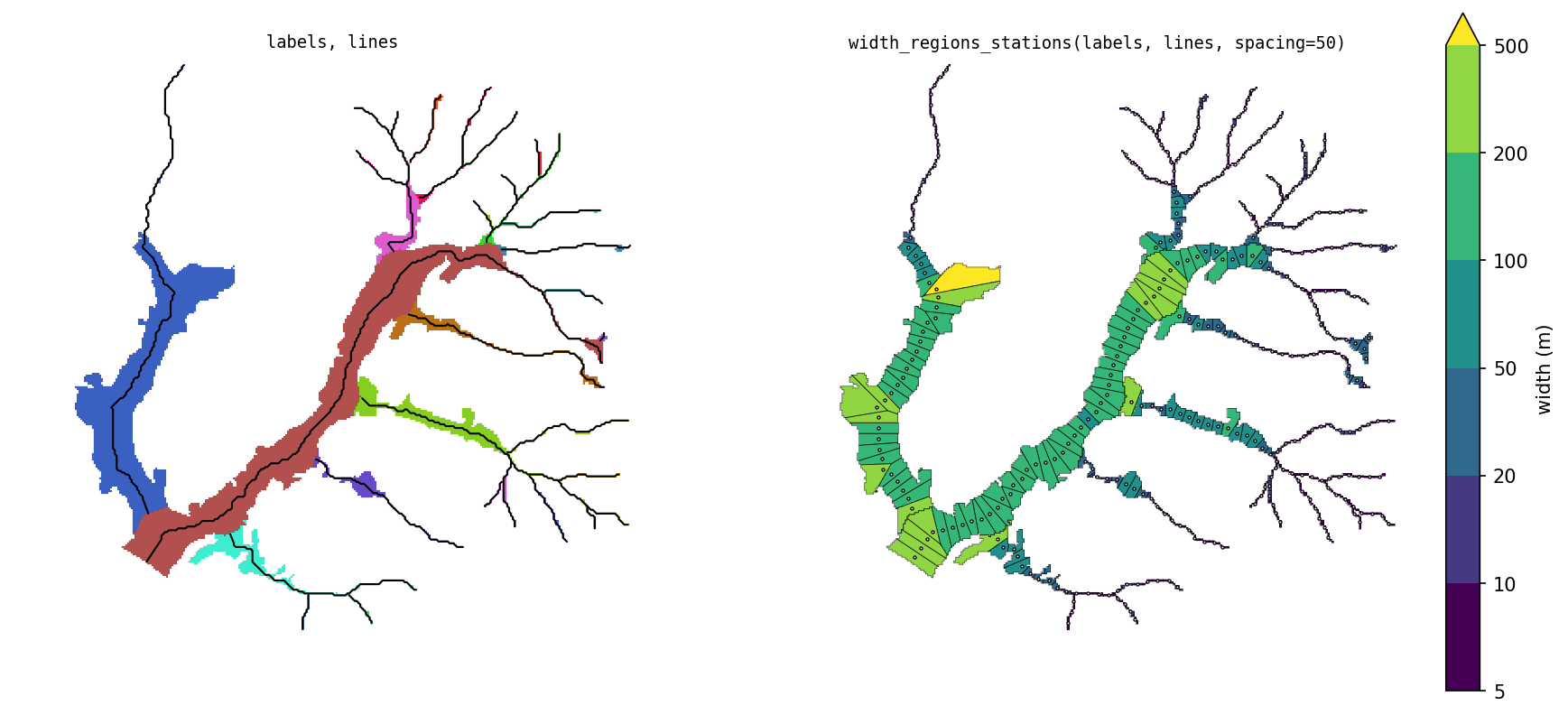
To get width along each branch, place stations along the centerlines:
widths, stations = ramify.width_regions_stations(labels, lines, spacing=50)
stations[["region_id", "station_id", "length", "area", "width"]].head()
 region_id  station_id  length    area  width
         1           1    49.4  9844.2  199.4
         1           2    51.3  6762.5  131.8
         1           3    50.6  6842.5  135.3
         1           4    49.1 11601.3  236.5
         1           5    51.2 12419.9  242.7
Partitioning
Inputs
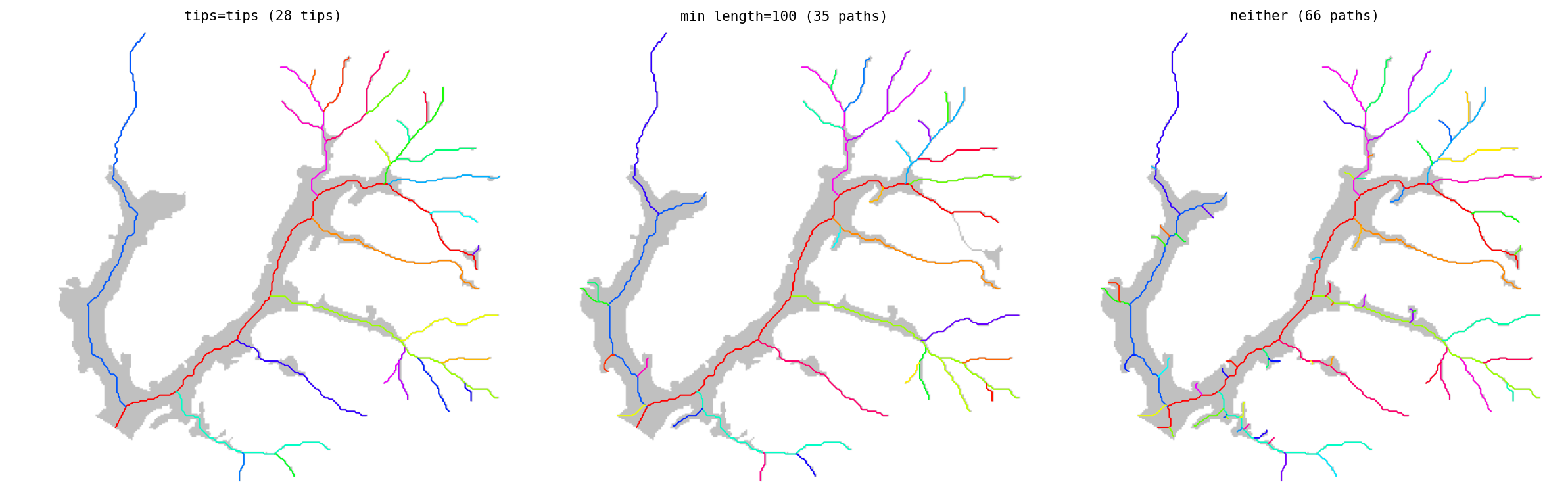
mask: 2-D array, shape pixels> 0.np.ndarray(setpixel_size=) or a georeferencedxr.DataArray; outputs match the input type.root:(row, col)of the network's outlet, the downstream end.- Tips, one of:
tips=[(row, col), ...]: the branch ends you want. Only these branches are kept.min_length=: use every end of the shape's skeleton, after pruning side branches shorter than this (map units).- neither: every skeleton end becomes a tip. Noisy boundaries produce many short spurious branches, so on real data use one of the options above.
Roots and tips can often be derived automatically: glacier branch tips (Kienholz et al., 2014), channel initiation points, or the lowest point on the boundary as the root. They can also be digitized by hand in GIS software.
Outputs
labels: a raster assigning every pixel of the shape to a branch. Region 1 is the mainstem. Ids are ordered by branch size, and a branch is always numbered before its tributaries.lines: one centerline per region, traced through the region's final pixels, withlengthandarea. Use these to measure branches.net: the network used to build the partition, one row per segment, traced through the whole shape before it was split. It records how the shape was split and why paths are ordered as they are. It is not for measuring.
Widths
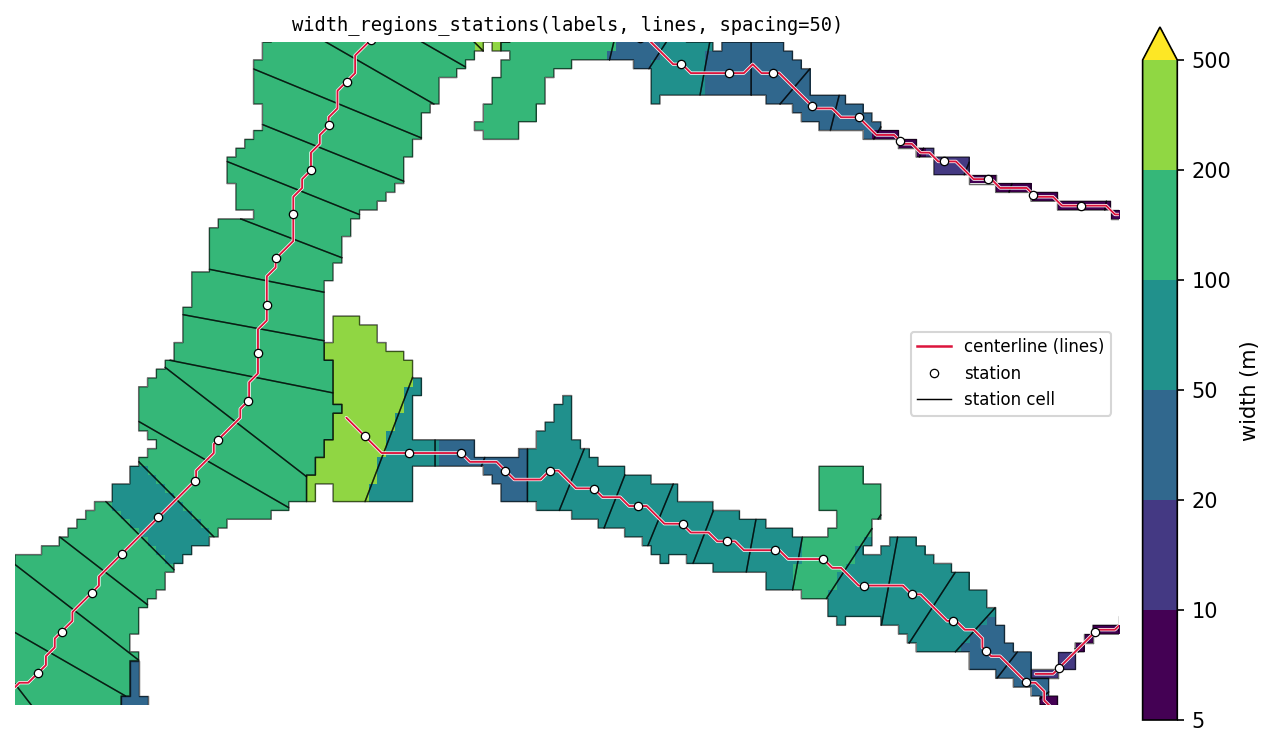
width_regions_stations places stations along each centerline, every
spacing map units (or n_stations per region). Each station gets the part
of its region closest to it (its cell). The station's width is the cell's
area divided by the centerline length inside it.
widths, stations = ramify.width_regions_stations(labels, lines, spacing=50)
widths, stations = ramify.width_regions_stations(labels, lines, n_stations=20)
widths is a raster of each pixel's station width. stations is a
GeoDataFrame with one row per station: region_id, station_id,
distance along the line, area, length, width, the cell polygon
(geometry), the station point (station), and the piece of centerline in
the cell (centerline).
Options
Partition method
labels, net, lines = ramify.partition_priority(mask, root, tips=tips)
labels, net, lines = ramify.partition_nearest(mask, root, tips=tips)
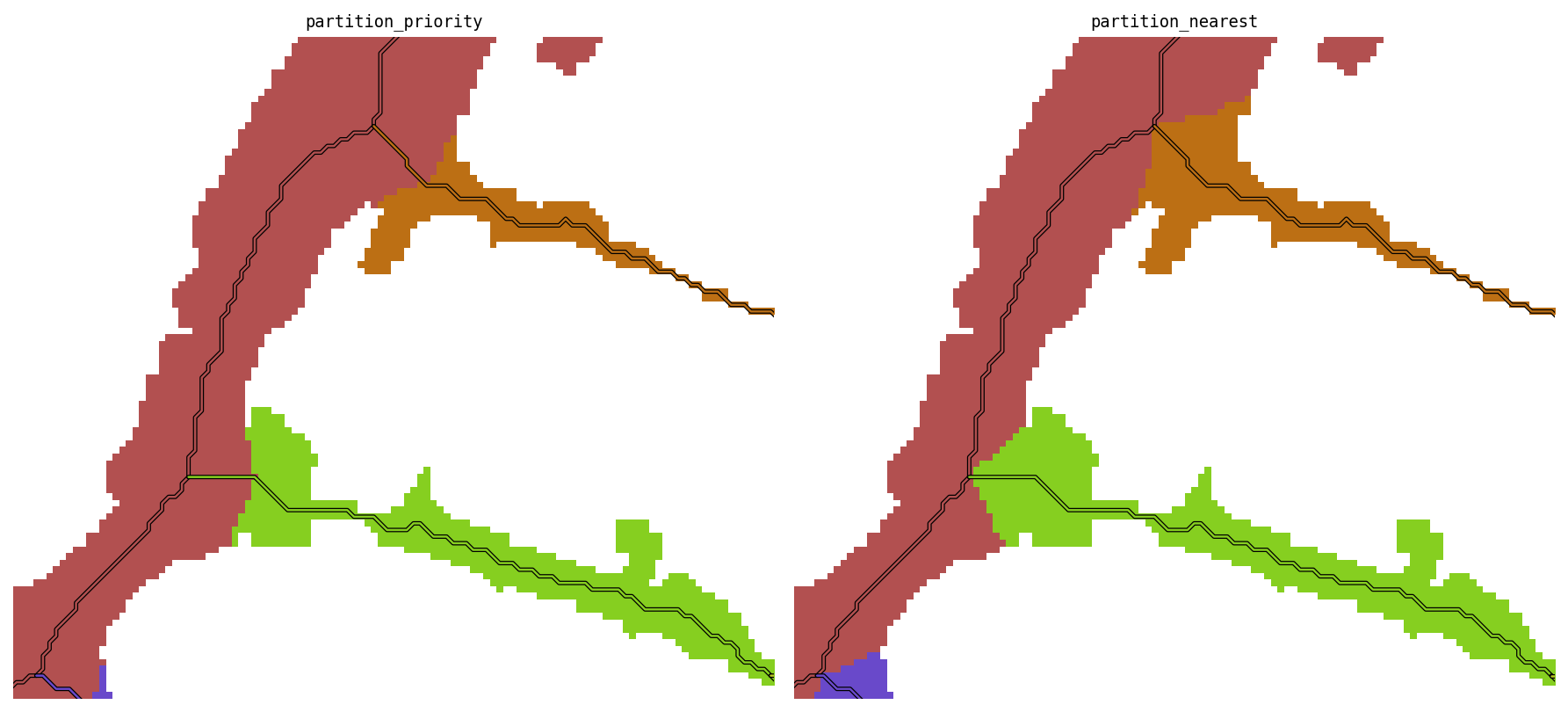
partition_priority: branches claim space in order, biggest first, each out to its local half-width. Wide branches take more space at junctions, and tributaries do not cut into the mainstem.partition_nearest: every pixel goes to the nearest branch centerline, with no ordering and no width limit. It is simpler, but at junctions tributaries cut into the mainstem.
Mainstem choice (path_by)
At each junction, the path continues into one upstream branch and the others
start new paths. path_by picks which branch continues the path:
"area"(default): the branch with the most shape upstream of it."length": the branch leading to the farthest tip (Hack's mainstem)."strahler": the branch with the higher Strahler order; ties go to the longest.
On the bundled dataset all three pick the same mainstem. They diverge when a short, wide branch competes against a long, narrow one.
Level
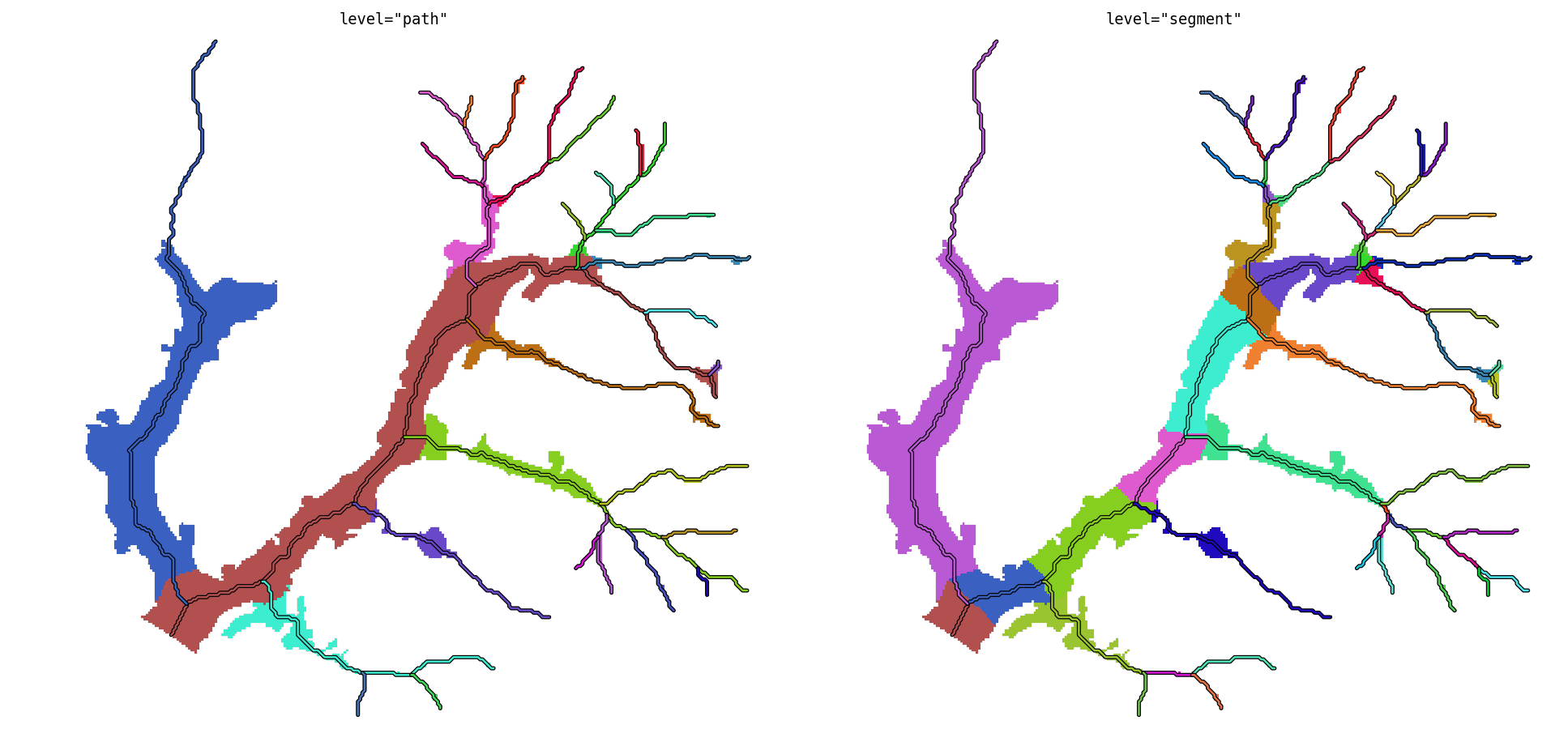
level="path" (default) gives one region per path. level="segment" splits
each path's region further, one region per segment (the piece between two
junctions, or between a junction and a tip). labels and lines are then
keyed by segment_id.
Width method
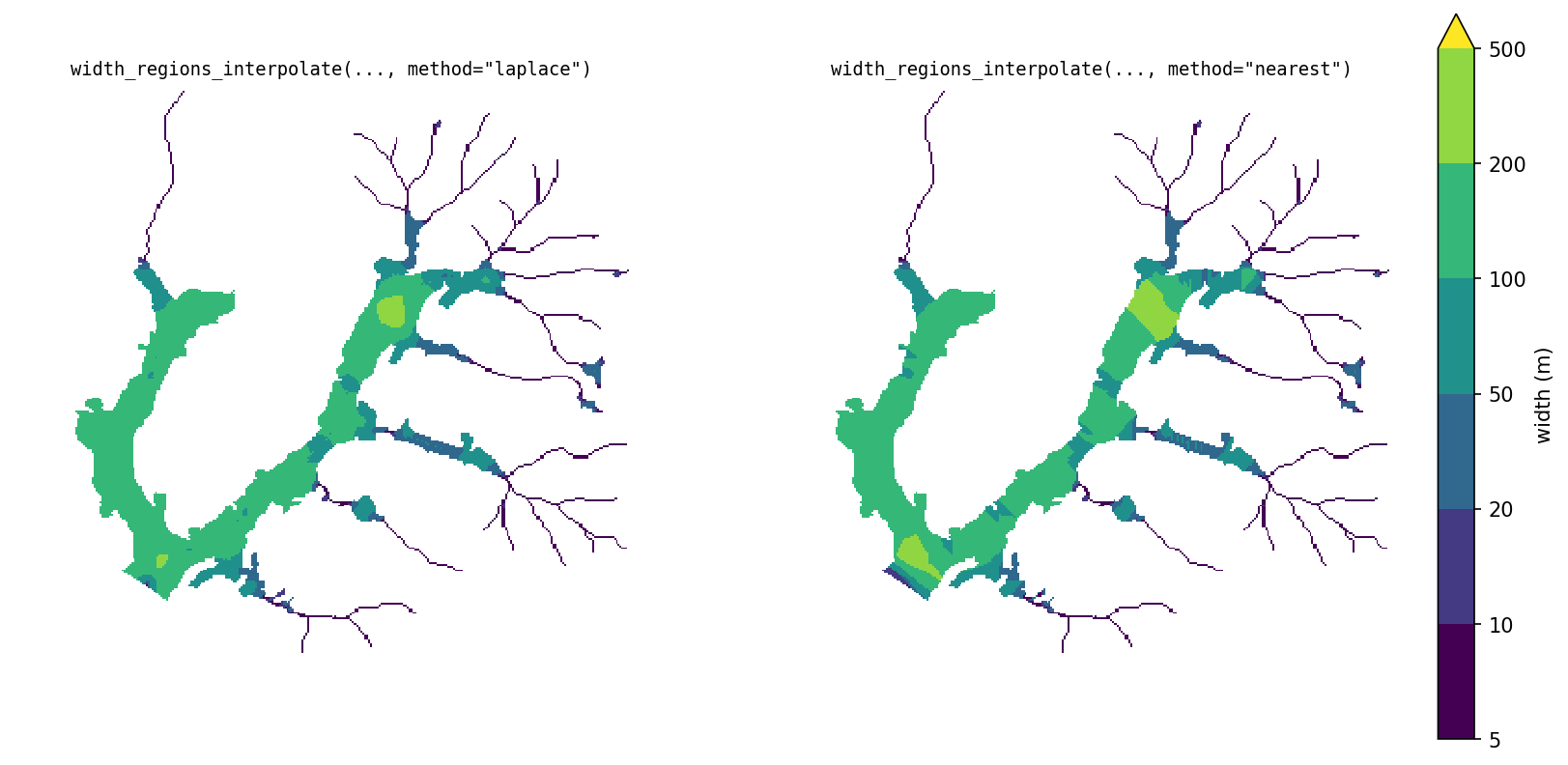
Instead of stations, width can be measured exactly on the centerline (twice the distance to the nearest wall) and spread across the region:
w = ramify.width_regions_interpolate(labels, lines)                     # laplace
w = ramify.width_regions_interpolate(labels, lines, method="nearest")
method="laplace"(default) spreads the centerline widths smoothly.method="nearest"copies the nearest centerline value. It is faster and piecewise constant.
Boundaries between regions are not treated as walls, so widths don't shrink at junctions.
Open boundaries
Open boundaries do not apply to stations: width_regions_stations does not
use wall distances and has no open_boundary.
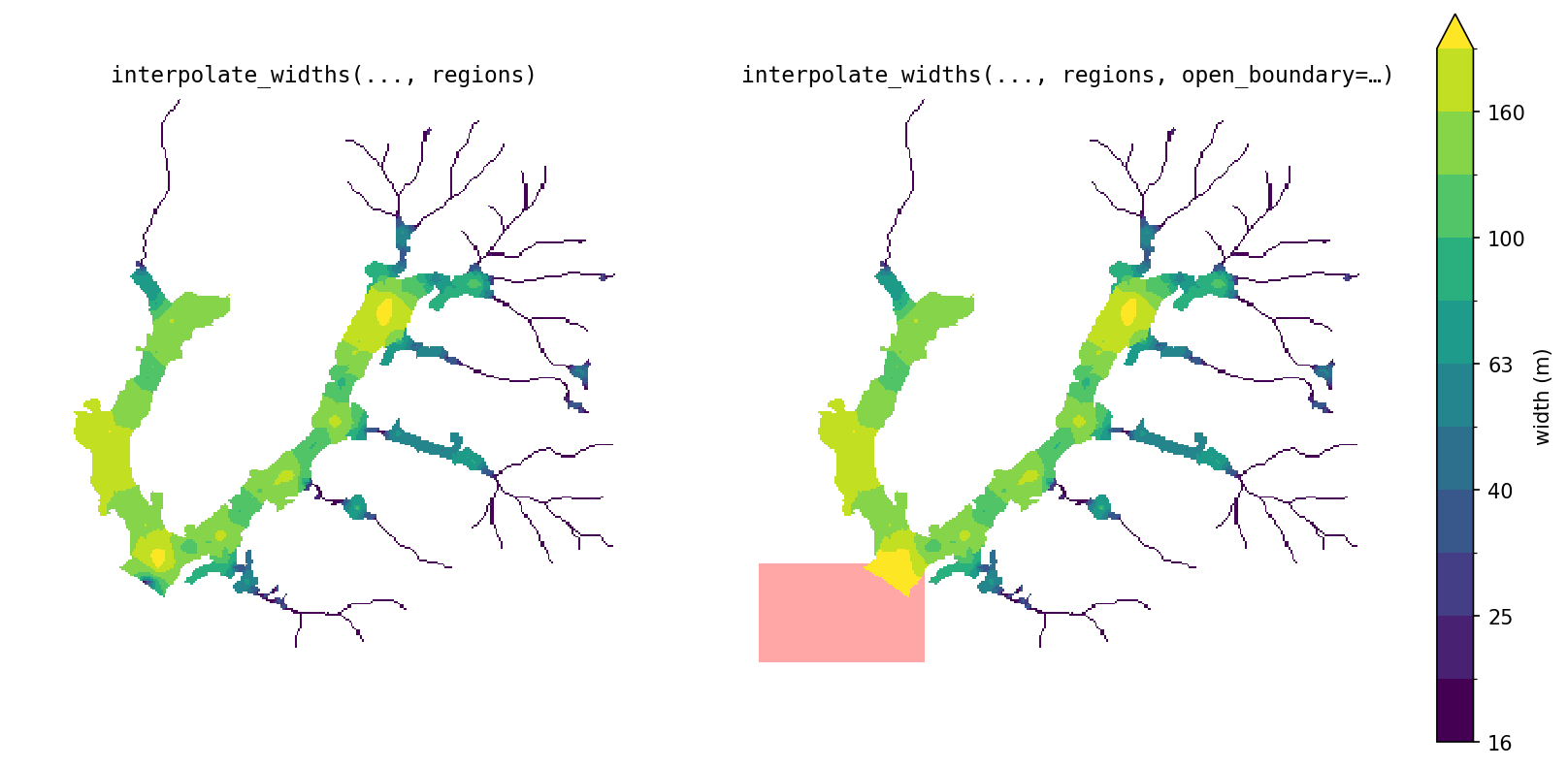
Branch sizes, claiming distances, and interpolated widths all depend on the
distance from each pixel to the shape's wall. By default every edge of the
mask is a wall. Where part of the edge is not a real wall, such as where the
shape is cut off by open water or the edge of the data, pass open_boundary:
a mask on the same grid marking the open area. Distances are then measured only to the
remaining real walls.
import numpy as np

mask_bool = np.asarray(mask.values) == 1
rr, cc = np.ogrid[:mask_bool.shape[0], :mask_bool.shape[1]]
open_boundary = (~mask_bool) & (rr >= root[0] - 10) & (cc <= root[1] + 20)

labels, net, lines = ramify.partition_priority(mask, root, tips=tips,
                                               open_boundary=open_boundary)
w = ramify.width_regions_interpolate(labels, lines, open_boundary=open_boundary)
Pass it to both steps so they measure against the same walls. Mark the open area with some depth, not a thin strip: distances are measured through it, so a one-pixel strip only moves the wall by one pixel.
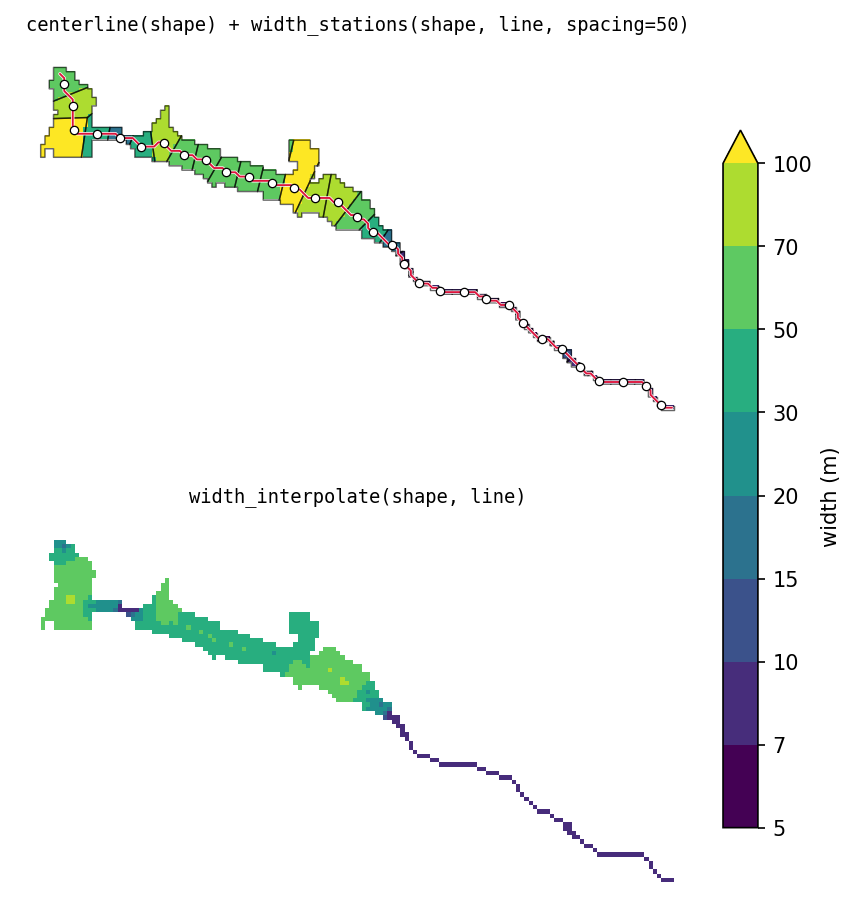
Single shapes
For a shape with no branches, or one region pulled out of a partition, use the underlying functions directly:
shape = labels == 3   # one region, pulled out of a partition

line = ramify.centerline(shape)                               # LineString
w, stations = ramify.width_stations(shape, line, spacing=50)
w = ramify.width_interpolate(shape, line)
centerline returns the longest path through the shape's skeleton. Give
root= to fix one end, or root= and tip= to fix both.
Conventions
- Coordinates. Georeferenced input: geometry is in the input's CRS. Plain
arrays:
x = col * pixel_size,y = row * pixel_size(y increases downward), vertices at pixel centers. - Units. Lengths, widths,
spacing,min_lengthin map units; areas in map units squared. - Points.
root,tip,tipsare(row, col)pixel indices. - Orientation. Every line runs downstream to upstream, starting at the
root end, wherever a root is known (
net,lines, andcenterlinegivenroot).centerline(shape)called with neitherrootnortiphas no root to start from; its direction is deterministic but arbitrary. - Output type. Rasters match the input (
np.ndarrayorxr.DataArray); NaN outside the shape for widths, 0 outside for labels.
Development
git clone https://github.com/avkoehl/ramify.git
cd ramify
uv sync --extra dev
1 maintainer

Metadata
1 maintainer
Release files for ramify 2.1.0
For a detailed explanation of source distributions (sdists) and built distributions (wheels), please see the package formats documentation.
Source distribution (sdist)
| File | Size | Uploaded | |
|---|---|---|---|
| ramify-2.1.0.tar.gz | 1.2 MB | Details |
Built distribution (wheel)
| File | Interpreter | ABI | Platform | Reset |
|---|---|---|---|---|
| ramify-2.1.0-py3-none-any.whl | Python 3 | none | any | Details |
Total release size: 1.2 MB
Release files / ramify-2.1.0.tar.gz
| Download URL | ramify-2.1.0.tar.gz |
|---|---|
| Size | 1.2 MB |
| Tags | Source |
|
SHA-256 checksum How to use checksums |
5bac64a6a487258f02e264db21bf47a16b1152ac901f6887007e18715a3cebb2
|
|
BLAKE2b-256 checksum How to use checksums |
d022c22625e89d29f1ee798bf920202b12c6368e44066ff6842e64715a4079f3
|
| Upload date | |
|
Uploaded using Trusted Publishing? What is trusted publishing? |
Yes |
| Uploaded via |
uv/0.12.20 {"installer":{"name":"uv","version":"0.12.20","subcommand":["publish"]},"python":null,"implementation":{"name":null,"version":null},"distro":{"name":"Ubuntu","version":"24.04","id":"noble","libc":null},"system":{"name":null,"release":null},"cpu":null,"openssl_version":null,"setuptools_version":null,"rustc_version":null,"ci":true}
|
Release files / ramify-2.1.0-py3-none-any.whl
| Download URL | ramify-2.1.0-py3-none-any.whl |
|---|---|
| Size | 35.4 kB |
| Tags | Python 3 |
|
SHA-256 checksum How to use checksums |
24b6cad9d32abb8294a50550dd7b2e5583fb05aa01739652a0f6f254dec0b6fb
|
|
BLAKE2b-256 checksum How to use checksums |
4dd4c365bf205df46b0259be5302942ef35998647876aab4cba5ffbe67fffdc0
|
| Upload date | |
|
Uploaded using Trusted Publishing? What is trusted publishing? |
Yes |
| Uploaded via |
uv/0.12.20 {"installer":{"name":"uv","version":"0.12.20","subcommand":["publish"]},"python":null,"implementation":{"name":null,"version":null},"distro":{"name":"Ubuntu","version":"24.04","id":"noble","libc":null},"system":{"name":null,"release":null},"cpu":null,"openssl_version":null,"setuptools_version":null,"rustc_version":null,"ci":true}
|














