
A local-first task manager for developers with a native CLI, optional Web UI, and local AI assistance powered by Ollama.
Verified details
These details have been verified by PyPIProject links
GitHub Statistics
Maintainers

Project description




A local-first task manager for developers with a native CLI, optional Web UI, and local AI assistance powered by Ollama.
Preview
CLI
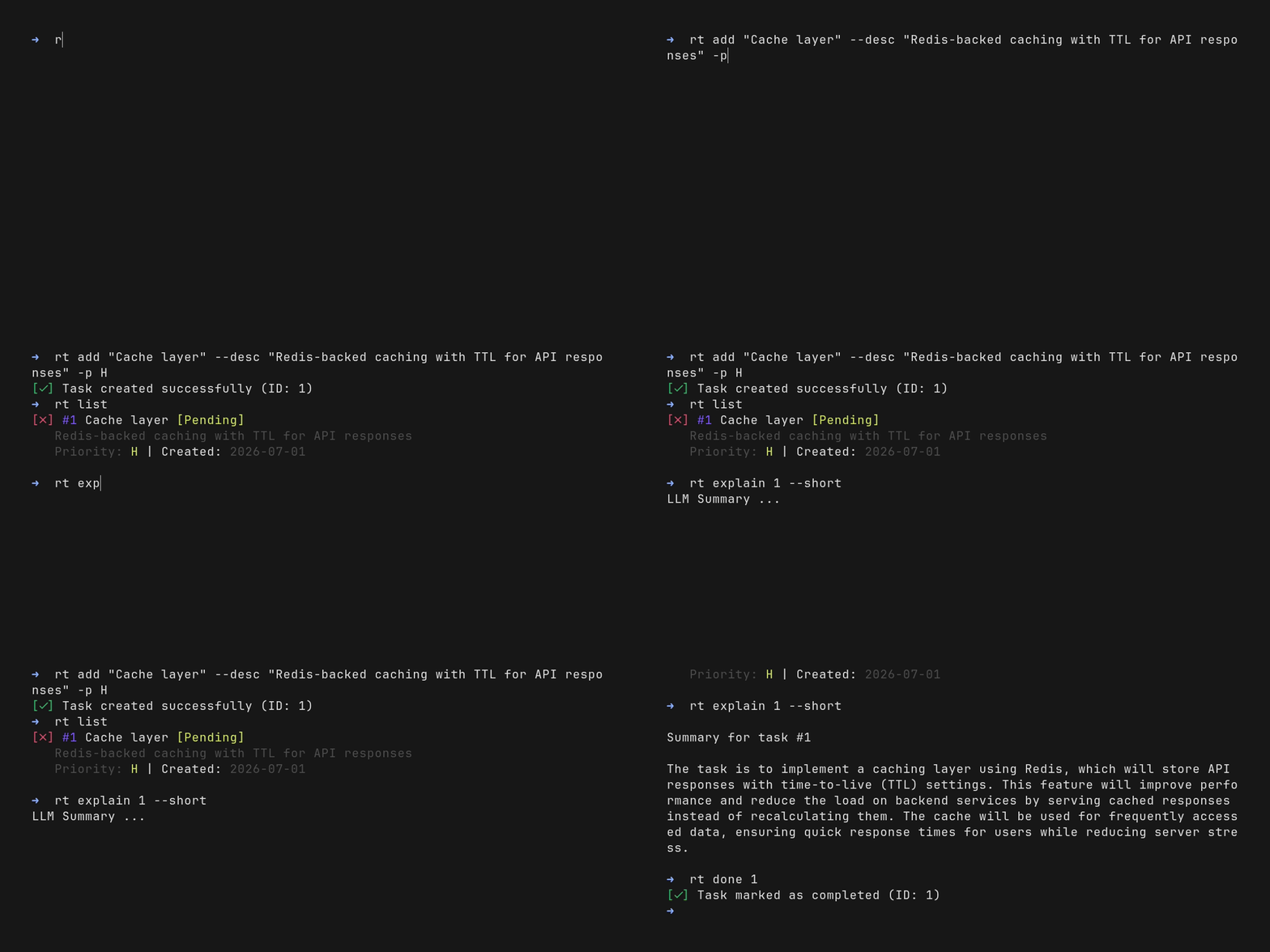
Local AI assistance powered by Ollama
Web UI
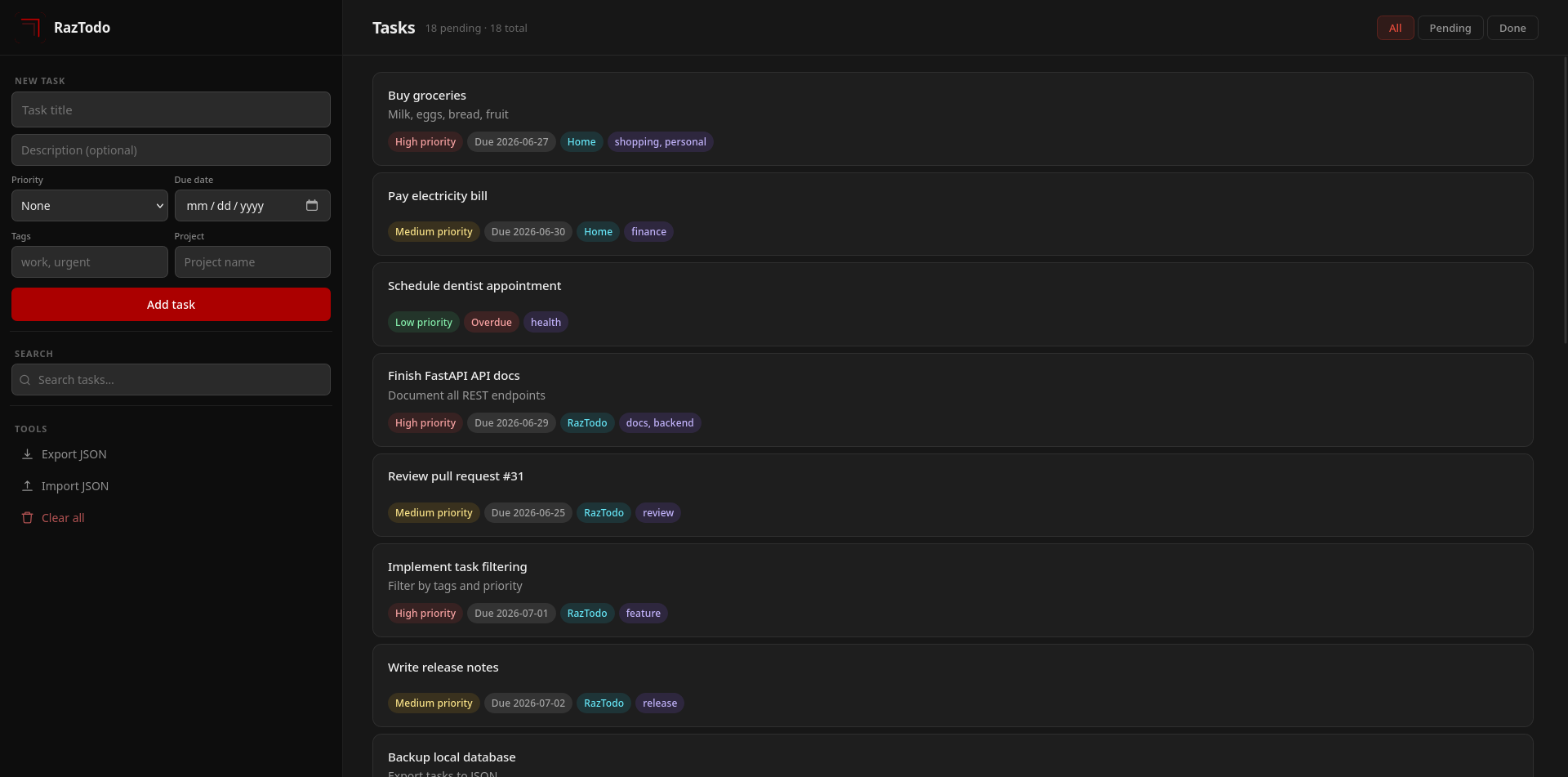
CLI + optional Web UI powered by FastAPI
Why RazTodo
Most task managers are either web-first, cloud-dependent, or tied to a single interface. RazTodo keeps everything local while letting you manage the same tasks from a native CLI or an optional Web UI.
Highlights
- 💻 Native CLI built for daily terminal workflows
- 🌐 Optional Web UI backed by the same local database
- 🤖 Local AI assistance powered by Ollama
- 🗄️ Single SQLite database shared across all interfaces
- 🔒 No cloud services, accounts, or telemetry
- ⚡ Fast startup with zero background services
Architecture
CLI ─┐
     ├── Core Engine ─── SQLite
Web ─┘
Both the CLI and Web UI use the same core engine and SQLite database, so every interface stays synchronized automatically.
The architecture follows three design principles:
- Separation of concerns core logic is independent of the user interface.
- Local-first storage all data stays on your machine.
- Composable interfaces use only the interfaces you need.
Quick Start
CLI
# Add a task
rt add "Prepare weekly groceries" --priority H --due 2026-12-31

# List all tasks
rt list

# Mark as done
rt done 1

# Search
rt search "groceries"

# Update
rt update 1 --title "Weekly groceries: milk, vegetables, essentials"

# Delete
rt remove 1
Web UI
Start the server:
rt-web
Then open http://127.0.0.1:8000.
[!NOTE] Runs locally only (not exposed to the internet) Single-user design with no authentication layer CLI and Web UI share one SQLite database (real-time sync) Local-first architecture optimized for personal use Built with FastAPI + lightweight static frontend AI-powered task explanations (Summary / Deep Analysis / Action Plan) via Ollama
Shell Completion
# Requires raztodo[completion]
eval "$(rt completion bash)"
Supports bash, zsh, and fish. For permanent setup see the Completion Guide.
LLM Integration
RazTodo integrates with Ollama to provide optional local AI assistance for your tasks. Every explanation runs locally using your own LLM, keeping your data private.
Available explanation modes:
--short— concise summary of the task--plan— actionable step-by-step plan--deep— detailed analysis and recommendations
Example:
rt explain 1 --short
rt explain 1 --plan
rt explain 1 --deep
[!NOTE] Requires Ollama with a compatible local model. All AI processing is performed locally.
📖 See the Explain Guide for installation, configuration, supported models, and usage examples.
Installation
# Recommended (pipx)
pipx install raztodo

# No-install (uv)
uvx --from raztodo rt

# Standard install
pip install raztodo

# Web UI (optional)
pip install "raztodo[web]"

# Shell completion (optional)
pip install "raztodo[completion]"

# Everything (web + completion)
pip install "raztodo[all]"
For virtual environment and source installation, see the Installation Guide.
Commands
| Command | Description | Example |
|---|---|---|
add |
Create a new task | rt add "Task" --priority H |
list |
List tasks with filters | rt list --pending --priority H |
update |
Update a task | rt update 1 --title "New title" |
done |
Toggle task done/undone | rt done 1 |
remove |
Delete a task | rt remove 1 |
search |
Search tasks by keyword | rt search "keyword" |
export |
Export tasks to JSON | rt export backup.json |
import |
Import tasks from JSON | rt import backup.json |
migrate |
Run database migrations | rt migrate |
clear |
Delete all tasks | rt clear --confirm |
completion |
Output shell completion script | rt completion bash |
explain |
Get an AI explanation of a task | rt explain 1 --plan |
rt --help
rt add --help
📖 See the Usage Guide for full command documentation.
Configuration
| Variable | Description | Default |
|---|---|---|
RAZTODO_DB |
Database filename or path | tasks.db |
LOG_LEVEL |
Logging level | ERROR |
export RAZTODO_DB="/path/to/custom.db"
export LOG_LEVEL="DEBUG"
[!TIP] 📖 See the Configuration Guide
Docker
docker build -t raztodo:local .
docker run --rm -it -v "$HOME/raztodo-data:/data" raztodo:local add "My first task"
[!NOTE] kept CLI-only to minimize image size and dependencies
[!TIP] 📖 See the Docker Guide
Documentation
Core:
Advanced:
- ⌨️ Completion Guide
- 🐳 Docker Guide
- 🏗️ Architecture
- 🧪 Testing
- 📝 Changelog
Ecosystem
RazTodo is part of the RazBuild ecosystem of open-source developer tools.
- RazTint Zero-dependency ANSI colors, icons, and terminal formatting utilities powering RazTodo's CLI output.
Contributing
We welcome bug reports, feature requests, and pull requests.
git clone https://github.com/razbuild/raztodo
cd raztodo
uv sync
Quality checks
uv run pytest
uv run ruff check src/ tests/
uv run ruff format src/ tests/
uv run ty check src/
Workflow
- Create feature branch
- Implement changes
- Ensure tests pass
- Submit PR
See the CONTRIBUTING guide for details.
License


Project details
Verified details
These details have been verified by PyPIProject links
GitHub Statistics
Maintainers
Release history Release notifications | RSS feed


Download files
Download the file for your platform. If you're not sure which to choose, learn more about installing packages.
Source Distribution
Built Distribution
Filter files by name, interpreter, ABI, and platform.
If you're not sure about the file name format, learn more about wheel file names.
Copy a direct link to the current filters
File details
Details for the file raztodo-0.8.1.tar.gz.
File metadata
- Download URL: raztodo-0.8.1.tar.gz
- Upload date:
- Size: 46.8 kB
- Tags: Source
- Uploaded using Trusted Publishing? Yes
- Uploaded via: uv/0.11.29 {"installer":{"name":"uv","version":"0.11.29","subcommand":["publish"]},"python":null,"implementation":{"name":null,"version":null},"distro":{"name":"Ubuntu","version":"24.04","id":"noble","libc":null},"system":{"name":null,"release":null},"cpu":null,"openssl_version":null,"setuptools_version":null,"rustc_version":null,"ci":true}
File hashes
| Algorithm | Hash digest | |
|---|---|---|
| SHA256 |
2c52cf0d103214edc36a76842e63073e2a1bdeb1997e69ef2757ce0e954cd6b4
|
|
| MD5 |
4749f461d3a777916a445cfd3d7b2527
|
|
| BLAKE2b-256 |
b0c9c032815601535014a5993f339974c2a7fcfeefc948d735cfaf23d88502b2
|
File details
Details for the file raztodo-0.8.1-py3-none-any.whl.
File metadata
- Download URL: raztodo-0.8.1-py3-none-any.whl
- Upload date:
- Size: 74.2 kB
- Tags: Python 3
- Uploaded using Trusted Publishing? Yes
- Uploaded via: uv/0.11.29 {"installer":{"name":"uv","version":"0.11.29","subcommand":["publish"]},"python":null,"implementation":{"name":null,"version":null},"distro":{"name":"Ubuntu","version":"24.04","id":"noble","libc":null},"system":{"name":null,"release":null},"cpu":null,"openssl_version":null,"setuptools_version":null,"rustc_version":null,"ci":true}
File hashes
| Algorithm | Hash digest | |
|---|---|---|
| SHA256 |
e111d2174362d9a61576c03bab1d5452ba1358fded3f29caed85a108cd93494d
|
|
| MD5 |
e503353e1cf38a5c45d920ecebffca3b
|
|
| BLAKE2b-256 |
fd8c9179ad75062950aa0706e48e617fd2593abb6aa845c32f1445fa124198f4
|






