


Read more on the blog: https://swarm.ptsecurity.com/fork-bomb-for-flutter/
This framework helps with Flutter apps reverse engineering using the patched version of the Flutter library which is already compiled and ready for app repacking. This library has snapshot deserialization process modified to allow you perform dynamic analysis in a convenient way.
Key features:
- traffic monitoring and interception via certificate bypass;
dart.ccis modified to print classes, functions and some fields;- dump mode emits
dump.dartwith class/library/function names and per-function code offsets (ready to use withfrida.js); - contains minor changes for successful compilation;
- if you would like to implement your own patches, manual Flutter code changes are supported using a specially crafted
Dockerfile.
Supported engines
- Android: arm64, arm32, x64;
- iOS: arm64;
- Release: Stable, Beta — engine coverage is keyed by snapshot hash, see enginehash.csv; x64 engine assets exist for Flutter >= 3.41 only
Install
# Linux, Windows, MacOS
pip3 install reflutter==0.9.2
Usage
impact@f:~$ reflutter main.apk

Please enter your Burp Suite IP: <input_ip>

SnapshotHash: 8ee4ef7a67df9845fba331734198a953
The resulting apk file: ./release.RE.apk
Please sign the apk file

impact@f:~$ reflutter main.ipa
Options:
-p, --patch-dump— dump mode: patch the engine to emitdump.dart(classes/methods/offsets) on start, and print afrida.jshint instead of the proxy instructions.-n, --no-interact— never prompt for a Burp IP (implies127.0.0.1); useful for old engines in CI.-b <Snapshot_Hash>, --build-engine— engine build mode: print the engine commit for a snapshot hash and (when run inside a flutter/flutter checkout) apply the reFlutter source patches. Seescripts/local-release.
Traffic interception
You need to specify the IP of your Burp Suite Proxy Server located in the same network where the device with the Flutter application is. Then configure the Proxy in BurpSuite -> Listener Proxy -> Options tab:
- Add port:
8083 - Bind to address:
All interfaces - Request handling: Support invisible proxying =
True
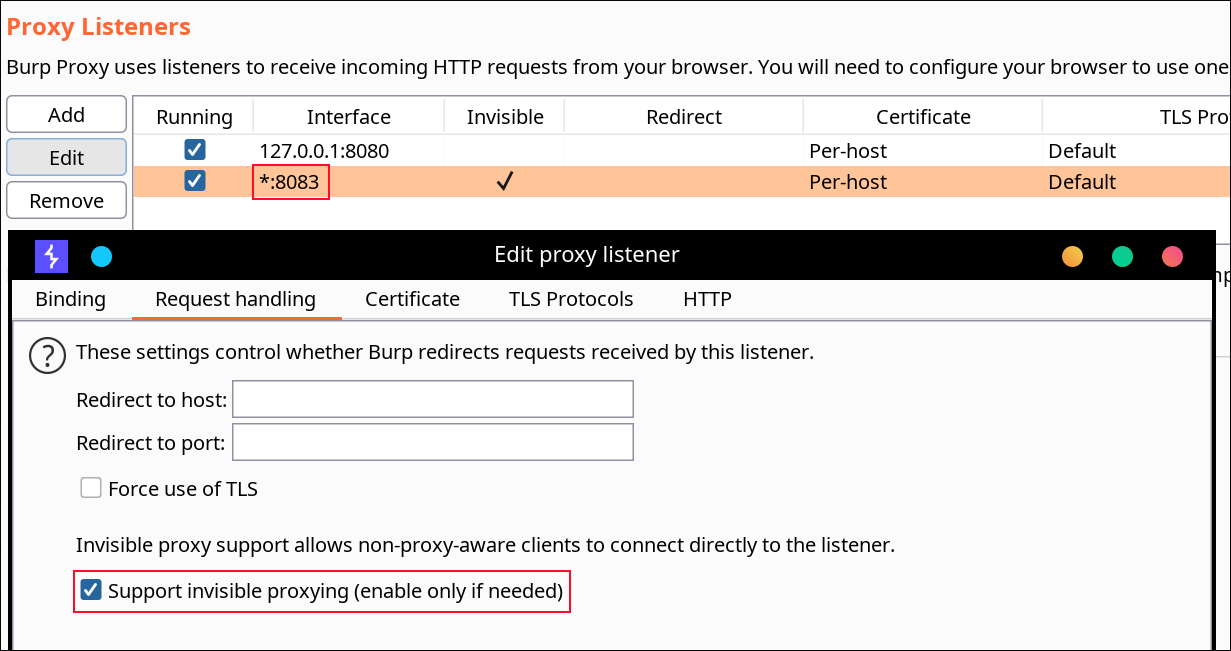
No certificate installation or root access is required for Android. reFlutter also allows bypassing some of the Flutter certificate pinning implementations.
⚠️ Note: Engines up to and including Flutter 3.24.x (snapshot hash
80a49c7111088100a233b2ae788e1f48) still carry the hardcoded proxy IP and get patched in place. Starting with 3.27.x the hardcoded IP is gone — configure the proxy directly on the device instead.
On Android
Use ADB to configure the device’s proxy:
adb -s <device> shell "settings put global http_proxy <proxy_ip:port>"
Sign, align, and install the APK. Optionally configure TunProxy to route traffic through Burp Suite.
On iOS
Sign and install the IPA. Configure Potatso to use your Burp Suite proxy server.
Usage on Android
The resulting apk must be aligned and signed. A recommended tool is uber-apk-signer:
java -jar uber-apk-signer.jar --allowResign -a release.RE.apk
Run the app on a device. Determine _kDartIsolateSnapshotInstructions via binary search. reFlutter writes the dump file to the app's root folder and sets 777 permissions. Retrieve it using:
adb -d shell "cat /data/data/<PACKAGE_NAME>/dump.dart" > dump.dart
file contents
Library:'package:anyapp/navigation/DeepLinkImpl.dart' Class: Navigation extends Object {
String* DeepUrl = anyapp://evil.com/ ;
...
Usage on iOS
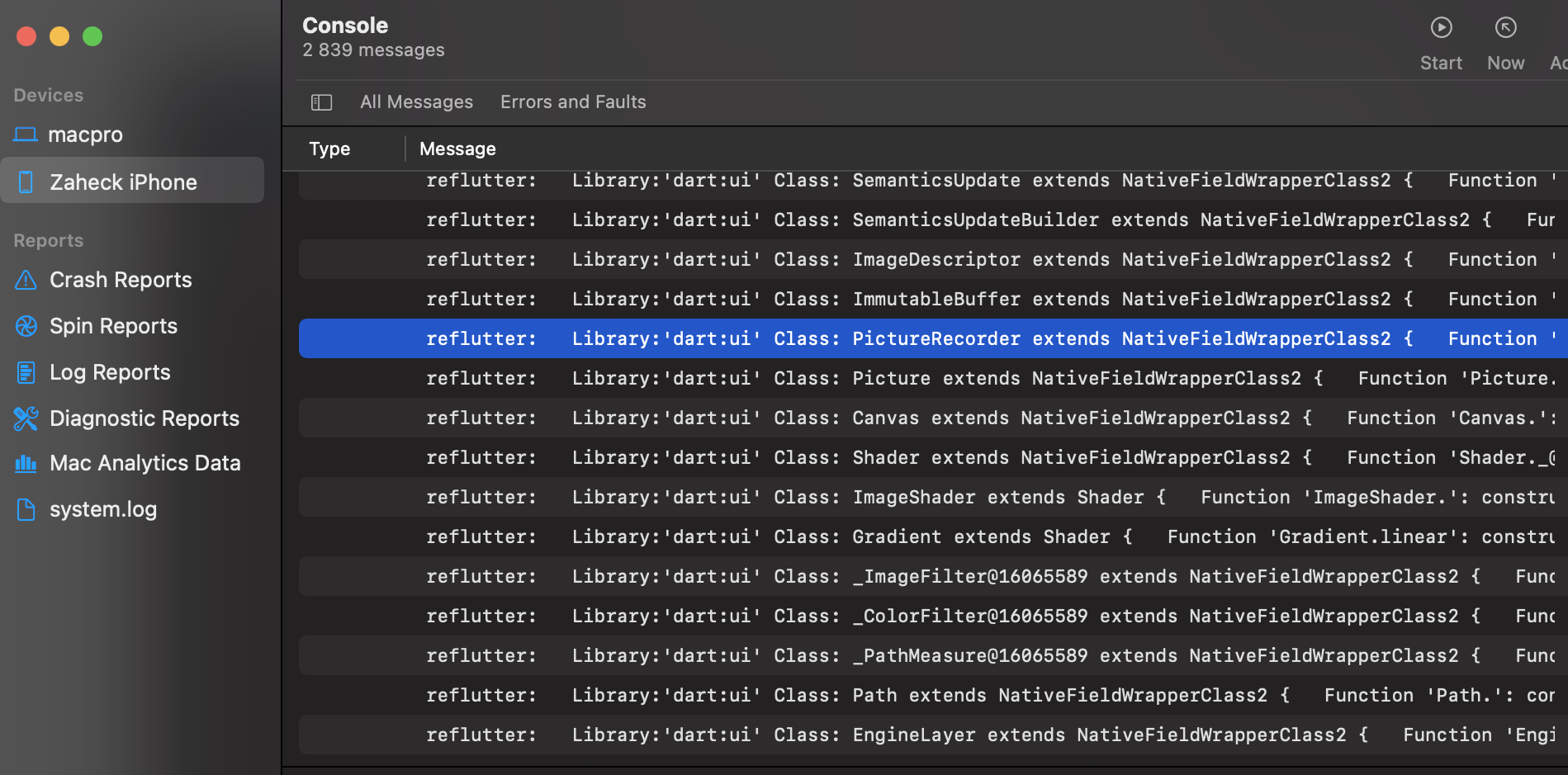
After running reflutter main.ipa, execute the app on device. The dump file path is printed to Xcode console logs:
Current working dir: /private/var/mobile/Containers/Data/Application/<UUID>/dump.dart
Retrieve the file from the device.
Frida
frida-tools==13.7.1
frida==16.7.19
Use dump offsets in the Frida script. The script resolves the snapshot-instructions symbol automatically — it is exported as _kDartSnapshotText in newer Dart and _kDartIsolateSnapshotInstructions in older versions — and works across Frida 14–17. Recent frida-server versions are recommended (16.x servers predate Android 15+ and cannot inject there):
frida -U -f <package> -l frida.js
For traffic interception without repacking at all on Android - works on stock release engines via .symtab symbol lookup - use the runtime SSL bypass:
frida -U -f <package> -l frida-ssl.js
It locates boringssl's certificate-chain verification inside the loaded libflutter.so through its symbol table (the function is internal-linkage, so it is read from .symtab, not .dynsym) and patches it to accept any chain - route the device through your proxy and you are intercepting. This needs an engine that still carries a symbol table: Shorebird engines ship unstripped (~150 MB libflutter.so), and debug/profile builds keep theirs. Stock release APKs ship a stripped engine (verified: no .symtab in the wild, and the bucket's symbols.zip is a separate link whose addresses do not transfer) - for those use reFlutter repack mode, which swaps in a prebuilt engine with the bypass compiled in. arm, arm64 and x64 devices are handled per-ISA; other arches abort without writing anything. Requires frida-server 17.x on Android 15/16 (16.x kills system_server there; verified 17.9.9 works on API 36).
Shorebird builds
Apps built with Shorebird use a patched Flutter engine whose snapshot hash differs from the vanilla Flutter release it is based on. reFlutter identifies these automatically (a hash found only in enginehash_sb.csv identifies a Shorebird app even when flutter_assets/shorebird.yaml is absent) and patches them for traffic interception with no engine build: Shorebird's own engine artifact is fetched from their public bucket for the matched revision, boringssl's certificate-chain verification is patched to succeed unconditionally (a pure-Python ELF walk — symbol table to file offset to an 8-byte arm64 patch — after which the ~150MB of shipped symbols are dropped, since Android's linker only reads program headers), and the app is repacked with it. Refresh the hash list any time with:
python3 scripts/gen_enginehash.py --shorebird
Notes: our own engines cannot run Shorebird snapshots (their code lives in patchable regions understood only by their private Dart fork's loader — verified empirically), which is exactly why the binary-patch route is used. Android requires the engine artifact to carry a symbol table — recent revisions (Aug 2025+) ship with one; some older revisions are stripped and fail loudly with a clear error. Android arm64/arm32/x64 are patched per-ABI. iOS support requires a dSYM from the same build (shipped frameworks are stripped); dSYM availability varies by engine revision — check the bucket. The resulting ipa must be re-signed, as the tool's output already instructs.
Dump mode for Shorebird apps works at runtime — no engine build at
all: their private Dart fork breaks reFlutter's patched-engine route,
but the engine Shorebird ships inside the APK is unstripped.
scripts/frida-dump.js hooks the app's own libflutter.so at
FunctionDeserializationCluster::PostLoad — the exact splice point of
the engine patch — and replays its JSONL dump by reading raw Dart
object layouts, deriving the instructions-image base at runtime:
frida -D <device> -f <package> -l scripts/frida-dump.js
adb pull /data/data/<package>/dump.dart .
python3 scripts/dump2disasm.py dump.dart
Requires an arm64 AOT app and the unstripped engine (the stock
Shorebird artifact is; reFlutter's repacked copies are not — the
script fails loudly there). Offsets are relative to the Dart
instructions image start, same convention as engine dumps; dump.dart
feeds straight into scripts/dump2disasm.py (IDA + Ghidra naming).
Function names carry the raw Class@12345 form (strictly more
information than the engine patch's scrubbed names). Validated on a
live Shorebird app: 6,957 functions, offsets arm64-spot-checked
against the APK's instructions image, and consumed downstream by
dump2disasm.
Profile and Debug builds
Apps built with flutter build --profile carry the same snapshot hash as
their release counterparts (verified across engines: the hash covers the VM
sources, not the runtime mode, and profile/release AOT snapshots are
format-compatible) - so profile-mode apps are expected to work with the regular release
engine assets (hash equality verified, runtime not yet demonstrated). scripts/gen_enginehash.py --profile re-verifies
this for new engines.
Debug builds are genuinely different (JIT kernel snapshots, no AOT
libapp.so, and the debug libflutter artifact embeds its engine commit
rather than a snapshot hash) - but they no longer need an engine build
for traffic analysis: frida-ssl.js (runtime SSL bypass, below) works
on any engine that retains a symbol table, which includes debug and
profile builds.
To Do
- Display absolute code offset for functions;
- Extract more strings and fields (is_static, parameter_count in the JSONL dump; frida.js auto-written next to -p output);
- Socket hardening on the tool side (default socket timeout for all outbound fetches; no engine-side socket patch - not needed);
- Debug-mode support — resolved without engine builds: debug artifacts
embed the engine commit rather than a snapshot hash (no hash mapping
exists to key a build on), debug apps are JIT with no AOT snapshot to
dump, and
frida-ssl.jscovers debug-mode traffic interception on stock engines directly; - Improve detection of
App.frameworkandlibapp.soinside zip archive (fallback scan + x86 path fixed in 0.9.0)
Build Engine
Engines are built with scripts/local-release (macOS; builds v2 + v3 for iOS and Android arm64/arm/x64, verifies every patch landed, and uploads the release assets) based on data in enginehash.csv. The engine commit for a snapshot hash is resolved via reflutter -b <Snapshot_Hash>. Pre-monorepo-merge engines (≤ 3.27) are fetched from the archived flutter/engine repo and built with the matching gclient layout — the era needs a handful of toolchain compatibility patches (dead mirror pins, libcxx roll against newer macOS SDKs), all applied automatically by the build. Snapshot hash is retrieved from:
https://storage.googleapis.com/flutter_infra_release/flutter/<hash>/android-arm64-release/linux-x64.zip
release

Custom Build
Manual Flutter code patching is supported using Docker:
git clone https://github.com/Impact-I/reFlutter && cd reFlutter
docker build -t reflutter -f Dockerfile .
Run with:
docker run -it -v "$(pwd):/t" -e HASH_PATCH=<Snapshot_Hash> -e COMMIT=<Engine_commit> reflutter
Example:
docker run -it -v "$(pwd):/t" -e HASH_PATCH=aa64af18e7d086041ac127cc4bc50c5e -e COMMIT=d44b5a94c976fbb65815374f61ab5392a220b084 reflutter
Example: Build Android ARM64 (Linux/Windows)
docker run -e WAIT=300 -e x64=0 -e arm=0 -e HASH_PATCH=<Snapshot_Hash> -e COMMIT=<Engine_commit> --rm -iv${PWD}:/t reflutter
Flags:
-e x64=0: disables x64 build-e arm64=0: disables arm64 build-e arm=0: disables arm32 build-e WAIT=300: time in seconds to modify source before build-e HASH_PATCH: snapshot hash fromenginehash.csv-e COMMIT: engine commit hash
2 maintainers


Metadata
2 maintainers
Release files for reflutter 0.9.5
For a detailed explanation of source distributions (sdists) and built distributions (wheels), please see the package formats documentation.
Source distribution (sdist)
| File | Size | Uploaded | |
|---|---|---|---|
| reflutter-0.9.5.tar.gz | 47.2 kB | Details |
Built distribution (wheel)
| File | Interpreter | ABI | Platform | Reset |
|---|---|---|---|---|
| reflutter-0.9.5-py3-none-any.whl | Python 3 | none | any | Details |
Total release size: 90.6 kB
Release files / reflutter-0.9.5.tar.gz
| Download URL | reflutter-0.9.5.tar.gz |
|---|---|
| Size | 47.2 kB |
| Tags | Source |
|
SHA-256 checksum How to use checksums |
08e6d117302396c80436fd1f5cb92a5523adf2d0c9cae3d29b0e4238598f02f8
|
|
BLAKE2b-256 checksum How to use checksums |
9096f5403a6a161365664b631a87aa567d862ed475655e74a1f747be4d5346df
|
| Upload date | |
|
Uploaded using Trusted Publishing? What is trusted publishing? |
No |
| Uploaded via |
twine/6.1.0 CPython/3.10.18
|
Release files / reflutter-0.9.5-py3-none-any.whl
| Download URL | reflutter-0.9.5-py3-none-any.whl |
|---|---|
| Size | 43.4 kB |
| Tags | Python 3 |
|
SHA-256 checksum How to use checksums |
8bcfbd9a9ecbe055034afc2e2bc554191d84fe8d9a82e0e895835d7567756f9a
|
|
BLAKE2b-256 checksum How to use checksums |
242106c2345df3a53ffe04e28aa6191c040f33ba27ad8d7a7b1022699c3627f6
|
| Upload date | |
|
Uploaded using Trusted Publishing? What is trusted publishing? |
No |
| Uploaded via |
twine/6.1.0 CPython/3.10.18
|














