
regridding






Numba-accelerated multilinear and first-order conservative interpolation of Numpy arrays.
Installation
regridding is published on the Python Package Index and can be installed using pip
pip install regridding
Features
- 1D linear interpolation
- 1D conservative resampling
- 2D conservative resampling of logically-rectangular curvilinear grids
Gallery
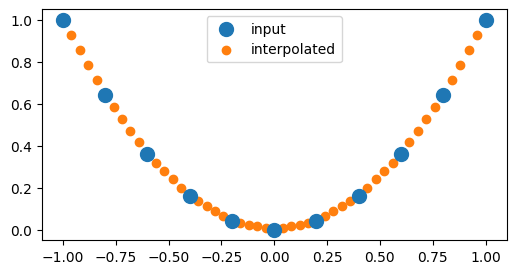
Regrid a 1D array using multilinear interpolation.
import numpy as np
import matplotlib.pyplot as plt
import regridding

# Define the input grid
x_input = np.linspace(-1, 1, num=11)

# Define the input array
values_input = np.square(x_input)

# Define the output grid
x_output = np.linspace(-1, 1, num=51)

# Regrid the input array onto the output grid
values_output = regridding.regrid(
    coordinates_input=(x_input,),
    coordinates_output=(x_output,),
    values_input=values_input,
    method="multilinear",
)

# Plot the results
plt.figure(figsize=(6, 3));
plt.scatter(x_input, values_input, s=100, label="input", zorder=1);
plt.scatter(x_output, values_output, label="interpolated", zorder=0);
plt.legend();
Regrid a 1D array using conservative resampling.
import numpy as np
import matplotlib.pyplot as plt
import regridding

# Define the edges of the input grid
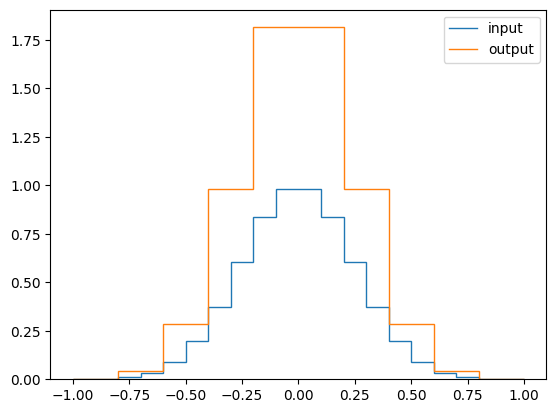
x_input = np.linspace(-1, 1, num=21)

# Define the edges of the output grid
# with a small offset to prevent degenerate cells
x_output = np.linspace(-1, 1, num=11)[::-1] + 1e-6

# Compute the centers of the input grid
x = (x_input[1:] + x_input[:-1]) / 2

# Define an array of values for each cell
# of the input grid
values = np.exp(-(x / 0.25) ** 2 /2)

# Regrid the array of values onto the output grid
values_new = regridding.regrid(
    coordinates_input=x_input,
    coordinates_output=x_output,
    values_input=values,
    method="conservative",
)

# Plot the result
fig, ax = plt.subplots()
ax.stairs(values, x_input, label="input")
ax.stairs(values_new, x_output, label="output")
ax.legend();
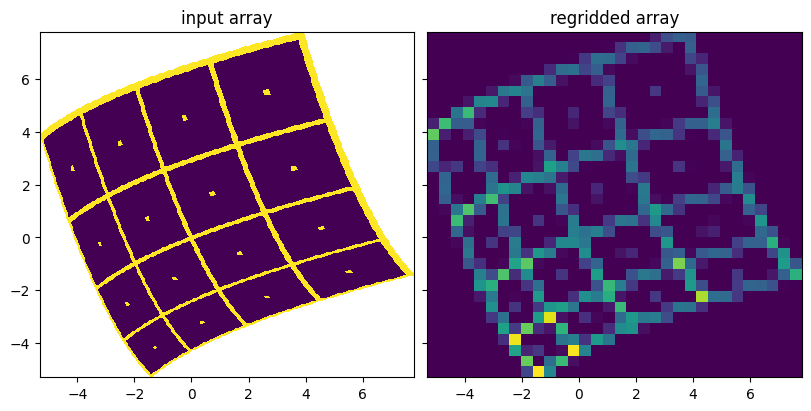
Regrid a 2D array using conservative resampling.
import numpy as np
import matplotlib.pyplot as plt
import regridding

# Define the number of edges in the input grid
num_x = 66
num_y = 66

# Define a dummy linear grid
x = np.linspace(-5, 5, num=num_x)
y = np.linspace(-5, 5, num=num_y)
x, y = np.meshgrid(x, y, indexing="ij")

# Define the curvilinear input grid using the dummy grid
angle = 0.4
x_input = x * np.cos(angle) - y * np.sin(angle) + 0.05 * x * x
y_input = x * np.sin(angle) + y * np.cos(angle) + 0.05 * y * y

# Define the test pattern
pitch = 16
a_input = 0 * x[:~0,:~0]
a_input[::pitch, :] = 1
a_input[:, ::pitch] = 1
a_input[pitch//2::pitch, pitch//2::pitch] = 1

# Define a rectilinear output grid using the limits of the input grid
x_output = np.linspace(x_input.min(), x_input.max(), num_x // 2)
y_output = np.linspace(y_input.min(), y_input.max(), num_y // 2)
x_output, y_output = np.meshgrid(x_output, y_output, indexing="ij")

# Regrid the test pattern onto the new grid
a_output = regridding.regrid(
    coordinates_input=(x_input, y_input),
    coordinates_output=(x_output, y_output),
    values_input=a_input,
    method="conservative",
)

fig, axs = plt.subplots(
    ncols=2,
    sharex=True,
    sharey=True,
    figsize=(8, 4),
    constrained_layout=True,
);
axs[0].pcolormesh(x_input, y_input, a_input);
axs[0].set_title("input array");
axs[1].pcolormesh(x_output, y_output, a_output);
axs[1].set_title("regridded array");
1 maintainer

Download files
Download the file for your platform. If you're not sure which to choose, learn more about installing packages.
Source Distribution
regridding-3.1.1.tar.gz
(146.7 kB
view details)
Built Distribution
Filter files by name, interpreter, ABI, and platform.
If you're not sure about the file name format, learn more about wheel file names.
Copy a direct link to the current filters
regridding-3.1.1-py3-none-any.whl
(149.7 kB
view details)
File details
Details for the file regridding-3.1.1.tar.gz.
File metadata
- Download URL: regridding-3.1.1.tar.gz
- Upload date:
- Size: 146.7 kB
- Tags: Source
- Uploaded using Trusted Publishing? No
- Uploaded via:
twine/6.1.0 CPython/3.13.14
File hashes
| Algorithm | Hash digest | |
|---|---|---|
| SHA256 |
a72975f8dab18636be67ebb85698b5ffbab5d92d90025c1cec880d5ce1d64f79
|
|
| MD5 |
34ed22fc46f46339bee26015df793072
|
|
| BLAKE2b-256 |
c419e27d60d35298bd0e5ce1ef509f60af8e79fb7d355874eacef369debf1592
|
File details
Details for the file regridding-3.1.1-py3-none-any.whl.
File metadata
- Download URL: regridding-3.1.1-py3-none-any.whl
- Upload date:
- Size: 149.7 kB
- Tags: Python 3
- Uploaded using Trusted Publishing? No
- Uploaded via:
twine/6.1.0 CPython/3.13.14
File hashes
| Algorithm | Hash digest | |
|---|---|---|
| SHA256 |
931194b160702c99b67926fba24ffa31295f9cdbbf3042b8bc3e3a989f950ba6
|
|
| MD5 |
b8d032f7171b09c87483ba1e588174bb
|
|
| BLAKE2b-256 |
c202115620bfbc32b60ab7e42b38e6ec5c7b2a1a442044b4faab91e153144e7e
|














