
Remote desktop client/server for Windows computers on the same LAN, with autodiscovery. Provides screen, keyboard, mouse, and clipboard sharing without RDP or Microsoft authentication.

Project description
Remote Desktop




Lossless, low-latency remote desktop for Windows computers on your LAN — pure Python, zero configuration.
Run the server on the computer you want to reach and the client anywhere else on the network: the server is discovered automatically, the first connection is approved with one click on the server side, and from then on the client reconnects instantly whenever the server is running. The screen stream is pixel-exact at full resolution — built for documents, code, and terminals rather than video — captured with DXGI desktop duplication and delta-compressed so only the parts of the screen that changed are sent. No Windows RDP, no Microsoft accounts, no cloud: just two apps and your LAN.
See it in action
Client
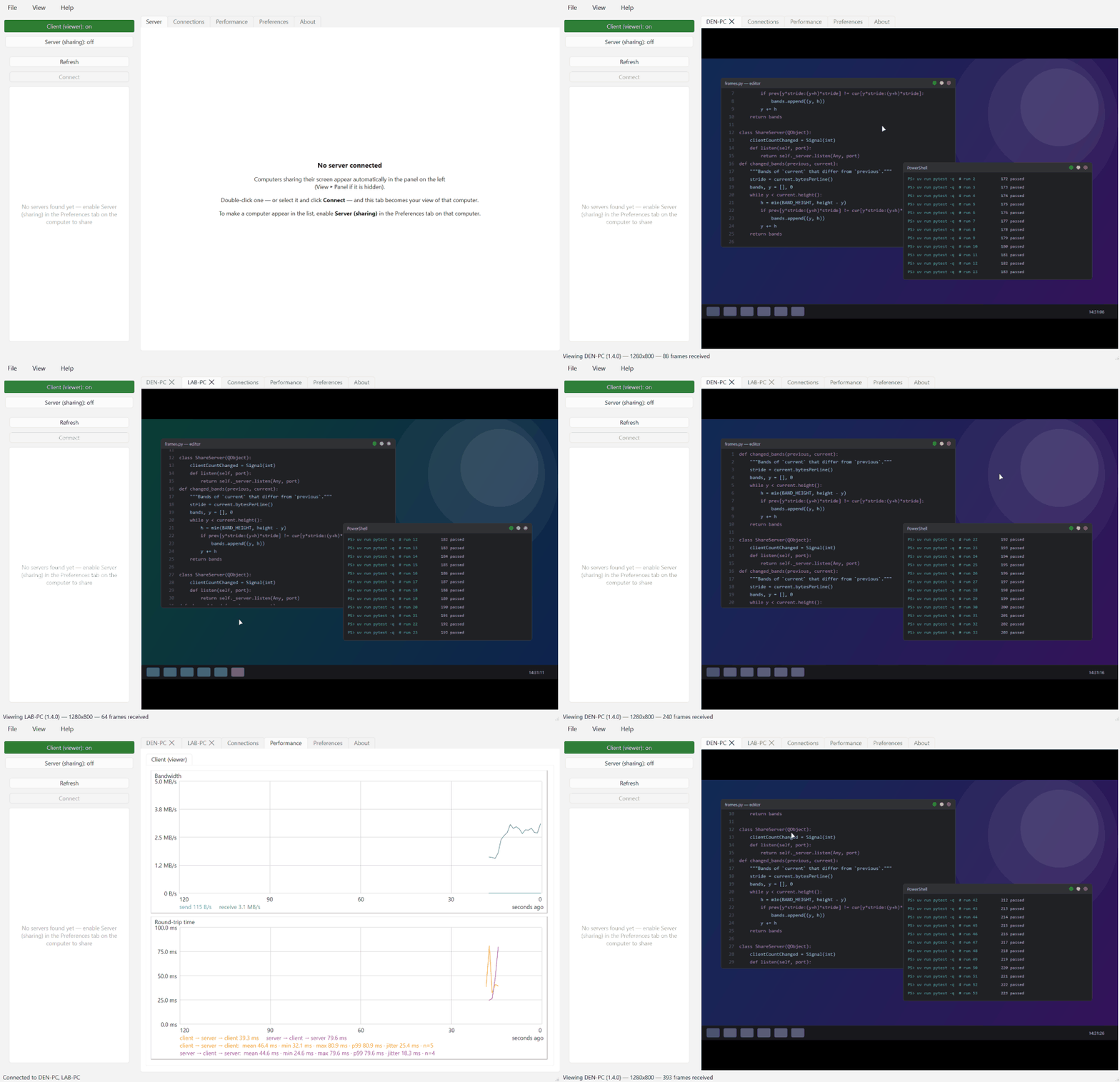
The client discovers the server on the LAN, connects, and streams its desktop live in the Remote Screen tab — click into the view and your mouse and keyboard control the remote machine. The Performance tab graphs bandwidth and round-trip time with live statistics.
Server
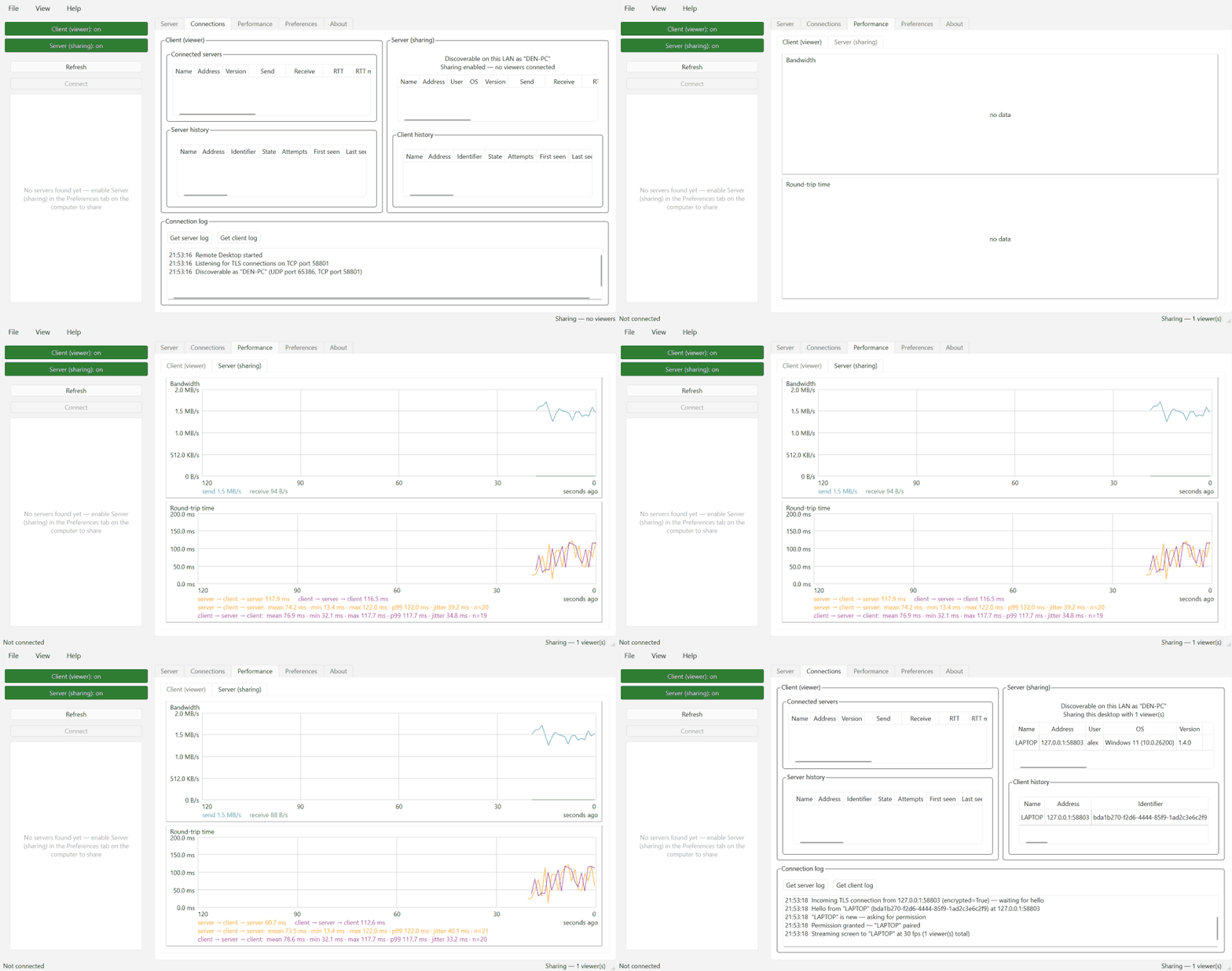
The server's Status tab shows every connected viewer — who they are (login name, computer, OS) and how the connection is doing (bandwidth, round-trip time with mean/min/max/p99/jitter over the recent window).
Features
- 🔍 Autodiscovery — servers announce themselves over UDP; the client lists every server on the LAN, no addresses to type.
- 🖥️ Lossless screen sharing — pixel-exact at full resolution, DXGI desktop-duplication capture (~10 ms per 4K frame), and inter-frame delta compression: an unchanged screen sends nothing.
- ⌨️🖱️ Full input control — mouse, wheel, and keyboard forwarding that is safe against interruptions: anything still held down is released on the server if the viewer loses focus or disconnects, so no stuck keys.
- 📋 Two-way clipboard — text and images copied on either machine appear on the other.
- 🔒 TLS + approve-once pairing — every connection is encrypted; the server user approves a new client once, after which it reconnects with a stored token and no prompt.
- 📊 Built-in performance monitoring — live bandwidth and round-trip-time graphs with window statistics (mean/min/max/p99/jitter), plus a per-viewer table on the server.
- 🔁 Robust connections — dead connections are detected and dropped within seconds, and approved clients reconnect automatically without ceremony.
- 🚀 Hands-off operation — optional start-at-login (per-user, no admin rights) and a Restart server button usable from the remote session itself, so you can update the software without visiting the machine.
- 🗃️ Persistent peer inventory — both apps keep a SQLite-backed history of every peer seen on the LAN, with one-click revoke access / forget server.
In scope: screen, keyboard, mouse, and clipboard. Out of scope: shared drives, devices, and audio — and smooth playback of fast-changing full-screen content (video, games) is a non-goal; the stream is optimized for mostly-static desktop work.
Installation
pip install remotedesktop
or, with uv:
uv tool install remotedesktop
Or run straight from a clone of this repository: double-click
run_server.bat on the computer to be shared and run_client.bat on the
viewing computer — each prepares the environment on first use and launches
the app.
Quick start
- On the computer to share, run
remotedesktop-server. - On the viewing computer, run
remotedesktop-client— the server appears in its Servers panel; double-click it. - Approve the connection in the dialog that pops up on the server. That's it — future connections from that client need no approval.
From a terminal in a clone of this repo, the same apps run with
uv run remotedesktop-server and uv run remotedesktop-client.
Security model
Connections are TLS-encrypted with a self-signed certificate the server generates once and keeps. The trust model is tuned for a trusted LAN: certificates are trusted on first use and a changed fingerprint is logged rather than blocking the connection, favoring reliable reconnection over strict certificate checking. Unapproved clients are limited to small handshake messages until the server user admits them; access can be revoked at any time from the server's Clients on LAN tab. There is no dependency on Windows RDP or any Microsoft-based authentication.
Versioning
The apps follow semantic versioning: the major version is the client/server compatibility contract (same major → guaranteed to interoperate), minor versions add backward-compatible features, patch versions fix bugs. On every connection each side compares its major version with the peer's; a mismatch shows a strong warning in both GUIs — connecting is still allowed, but the experience is not guaranteed. Keep both computers on the same version for best results.
Requirements
- Windows
- Python 3.14+
How discovery works
The client broadcasts a small JSON probe over UDP (port 48653); each server on the LAN replies with its hostname and connection port. Windows Firewall must allow Python to receive inbound UDP on that port for a server to be discoverable from other machines.
Development
uv sync          # set up the environment
uv run pytest    # run the tests
Run the tests from PowerShell or cmd, not Git Bash: Git Bash puts Git's
MinGW OpenSSL DLLs on PATH, which Qt's TLS backend loads and crashes on.
From PowerShell, Qt uses the Windows schannel backend as intended.
The demo GIFs above are generated — entirely from synthetic data — by
uv run python tools/make_demo_gifs.py.
The badges branch
The coverage badge above is served from the badges branch
(raw.githubusercontent.com/.../badges/coverage.svg). CI regenerates the
SVG after each test run on master and force-pushes it there as a single
orphan commit. It lives on its own branch because master only accepts
pull requests (a repository ruleset), so CI cannot commit to it directly;
keeping the badge in the repo avoids depending on an external coverage
service. The branch is generated output — never branch from it or merge it.
Project details
Release history Release notifications | RSS feed


Download files
Download the file for your platform. If you're not sure which to choose, learn more about installing packages.
Source Distribution
Built Distribution
Filter files by name, interpreter, ABI, and platform.
If you're not sure about the file name format, learn more about wheel file names.
Copy a direct link to the current filters
File details
Details for the file remotedesktop-0.19.0.tar.gz.
File metadata
- Download URL: remotedesktop-0.19.0.tar.gz
- Upload date:
- Size: 3.2 MB
- Tags: Source
- Uploaded using Trusted Publishing? No
- Uploaded via: uv/0.11.23 {"installer":{"name":"uv","version":"0.11.23","subcommand":["publish"]},"python":null,"implementation":{"name":null,"version":null},"distro":null,"system":{"name":null,"release":null},"cpu":null,"openssl_version":null,"setuptools_version":null,"rustc_version":null,"ci":null}
File hashes
| Algorithm | Hash digest | |
|---|---|---|
| SHA256 |
1eadc73de68414a723380ab5922e02adca98e03a26ad44a802f19587406397d0
|
|
| MD5 |
ed732d1bf7446551b8a7271cc8bb0152
|
|
| BLAKE2b-256 |
ba8975a7a377783d71ca9b0e525ec60fa938f36eae4e215776072521a1cfca52
|
File details
Details for the file remotedesktop-0.19.0-py3-none-any.whl.
File metadata
- Download URL: remotedesktop-0.19.0-py3-none-any.whl
- Upload date:
- Size: 68.5 kB
- Tags: Python 3
- Uploaded using Trusted Publishing? No
- Uploaded via: uv/0.11.23 {"installer":{"name":"uv","version":"0.11.23","subcommand":["publish"]},"python":null,"implementation":{"name":null,"version":null},"distro":null,"system":{"name":null,"release":null},"cpu":null,"openssl_version":null,"setuptools_version":null,"rustc_version":null,"ci":null}
File hashes
| Algorithm | Hash digest | |
|---|---|---|
| SHA256 |
fb1829dcad769dc909c33104e06731751b78e0176d65303722bdf1d3344ff2c1
|
|
| MD5 |
e9372ea729b9a609307b5e953be45868
|
|
| BLAKE2b-256 |
d23ca06ad212cbcd51e52ace1160354b176dd420d3e66e8f9b227ef05d2edeaf
|






