
reportlab_layout




PDF generation made easier, on top of reportlab and platypus.
A cursor that moves down the page, with the reportlab canvas still at hand to
draw exactly where you want on the page.
pip install reportlab_layout
from reportlab_layout import PDFMaker

with PDFMaker("report.pdf", top=25, auto_page_break=True) as doc:
    doc.set_footer(doc.make_paragraph("Acme Ltd", "Right"))
    doc.draw_paragraph("Third-term report", "Heading1 Centered")
    doc.draw_centered_line(wscale=0.4)
    doc.add_space()
    doc.draw_table([["Subject", "Mark"], ["Mathematics", "17"]])

    # And right there, without switching tool or file:
    doc.draw_round_rect(doc.x_left, doc.cursor_y - 40, doc.content_width, 40, radius=6, fill="#eef4fb")
    doc.draw_string("Distinction", *doc.cursor_point, halign="left", valign="cap")
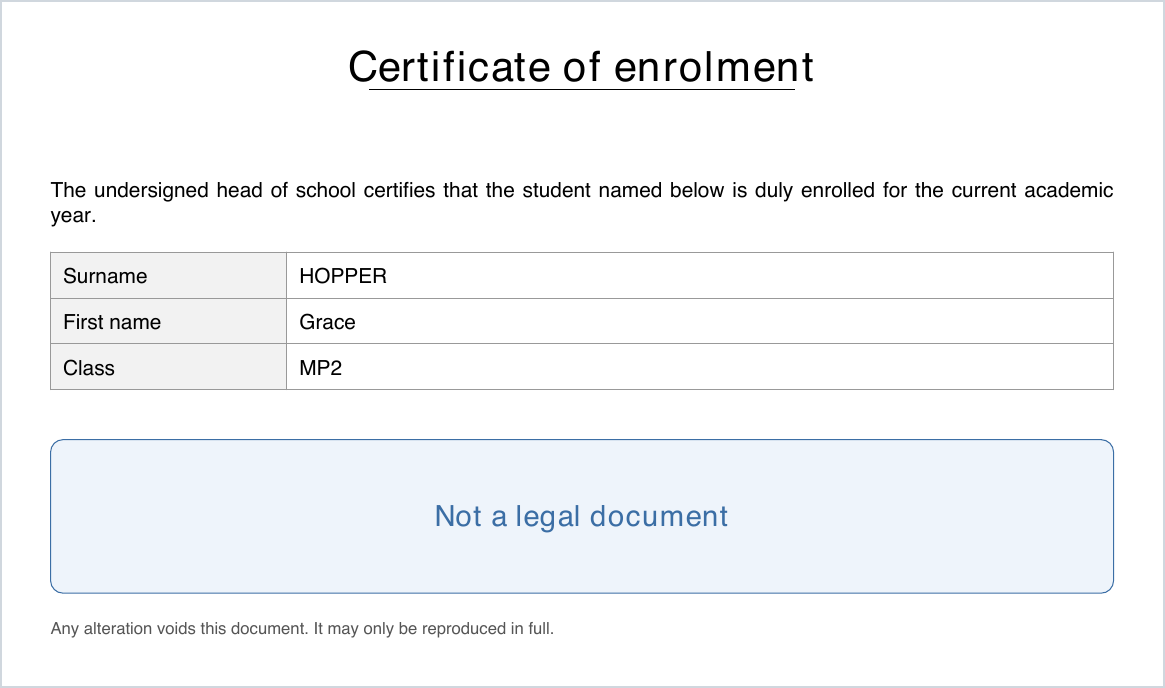
A page drawn by
examples/certificate.py:
the title, the paragraph and the table flow down the page; the callout is drawn
on the canvas where the cursor stands, its label centred on the cap height, and
the flow resumes below it.
The problem it solves
reportlab gives you two ways to work, and they do not mix well.
The canvas draws wherever you tell it, in points, from the bottom-left corner. Precise, but you hold the current position yourself, you recompute heights by hand, and one line inserted in the middle shifts everything after it.
Platypus threads flowables through frames and handles flow, pagination and
table splitting. But it takes over the page: to draw a box behind a paragraph at
an exact point you have to go through a BaseDocTemplate's onPage callbacks,
which means writing the layout in two separate places and out of order.
This package keeps platypus flowables but lays them down itself, at the position
of a cursor you can read, move and question at any time. The canvas stays
reachable through doc.canvas. The two modes mix line by line.
doc.draw_paragraph("This paragraph moves the cursor down.")  # flow
y = doc.cursor_y                                             # current position
doc.draw_rect(doc.x_left, y - 30, doc.content_width, 30)     # absolute
doc.advance(30)                                              # the cursor follows
What it brings
- An explicit cursor.
doc.cursor.depth,doc.cursor_y,doc.remaining_height,doc.advance(h). No magic: you always know where you are on the page. - One method for plain text.
draw_string(text, x, y, halign=…, valign=…, scale=…, angle=…)replaces the half-dozen variants everyone ends up writing, and the vertical centring is right — including thecapanchor that centres short labels on their capitals, which is what a table cell or a badge actually wants. Seemiddleorcap? - One uniform return. Every drawing call returns a
Box(x, y, width, height)that unpacks as a plain 4-tuple. You know what you just laid down, and where. - The two coordinate systems kept apart. The canvas ordinate goes up, the
cursor depth goes down;
PageGeometryis the only place that converts. - Nothing leaks. Every drawing is wrapped in
saveState/restoreState, so a colour, a line width or a dash pattern never contaminates the next call. - What a report needs and reportlab lacks. Columns that carry on from page
to page and end level, as LaTeX's
multicolsdoes; TrueType families whose bold and italic work in markup; images set on the baseline, for formulas typeset elsewhere; a tag flush right on the last line of a paragraph; the lines of a text before it is drawn, no-break spaces kept whole; QR codes sized by their side, and the modules they encode, for a program that reads its own codes back from a scan; any element turned,angle=ondraw. - The canvas left behind, even in a flowable of your own. A
PaintedFlowabledraws with the same painters as a page — anchored text, shapes, images — rather than with reportlab's bare canvas. The reportlab names the package's own signatures use,ParagraphStyle,Color,mmand a few more, come from it too: an import from reportlab left in a project marks code that reaches past it. - Nothing falls off the page. A block taller than the page splits from the
cursor over as many pages as it takes, a table between two rows with its
heading repeated; one that cannot split starts a fresh page and says so in the
log.
canvasmaker=NumberedCanvasnumbers the pages "x of y" in one pass. - Marks a reader can move. What is drawn inside
with doc.annotation(…)becomes a PDF annotation rather than part of the page: it prints with the page, and a reader with an annotation editor — Firefox's, for one — lets whoever reads the file drag it aside or delete it: the stamps and comments a corrector puts on a scanned copy. The annotation carries its own drawing, so readers show it exactly as drawn, images, fonts and transparency included. - Lighter files. Images and page streams are written in binary, not in the
ASCII85 reportlab uses by default, which adds a quarter to every one of them:
a document of scanned pages comes out a fifth smaller. reportlab only offers
this as a process-wide switch, so a document holds it for as long as it is
open, and other PDFs built meanwhile come out binary too.
ascii85=Trueturns it back. - PDF pages as vector drawing. A formula typeset by LaTeX and saved as a one-page PDF goes on the page, or inside a line of text as an image would, and stays vector: sharp at any size, its text still text. Every object it brings is written once per document, so the fonts many formulas share cost their size once: thirty-nine sheets of a hundred real formulas weigh 407 kB, against 1,087 kB with the same formulas as 600 dpi images.
- Redaction, not a box drawn over.
redact_pdfwrites a PDF again without the glyphs, images and paths a predicate refuses — a zone, a font, a word — the rest drawn as it was. The file keeps no text under a box, no image left unused, no metadata: of what was taken out, only the shapes of the font subsets' glyphs remain, not which glyph went where. - Markdown with LaTeX formulas.
draw_markdownsets a Markdown text — headings, lists, tables, quotations, code, images — from the cursor over as many pages as it takes, read as markdown-it reads it for a web page. Its formulas,$…$on the baseline and$$…$$displayed, are typeset by a composer you hand it, all at once:TexFormulas, built on texformules, typesets them with a real LaTeX and your preamble, in one compilation. A formula it refuses is written as it stands, and reported; the document goes on. Classes centre or frame a block, colour, highlight or shrink a word, start a new page, in the syntax Pandoc shares:::: center…:::,[a word]{.red}. See Markdown with formulas. - Two dependencies, reportlab and Pillow; three extras for the rest, listed below. No headless browser, and no LaTeX unless you ask for it.
Extras
The core needs reportlab and Pillow only. PDF pages, Markdown and LaTeX formulas need more, installed as extras; a feature whose extra is missing says which one to install.
pip install "reportlab_layout[pdf]"                    # pages of other PDFs, redaction
pip install "reportlab_layout[markdown]"               # Markdown, formulas by your own composer
pip install "reportlab_layout[markdown,texformules]"   # Markdown, formulas typeset by LaTeX
| Extra | Installs | What it adds |
|---|---|---|
pdf |
pypdf | A page of another PDF laid down as vector drawing, at a point or inside a line (draw_pdf_page, inline_pdf); what a page draws, element by element, and a PDF written again without what you refuse (pdf_elements, redact_pdf). |
markdown |
markdown-it-py, mdit-py-plugins | A Markdown text set from the cursor over the pages (draw_markdown), its formulas typeset by a composer you hand it — one that hands over PDFs needs pdf too. |
texformules |
texformules, latexdetok, pypdf | TexFormulas, a composer that typesets those formulas with LaTeX, in one compilation, and lays them down as vector drawing. Python 3.13 or later, and lualatex or pdflatex on the PATH. |
How it compares
The landscape
| Tool | Model | System deps | Licence | Status (September 2026) |
|---|---|---|---|---|
| reportlab canvas | absolute, points | no | BSD | 5.0.1, very active |
| reportlab platypus | flow, flowables | no | BSD | same |
reportlab_layout |
cursor + canvas | no | MIT | this package |
| fpdf2 | native cursor | no | LGPL-3.0 | 2.8.8, very active |
| pdfino | platypus wrapper | no | MIT | 0.1.0, 2023 |
| pdfdocument | platypus wrapper | no | BSD | 4.0.0, 2020 |
| borb | object model | no | AGPL-3.0 | 3.0.9, active |
| WeasyPrint | HTML + CSS | no | BSD | 70.0, very active |
| pdfme | document as a dict | no | MIT | 0.5.0 |
| rst2pdf | reStructuredText | no | MIT | 0.105, active |
| pypdf / pikepdf | manipulation, not generation | no | BSD / MPL | active |
| pylatex, Typst, wkhtmltopdf | markup + external engine | yes | various | various |
What the community already offers
reportlab platypus is an excellent package, and it does more than this one:
tables of contents, bookmarks, and page templates whose frames alternate from
page to page. It also splits a flowable the moment it does not fit, where this
package moves it whole and splits only what no page could hold — hand a block to
draw_columns with a single column to split it on demand. If your document is a
report that flows from start to finish, use platypus: this package has
nothing to add. The difference comes
down to one point: as soon as you need to alternate free drawing and flow in the
same gesture, platypus makes you separate the content (the story) from the
decoration (the onPage callbacks). Here, everything is written in the order it
is drawn.
fpdf2 is the fairest comparison, because it is already a cursor model —
set_xy, cell, multi_cell, ln() — and it is excellent: an HTML subset,
tables, digital signing, a lively community. Three concrete differences. Its
licence is LGPL-3.0, which is enough to rule it out in some settings; reportlab
is BSD and this package MIT. Its rich-text engine is an HTML subset, where
reportlab's Paragraph takes proper markup (<super>, <font>, subscripts,
bullets) and knows how to wrap within a given width. And its cursor is the
API: you cannot lay a reportlab flowable in the middle of it. If you are
starting from scratch and the LGPL does not bother you, fpdf2 is a very good
choice.
pdfino and pdfdocument sit in exactly the same slot: a sequential layer
on top of platypus. They are older and simpler — h1(), p(), table() — and
pdfino even lets you insert a raw flowable. What neither offers: reading and
moving the cursor explicitly, absolute placement in points within the same API,
corrected font metrics, and a Box returned from every call. They publish a
document; this one lets you build a page. Worth noting too: pdfdocument has not
released since 2020, and pdfino is at a 0.1.0 from 2023.
borb offers a complete object model and reads existing PDFs as well. It is more ambitious; it is also AGPL-3.0, a licence that reaches any service exposing it over a network. Rule it out up front in a proprietary setting.
WeasyPrint produces the finest typography of the list and handles paged CSS
(@page, running headers, breaks). The price: you have to express the layout in
HTML and CSS, and rendering goes through a full layout engine. For a document
whose geometry is computed — a yearly planner, a slot table, a grid of photos —
describing coordinates in CSS is a detour. For an invoice or a report whose
template you already have on the web, WeasyPrint wins hands down.
pdfme, rst2pdf and pylatex share one stance: describe the document in some format (a dict, reStructuredText, LaTeX) and let an engine typeset it. Excellent when the content is the subject; unsuited when the coordinates are. pylatex and Typst add a heavy system dependency on top.
pypdf and pikepdf do not generate documents: they merge, split and sign. Complementary, not competing.
In short
| What you need | Prefer |
|---|---|
| A report that flows on its own, tables split across pages, a table of contents | reportlab platypus |
| The template already exists in HTML/CSS | WeasyPrint |
| A simple cursor, without reportlab, and the LGPL is no problem | fpdf2 |
| To publish a simple document in a handful of calls | pdfino |
| To split, merge or sign existing PDFs | pypdf, pikepdf |
| The content is marked-up text | rst2pdf, pylatex |
| A page whose geometry is computed, alternating flow and point-exact drawing | reportlab_layout |
This package fills a narrow slot, but one that turns out to come up often: documents where you know the formula that gives each element's position — planners, grids, calendars, slot tables, contact sheets, mail merges — and where you still want to write text as it comes, without counting points by hand.
Going further
docs/DOC.md— the full API reference: coordinate systems, placement, styles, metrics, fonts, inline images, PDF pages, redaction, Markdown with formulas, annotations, frames, columns, pagination.examples/certificate.py— a one-page document, flow and absolute drawing mixed.examples/markdown.py— a worked solution written in Markdown, its formulas typeset by LaTeX.examples/annotations.py— a marked copy whose marks are annotations a reader can move.scripts/centering_proof.py— the visual and numeric proof of the centring.
Compatibility
Python 3.11 to 3.14, reportlab 4.x and 5.x. The continuous-integration matrix
covers each of these eight combinations. The texformules extra, which
typesets formulas with LaTeX, needs Python 3.13 or later.
Licence
MIT. reportlab is under a BSD licence, Pillow under MIT-CMU.
1 maintainer

Metadata
1 maintainer
Release files for reportlab-layout 1.14.0
For a detailed explanation of source distributions (sdists) and built distributions (wheels), please see the package formats documentation.
Source distribution (sdist)
| File | Size | Uploaded | Provenance | Actions |
|---|---|---|---|---|
| reportlab_layout-1.14.0.tar.gz | 288.6 kB | With provenance | Details for reportlab_layout-1.14.0.tar.gz |
Built distribution (wheel)
| File | Interpreter | ABI | Platform | Actions Reset |
|---|---|---|---|---|
| reportlab_layout-1.14.0-py3-none-any.whl | Python 3 | none | any | Details for reportlab_layout-1.14.0-py3-none-any.whl |
Total release size: 381.8 kB
Release files / reportlab_layout-1.14.0.tar.gz
| Download URL | reportlab_layout-1.14.0.tar.gz |
|---|---|
| Size | 288.6 kB |
| Tags | Source |
|
SHA-256 checksum How to use checksums |
e3ac28ff4b3076a5a432c1726358bfe38fab56f31259eca07a50e91354fa03cb
|
|
BLAKE2b-256 checksum How to use checksums |
0f2ccec7f78c49cedb5672b887c41c324e565fba03a59e5d38ef1c49dd1b9bd4
|
| Upload date | |
|
Uploaded using Trusted Publishing? What is trusted publishing? |
Yes |
| Uploaded via |
twine/7.0.0 CPython/3.13.16
|
Provenance
Provenance describes where a file came from. On PyPI, provenance is shared via attestations, which provide a verifiable record of the build or publishing details. View details, limitations and caveats.


PyPI Publish Attestation
PyPI verified that this artifact, at this checksum, originated from the publisher listed below.
Signed by GitHub Actions, verified by PyPI on Nov 15, 2026.
Transparency logRelease files / reportlab_layout-1.14.0-py3-none-any.whl
| Download URL | reportlab_layout-1.14.0-py3-none-any.whl |
|---|---|
| Size | 93.1 kB |
| Tags | Python 3 |
|
SHA-256 checksum How to use checksums |
790b43033d23d51dedb299d34c280280ddc78ae4c98331320f0ff80257a2ffc0
|
|
BLAKE2b-256 checksum How to use checksums |
55ec9f44ed4597cb8866e0fffb01b34274cb9e3a2f036cea85426d6522ef78d1
|
| Upload date | |
|
Uploaded using Trusted Publishing? What is trusted publishing? |
Yes |
| Uploaded via |
twine/7.0.0 CPython/3.13.16
|
Provenance
Provenance describes where a file came from. On PyPI, provenance is shared via attestations, which provide a verifiable record of the build or publishing details. View details, limitations and caveats.
PyPI Publish Attestation
PyPI verified that this artifact, at this checksum, originated from the publisher listed below.
Signed by GitHub Actions, verified by PyPI on Nov 15, 2026.
Transparency logSecurity for reportlab-layout 1.14.0
Provenance
Provenance describes where a file came from. On PyPI, provenance is shared via attestations, which provide a verifiable record of the build or publishing details. View details, limitations and caveats.
Full provenance
Both files in this release have been uploaded with provenance metadata.
Attestation for reportlab_layout-1.14.0.tar.gz
PyPI Publish Attestation
PyPI verified that this artifact, at this checksum, originated from the publisher listed below.
Signed by GitHub Actions, verified by PyPI on Nov 15, 2026.
Transparency logA note on package security
PyPI is a repository for distributing packages, not a service for auditing them. While third-party security researchers and our staff do their best to detect and remove malicious packages, PyPI cannot guarantee the quality, security or suitability of any given package.
To learn more about protecting yourself from malicious actors, visit our package security documentation.














