
The Rerun Python Log SDK
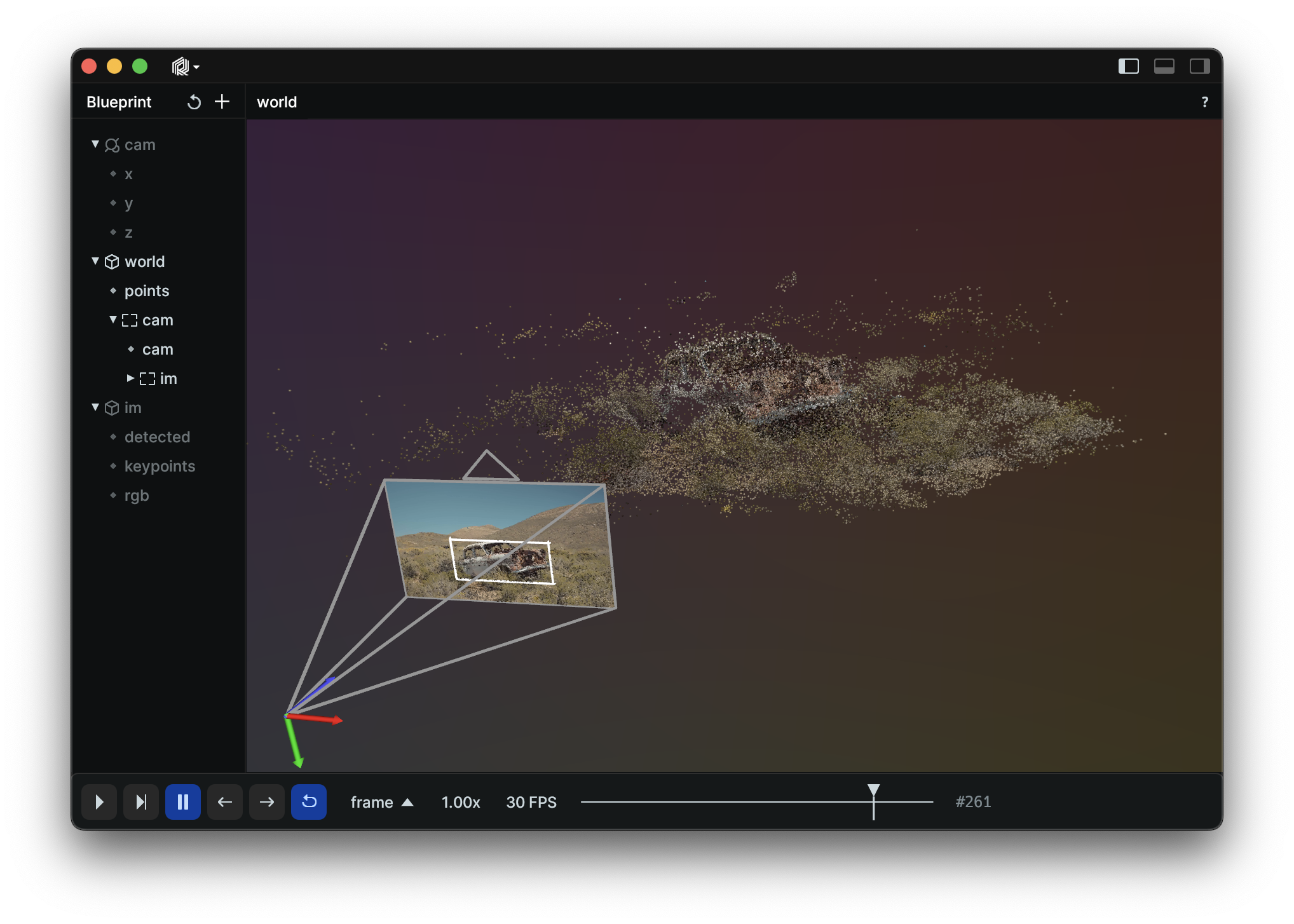
Rerun is an SDK for logging computer vision and robotics data paired with a visualizer for exploring that data over time. It lets you debug and understand the internal state and data of your systems with minimal code.
Install
pip3 install rerun-sdk
ℹ️ Note:
The Python module is called rerun, while the package published on PyPI is rerun-sdk.
Example
import rerun as rr
import numpy as np

rr.spawn()

positions = np.vstack([xyz.ravel() for xyz in np.mgrid[3 * [slice(-5, 5, 10j)]]]).T
colors = np.vstack([rgb.ravel() for rgb in np.mgrid[3 * [slice(0, 255, 10j)]]]).astype(np.uint8).T

rr.log_points("my_points", positions=positions, colors=colors)
Resources
Logging and viewing in different processes
You can run the viewer and logger in different processes.
In one terminal, start up a viewer with a server that the SDK can connect to:
python3 -m rerun
In a second terminal, run the example with the --connect option:
python3 examples/python/car/main.py --connect
From Source
Setup:
- Install the Rust toolchain: https://rustup.rs/
git clone git@github.com:rerun-io/rerun.git && cd rerun- Run
./scripts/setup_dev.sh. - Make sure
cargo --versionprints1.67.1once you are done
Building
To build from source and install Rerun into your current Python environment run:
python3 -m pip install --upgrade pip
pip3 install -r rerun_py/requirements-build.txt
pip3 install "./rerun_py"
ℹ️ Note:
If you are unable to upgrade pip to version >=21.3, you need to pass --use-feature=in-tree-build to the pip3 install command.
Development
To set up a new virtualenv for development:
just py-dev-env
# For bash/zsh users:
source venv/bin/activate
# Or if you're using fish:
source venv/bin/activate.fish
Build, test, and run
For ease of development you can build and install in "editable" mode. This means you can edit the rerun Python code without having to re-build and install to see changes.
# Build the SDK and install in develop mode into the virtualenv
# Re-run this if the Rust code has changed!
just py-build
Test
# Run the unit tests
just py-test

# Run the linting checks
just py-lint

# Run an example
python examples/python/car/main.py
Building an installable Python Wheel
The Python bindings to the core Rust library are built using https://github.com/PyO3/pyo3.
To build an installable Python wheel run:
pip install -r rerun_py/requirements-build.txt
maturin build -m rerun_py/Cargo.toml --release
By default the wheels will be built to target/wheels (use the -o flag to set a different output directory).
Now you can install rerun in any Python3 environment using:
pip3 install target/wheels/*.whl
Viewing the docs locally
The rerun python docs are generated using mkdocs
Install the doc requirements:
pip install -r rerun_py/requirements-doc.txt
Serve the docs:
mkdocs serve -f rerun_py/mkdocs.yml -w rerun_py
or
just py-docs-serve
For information on how the docs system works, see: docs/docs.md
Troubleshooting
You can run with RUST_LOG=debug to get more output out of the rerun SDK.
If you are using an Apple-silicon Mac, make sure rustc -vV outputs host: aarch64-apple-darwin. If not, this should fix it:
rustup set default-host aarch64-apple-darwin && rustup install 1.67
If you want to switch back, this is how:
rustup set default-host x86_64-apple-darwin && rustup install 1.67
1 maintainer

Metadata
1 maintainer
Release files for rerun-sdk 0.5.0
For a detailed explanation of source distributions (sdists) and built distributions (wheels), please see the package formats documentation.
Built distributions (wheels)
| File | Reset | |||
|---|---|---|---|---|
| rerun_sdk-0.5.0-cp38-abi3-win_amd64.whl | CPython 3.8 | abi3 | Windows x86-64 | Details |
| rerun_sdk-0.5.0-cp38-abi3-manylinux_2_31_x86_64.whl | CPython 3.8 | abi3 | Linux glibc 2.31+ x86-64 | Details |
| rerun_sdk-0.5.0-cp38-abi3-macosx_11_0_arm64.whl | CPython 3.8 | abi3 | macOS 11.0+ ARM64 | Details |
| rerun_sdk-0.5.0-cp38-abi3-macosx_10_7_x86_64.whl | CPython 3.8 | abi3 | macOS 10.7+ x86-64 | Details |
Total release size: 86.6 MB
Release files / rerun_sdk-0.5.0-cp38-abi3-win_amd64.whl
| Download URL | rerun_sdk-0.5.0-cp38-abi3-win_amd64.whl |
|---|---|
| Size | 19.7 MB |
| Tags | CPython 3.8 Windows x86-64 abi3 |
|
SHA-256 checksum How to use checksums |
3eeb921785e44e931e76f6ac135c17afdc96504d3f20446dd5181d51b7c7027b
|
|
BLAKE2b-256 checksum How to use checksums |
5c789ea519f48f6ca64d824dedeb76158b28463e28ca9fa0ec588c6ce5e0a0ad
|
| Upload date | |
|
Uploaded using Trusted Publishing? What is trusted publishing? |
No |
| Uploaded via |
maturin/0.14.17
|
Release files / rerun_sdk-0.5.0-cp38-abi3-manylinux_2_31_x86_64.whl
| Download URL | rerun_sdk-0.5.0-cp38-abi3-manylinux_2_31_x86_64.whl |
|---|---|
| Size | 25.1 MB |
| Tags | CPython 3.8 Linux glibc 2.31+ x86-64 abi3 |
|
SHA-256 checksum How to use checksums |
04b9136ed6e56e3a639dbac63d720e6bf99cc960afe345face2d8ef98b764f2a
|
|
BLAKE2b-256 checksum How to use checksums |
f74f8bd3501198c3fd6f4f6170323c5aca1f5e4064d8e61c9792efa614187ff7
|
| Upload date | |
|
Uploaded using Trusted Publishing? What is trusted publishing? |
No |
| Uploaded via |
maturin/0.14.17
|
Release files / rerun_sdk-0.5.0-cp38-abi3-macosx_11_0_arm64.whl
| Download URL | rerun_sdk-0.5.0-cp38-abi3-macosx_11_0_arm64.whl |
|---|---|
| Size | 20.4 MB |
| Tags | CPython 3.8 abi3 macOS 11.0+ ARM64 |
|
SHA-256 checksum How to use checksums |
ca93168da7366b483e8ddf7004634ff2e3d291ba043e8219141a9754c26cbfcb
|
|
BLAKE2b-256 checksum How to use checksums |
743f620e5a6e06168219e38eb37acd3fa0d5f1164334b701c06189679ecfa32c
|
| Upload date | |
|
Uploaded using Trusted Publishing? What is trusted publishing? |
No |
| Uploaded via |
maturin/0.14.17
|
Release files / rerun_sdk-0.5.0-cp38-abi3-macosx_10_7_x86_64.whl
| Download URL | rerun_sdk-0.5.0-cp38-abi3-macosx_10_7_x86_64.whl |
|---|---|
| Size | 21.4 MB |
| Tags | CPython 3.8 abi3 macOS 10.7+ x86-64 |
|
SHA-256 checksum How to use checksums |
36af9ec1cf3b0a716f27aeb891750733736336e50fb23dc32cf4c5f7d2bce93e
|
|
BLAKE2b-256 checksum How to use checksums |
f28f99a65857fca40e991847556b0ff84e9c7445315cea1fffa18240a9183305
|
| Upload date | |
|
Uploaded using Trusted Publishing? What is trusted publishing? |
No |
| Uploaded via |
maturin/0.14.17
|
Security for rerun-sdk 0.5.0
Provenance
Provenance describes where a file came from. On PyPI, provenance is shared via attestations, which provide a verifiable record of the build or publishing details. View details, limitations and caveats.
No provenance found
None of the files in this release were uploaded with provenance metadata.
A note on package security
PyPI is a repository for distributing packages, not a service for auditing them. While third-party security researchers and our staff do their best to detect and remove malicious packages, PyPI cannot guarantee the quality, security or suitability of any given package.














