
reshoot
Demos that stay current.
Script a task in your app once. reshoot records it as a captioned MP4 and a README GIF, checks that the result appeared, and keeps the script beside your code. When the UI changes, run it again.
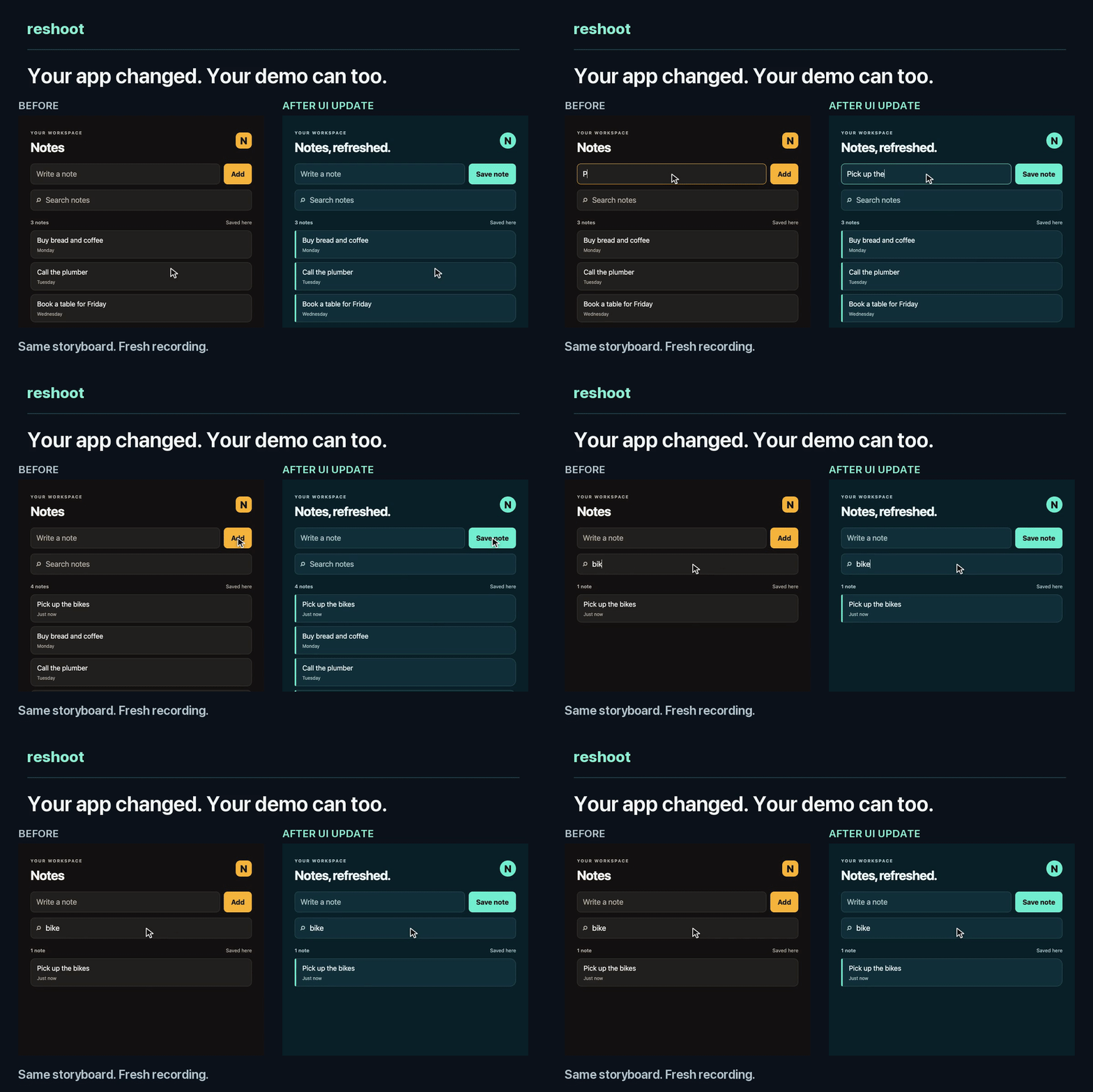
Before and after a UI change, from one storyboard. Watch the 21-second social cut.
Each run confirms the result appeared, stops on the step whose control no longer matches, and scans the frames for email addresses, keys and faces. Skills for Claude Code and Codex write the story from your app. In CI, the demo is a check on each pull request: it says which step a change breaks and suggests the repair, then records the demo again after merge.
Make a demo of your app
Open Claude Code or Codex in your app's repository, or in an empty folder if you only have a running app, and paste:
Make a short demo with reshoot.
Read https://github.com/mumit/reshoot/blob/main/guide/agent-quickstart.md
and follow its setup and creation workflow.

Target: the app in this repository.
Choose one useful task with a clear visible result. Use synthetic demo data.
Produce a short captioned MP4 and a README GIF. Keep the recording source in
demo/ so it can be updated later.

Inspect a preview, then record a fresh final and open both exports for review.
Ask only for permissions or missing details needed to proceed.
Change Target: to a URL, or a macOS app and its window, if there's no source.
In trials on new apps this took
2 to 5 minutes in Claude Code and 4 to 9 in Codex. Reply "accept" or ask for
changes. reshoot needs no API key: see
what your agent needs.
Or try it on a made-up app
uv tool install 'reshoot[browser]'
reshoot create        # make the notes demo and open it in the studio
It needs uv, ffmpeg and Chrome or Chromium on macOS or Linux; see installation. It records a preview in about 25 seconds and opens it in the studio, a local page where you change captions, timing, the look and the cut by pointing. The tutorial walks through it.
To show a task in your own simple web app, start it with demo data and run
reshoot create http://127.0.0.1:3000/ --directory demo. See
show the task.
The story is a file
[[beat]]
id = "search"
caption = "Find the matching note"
hold = 2.0
[[beat.action]]
type = "type"
target = {css = "#q"}
text = "bike"
[[beat.expect]]
type = "text"
target = {css = "#list li"}
contains = "Pick up the bikes"
reshoot types into the real page with a visible cursor, shows the caption, and
holds on the result. When the app renames #q, the run stops on that step, and
the studio offers the new control.
Keep it current
Accept a final once; that writes demo/accepted/ to commit. After the app
changes:
reshoot run demo/reshoot.toml
reshoot compare demo/accepted demo/latest --out demo/comparison.json
reshoot accept demo/latest
reshoot export demo/accepted --directory docs/demo --replace
Or let GitHub workflows do it. One records the demo on each
pull request and comments when a step stops, with a patch for the storyboard.
The other records it when main changes and opens a pull request with the new
video, GIF and comparison, including any result check that was removed.
How it differs
Screen recorders such as Screen Studio, Loom and OpenScreen record what happens on screen, and some can be driven by a script or an agent. reshoot runs the task and checks that each step's result appeared, so when the app changes it stops on the step that broke instead of recording the wrong thing, and suggests the repair. Unlike Playwright video, it adds a cursor, typing, captions, zoom, cuts, a GIF and a privacy scan around those checks. Unlike Arcade or Supademo, it makes ordinary MP4 and GIF files locally that CI can refresh. It is VHS for web apps, and uses VHS for terminals. It records a macOS window too, but without result checks.
What it records
A web app in headless Chrome (the page only, never your desktop), a terminal with VHS, or one macOS window, with optional voiceover, music and subtitles. See platforms.
Where next
The guide covers your own web app, a macOS window, how the videos look, teams, CI, the project reference, commands and troubleshooting. The before-and-after recipe rebuilds the video above.
Why reshoot exists
I made the launch video for photosearch this way and pulled the tools into reshoot. The original notes recording and its source files are still here.
Contributing · Roadmap · MIT license
1 maintainer

Metadata
1 maintainer
Release files for reshoot 0.3.14
For a detailed explanation of source distributions (sdists) and built distributions (wheels), please see the package formats documentation.
Source distribution (sdist)
| File | Size | Uploaded | Provenance | Actions |
|---|---|---|---|---|
| reshoot-0.3.14.tar.gz | 367.2 kB | With provenance | Details for reshoot-0.3.14.tar.gz |
Built distribution (wheel)
| File | Interpreter | ABI | Platform | Actions Reset |
|---|---|---|---|---|
| reshoot-0.3.14-py3-none-any.whl | Python 3 | none | any | Details for reshoot-0.3.14-py3-none-any.whl |
Total release size: 663.5 kB
Release files / reshoot-0.3.14.tar.gz
| Download URL | reshoot-0.3.14.tar.gz |
|---|---|
| Size | 367.2 kB |
| Tags | Source |
|
SHA-256 checksum How to use checksums |
dd19aa36c19f893920afe98bfbe81ea971fd686479ac9efb682c0ccd36be1da9
|
|
BLAKE2b-256 checksum How to use checksums |
66419a8ce605eef2a3c2eba9590b16447990557fb3dc41c01f91c87c46604489
|
| Upload date | |
|
Uploaded using Trusted Publishing? What is trusted publishing? |
Yes |
| Uploaded via |
twine/7.0.0 CPython/3.13.16
|
Provenance
Provenance describes where a file came from. On PyPI, provenance is shared via attestations, which provide a verifiable record of the build or publishing details. View details, limitations and caveats.


PyPI Publish Attestation
PyPI verified that this artifact, at this checksum, originated from the publisher listed below.
Signed by GitHub Actions, verified by PyPI on Nov 6, 2026.
Transparency logRelease files / reshoot-0.3.14-py3-none-any.whl
| Download URL | reshoot-0.3.14-py3-none-any.whl |
|---|---|
| Size | 296.3 kB |
| Tags | Python 3 |
|
SHA-256 checksum How to use checksums |
0c6ec92e644a50a804e83e08d15ace63b9fa1e9086d69d75f2f3ab6501c96774
|
|
BLAKE2b-256 checksum How to use checksums |
14cfda15463eb432b0aba99905e05668e1e2477b41408788a879cd13f6aac296
|
| Upload date | |
|
Uploaded using Trusted Publishing? What is trusted publishing? |
Yes |
| Uploaded via |
twine/7.0.0 CPython/3.13.16
|
Provenance
Provenance describes where a file came from. On PyPI, provenance is shared via attestations, which provide a verifiable record of the build or publishing details. View details, limitations and caveats.
PyPI Publish Attestation
PyPI verified that this artifact, at this checksum, originated from the publisher listed below.
Signed by GitHub Actions, verified by PyPI on Nov 6, 2026.
Transparency logSecurity for reshoot 0.3.14
Provenance
Provenance describes where a file came from. On PyPI, provenance is shared via attestations, which provide a verifiable record of the build or publishing details. View details, limitations and caveats.
Full provenance
Both files in this release have been uploaded with provenance metadata.
Attestation for reshoot-0.3.14.tar.gz
PyPI Publish Attestation
PyPI verified that this artifact, at this checksum, originated from the publisher listed below.
Signed by GitHub Actions, verified by PyPI on Nov 6, 2026.
Transparency logA note on package security
PyPI is a repository for distributing packages, not a service for auditing them. While third-party security researchers and our staff do their best to detect and remove malicious packages, PyPI cannot guarantee the quality, security or suitability of any given package.
To learn more about protecting yourself from malicious actors, visit our package security documentation.














