
Resumake
Generate resume using data representation objects in Python
Dependencies
python >= 3.10pandocwkhtmltopdfpoppler-utilsfonts-roboto(or install theRobotofont family to your system)
Installation
Install package resumake from PyPI:
python3 -m pip install resumake
Usage
- create
.pyfile - import all from
resumake.components:from resumake.components import *
- create
authorvariable and assign it anAuthorobject - fill
Authorobject parameters with info (see resume/cybardev.py) - run
resumake.builderfollowing examples below
Output of python3 -m resumake.builder -h:
usage: resumake.builder [-h] [-s SCHEMA] [-o OUTPUT] [-t HTML] [-c CSS]
                        [-m SIZE]
                        RESUME

Generate a resume from a given Python file containing data representation
objects

positional arguments:
  RESUME                path to the Python file containing the resume data

options:
  -h, --help            show this help message and exit
  -s SCHEMA, --schema SCHEMA
                        order of sections to display in the resume
  -o OUTPUT, --output OUTPUT
                        path to the output directory
  -t HTML, --template HTML
                        path to the HTML template file
  -c CSS, --css CSS     path to the CSS template file
  -m SIZE, --margin SIZE
                        top margin size
Examples
-
see default help message
python3 -m resumake.builder -h
-
generate resume from
example.pyto current directorypython3 -m resumake.builder example.py
-
generate resume from
example.pytobuild/directorypython3 -m resumake.builder example.py -o ./build
-
generate resume from
example.pytobuild/directory using customhtmlandcsstemplatespython3 -m resumake.builder example.py -o ./build -t custom.html -c custom.css
-
generate resume from
example.pywith custom section order and omitting a default section (projects)python3 -m resumake.builder example.py -s "education, experience, skills"
Using GitHub Actions
Automatically generate your resume and publish it as a website
- fork this repo
- navigate to your fork
- edit
.github/workflows/update-resume.ymlaccording to theTODOcomments inside the file - rename
resume/cybardev.pyto have your GitHub username instead ofcybardev - modify the renamed Python file to include your resume info
- push changes to your fork
Extras
- check
Actionstab of your fork for workflow run details - configure custom domain (if desired) from
Settings > Pages - to change order of sections or show/hide sections in resume, edit
.github/workflows/update-resume.ymlaccording to theTODOcomment inside the file
Using Docker Container
Dependencies
docker- Docker Engine, at least; Docker Desktop optional
Installation
docker pull cybardev/resumake
Usage
- make a
resumedirectory at a suitable location - place resume
.pyscript file in theresumedirectory - run the containerized application from within the
resumedirectory as such:docker run --rm -v $PWD:/app/resume cybardev/resumake [args] <resume.py>
- replace
<resume.py>with the name of your resume.pyscript - for available
[args], see main Usage and Examples sections above, or run it with the-hflag- NOTE: the
-oflag shouldn't be used for the containerized application as it controls where the files are generated inside the container, not on your computer (move them manually after generation) - for template files, place them alongside the
.pyresume script and refer to them by their basename
- NOTE: the
- replace
- resume
.md,.pdf, and.pngfiles will be generated adjacent to the.pyfile
PS: Since the command is so tedious to type, I suggest setting up a shell alias or function for ease of use. Make sure to replace
$PWDwith absolute path to theresumedirectory.
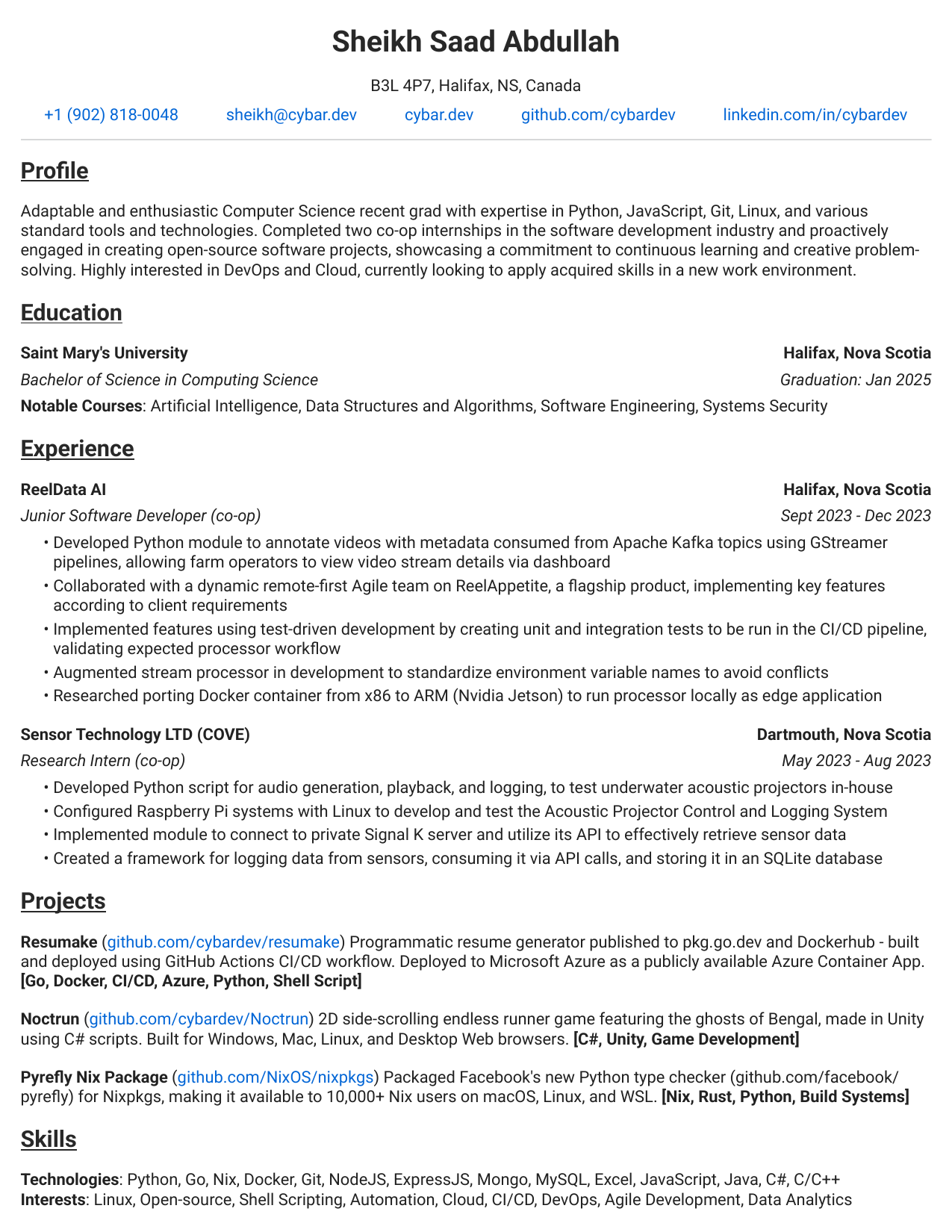
Sample Output
Source: resume/cybardev.py
1 maintainer

Metadata
1 maintainer
Release files for resumake 3.1.6
For a detailed explanation of source distributions (sdists) and built distributions (wheels), please see the package formats documentation.
Source distribution (sdist)
| File | Size | Uploaded | |
|---|---|---|---|
| resumake-3.1.6.tar.gz | 21.3 kB | Details |
Built distribution (wheel)
| File | Interpreter | ABI | Platform | Reset |
|---|---|---|---|---|
| resumake-3.1.6-py3-none-any.whl | Python 3 | none | any | Details |
Total release size: 44.4 kB
Release files / resumake-3.1.6.tar.gz
| Download URL | resumake-3.1.6.tar.gz |
|---|---|
| Size | 21.3 kB |
| Tags | Source |
|
SHA-256 checksum How to use checksums |
9e8799dca05bdd8ed732819702dfbe6af076a92e19c9327eacd58e47e39616d8
|
|
BLAKE2b-256 checksum How to use checksums |
42e5bb4adbdadbb5f094ba0b010ea4052b91023587ca7598bbcbb0fdda737c89
|
| Upload date | |
|
Uploaded using Trusted Publishing? What is trusted publishing? |
Yes |
| Uploaded via |
twine/4.0.2 CPython/3.11.8
|
Release files / resumake-3.1.6-py3-none-any.whl
| Download URL | resumake-3.1.6-py3-none-any.whl |
|---|---|
| Size | 23.1 kB |
| Tags | Python 3 |
|
SHA-256 checksum How to use checksums |
298f8a1df4cb79ed806d5279052297a0b039359902538fa5cdcd87b6f6839a2f
|
|
BLAKE2b-256 checksum How to use checksums |
468fb5c7131458385be7c725df394f5ba3b7989b0e94582eb6f095493f50ca99
|
| Upload date | |
|
Uploaded using Trusted Publishing? What is trusted publishing? |
Yes |
| Uploaded via |
twine/4.0.2 CPython/3.11.8
|














