
Generate resume using data representation objects in Python

Project description
Resumake
Generate resume using data representation objects in Python
Dependencies
python >= 3.9pandocwkhtmltopdfpoppler-utils
Installation
Install package resumake from PyPI:
python3 -m pip install resumake
Usage
- create
.pyfile - import all from
resumake.components:from resumake.components import *
- create
authorvariable and assign it anAuthorobject - fill
Authorobject parameters with info (see resume/cybardev.py) - run
resumake.builderfollowing examples below
Output of python3 -m resumake.builder -h:
usage: resumake.builder [-h] [-s SCHEMA] [-o OUTPUT] [-t HTML] [-c CSS] RESUME

Generate a resume from a given Python file containing data representation objects

positional arguments:
  RESUME                path to the Python file containing the resume data

options:
  -h, --help            show this help message and exit
  -s SCHEMA, --schema SCHEMA
                        order of sections to display in the resume
  -o OUTPUT, --output OUTPUT
                        path to the output directory
  -t HTML, --template HTML
                        path to the HTML template file
  -c CSS, --css CSS     path to the CSS template file
Examples
-
see default help message
python3 -m resumake.builder -h
-
generate resume from
example.pyto current directorypython3 -m resumake.builder example.py
-
generate resume from
example.pytobuild/directorypython3 -m resumake.builder example.py -o ./build
-
generate resume from
example.pytobuild/directory using customhtmlandcsstemplatespython3 -m resumake.builder example.py -o ./build -t custom.html -c custom.css
-
generate resume from
example.pywith custom section order and omitting a default section (projects)python3 -m resumake.builder example.py -s "education, experience, skills"
Using GitHub Actions
Automatically generate your resume and publish it as a website
- fork this repo
- navigate to your fork
- edit
.github/workflows/main.ymlaccording to theTODOcomments inside the file - rename
resume/cybardev.pyto have your GitHub username instead ofcybardev - modify the renamed Python file to include your resume info
- push changes to your fork
Extras
- check
Actionstab of your fork for workflow run details - configure custom domain (if desired) from
Settings > Pages
Using Docker Container
Dependencies
docker- Docker Engine, at least; Docker Desktop optional
Installation
docker pull cybardev/resumake
Usage
- make a
resumedirectory at a suitable location - place resume
.pyscript file in theresumedirectory - run the containerized application from within the
resumedirectory as such:docker run --rm -v $PWD:/app/resume cybardev/resumake [args] <resume.py>
- replace
<resume.py>with the name of your resume.pyscript - for available
[args], see main Usage and Examples sections above, or run it with the-hflag- NOTE: the
-oflag shouldn't be used for the containerized application as it controls where the files are generated inside the container, not on your computer (move them manually after generation) - for template files, place them alongside the
.pyresume script and refer to them by their basename
- NOTE: the
- replace
- resume
.md,.pdf, and.pngfiles will be generated adjacent to the.pyfile
PS: Since the command is so tedious to type, I suggest setting up a shell alias or function for ease of use. Make sure to replace
$PWDwith absolute path to theresumedirectory.
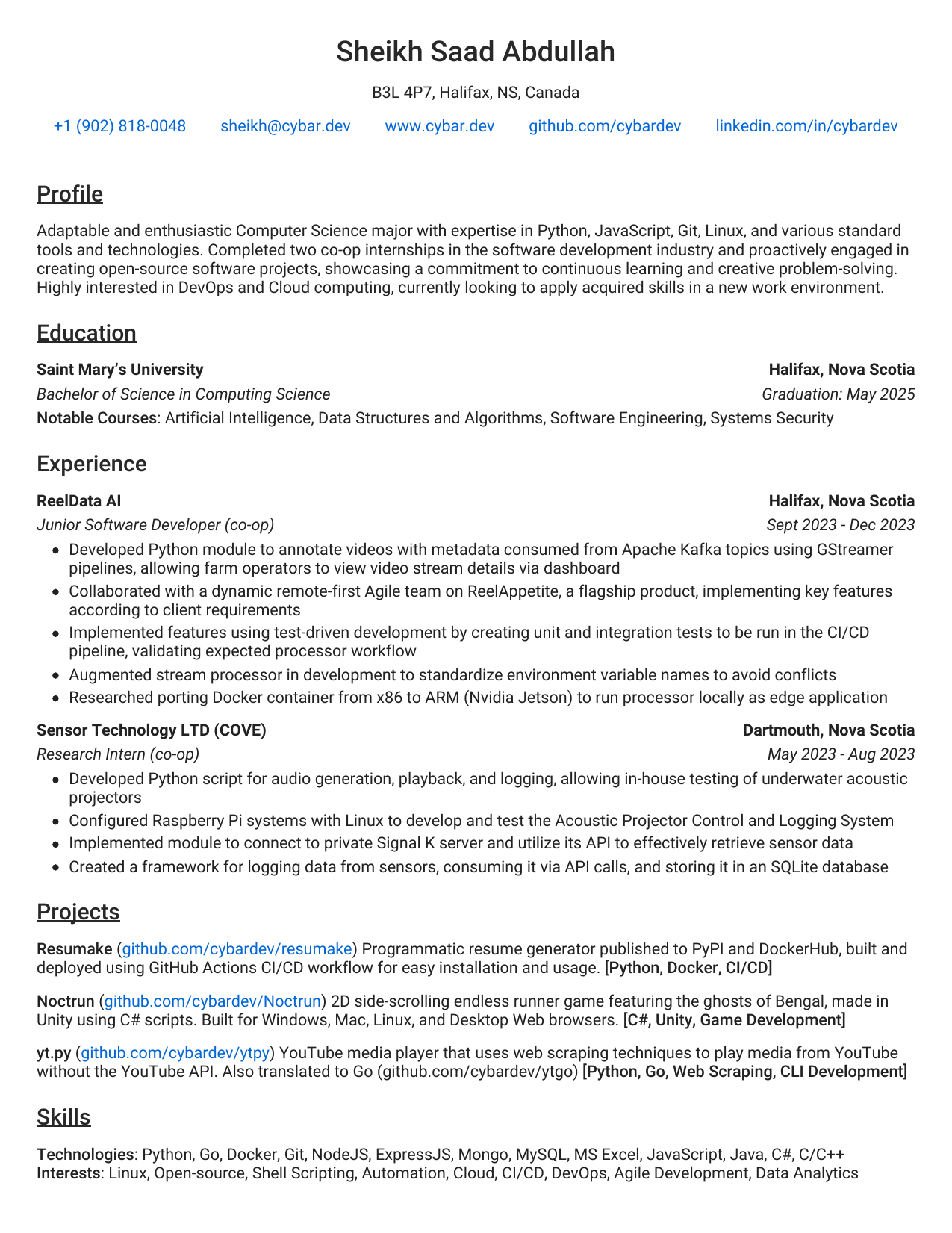
Sample Output
Source: resume/cybardev.py
Release history Release notifications | RSS feed


Download files
Download the file for your platform. If you're not sure which to choose, learn more about installing packages.
Source Distribution
Built Distribution
Filter files by name, interpreter, ABI, and platform.
If you're not sure about the file name format, learn more about wheel file names.
Copy a direct link to the current filters
File details
Details for the file resumake-1.0.6.tar.gz.
File metadata
- Download URL: resumake-1.0.6.tar.gz
- Upload date:
- Size: 29.1 kB
- Tags: Source
- Uploaded using Trusted Publishing? Yes
- Uploaded via: twine/4.0.2 CPython/3.11.7
File hashes
| Algorithm | Hash digest | |
|---|---|---|
| SHA256 |
52e46dfe796d583e050a5dc23041790eaa964380dcdb0b0887f0e2e2236628b3
|
|
| MD5 |
f7d536933833c99dbe7a1bc40879e79b
|
|
| BLAKE2b-256 |
cc23e50deba37db12a4f0ef3c82bed3503c0c858994b1b7efa7247d5a2c5e7eb
|
File details
Details for the file resumake-1.0.6-py3-none-any.whl.
File metadata
- Download URL: resumake-1.0.6-py3-none-any.whl
- Upload date:
- Size: 30.6 kB
- Tags: Python 3
- Uploaded using Trusted Publishing? Yes
- Uploaded via: twine/4.0.2 CPython/3.11.7
File hashes
| Algorithm | Hash digest | |
|---|---|---|
| SHA256 |
9a4803c095002a86c9c13bf15c85090bd8c28421b8180ecd7f5e7660ea67f9a4
|
|
| MD5 |
21323a650120a0fc9ddbbc21bceb610a
|
|
| BLAKE2b-256 |
ddd3e593ecf1afdd79541d047e2dd649d61766e71e3b38114813c0ef21b3e12c
|






