
Recency-Frequency based recommendation scoring

Project description
rfscorer



rfscorer is a Python package for Recency-Frequency based recommendation scoring.
It estimates product-choice probabilities — the preference score for each user-item pair, forming a matrix analogous to a rating matrix — from interaction histories, using two simple but powerful behavioral signals: recency, which captures how recently a user interacted with an item, and frequency, which captures how often the user has interacted with it. The target event whose probability is estimated (revisits, purchases, conversions, etc.) is configurable through the evaluation log.
The package is designed for product recommendation and repeat-engagement modeling, especially in settings where interpretable scoring based on interaction history is preferred over black-box recommendation models.
Note: In this package, RF stands for Recency-Frequency, not Random Forest.
Features
- scikit-learn-style API — familiar
fit()/transform()interface makes it easy to integrate into existing data science workflows - Minimal data requirements — works with any interaction log that has three columns:
user,item, and a time column (datetimeby default, configurable viatime_col; accepts datetime or integer); no ratings or explicit feedback needed - Explainable scoring — probabilities are derived through mathematical optimization under RF monotonicity constraints, making every score fully traceable and auditable; 3D surface visualization further supports intuitive understanding
- Probabilistic output — product-choice probabilities serve as preference scores, enabling expected value calculations and probabilistic ranking of recommendations
- Extensible — the user–item probability matrix produced by
transform()can be directly used as input to collaborative filtering or other downstream recommendation models
Installation
pip install rfscorer
Usage
import pandas as pd
from rfscorer import RecencyFrequencyScorer
Prepare an interaction log with three columns: user, item, and a time column (default column name: datetime).
df_train = ...  # replace with your own training interaction log (columns: user, item, datetime)
df_test  = ...  # replace with your own test interaction log     (columns: user, item, datetime)
Each DataFrame has the following structure. The same user-item pair may appear multiple times, representing repeat visits.
| user | item | datetime |
|---|---|---|
| u_001 | i_032 | 2026-07-01 |
| u_001 | i_017 | 2026-07-03 |
| u_001 | i_032 | 2026-07-05 |
| u_002 | i_011 | 2026-07-02 |
| u_002 | i_058 | 2026-07-04 |
Split users into training and test sets, then split each by target_date into an observation window and an evaluation window.
target_date = "2026-07-07"

df_train_obs  = df_train[df_train.datetime <= target_date]
df_train_eval = df_train[df_train.datetime >  target_date]
Call fit() to estimate empirical product-choice probabilities.
Recency and frequency are computed from the observation window; the evaluation window provides ground-truth event labels (revisits, purchases, conversions, etc.).
scorer = RecencyFrequencyScorer()
scorer.fit(df_train_obs, df_train_eval)
The empirical surface reflects raw event rates and may be irregular due to sparse data.
fig = scorer.plot_probability_surface(kind="emp")
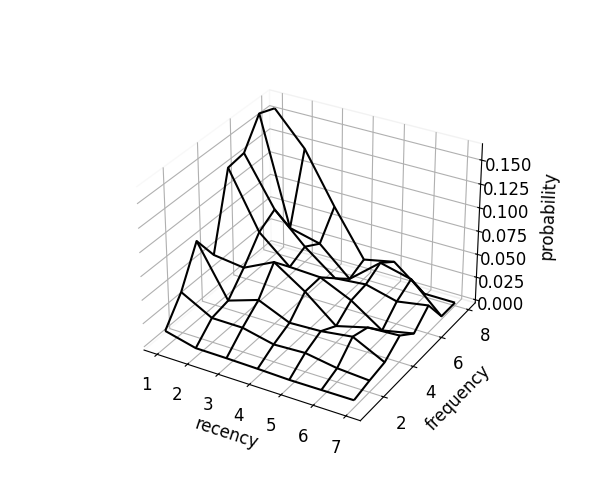
Call optimize() to smooth the surface under RF monotonicity constraints using convex quadratic programming.
kind="mono" enforces recency and frequency monotonicity.
scorer.optimize(kind="mono")
fig = scorer.plot_probability_surface(kind="mono")
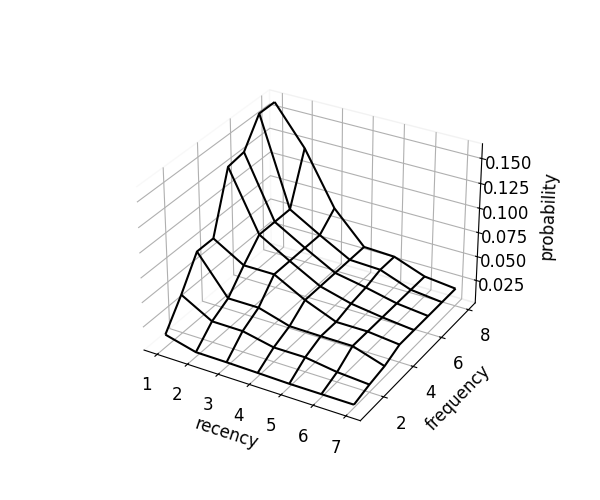
kind="mcc" additionally adds convexity in recency and concavity in frequency, yielding a smoother surface.
scorer.optimize(kind="mcc")
fig = scorer.plot_probability_surface(kind="mcc")
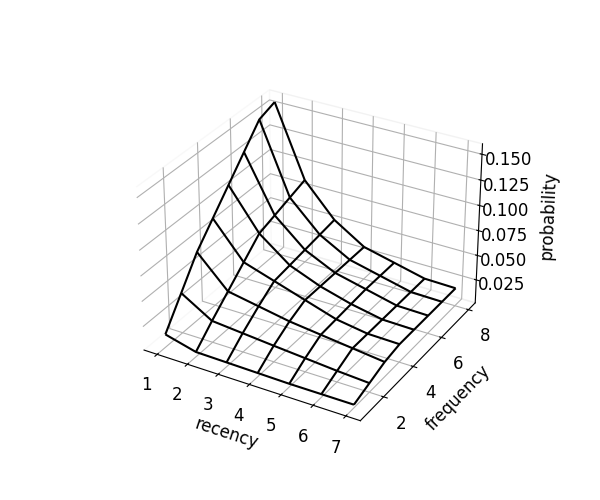
Call transform() to score each user-item pair in the test observation window.
It returns a DataFrame with columns user, item, recency, frequency, probability, and order (rank within each user, sorted by probability descending).
df_test_obs  = df_test[df_test.datetime <= target_date]
df_test_eval = df_test[df_test.datetime >  target_date]

df_rec = scorer.transform(df_test_obs, target_date, kind="mcc")
| user | item | recency | frequency | probability | order |
|---|---|---|---|---|---|
| u_001 | i_032 | 1 | 4 | 0.1167 | 1 |
| u_001 | i_017 | 2 | 3 | 0.0789 | 2 |
| u_001 | i_045 | 3 | 1 | 0.0248 | 3 |
| u_002 | i_011 | 1 | 2 | 0.0621 | 1 |
| u_002 | i_058 | 4 | 1 | 0.0182 | 2 |
Within each user, rows are sorted by probability descending; order represents the recommendation rank.
Call evaluate() to measure recommendation quality at each rank cutoff.
It returns precision, recall, and F1 for each cutoff from 1 to order.
scorer.evaluate(df_rec, df_test_eval, order=5)
Examples
- examples/basic_usage.ipynb — end-to-end walkthrough: load data, fit, optimize, transform, and evaluate
References
Citation
If you use rfscorer in academic work, please cite the following paper:
@article{Iwanaga2016,
  author  = {Jiro Iwanaga and Naoki Nishimura and Noriyoshi Sukegawa and Yuichi Takano},
  title   = {Estimating product-choice probabilities from recency and frequency of page views},
  journal = {Knowledge-Based Systems},
  volume  = {99},
  pages   = {157--167},
  year    = {2016},
  url     = {https://www.sciencedirect.com/science/article/abs/pii/S0950705116000848}
}
If you additionally use the probability matrix as input to a collaborative filtering model, please also cite:
@article{Iwanaga2019,
  author  = {Jiro Iwanaga and Naoki Nishimura and Noriyoshi Sukegawa and Yuichi Takano},
  title   = {Improving collaborative filtering recommendations by estimating user preferences from clickstream data},
  journal = {Electronic Commerce Research and Applications},
  volume  = {37},
  pages   = {100877},
  year    = {2019},
  url     = {https://www.sciencedirect.com/science/article/abs/pii/S1567422319300547}
}
License
MIT License
Release history Release notifications | RSS feed


Download files
Download the file for your platform. If you're not sure which to choose, learn more about installing packages.
Source Distribution
Built Distribution
Filter files by name, interpreter, ABI, and platform.
If you're not sure about the file name format, learn more about wheel file names.
Copy a direct link to the current filters
File details
Details for the file rfscorer-0.4.1.tar.gz.
File metadata
- Download URL: rfscorer-0.4.1.tar.gz
- Upload date:
- Size: 630.2 kB
- Tags: Source
- Uploaded using Trusted Publishing? No
- Uploaded via: uv/0.8.4
File hashes
| Algorithm | Hash digest | |
|---|---|---|
| SHA256 |
87d8303fcc17cc006cf20c3ca3c57fabf8e545e7bfe0b029817de35508a8d7c4
|
|
| MD5 |
b24cece33ba4171878fc67747af6b43f
|
|
| BLAKE2b-256 |
aeed416fa3ce9044e599fce71b9b077815e5d7d1478fe4d8612f985cee09519a
|
File details
Details for the file rfscorer-0.4.1-py3-none-any.whl.
File metadata
- Download URL: rfscorer-0.4.1-py3-none-any.whl
- Upload date:
- Size: 25.7 kB
- Tags: Python 3
- Uploaded using Trusted Publishing? No
- Uploaded via: uv/0.8.4
File hashes
| Algorithm | Hash digest | |
|---|---|---|
| SHA256 |
67882ffea9c15fa15812dc4609543de07f6291930bcdffd4797dc7adad1d25f7
|
|
| MD5 |
cf14cf9e3040ac260fb15c5be521aa9c
|
|
| BLAKE2b-256 |
dd2aa86a2ebf081bc72bb536c496105305f843918ea54370a3e19ffc68ac2c4c
|






