





Purpose
rich-gradient layers smooth foreground and background gradients on top of
Rich renderables.
It includes a drop-in Text subclass, wrappers for Panel and Rule,
gradient-aware Markdown, convenience wrappers for common Rich renderables,
animated variants, and utilities for building palettes.
Highlights
- Works anywhere Rich expects a
ConsoleRenderable, including panels, tables, and live updates. - Generates color stops automatically or from CSS color names,
hex codes, RGB tuples, or
rich.color.Colorobjects. - Supports foreground and background gradients, rainbow palettes, and seedable color spectrums.
- Ships with ready-to-use renderables:
AnimatedText,AnimatedGradient,AnimatedPanel,AnimatedRule, andAnimatedMarkdownfor live gradient updates.- Loads optional JSON configuration from
~/.rich-gradient/config.json, where you can toggle animation globally and customize the default spectrum palette. Invalid settings are ignored with a logged warning rather than raising. - Optional Rich traceback formatting via
rich_gradient.install_tracebacks().
What's new in v0.4.3
- Fixed —
Panel(expand=True)now actually fills the available width (the 0.4.2 fix did not take effect).
What's new in v0.4.2
- Fixed —
Panel(expand=True)now fills the available width, so the border and its content share one gradient. - Fixed —
Syntaxkeeps the theme's token colors by default instead of recoloring all code; passkeep_token_colors=Falsefor the old look.
What's new in v0.4.1
- Added —
JSONandProgressBargradient renderables (the progress bar colors only its filled portion), plus atrailing_newlineoption onGradient. - Fixed —
Gradientoutput now ends with a newline like other Rich renderables. Passtrailing_newline=Falsefor the previous behavior.
What's new in v0.4.0
- Breaking — importing
rich_gradientno longer installs Rich's pretty traceback handler (it previously replacedsys.excepthookas an import side effect). Programs run identically; only uncaught-exception formatting is affected. To keep Rich tracebacks, callrich_gradient.install_tracebacks()once at startup, or setRICH_GRADIENT_TRACEBACKS=1for the old automatic behavior with no code changes. - Changed — color strings are parsed with Rich's own parser first, falling
back to
rich-color-ext(CSS names and 3-digit hex). Names Rich defines keep Rich's meaning, so"red"is ANSI red (#800000); use"#ff0000"for pure red. Requiresrich-color-ext>=3.0.0. - Changed —
hueshas a minimum of 2 everywhere and raisesValueErrorbelow that (Gradientused to clamp silently). - Changed — configuration loading is stricter and quieter: invalid values
are ignored with a warning,
RICH_GRADIENT_ANIMATEalso accepts0/false/no/off, and the defaulthotpinkpalette entry is nowpink. - Changed — the docs moved from MkDocs to Zensical
(
zensical.toml), and CI now tests Python 3.11–3.14 and builds the docs. - Fixed gradients now reach their first and last colors:
repeat_scaledefaults toNoneand is derived from the color stops (previouslyMarkdownstopped at the second color and two-color gradients stopped halfway). Pass an explicitrepeat_scaleto keep the old spread. - Fixed
Gradientaccepts a tuple or generator of renderables, as documented, andGradient("")prints a blank line likeconsole.print(""). - Fixed
Ruleonly reports "Invalid color for Rule" for real color errors; other errors (such as a badhues) keep their own message. - Fixed
Panelcrashing whenstylewas passed as arich.style.Styleinstance instead of a string. - Fixed
Rule()can now be constructed without a title, matchingAnimatedRuleand Rich's ownRule. - Fixed
AnimatedRulenow uses its faster phase speed when animation is enabled via the global config, not only whenanimate=Trueis passed. - Removed the unused
requestsruntime dependency for lighter installs.
See the CHANGELOG for more details.
Installation
rich-gradient requires Python 3.11 or newer.
uv
# Recommended: use uv
uv add rich-gradient

# or via `uv pip`
uv pip install rich-gradient
Pip
Or with pip:
# via pip
pip install rich-gradient
Contributor notes
Use uv for everything:
- Install:
uv sync - Tests:
uv run pytestworks without an editable install becausetests/conftest.pyaddssrc/tosys.path. - Type check:
uv run mypy - Docs:
uv run zensical serveto preview anduv run zensical build --cleanto build (the docs use Zensical; there is nomkdocs.yml).
CI runs the tests on Python 3.11, 3.12, 3.13, and 3.14 and builds the docs, so
run uv run pytest and uv run zensical build --clean before committing.
Usage
Basic Gradient Text Example
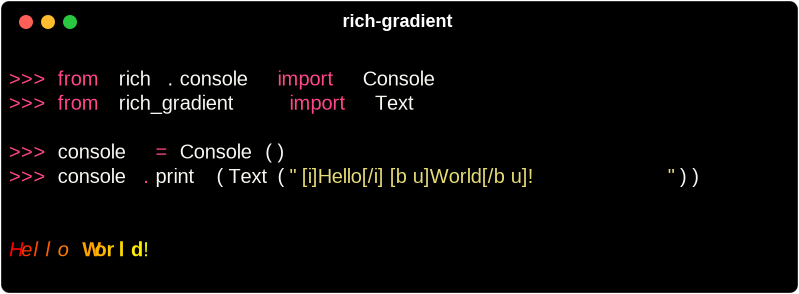
Use Text when you want a drop-in rich.text.Text replacement with gradient
spans applied to the text itself.
from rich.console import Console
from rich_gradient import Text

console = Console()
console.print(Text("[i]Hello[/i] [b u] World![/b u]"))
Gradient Text with Specific Colors
If you want a bit more control of the gradient,
you can specify the colors you want to use in the gradient
by passing them as a list of colors to the colors parameter.
Color Formats
Color can be parsed from a variety of formats including:
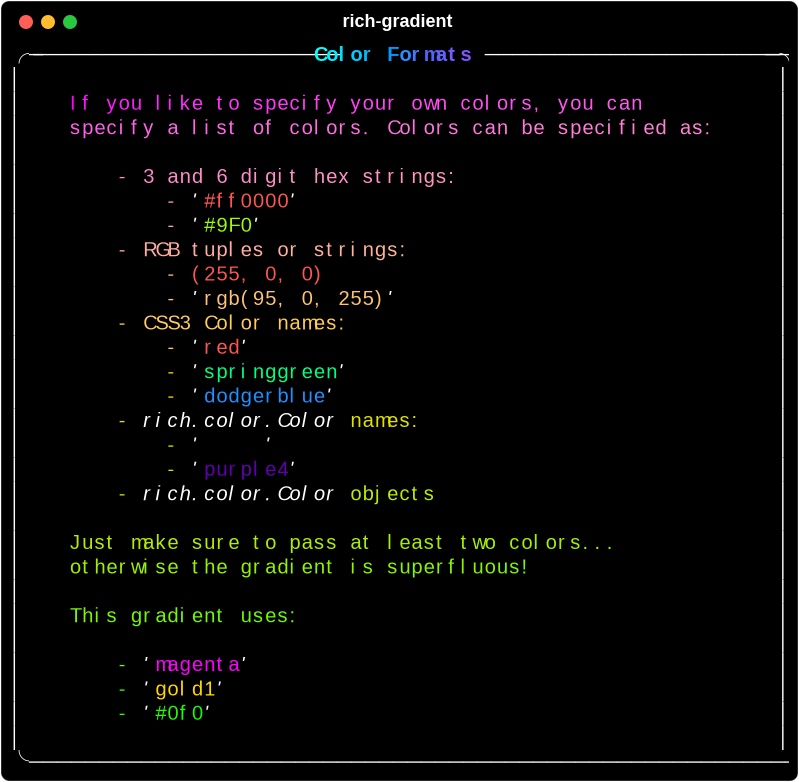
Colors are parsed with Rich's own parser first, falling back to
rich-color-ext for CSS names
and 3-digit hex. Names Rich defines keep Rich's meaning, so "red" is ANSI red
(#800000) while "#ff0000" is pure red; CSS-only names like "tomato" work as
expected.
Example Code
Specific Two-Color Gradient Example
console.print(
    Text(
        "This a gradient with two colors.",
        colors=["#f00", "orange"],
    ),
    justify="center"
)

Specific Four-Color Gradient Example
console.print(
    Text(
        "This a gradient uses four specific colors.",
        colors=["#f00", "#ff9900", "#ff0", "Lime"],
        justify="center",
    ),
)
Specific Color Gradient Result
Rainbow Gradient Example
If four colors aren't enough, you can use the 'rainbow' parameter to generate a rainbow gradient that spans the full spectrum palette.
console.print(
    Text(
        "This is a rainbow gradient.",
        rainbow=True,
        justify="center",
    ),
)
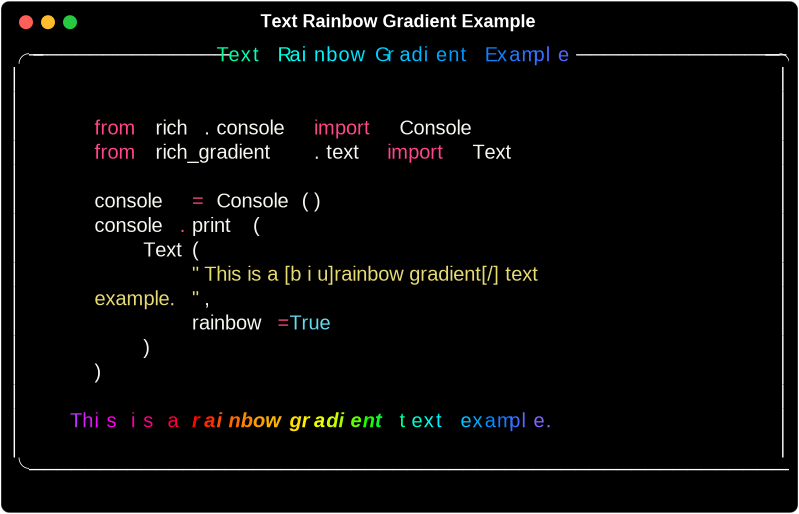
Use Spectrum(hues=..., seed=...) when you need reproducible color stops.
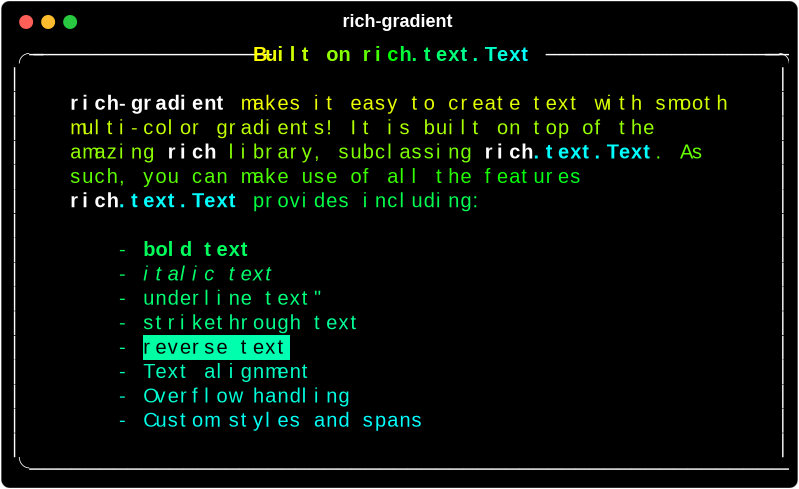
Still inherits from rich.text.Text
Since Text is a subclass of rich.text.Text, you can still use all
the same methods and properties as you would with Text.
console.print(
    Text(
        "This is an underlined rainbow gradient.",
        rainbow=True,
        style="underline",
    ),
    justify="center"
)
console.line()
console.print(
    Text(
        "This is a bold italic gradient.",
        style="bold italic",
    ),
    justify="center"
)
console.line()
Wrap Any Rich Renderable
Use Gradient when you want to paint across an existing Rich renderable, such
as Markdown, a table, a layout, or a standard Rich panel.
from rich.console import Console
from rich.markdown import Markdown
from rich_gradient import Gradient

console = Console()
console.print(
    Gradient(
        Markdown("## Renderables\n\n- Text\n- Panels\n- Markdown"),
        colors=["#38bdf8", "#a855f7", "#f97316"],
        bg_colors=["#0f172a", "#1f2937"],
        justify="center",
    )
)
Pass a list, tuple, or generator to wrap several renderables at once. See
examples/renderables_that_work.py for a
script that renders every renderable and reports which ones work:

Background Gradients
Pass bg_colors to Text, Gradient, Panel, Rule, or Markdown to apply
background color stops. A single background color is treated as a solid fill;
multiple stops interpolate across the rendered output.
from rich_gradient import Text

Text(
    "Foreground and background gradient",
    colors=["#f8fafc", "#a7f3d0"],
    bg_colors=["#0f172a", "#1e293b"],
)
Markdown
Use Markdown for a Rich Markdown renderable with the same gradient controls
as Gradient.
from rich.console import Console
from rich_gradient import Markdown

console = Console()
console.print(
    Markdown(
        "# Gradient Markdown\n\nSupports **Rich Markdown** content.",
        colors=["cyan", "magenta", "gold1"],
    )
)
CLI
This package no longer ships a command-line interface. Install
rich-gradient-cli for
terminal commands that build on the renderables provided here.

1 maintainer

Metadata
1 maintainer
Release files for rich-gradient 0.4.3
For a detailed explanation of source distributions (sdists) and built distributions (wheels), please see the package formats documentation.
Source distribution (sdist)
| File | Size | Uploaded | Provenance | Actions |
|---|---|---|---|---|
| rich_gradient-0.4.3.tar.gz | 16.8 MB | With provenance | Details for rich_gradient-0.4.3.tar.gz |
Built distribution (wheel)
| File | Interpreter | ABI | Platform | Actions Reset |
|---|---|---|---|---|
| rich_gradient-0.4.3-py3-none-any.whl | Python 3 | none | any | Details for rich_gradient-0.4.3-py3-none-any.whl |
Total release size: 16.9 MB
Release files / rich_gradient-0.4.3.tar.gz
| Download URL | rich_gradient-0.4.3.tar.gz |
|---|---|
| Size | 16.8 MB |
| Tags | Source |
|
SHA-256 checksum How to use checksums |
0548c48adeab202a439911d0a8a7420cdf66b95dc3c31ccf6c59e935144c802a
|
|
BLAKE2b-256 checksum How to use checksums |
e1a8a84f927a0abce6b3035e09f0964e61fe22631cef8fc32aaab36d43cded2b
|
| Upload date | |
|
Uploaded using Trusted Publishing? What is trusted publishing? |
Yes |
| Uploaded via |
twine/7.0.0 CPython/3.13.16
|
Provenance
Provenance describes where a file came from. On PyPI, provenance is shared via attestations, which provide a verifiable record of the build or publishing details. View details, limitations and caveats.


PyPI Publish Attestation
PyPI verified that this artifact, at this checksum, originated from the publisher listed below.
Signed by GitHub Actions, verified by PyPI on Nov 6, 2026.
Transparency logRelease files / rich_gradient-0.4.3-py3-none-any.whl
| Download URL | rich_gradient-0.4.3-py3-none-any.whl |
|---|---|
| Size | 77.9 kB |
| Tags | Python 3 |
|
SHA-256 checksum How to use checksums |
50aa88892c4a04b07f09eeb92e49ea17456fe7b03aed63f480e7f1e53b9c60dc
|
|
BLAKE2b-256 checksum How to use checksums |
9eaf7c4c59119f1313bf7ba58a388238f1a8a085abbca684ed486667285a80b5
|
| Upload date | |
|
Uploaded using Trusted Publishing? What is trusted publishing? |
Yes |
| Uploaded via |
twine/7.0.0 CPython/3.13.16
|
Provenance
Provenance describes where a file came from. On PyPI, provenance is shared via attestations, which provide a verifiable record of the build or publishing details. View details, limitations and caveats.
PyPI Publish Attestation
PyPI verified that this artifact, at this checksum, originated from the publisher listed below.
Signed by GitHub Actions, verified by PyPI on Nov 6, 2026.
Transparency logSecurity for rich-gradient 0.4.3
Provenance
Provenance describes where a file came from. On PyPI, provenance is shared via attestations, which provide a verifiable record of the build or publishing details. View details, limitations and caveats.
Full provenance
Both files in this release have been uploaded with provenance metadata.
Attestation for rich_gradient-0.4.3.tar.gz
PyPI Publish Attestation
PyPI verified that this artifact, at this checksum, originated from the publisher listed below.
Signed by GitHub Actions, verified by PyPI on Nov 6, 2026.
Transparency logA note on package security
PyPI is a repository for distributing packages, not a service for auditing them. While third-party security researchers and our staff do their best to detect and remove malicious packages, PyPI cannot guarantee the quality, security or suitability of any given package.
To learn more about protecting yourself from malicious actors, visit our package security documentation.














