
riggen


The blazingly fast, lightweight robot assembler for RL researchers. Drop meshes in, get a simulation-ready MJCF, URDF or SDF out — in a window, or from ten lines of Python.
Try it in the browser
divelix.github.io/riggen — the real
app, wasm, with the sample arm already in it. Orbit it, pose it from the
joint tree or with the wheel over a joint, drop your own .stl / .obj / .riggen / .urdf / .xml onto
the page, and Export to get the same MJCF, URDF and SDF the desktop writes,
as one zip. Needs a browser with WebGPU (Chrome/Edge 113+, Firefox 141+,
Safari 26+); the desktop app does not.
Drop a document together with its meshes — the browser hands a page one
flat set of files per drop and no directory, so a .riggen on its own can
only tell you which meshes are missing.
Install
uv tool install riggen      # or: uvx riggen  /  pip install riggen
riggen --example arm        # the bundled sample robot
One wheel per platform (Linux x86_64 / aarch64, macOS arm64 / x86_64,
Windows x86_64), Python 3.10 or later, nothing else to install — the
riggen command is a native executable, import riggen the SDK over the
same core, and there is no Rust toolchain on this path. On a platform
without a wheel, pip install builds the SDK from source with cargo on
PATH and tells you how to get the app (see Python).
The first minute
-
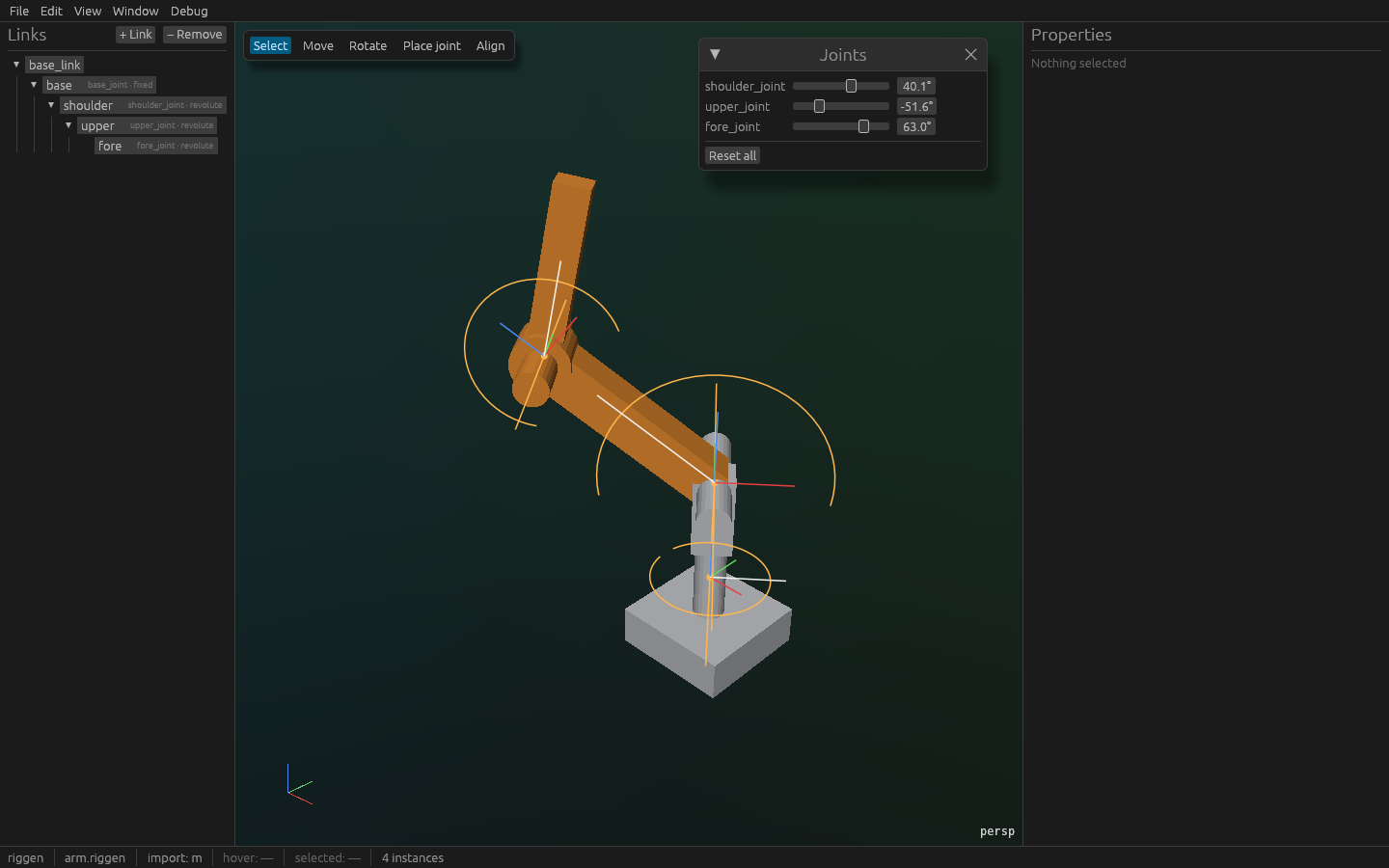
riggen --example armopens a four-part arm in View: the joint tree on the left, the viewport with the robot. Drag with the left button to orbit and with the right to pan (shift+left pans too, for a trackpad; the middle button orbits and shift+middle pans), zoom with the wheel,Hometo frame everything. The ViewCube in the bottom-right says which way you are looking: click a face, edge or corner to fly to that view, drag it to orbit, click the house to frame everything, and the button under it switches perspective and orthographic.W A S D E Qwalk the camera into the assembly — the point it orbits around comes with you, so a joint buried in a shell can be put in front of you and then turned around locally. The arm stands on a ground grid at z = 0, so a part at the origin reads as resting on something. The six buttons top-right are the visibility row: ground, joints, joint names, frames, links, collision geometry. Switching one off takes it out of the picture and out of the cursor's reach, so with joints off you get the robot and nothing else — the status bar says what is hidden. -
Pose it: drag a joint's bar in the tree, or turn the wheel over it — or over the joint's glyph in the viewport, which steps it by 5° (1° with shift) instead of zooming. A click on a glyph selects the joint; in View a mesh is not a thing to click. That is the kinematic tree you will build for your own robot.
-
Tab(or the View | Edit control top-left) switches to Edit: the robot at its zero configuration, the link tree, Properties, and the five tools on the toolbar with their keys —Vselect,Gmove,Rrotate,Jplace joint,Balign,Escback to select. With Rotate up, the wheel over one of the gizmo's three rings steps that ring by 5° — 1° with shift — instead of zooming; with Move up, a drag snaps to the vertex, box corner or bore centre under the cursor, looking through the part it is carrying.Tabagain brings the pose back. -
File › Export…, tick the formats you want (all three by default), choose a directory. The dialog lists anything that would stop the export (a link with no mass, a joint with no axis) and writes
arm.xml,arm.urdfandarm.sdfbesidemeshes/*.stlwhen there is nothing. -
Load it:
python -c "import mujoco; m = mujoco.MjModel.from_xml_path('out/arm.xml'); print(m.nbody, 'bodies')"
or
python -m mujoco.viewer --mjcf out/arm.xml.
Then your robot: riggen base.stl upper.stl fore.stl drops each mesh as a
link under the root (meters or millimetres — the import units are in the
status bar). Reparent by dragging rows in the tree; Place joint puts a
revolute joint on a bore by clicking its edge; Align snaps a part's
bore concentric with its parent's; Properties computes the inertial from
the mesh and a material, and fits a hull, convex pieces or primitives for
collision. Every number there scrubs: drag it, step it with Ctrl+wheel,
or click and type (2.86e-5 reads and edits as written). + Frame puts a named frame on a link — a TCP, a sensor
mount — which Move and Rotate land on a picked feature the same way.
What it does
- Assembles: STL and OBJ meshes into a kinematic tree — fixed, revolute and prismatic joints, placed by clicking geometry, with limits — and named frames (a TCP, a sensor mount) placed the same way.
- Computes: mass, centre of mass and the inertia tensor from the mesh and a material density, or from a spec you type; convex hulls, convex decomposition (V-HACD, so a C-bracket keeps its notch) and fitted boxes / cylinders / spheres for collision.
- Exports: MJCF, URDF and SDF from the same document, meshes baked to
meters as STL — a named frame becomes an MJCF
<site>, an SDF<frame>, and the massless dummy link ROS expects — so MuJoCo loads it with zero warnings and libsdformat, the SDF spec's own parser, reads the.sdf, and the forward kinematics of both agree with riggen's (those are CI jobs, not hopes). - Imports: an existing URDF or MJCF —
package://paths resolved beside the file, MuJoCo's<default>classes and degrees understood, a model spelled across several files opened through its main one (<include>and MuJoCo 3's<frame>are resolved on the way in) — to fix and convert it. Whatever the file held that the document cannot is named, never dropped in silence. - Stays out of the way: a native window through wgpu, a document that
is plain JSON (
.riggen), undo for everything, and a headless CLI.
Command line
usage:
  riggen [FILE...]        open a .riggen document, or drop meshes (.stl, .obj) as links
  riggen --example arm    open the bundled sample arm
  riggen --export mjcf|urdf|sdf|both|all --out DIR [--fk-samples] INPUT
                          write INPUT's export to DIR without opening a window

options:
  --example NAME          open a bundled example: arm (the five-link sample robot)
  --export FORMAT         headless export of INPUT (.riggen, .urdf or .xml): mjcf, urdf, sdf, both or all
  --out DIR               where --export writes; created if missing
  --fk-samples            with --export: also write <name>.fk.json, five sampled joint configurations
  --timing                print the time from launch to the first frame on stderr
  -h, --help              print this help
  -V, --version           print the version and the git commit it was built from
riggen --export needs no display, so it runs in CI and in scripts: give
it a .riggen, a .urdf or an MJCF .xml and it writes the model or
models, the meshes and, with
--fk-samples, five joint configurations with every body's world pose —
the file python/tests/test_mjcf_load.py checks MuJoCo against and
python/tests/test_sdf_load.py checks libsdformat against.
python -m riggen is the same executable, for an environment whose
bin/ is not on PATH.
Python
The same document, the same rules, from a script or a notebook:
uv add riggen # or: pip install riggen — the wheel that has the app has the SDK
import riggen

robot = riggen.Robot("pendulum")
robot.root.add_mesh("base.stl", scale=0.001)          # your STL, in millimetres
robot.root.material = "aluminium"
arm = robot.root.add_link(
    "arm",
    riggen.Revolute("y", origin=(0, 0, 0.5), limits=(-90, 90), degrees=True),
    mesh="arm.stl", scale=0.001, material="PLA",      # and the part it moves
)
arm.geoms[0].pose = (0, 0, 0.5)                       # the mesh half a unit above the hinge
robot.export("out", format="mjcf")                    # out/pendulum.xml + out/meshes/*.stl
Every call is one document edit, checked the way the window checks it: a
duplicate name, a hinge without limits or a link hung under its own child
raises a riggen.EditError subclass and changes nothing. Meters and
radians, Z-up; degrees=True wherever an angle is typed.
robot.fk({"arm_joint": 0.3})["arm"]                   # Pose((0.0, 0.0, 0.5), rpy=(0.0, 0.3, 0.0))
arm.inertial                                          # Inertial(mass=…, com=…, inertia=…) from the mesh
robot.link("arm").joint.limits = (-1.0, 1.0)          # radians; one edit
robot.link("arm").add_frame("tcp", (0, 0, 0.3))       # an MJCF <site>; frame.world(q) for its pose
robot.save("pendulum.riggen")                         # the window opens this file
Place the joint by hand, keep scripting:
viewer = riggen.show(robot)      # the riggen window on a copy; click the bore, Ctrl+S
robot = viewer.wait()            # the document as the window saved it
Then MuJoCo:
import mujoco
model = mujoco.MjModel.from_xml_path("out/pendulum.xml")
riggen.load(path) reads a .riggen, riggen.load_urdf(path) an existing
URDF (with packages={"name": "dir"} for package:// paths) and
riggen.load_mjcf(path) an MJCF; format names a set of writers —
"mjcf", "urdf", "sdf", "both" or "all", the default — and
fk_samples=True adds the five joint configurations CI compares against
MuJoCo and libsdformat. examples/pendulum.py
is the snippet above as a file; examples/arm.py builds
the bundled arm from its four STLs with typed joints — its export is
byte-identical to the app's. Everything is typed (py.typed) and
documented in docstrings: help(riggen.Link).
The wheel is cp310-abi3: one build for every CPython from 3.10 on,
which is why it needs no per-version matrix — and why it does not install
on free-threaded CPython (3.13t / 3.14t) yet. An install from the source
distribution (any other platform) compiles the SDK alone; riggen.show()
and python -m riggen then say how to get the app: a wheel, cargo install --git, or RIGGEN_BINARY pointing at a binary you built.
Developing
Rust stable, then:
git clone https://github.com/Divelix/riggen && cd riggen
git config core.hooksPath .githooks   # fmt, clippy -D warnings, test before every commit
cargo run                             # the app
cargo test --workspace                # incl. the visual snapshot suite (needs a Vulkan driver;
                                      # lavapipe / mesa-vulkan-drivers is the reference)
python python/build_wheel.py                             # the wheel: the app binary + the extension module
A notebook on the dev build, next to the fixtures — the SDK's own venv, the extension installed editable, the app from a local build:
uv venv target/sdk-venv --python 3.12
VIRTUAL_ENV=$PWD/target/sdk-venv uvx maturin develop --uv   # rerun after a Rust change (~10 s)
uv pip install --python target/sdk-venv ipykernel mujoco pytest
target/sdk-venv/bin/python -m ipykernel install --user --name riggen-dev --display-name "riggen (dev)"
cargo build --release -p riggen-app && export RIGGEN_BINARY=$PWD/target/release/riggen   # for riggen.show()
Put notebooks in scratch/ (gitignored) on the "riggen (dev)" kernel;
anything worth keeping becomes an examples/*.py, which the test suite
runs. The SDK suite itself: target/sdk-venv/bin/python -m pytest python/tests/sdk.
To try a TestPyPI build in a uv project instead, give riggen its own
index — an explicit one, or uv's dependency-confusion guard will find
some other package's old version on TestPyPI and refuse:
[[tool.uv.index]]
name = "testpypi"
url = "https://test.pypi.org/simple/"
explicit = true

[tool.uv.sources]
riggen = { index = "testpypi" }
then uv add "riggen==<version>".
The Rust route to the binary is cargo install --git https://github.com/Divelix/riggen riggen-app; publishing the workspace to
crates.io so that cargo install riggen works is a later release.
Read, in order: SEED.md (what and why),
docs/ARCHITECTURE.md,
docs/DATA-MODEL.md,
docs/ROADMAP.md, docs/adr/ — then
AGENTS.md for the rules, agent or human. The SDK's own
tests are python/tests/sdk/ (pytest, against the built wheel).
Licence
MIT or Apache-2.0, at your option.
1 maintainer

Metadata
1 maintainer
Release files for riggen 0.5.0
For a detailed explanation of source distributions (sdists) and built distributions (wheels), please see the package formats documentation.
Source distribution (sdist)
| File | Size | Uploaded | |
|---|---|---|---|
| riggen-0.5.0.tar.gz | 333.9 kB | Details |
Built distributions (wheels)
| File | Reset | |||
|---|---|---|---|---|
| riggen-0.5.0-cp310-abi3-win_amd64.whl | CPython 3.10 | abi3 | Windows x86-64 | Details |
| riggen-0.5.0-cp310-abi3-manylinux_2_28_x86_64.whl | CPython 3.10 | abi3 | Linux glibc 2.28+ x86-64 | Details |
| riggen-0.5.0-cp310-abi3-manylinux_2_28_aarch64.whl | CPython 3.10 | abi3 | Linux glibc 2.28+ ARM64 | Details |
| riggen-0.5.0-cp310-abi3-macosx_11_0_arm64.whl | CPython 3.10 | abi3 | macOS 11.0+ ARM64 | Details |
| riggen-0.5.0-cp310-abi3-macosx_10_12_x86_64.whl | CPython 3.10 | abi3 | macOS 10.12+ x86-64 | Details |
Total release size: 48.0 MB
Release files / riggen-0.5.0.tar.gz
| Download URL | riggen-0.5.0.tar.gz |
|---|---|
| Size | 333.9 kB |
| Tags | Source |
|
SHA-256 checksum How to use checksums |
9884f40ee9b39ad0a9681305b2267cf988c5ab1fefcc00905d229b7a0923dfe9
|
|
BLAKE2b-256 checksum How to use checksums |
652ea4e9b3739f95f8eb1924bec9adb3f6b74b942919e6eaa23a5942b8e3d516
|
| Upload date | |
|
Uploaded using Trusted Publishing? What is trusted publishing? |
Yes |
| Uploaded via |
twine/7.0.0 CPython/3.13.14
|
Provenance
Provenance describes where a file came from. On PyPI, provenance is shared via attestations, which provide a verifiable record of the build or publishing details. View details, limitations and caveats.


PyPI Publish Attestation
PyPI verified that this artifact, at this checksum, originated from the publisher listed below.
Signed by GitHub Actions, verified by PyPI on Sep 12, 2026.
Transparency logRelease files / riggen-0.5.0-cp310-abi3-win_amd64.whl
| Download URL | riggen-0.5.0-cp310-abi3-win_amd64.whl |
|---|---|
| Size | 9.3 MB |
| Tags | CPython 3.10 Windows x86-64 abi3 |
|
SHA-256 checksum How to use checksums |
f574396e6f1ceab93d450d7e0bfd4abd8d25a61ac93418aa6243fcebf30d6286
|
|
BLAKE2b-256 checksum How to use checksums |
808c652eeeb91e825f57831974d0862e17efee0b93914c3f414c19bdd107bd13
|
| Upload date | |
|
Uploaded using Trusted Publishing? What is trusted publishing? |
Yes |
| Uploaded via |
twine/7.0.0 CPython/3.13.14
|
Provenance
Provenance describes where a file came from. On PyPI, provenance is shared via attestations, which provide a verifiable record of the build or publishing details. View details, limitations and caveats.
PyPI Publish Attestation
PyPI verified that this artifact, at this checksum, originated from the publisher listed below.
Signed by GitHub Actions, verified by PyPI on Sep 12, 2026.
Transparency logRelease files / riggen-0.5.0-cp310-abi3-manylinux_2_28_x86_64.whl
| Download URL | riggen-0.5.0-cp310-abi3-manylinux_2_28_x86_64.whl |
|---|---|
| Size | 11.5 MB |
| Tags | CPython 3.10 Linux glibc 2.28+ x86-64 abi3 |
|
SHA-256 checksum How to use checksums |
b1a3bf893e64680efcd8a0d3924b95cd7a27fc5936741d451f921bd14a70499a
|
|
BLAKE2b-256 checksum How to use checksums |
6e5d46ffd0d68fca6aed8cdcffcfc90eda67a52ab736b4838b62cf4a16d5f668
|
| Upload date | |
|
Uploaded using Trusted Publishing? What is trusted publishing? |
Yes |
| Uploaded via |
twine/7.0.0 CPython/3.13.14
|
Provenance
Provenance describes where a file came from. On PyPI, provenance is shared via attestations, which provide a verifiable record of the build or publishing details. View details, limitations and caveats.
PyPI Publish Attestation
PyPI verified that this artifact, at this checksum, originated from the publisher listed below.
Signed by GitHub Actions, verified by PyPI on Sep 12, 2026.
Transparency logRelease files / riggen-0.5.0-cp310-abi3-manylinux_2_28_aarch64.whl
| Download URL | riggen-0.5.0-cp310-abi3-manylinux_2_28_aarch64.whl |
|---|---|
| Size | 10.8 MB |
| Tags | CPython 3.10 Linux glibc 2.28+ ARM64 abi3 |
|
SHA-256 checksum How to use checksums |
0ba1d64ac2248830edccf2bcc1499cd0f9032c9bc3d15545e4fbf9049d3eee64
|
|
BLAKE2b-256 checksum How to use checksums |
fab10c1cfdf3077b9b295f0267899d636bda10c41efb9c1483050bca41638f6c
|
| Upload date | |
|
Uploaded using Trusted Publishing? What is trusted publishing? |
Yes |
| Uploaded via |
twine/7.0.0 CPython/3.13.14
|
Provenance
Provenance describes where a file came from. On PyPI, provenance is shared via attestations, which provide a verifiable record of the build or publishing details. View details, limitations and caveats.
PyPI Publish Attestation
PyPI verified that this artifact, at this checksum, originated from the publisher listed below.
Signed by GitHub Actions, verified by PyPI on Sep 12, 2026.
Transparency logRelease files / riggen-0.5.0-cp310-abi3-macosx_11_0_arm64.whl
| Download URL | riggen-0.5.0-cp310-abi3-macosx_11_0_arm64.whl |
|---|---|
| Size | 7.8 MB |
| Tags | CPython 3.10 abi3 macOS 11.0+ ARM64 |
|
SHA-256 checksum How to use checksums |
f125910a5255ec6707ac77d335187814a600729b6364fb551ad22621e64720d4
|
|
BLAKE2b-256 checksum How to use checksums |
1c7cf75a5d931a8415c980054634e1f7ed4e2ceff565164a36f0f353e5c6a50a
|
| Upload date | |
|
Uploaded using Trusted Publishing? What is trusted publishing? |
Yes |
| Uploaded via |
twine/7.0.0 CPython/3.13.14
|
Provenance
Provenance describes where a file came from. On PyPI, provenance is shared via attestations, which provide a verifiable record of the build or publishing details. View details, limitations and caveats.
PyPI Publish Attestation
PyPI verified that this artifact, at this checksum, originated from the publisher listed below.
Signed by GitHub Actions, verified by PyPI on Sep 12, 2026.
Transparency logRelease files / riggen-0.5.0-cp310-abi3-macosx_10_12_x86_64.whl
| Download URL | riggen-0.5.0-cp310-abi3-macosx_10_12_x86_64.whl |
|---|---|
| Size | 8.3 MB |
| Tags | CPython 3.10 abi3 macOS 10.12+ x86-64 |
|
SHA-256 checksum How to use checksums |
7bfcf857cffeb3eae5054a10bab12ce3e66bfe73dd660f5209d611304726deb0
|
|
BLAKE2b-256 checksum How to use checksums |
365a6d1824cc316494d3d1083574ee7f66ef10e28a9f1bfe51376e57a92004af
|
| Upload date | |
|
Uploaded using Trusted Publishing? What is trusted publishing? |
Yes |
| Uploaded via |
twine/7.0.0 CPython/3.13.14
|
Provenance
Provenance describes where a file came from. On PyPI, provenance is shared via attestations, which provide a verifiable record of the build or publishing details. View details, limitations and caveats.
PyPI Publish Attestation
PyPI verified that this artifact, at this checksum, originated from the publisher listed below.
Signed by GitHub Actions, verified by PyPI on Sep 12, 2026.
Transparency log













