
Robotframework ReportLens





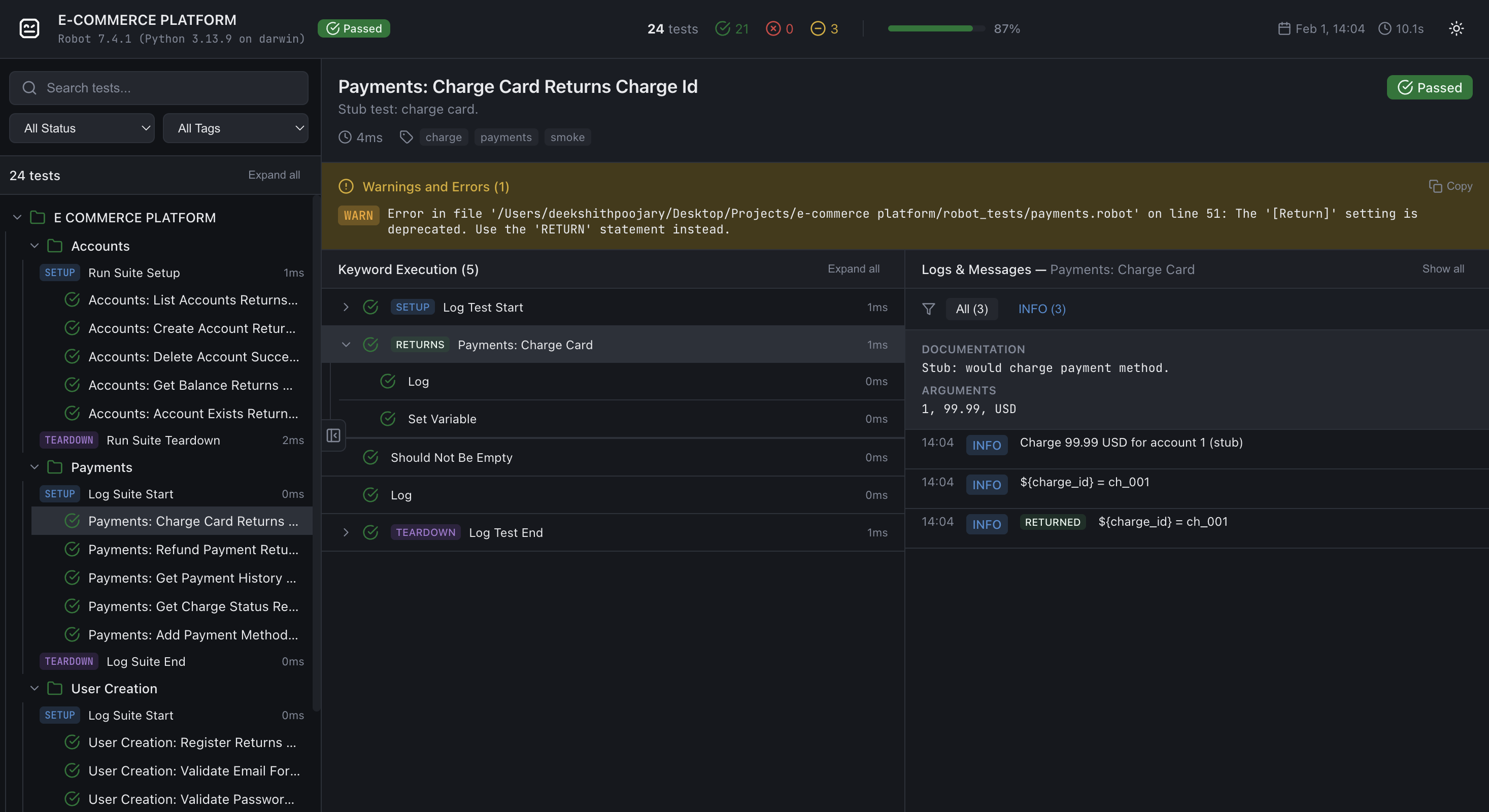
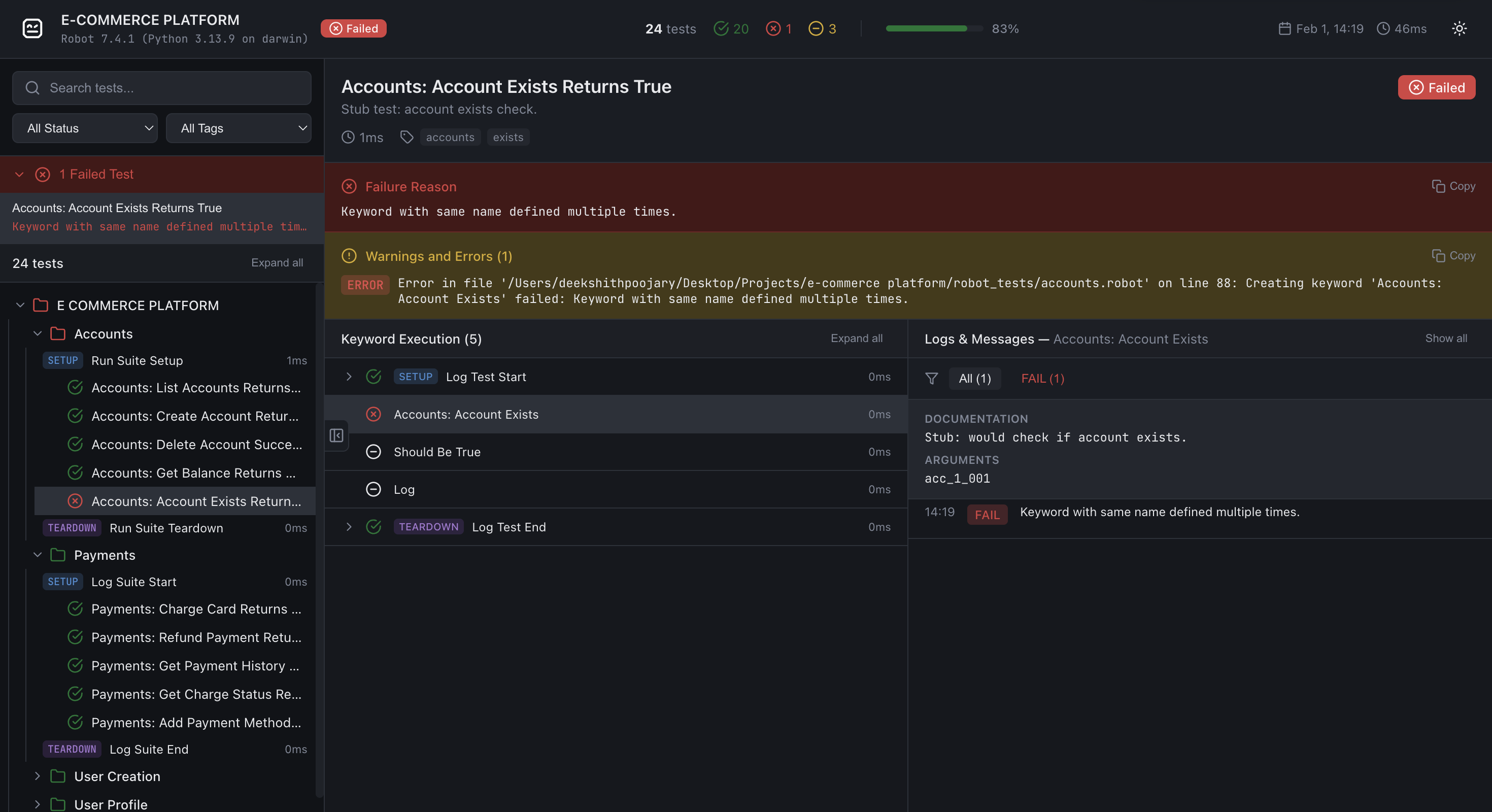
ReportLens turns Robot Framework XML output (output.xml) into a single, self-contained HTML report with a modern, interactive UI.
Sample Report
View generated reports here
Installation
pip install robotframework-reportlens
Requires Python 3.10+. No extra dependencies (stdlib only).
Usage
After running Robot Framework tests (e.g. robot test/), generate a report from output.xml:
reportlens output.xml -o report.html
Arguments:
| Argument | Description |
|---|---|
xml_file |
Path to Robot Framework XML output (e.g. output.xml) |
-o, --output |
Output HTML path (default: report.html) |
--external-data |
Store report data in reportlens-data/ and fetch it lazily (recommended for large suites) |
--compress-data |
Write gzip-compressed .json.gz files alongside every .json in reportlens-data/. Requires --external-data. The report automatically prefers .json.gz in browsers that support the DecompressionStream API, with transparent fallback to plain .json. Both formats are written so older browsers still work. |
--compress-data-only |
Like --compress-data but writes only .json.gz files — no plain .json files are written. Requires --external-data. Produces the smallest possible output (~20 MB for 10k tests vs ~650 MB uncompressed) but drops support for browsers without DecompressionStream (Chrome < 80, Firefox < 113, Safari < 16.4). |
--loglevel |
Minimum log level to include (TRACE, DEBUG, INFO, WARN, ERROR). Default: DEBUG for external-data mode, TRACE for self-contained mode. |
Examples:
# Default output (report.html in current directory)
reportlens output.xml

# Custom output path
reportlens output.xml -o docs/report.html

# External-data mode (lazy loading + smaller HTML)
reportlens output.xml -o report.html --external-data

# External-data + gzip compression (recommended for CI artifacts and large suites)
reportlens output.xml -o report.html --external-data --compress-data

# External-data + gz-only (smallest output, modern browsers only)
reportlens output.xml -o report.html --external-data --compress-data-only

# Only include INFO and above (exclude DEBUG messages)
reportlens output.xml -o report.html --loglevel INFO
Open the generated .html file in a browser.
External-data mode note When using
--external-data, open the report via a local web server (e.g.python -m http.server). Opening the file directly withfile://will show a banner explaining how to start a server.
--compress-datanote Gzip compression requires no server configuration. The browser fetches.json.gzfiles directly and decompresses them client-side using the browser-nativeDecompressionStreamAPI. Older browsers automatically fall back to the plain.jsonfiles. Both formats are always written so static hosting works without any special server settings.
--compress-data-onlynote Produces the smallest possible output by writing only.json.gzfiles (no.jsonfallback). Ideal for CI artefact storage and modern-browser dashboards. Not recommended if you need to support Chrome < 80, Firefox < 113, or Safari < 16.4.
You can also run the module directly:
python -m robotframework_reportlens output.xml -o report.html
Features
- Suite/test tree – Navigate suites and tests with pass/fail/skip counts
- Search & filters – Filter by status and tags; search test names
- External-data mode – Optional
--external-dataoutput splits the report into small JSON files fetched lazily, keeping the HTML shell tiny regardless of suite size - Compressed external data –
--compress-datawrites gzip-compressed.json.gzsiblings for every JSON file alongside the plain.jsonfiles (dual-write, full browser compatibility).--compress-data-onlyskips the plain.jsonfiles entirely — at 10k tests this reduces the data directory from ~650 MB to ~20 MB (97% smaller) with no server configuration needed. The browser decompresses files natively using theDecompressionStreamAPI;--compress-dataadds automatic fallback to plain.jsonon older browsers - Log level filtering at generation time –
--loglevelcontrols which messages are included; defaults toDEBUGin external-data mode (excludesTRACE) andTRACEin self-contained mode (includes everything) - Keyword tree – Expand SETUP, keywords, and TEARDOWN; select a keyword to scope the logs panel to that keyword only; control structures (FOR, WHILE, IF/ELSE, TRY/EXCEPT) render with distinct badges and collapsible iteration/branch children
- Logs panel – Log level filter (All, ERROR, WARN, INFO, etc.); copy button on each log message (shown on hover); HTML log messages (e.g. embedded screenshots) render inline with images opening in a new tab
- Failed-tests summary – Quick access to all failed tests from the sidebar with their error message preview
- Dark/light theme – Toggle in the report header; preference is not persisted (intentional for CI artefact consistency)
- Batch rendering – Large suites render tests in batches of 100 for smooth UI performance without blocking the main thread
- Resizable panels – Drag the sidebar edge or the keyword/logs divider to any width; sizes persist in
localStorage - Fixed layout – Same layout on all screens; zoom and scroll as needed
How it works
ReportLens reads output.xml using the Robot Framework execution result API, builds an internal ReportModel, serialises it to a compact JSON payload (empty arrays and default-value fields are omitted), then injects the result into a single self-contained HTML file built from a bundled template.
In external-data mode the JSON payload is split across small per-suite and per-test files written to a reportlens-data/ directory. The HTML shell fetches only the data it needs as the user navigates (suite files on expand, test files on click). With --compress-data every file is additionally written as a .json.gz sibling; the browser fetches the compressed variant automatically using the native DecompressionStream API and falls back to plain JSON if the API is unavailable. With --compress-data-only only .json.gz files are written, producing the smallest possible output at the cost of dropping support for very old browsers (Chrome < 80, Firefox < 113, Safari < 16.4).
No server is required for self-contained reports. External-data mode requires a static file server (any HTTP server works — python -m http.server is sufficient for local use).
Development / source layout
├── robotframework_reportlens/
│   ├── __init__.py
│   ├── cli.py           # reportlens entry point
│   ├── builder.py       # Robot Framework XML → ReportModel
│   ├── model.py         # ReportModel dataclasses
│   ├── serialize.py     # ReportModel → compact JSON dicts
│   ├── generator.py     # Orchestrates HTML + external JSON file generation
│   └── template/
│       └── template.html  # Single-file JS report renderer
├── tests/
│   ├── conftest.py        # pytest fixtures
│   ├── test_builder.py    # builder unit tests
│   ├── test_cli.py        # CLI tests
│   ├── test_generator.py  # report generator tests (incl. compression)
│   ├── test_serialize.py  # serializer tests
│   └── fixtures/          # checked-in Robot Framework output.xml files
├── robot_tests/           # Robot Framework test suites used to generate fixtures
├── pyproject.toml
└── README.md
Running tests
Install with dev dependencies and run pytest:
pip install -e ".[dev]"
pytest tests/ -v
License
Apache License 2.0 - See LICENSE file for details.
Contributing
Contributions are welcome! Please feel free to submit a Pull Request.
1 maintainer

Release files for robotframework-reportlens 0.1.8
For a detailed explanation of source distributions (sdists) and built distributions (wheels), please see the package formats documentation.
Source distribution (sdist)
| File | Size | Uploaded | |
|---|---|---|---|
| robotframework_reportlens-0.1.8.tar.gz | 59.0 kB | Details |
Built distribution (wheel)
| File | Interpreter | ABI | Platform | Reset |
|---|---|---|---|---|
| robotframework_reportlens-0.1.8-py3-none-any.whl | Python 3 | none | any | Details |
Total release size: 108.4 kB
Release files / robotframework_reportlens-0.1.8.tar.gz
| Download URL | robotframework_reportlens-0.1.8.tar.gz |
|---|---|
| Size | 59.0 kB |
| Tags | Source |
|
SHA-256 checksum How to use checksums |
3b7bbf0706a43b926145a61da9380057a92a3c7f071a27bf83a5ff1e3e3e9948
|
|
BLAKE2b-256 checksum How to use checksums |
772ba725395d6469ec3f2c14437adaec43b51b2ef3ebef79d4033c4f8e67c801
|
| Upload date | |
|
Uploaded using Trusted Publishing? What is trusted publishing? |
No |
| Uploaded via |
twine/6.2.0 CPython/3.13.9
|
Release files / robotframework_reportlens-0.1.8-py3-none-any.whl
| Download URL | robotframework_reportlens-0.1.8-py3-none-any.whl |
|---|---|
| Size | 49.4 kB |
| Tags | Python 3 |
|
SHA-256 checksum How to use checksums |
4a4ef38e2bed6cf81b6bda22526879d5585bc064cd1216e2069da5bfa00c2532
|
|
BLAKE2b-256 checksum How to use checksums |
6b7fe25bfd47f6ccb8a41df2823b79cafe53fae6f3de773ee7f4b325a1b8d06c
|
| Upload date | |
|
Uploaded using Trusted Publishing? What is trusted publishing? |
No |
| Uploaded via |
twine/6.2.0 CPython/3.13.9
|














