
Generate a modern, interactive HTML report from Robot Framework output.xml

Project description
Robotframework ReportLens





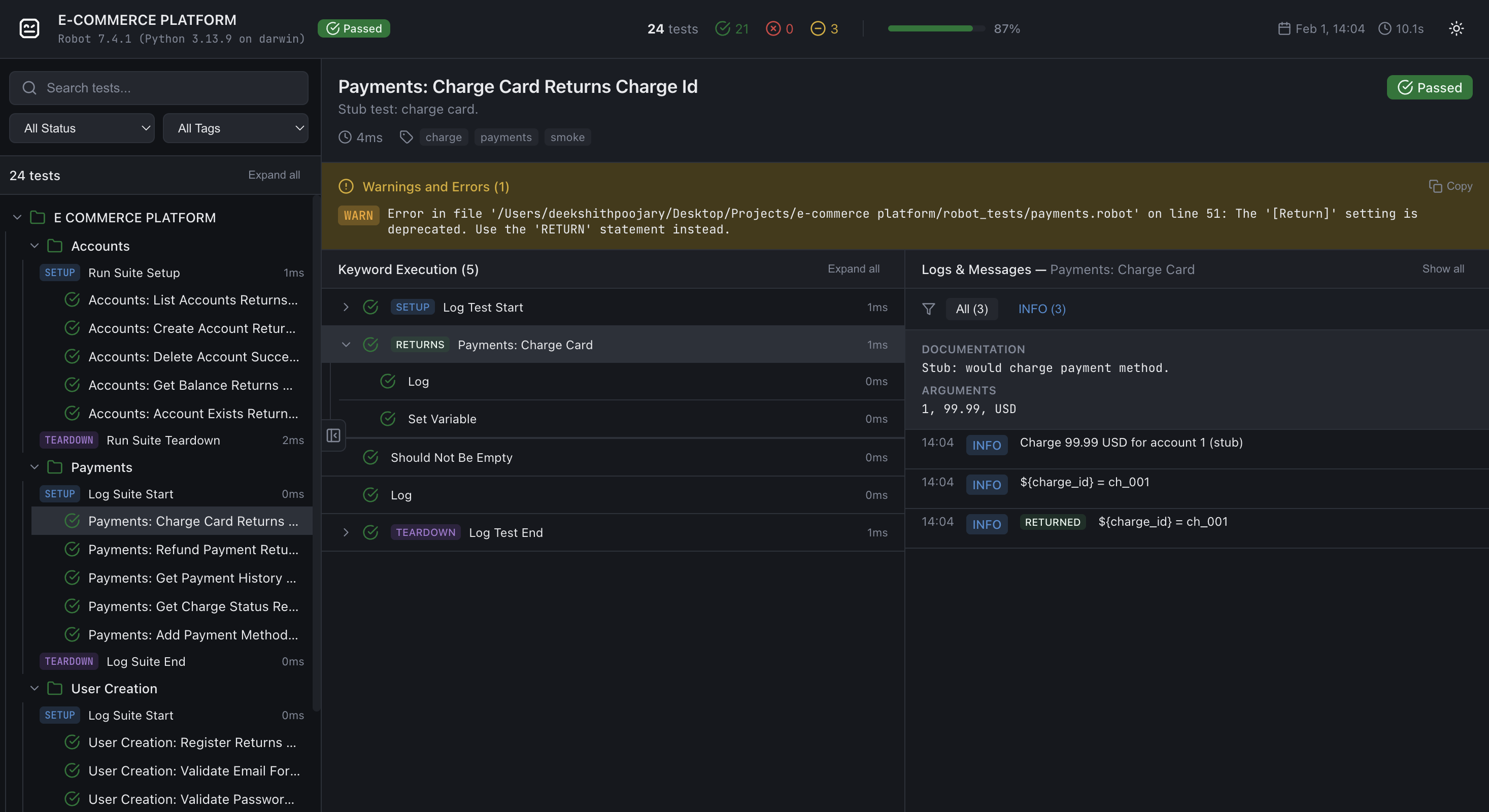
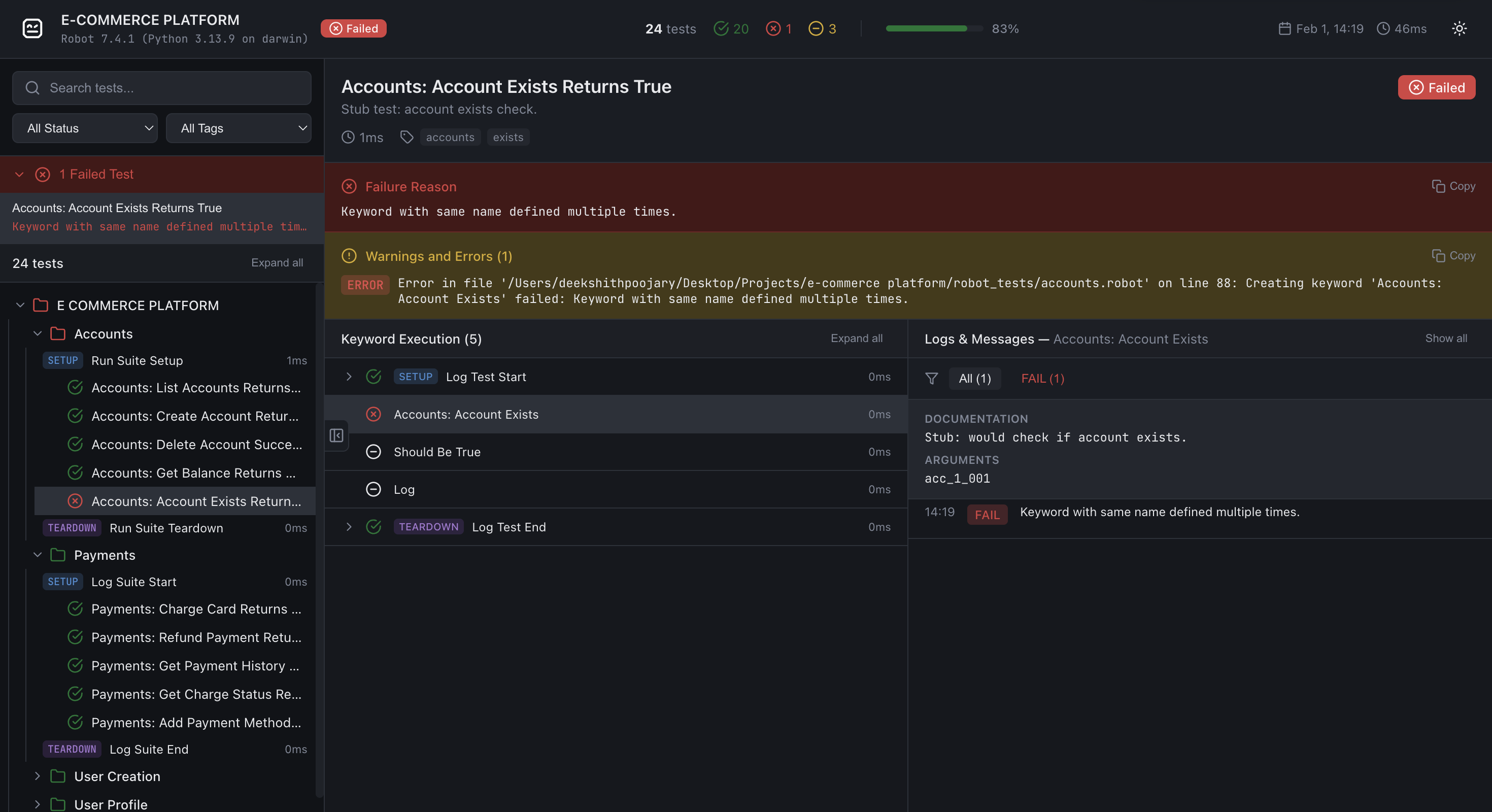
ReportLens turns Robot Framework XML output (output.xml) into a single, self-contained HTML report with a modern, interactive UI.
Sample Report
View generated reports here
Installation
pip install robotframework-reportlens
Requires Python 3.10+. No extra dependencies (stdlib only).
Usage
After running Robot Framework tests (e.g. robot test/), generate a report from output.xml:
reportlens output.xml -o report.html
Arguments:
| Argument | Description |
|---|---|
xml_file |
Path to Robot Framework XML output (e.g. output.xml) |
-o, --output |
Output HTML path (default: report.html) |
--external-data |
Store report data in reportlens-data/ and fetch it lazily (recommended for large suites) |
--compress-data |
Write gzip-compressed .json.gz files alongside every .json in reportlens-data/. Requires --external-data. The report automatically prefers .json.gz in browsers that support the DecompressionStream API, with transparent fallback to plain .json. Both formats are written so older browsers still work. |
--compress-data-only |
Like --compress-data but writes only .json.gz files — no plain .json files are written. Requires --external-data. Produces the smallest possible output (~20 MB for 10k tests vs ~650 MB uncompressed) but drops support for browsers without DecompressionStream (Chrome < 80, Firefox < 113, Safari < 16.4). |
--loglevel |
Minimum log level to include (TRACE, DEBUG, INFO, WARN, ERROR). Default: DEBUG for external-data mode, TRACE for self-contained mode. |
Examples:
# Default output (report.html in current directory)
reportlens output.xml

# Custom output path
reportlens output.xml -o docs/report.html

# External-data mode (lazy loading + smaller HTML)
reportlens output.xml -o report.html --external-data

# External-data + gzip compression (recommended for CI artifacts and large suites)
reportlens output.xml -o report.html --external-data --compress-data

# External-data + gz-only (smallest output, modern browsers only)
reportlens output.xml -o report.html --external-data --compress-data-only

# Only include INFO and above (exclude DEBUG messages)
reportlens output.xml -o report.html --loglevel INFO
Open the generated .html file in a browser.
External-data mode note When using
--external-data, open the report via a local web server (e.g.python -m http.server). Opening the file directly withfile://will show a banner explaining how to start a server.
--compress-datanote Gzip compression requires no server configuration. The browser fetches.json.gzfiles directly and decompresses them client-side using the browser-nativeDecompressionStreamAPI. Older browsers automatically fall back to the plain.jsonfiles. Both formats are always written so static hosting works without any special server settings.
--compress-data-onlynote Produces the smallest possible output by writing only.json.gzfiles (no.jsonfallback). Ideal for CI artefact storage and modern-browser dashboards. Not recommended if you need to support Chrome < 80, Firefox < 113, or Safari < 16.4.
You can also run the module directly:
python -m robotframework_reportlens output.xml -o report.html
Features
- Suite/test tree – Navigate suites and tests with pass/fail/skip counts
- Search & filters – Filter by status and tags; search test names
- External-data mode – Optional
--external-dataoutput splits the report into small JSON files fetched lazily, keeping the HTML shell tiny regardless of suite size - Compressed external data –
--compress-datawrites gzip-compressed.json.gzsiblings for every JSON file alongside the plain.jsonfiles (dual-write, full browser compatibility).--compress-data-onlyskips the plain.jsonfiles entirely — at 10k tests this reduces the data directory from ~650 MB to ~20 MB (97% smaller) with no server configuration needed. The browser decompresses files natively using theDecompressionStreamAPI;--compress-dataadds automatic fallback to plain.jsonon older browsers - Log level filtering at generation time –
--loglevelcontrols which messages are included; defaults toDEBUGin external-data mode (excludesTRACE) andTRACEin self-contained mode (includes everything) - Keyword tree – Expand SETUP, keywords, and TEARDOWN; select a keyword to scope the logs panel to that keyword only; control structures (FOR, WHILE, IF/ELSE, TRY/EXCEPT) render with distinct badges and collapsible iteration/branch children
- Logs panel – Log level filter (All, ERROR, WARN, INFO, etc.); copy button on each log message (shown on hover); HTML log messages (e.g. embedded screenshots) render inline with images opening in a new tab
- Failed-tests summary – Quick access to all failed tests from the sidebar with their error message preview
- Dark/light theme – Toggle in the report header; preference is not persisted (intentional for CI artefact consistency)
- Batch rendering – Large suites render tests in batches of 100 for smooth UI performance without blocking the main thread
- Resizable panels – Drag the sidebar edge or the keyword/logs divider to any width; sizes persist in
localStorage - Fixed layout – Same layout on all screens; zoom and scroll as needed
How it works
ReportLens reads output.xml using the Robot Framework execution result API, builds an internal ReportModel, serialises it to a compact JSON payload (empty arrays and default-value fields are omitted), then injects the result into a single self-contained HTML file built from a bundled template.
In external-data mode the JSON payload is split across small per-suite and per-test files written to a reportlens-data/ directory. The HTML shell fetches only the data it needs as the user navigates (suite files on expand, test files on click). With --compress-data every file is additionally written as a .json.gz sibling; the browser fetches the compressed variant automatically using the native DecompressionStream API and falls back to plain JSON if the API is unavailable. With --compress-data-only only .json.gz files are written, producing the smallest possible output at the cost of dropping support for very old browsers (Chrome < 80, Firefox < 113, Safari < 16.4).
No server is required for self-contained reports. External-data mode requires a static file server (any HTTP server works — python -m http.server is sufficient for local use).
Development / source layout
├── robotframework_reportlens/
│   ├── __init__.py
│   ├── cli.py           # reportlens entry point
│   ├── builder.py       # Robot Framework XML → ReportModel
│   ├── model.py         # ReportModel dataclasses
│   ├── serialize.py     # ReportModel → compact JSON dicts
│   ├── generator.py     # Orchestrates HTML + external JSON file generation
│   └── template/
│       └── template.html  # Single-file JS report renderer
├── tests/
│   ├── conftest.py        # pytest fixtures
│   ├── test_builder.py    # builder unit tests
│   ├── test_cli.py        # CLI tests
│   ├── test_generator.py  # report generator tests (incl. compression)
│   ├── test_serialize.py  # serializer tests
│   └── fixtures/          # checked-in Robot Framework output.xml files
├── robot_tests/           # Robot Framework test suites used to generate fixtures
├── pyproject.toml
└── README.md
Running tests
Install with dev dependencies and run pytest:
pip install -e ".[dev]"
pytest tests/ -v
License
Apache License 2.0 - See LICENSE file for details.
Contributing
Contributions are welcome! Please feel free to submit a Pull Request.


Download files
Download the file for your platform. If you're not sure which to choose, learn more about installing packages.
Source Distribution
Built Distribution
Filter files by name, interpreter, ABI, and platform.
If you're not sure about the file name format, learn more about wheel file names.
Copy a direct link to the current filters
File details
Details for the file robotframework_reportlens-0.1.7.tar.gz.
File metadata
- Download URL: robotframework_reportlens-0.1.7.tar.gz
- Upload date:
- Size: 59.1 kB
- Tags: Source
- Uploaded using Trusted Publishing? No
- Uploaded via: twine/6.2.0 CPython/3.13.9
File hashes
| Algorithm | Hash digest | |
|---|---|---|
| SHA256 |
2d6aa8f189f4feb3abb1edbf9934a64151711568e688cfbf4d09e7c1d5345695
|
|
| MD5 |
c8301820a28e7f46e72c789030516495
|
|
| BLAKE2b-256 |
36189a4c3ac0821c7523115a0c52efb84a0e37b2b69b83e58c871c6f2968300f
|
File details
Details for the file robotframework_reportlens-0.1.7-py3-none-any.whl.
File metadata
- Download URL: robotframework_reportlens-0.1.7-py3-none-any.whl
- Upload date:
- Size: 49.9 kB
- Tags: Python 3
- Uploaded using Trusted Publishing? No
- Uploaded via: twine/6.2.0 CPython/3.13.9
File hashes
| Algorithm | Hash digest | |
|---|---|---|
| SHA256 |
b4ad47619ff084021f2fa4618ce98c604fdb70b96ee952ab81d70113c16a1219
|
|
| MD5 |
e3e28b925c138d33f22ec6571e34070e
|
|
| BLAKE2b-256 |
48288d67d401500dfbf74165cda813c244942f8193be07ff76654ae897951cc5
|






