
Generate a modern, interactive HTML report from Robot Framework output.xml

Project description
Robotframework ReportLens





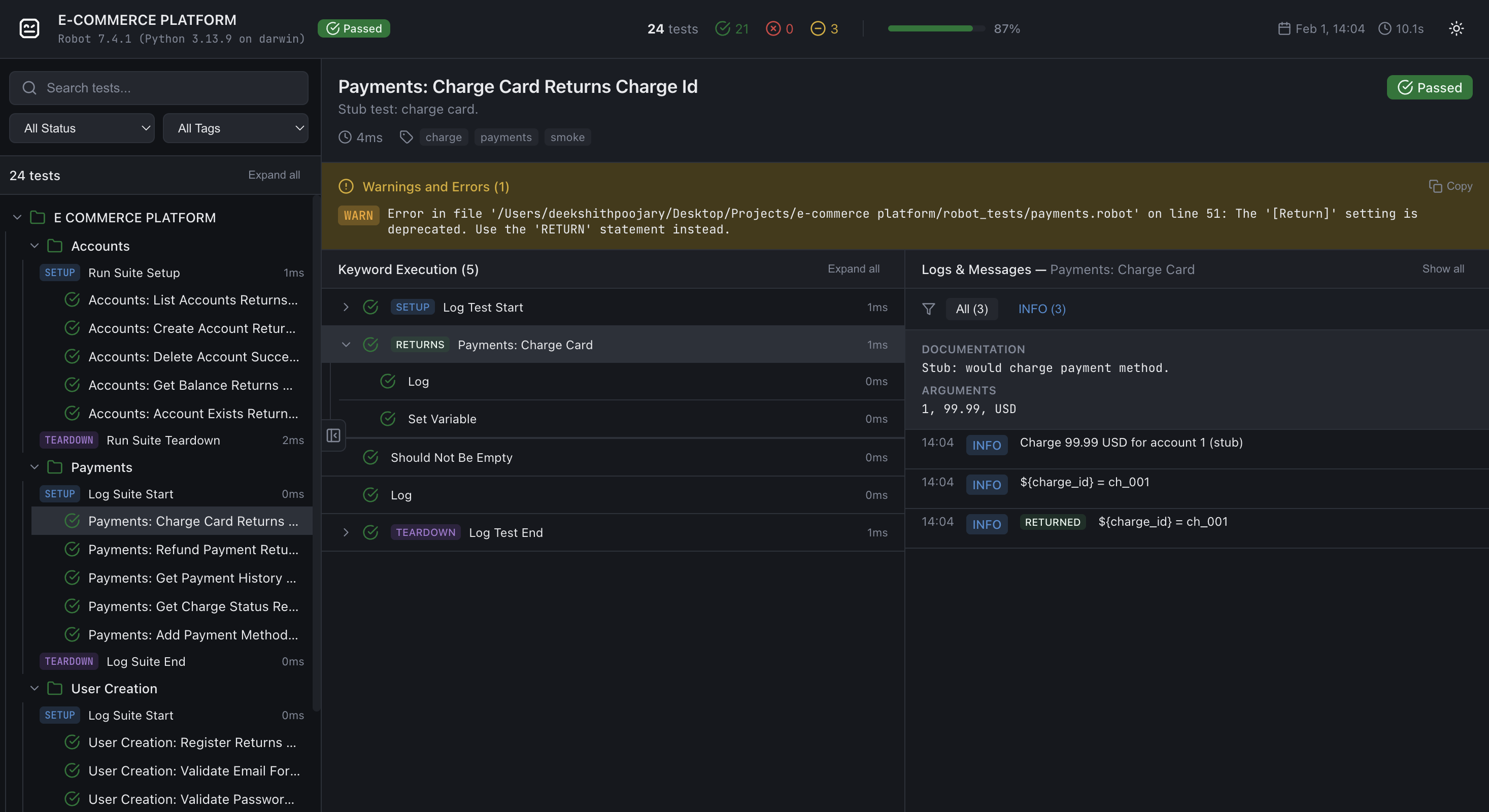
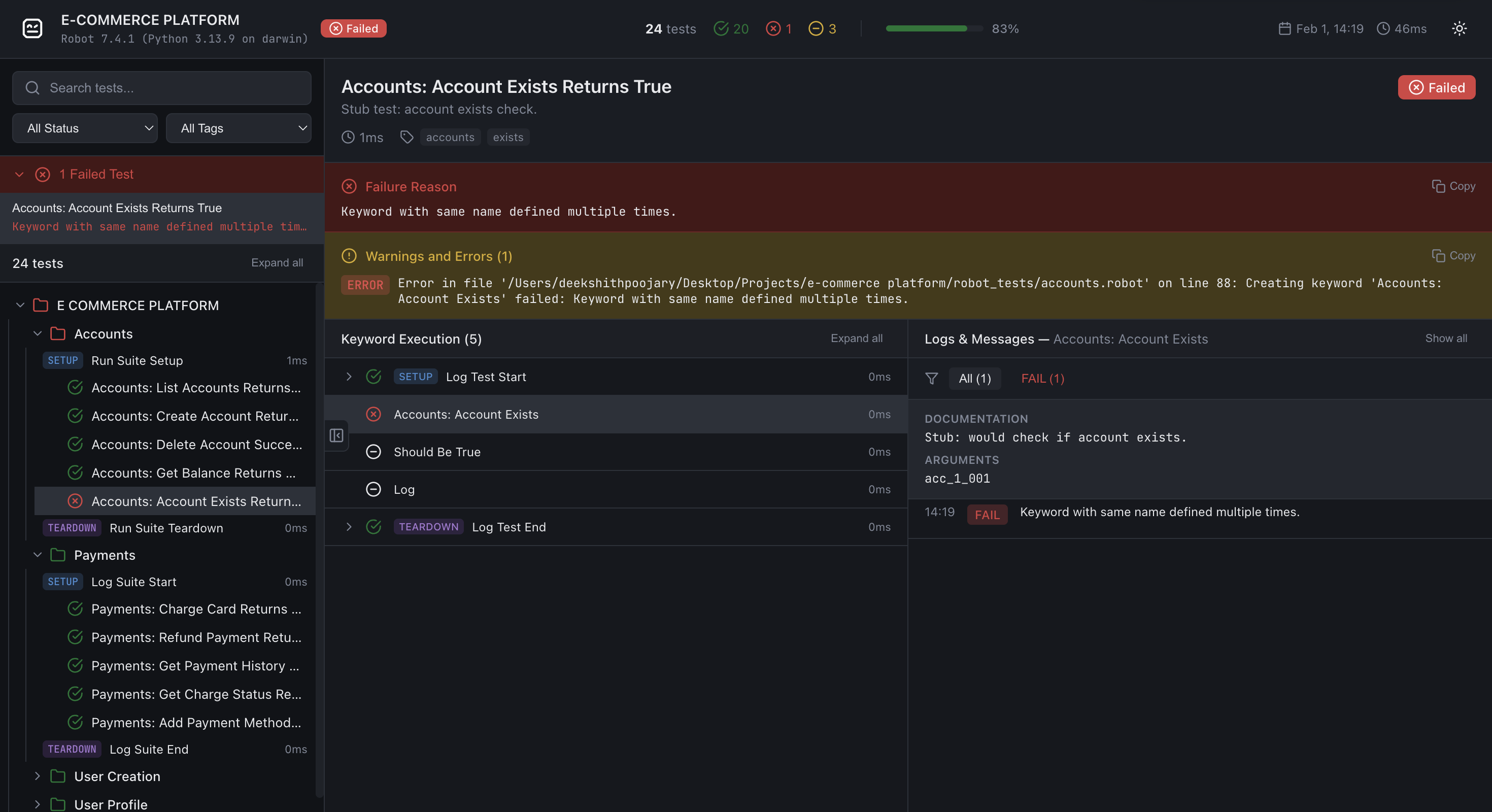
ReportLens turns Robot Framework XML output (output.xml) into a single, self-contained HTML report with a modern, interactive UI.
Sample Report
View generated reports here
Installation
pip install robotframework-reportlens
Requires Python 3.10+. No extra dependencies (stdlib only).
Usage
After running Robot Framework tests (e.g. robot test/), generate a report from output.xml:
reportlens output.xml -o report.html
Arguments:
xml_file– Path to Robot Framework XML output (e.g.output.xml)-o,--output– Output HTML path (default:report.html)
Examples:
# Default output (report.html in current directory)
reportlens output.xml

# Custom output path
reportlens output.xml -o docs/report.html
Open the generated .html file in a browser.
You can also run the module directly:
python -m robotframework_reportlens output.xml -o report.html
Features
- Suite/test tree – Navigate suites and tests with pass/fail/skip counts
- Search & filters – Filter by status and tags; search test names
- Keyword tree – Expand SETUP, keywords, and TEARDOWN; select a keyword to see its logs
- Logs panel – Log level filter (All, ERROR, WARN, INFO, etc.); copy button on each log message (shown on hover)
- Failed-tests summary – Quick access to failed tests from the sidebar
- Dark/light theme – Toggle in the report header
- Fixed layout – Same layout on all screens; zoom and scroll as needed
How it works
ReportLens reads output.xml, parses suites, tests, keywords, and messages, then builds one HTML file from a bundled template. The report is data-driven: all content is embedded as JSON and rendered by JavaScript in the browser. No server required.
Development / source layout
├── robotframework_reportlens/
│   ├── __init__.py
│   ├── cli.py           # reportlens entry point
│   ├── generator.py     # XML → report data → HTML
│   └── template/
│       └── template.html
├── tests/
│   ├── conftest.py      # pytest fixtures
│   ├── test_cli.py      # CLI tests
│   ├── test_generator.py # report generator tests
│   └── fixtures/        # minimal Robot output.xml for tests
├── pyproject.toml
└── README.md
Running tests
Install with dev dependencies and run pytest:
pip install -e ".[dev]"
pytest tests/ -v
License
Apache License 2.0 - See LICENSE file for details.
Contributing
Contributions are welcome! Please feel free to submit a Pull Request.


Download files
Download the file for your platform. If you're not sure which to choose, learn more about installing packages.
Source Distribution
Built Distribution
Filter files by name, interpreter, ABI, and platform.
If you're not sure about the file name format, learn more about wheel file names.
Copy a direct link to the current filters
File details
Details for the file robotframework_reportlens-0.1.5.tar.gz.
File metadata
- Download URL: robotframework_reportlens-0.1.5.tar.gz
- Upload date:
- Size: 42.1 kB
- Tags: Source
- Uploaded using Trusted Publishing? No
- Uploaded via: twine/6.2.0 CPython/3.13.9
File hashes
| Algorithm | Hash digest | |
|---|---|---|
| SHA256 |
cf505f594afafe31a9d7c92b85ff7a5576d3ac3034e40bdd15a5cc59c6d950fa
|
|
| MD5 |
8f4d4a322e6d73ac90221300601968f4
|
|
| BLAKE2b-256 |
86a53ecdec802e153afa10138d5ed13e56310879ae0c035ac2bde28a54a0a549
|
File details
Details for the file robotframework_reportlens-0.1.5-py3-none-any.whl.
File metadata
- Download URL: robotframework_reportlens-0.1.5-py3-none-any.whl
- Upload date:
- Size: 37.1 kB
- Tags: Python 3
- Uploaded using Trusted Publishing? No
- Uploaded via: twine/6.2.0 CPython/3.13.9
File hashes
| Algorithm | Hash digest | |
|---|---|---|
| SHA256 |
20ddf4653ca15d11a7a69d037fe732eda51f7955a748d2b71ebe6582e922b776
|
|
| MD5 |
9d5b5fc0d10a197dcb40af6d6e49210e
|
|
| BLAKE2b-256 |
1f28eecda48d37e33e203de274efa1b4be72eb90bc8b1bd769477278af9dfcd1
|






