
Robotframework ReportLens


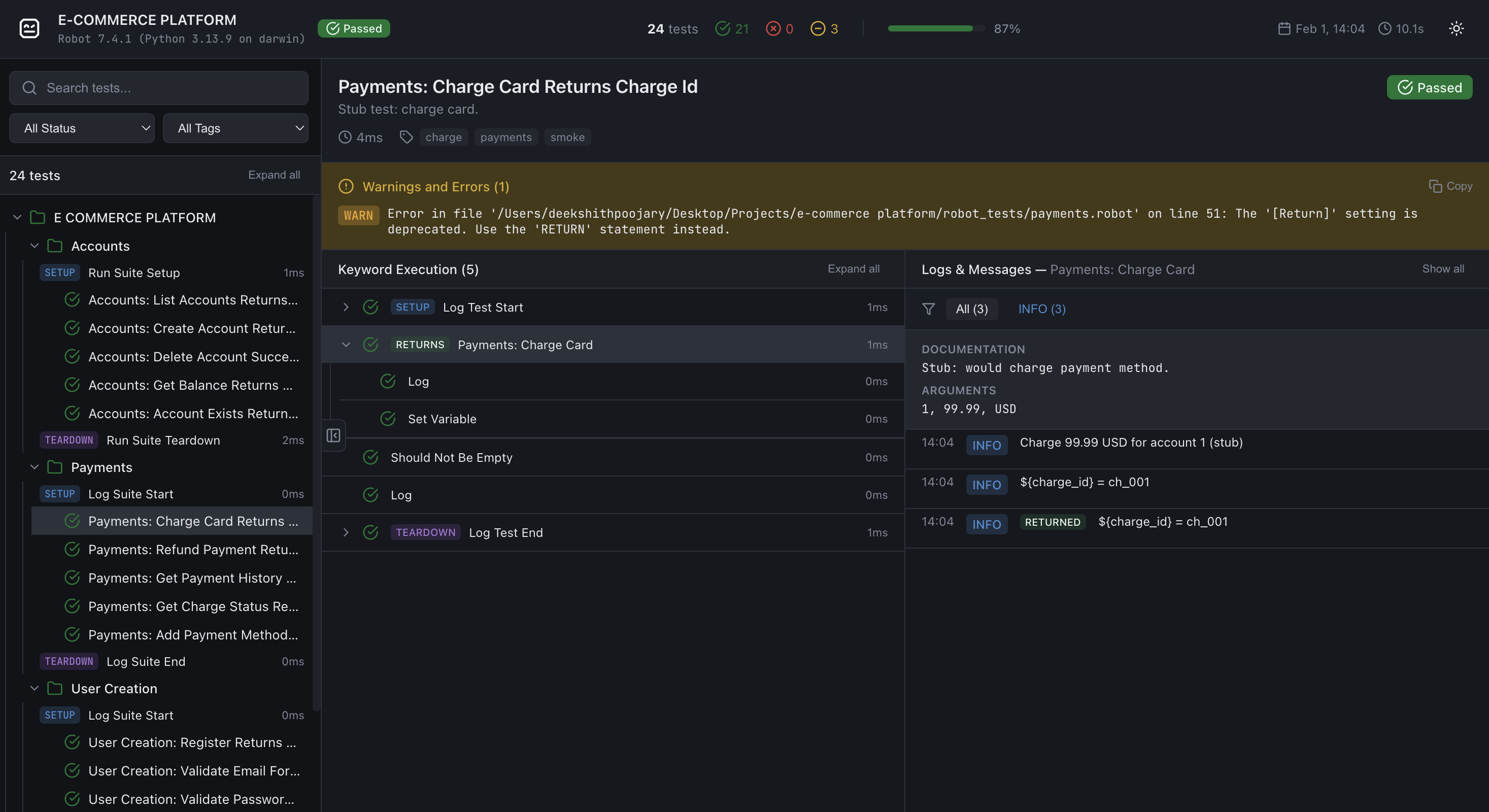
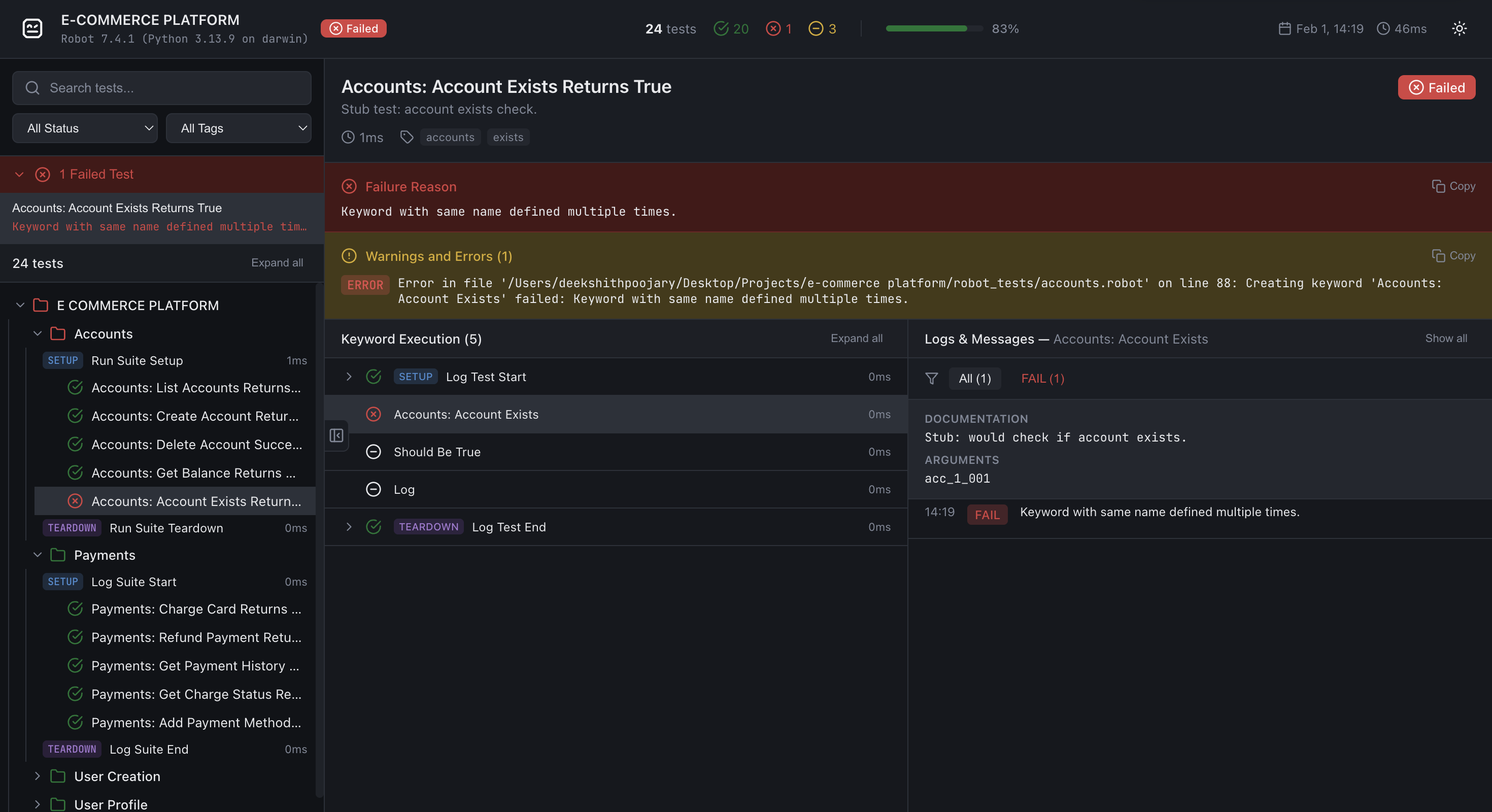
ReportLens turns Robot Framework XML output (output.xml) into a single, self-contained HTML report with a modern, interactive UI.
Sample Report
View generated reports here
Installation
pip install robotframework-reportlens
Requires Python 3.10+. No extra dependencies (stdlib only).
Usage
After running Robot Framework tests (e.g. robot test/), generate a report from output.xml:
reportlens output.xml -o report.html
Commands:
| Command | Description |
|---|---|
reportlens output.xml |
Generate a report (default) |
reportlens compare a.xml b.xml |
Diff two runs (newly failing/passing, duration deltas) |
reportlens merge a.xml b.xml … |
Merge shards/retries into one report with attempt history |
reportlens live --outdir live-report |
Prepare live listener folder + print robot --listener command |
Generate arguments:
| Argument | Description |
|---|---|
xml_file |
Path to Robot Framework XML output (e.g. output.xml) |
-o, --output |
Output HTML path (default: report.html) |
--external-data |
Store report data in reportlens-data/ and fetch it lazily (recommended for large suites) |
--compress-data |
Write only gzip-compressed .json.gz files in reportlens-data/. Requires --external-data. |
--loglevel |
Minimum log level to include (TRACE, DEBUG, INFO, WARN, ERROR). Default: DEBUG for external-data mode, TRACE for self-contained mode. |
Examples:
# Default output (report.html in current directory)
reportlens output.xml

# Custom output path
reportlens output.xml -o docs/report.html

# External-data mode (lazy loading + smaller HTML)
reportlens output.xml -o report.html --external-data

# External-data + gzip compression (writes only `.json.gz` files)
reportlens output.xml -o report.html --external-data --compress-data

# Only include INFO and above (exclude DEBUG messages)
reportlens output.xml -o report.html --loglevel INFO

# Compare two CI runs
reportlens compare baseline/output.xml current/output.xml -o diff.html

# Merge parallel shards or retries
reportlens merge shard1.xml shard2.xml -o report.html
reportlens merge attempt1.xml attempt2.xml --name RETRIES -o report.html

# Live streaming while Robot runs
reportlens live --outdir live-report
robot --listener robotframework_reportlens.listener.LiveReportListener:outdir=live-report suite.robot
# then open live-report/live.html (via python -m http.server if needed)
Open the generated .html file in a browser.
External-data mode note When using
--external-data, open the report via a local web server (e.g.python -m http.server). Opening the file directly withfile://will show a banner explaining how to start a server.
--compress-datanote Gzip compression requires no server configuration. The browser fetches.json.gzfiles directly and decompresses them client-side using the browser-nativeDecompressionStreamAPI.--compress-datawrites only.json.gzfiles; there is no plain.jsonfallback in the frontend.
You can also run the module directly:
python -m robotframework_reportlens output.xml -o report.html
Features
- Suite/test tree – Navigate suites and tests with pass/fail/skip counts
- Search & filters – Filter by status and tags; search test names
- Compare two runs – Diff baseline vs candidate
output.xmlfor newly failing/passing tests and duration deltas - Merge / rebot mode – Combine shard or retry XMLs into one report; retries keep structured attempt history in the UI
- Duration insights – Slowest tests/keywords and a simple duration histogram in the sidebar
- Live listener – Stream completed tests into a polling HTML report while Robot is still running
- External-data mode – Optional
--external-dataoutput splits the report into small JSON files fetched lazily, keeping the HTML shell tiny regardless of suite size - Compressed external data –
--compress-datawrites only gzip-compressed.json.gzfiles in external-data mode. At 10k tests this reduces the data directory from ~650 MB to ~20 MB (97% smaller) with no server configuration needed. The browser decompresses files natively using theDecompressionStreamAPI - Log level filtering at generation time –
--loglevelcontrols which messages are included; defaults toDEBUGin external-data mode (excludesTRACE) andTRACEin self-contained mode (includes everything) - Keyword tree – Expand SETUP, keywords, and TEARDOWN; select a keyword to scope the logs panel to that keyword only; control structures (FOR, WHILE, IF/ELSE, TRY/EXCEPT) render with distinct badges and collapsible iteration/branch children
- Logs panel – Log level filter (All, ERROR, WARN, INFO, etc.); copy button on each log message (shown on hover); HTML log messages (e.g. embedded screenshots) render inline with images opening in a new tab
- Failed-tests summary – Quick access to all failed tests from the sidebar with their error message preview
- Dark/light theme – Toggle in the report header; preference is not persisted (intentional for CI artefact consistency)
- Batch rendering – Large suites render tests in batches of 100 for smooth UI performance without blocking the main thread
- Resizable panels – Drag the sidebar edge or the keyword/logs divider to any width; sizes persist in
localStorage - Fixed layout – Same layout on all screens; zoom and scroll as needed
How it works
ReportLens reads output.xml using the Robot Framework execution result API, builds an internal ReportModel, serialises it to a compact JSON payload (empty arrays and default-value fields are omitted), then injects the result into a single self-contained HTML file built from a bundled template.
In external-data mode the JSON payload is split across small per-suite and per-test files written to a reportlens-data/ directory. The HTML shell fetches only the data it needs as the user navigates (suite files on expand, test files on click). With --compress-data, files are written only as .json.gz; the browser fetches and decompresses them using the native DecompressionStream API, with no plain .json fallback in the frontend.
No server is required for self-contained reports. External-data mode requires a static file server (any HTTP server works — python -m http.server is sufficient for local use).
Development / source layout
├── robotframework_reportlens/
│   ├── __init__.py
│   ├── cli.py           # reportlens entry point (generate/compare/merge/live)
│   ├── builder.py       # Robot Framework XML → ReportModel
│   ├── compare.py       # Diff two ReportModels
│   ├── merge.py         # Merge shards/retries with attempt history
│   ├── insights.py      # Duration insights (slowest + histogram)
│   ├── listener.py      # LiveReportListener for streaming runs
│   ├── model.py         # ReportModel dataclasses
│   ├── serialize.py     # ReportModel → compact JSON dicts
│   ├── generator.py     # Orchestrates HTML + external JSON file generation
│   └── template/
│       └── template.html  # Single-file JS report renderer
├── tests/
│   ├── conftest.py        # pytest fixtures
│   ├── test_*.py          # unit/integration tests
│   └── fixtures/          # checked-in Robot Framework output.xml files
├── robot_tests/           # Robot Framework test suites used to generate fixtures
├── pyproject.toml
└── README.md
Running tests
Install with dev dependencies and run pytest:
pip install -e ".[dev]"
pytest tests/ -v
License
Apache License 2.0 - See LICENSE file for details.
Contributing
Contributions are welcome! Please feel free to submit a Pull Request.
1 maintainer

Metadata
1 maintainer
Release files for robotframework-reportlens 0.1.9
For a detailed explanation of source distributions (sdists) and built distributions (wheels), please see the package formats documentation.
Source distribution (sdist)
| File | Size | Uploaded | Provenance | Actions |
|---|---|---|---|---|
| robotframework_reportlens-0.1.9.tar.gz | 88.9 kB | Without provenance | Details for robotframework_reportlens-0.1.9.tar.gz |
Built distribution (wheel)
| File | Interpreter | ABI | Platform | Actions Reset |
|---|---|---|---|---|
| robotframework_reportlens-0.1.9-py3-none-any.whl | Python 3 | none | any | Details for robotframework_reportlens-0.1.9-py3-none-any.whl |
Total release size: 163.2 kB
Release files / robotframework_reportlens-0.1.9.tar.gz
| Download URL | robotframework_reportlens-0.1.9.tar.gz |
|---|---|
| Size | 88.9 kB |
| Tags | Source |
|
SHA-256 checksum How to use checksums |
a19393a0a69d810701fae56cf0da4ad4fb51a927b6c14236bc87aec7ef4c4b33
|
|
BLAKE2b-256 checksum How to use checksums |
3f972f755945cacc2baa3cbab3fd5e56321e5440d158a16360d618487cb84131
|
| Upload date | |
|
Uploaded using Trusted Publishing? What is trusted publishing? |
No |
| Uploaded via |
twine/6.2.0 CPython/3.13.15
|
Release files / robotframework_reportlens-0.1.9-py3-none-any.whl
| Download URL | robotframework_reportlens-0.1.9-py3-none-any.whl |
|---|---|
| Size | 74.4 kB |
| Tags | Python 3 |
|
SHA-256 checksum How to use checksums |
41c6c9cf135a8f1b3bec29f853790e3688bfe5b7888079d960af50d39fae9f3a
|
|
BLAKE2b-256 checksum How to use checksums |
f3d8177162f89c18672b7169aef882b546937b6c1b2938013fd3c7f3b3b55368
|
| Upload date | |
|
Uploaded using Trusted Publishing? What is trusted publishing? |
No |
| Uploaded via |
twine/6.2.0 CPython/3.13.15
|
Security for robotframework-reportlens 0.1.9
Provenance
Provenance describes where a file came from. On PyPI, provenance is shared via attestations, which provide a verifiable record of the build or publishing details. View details, limitations and caveats.
No provenance found
None of the files in this release were uploaded with provenance metadata.
A note on package security
PyPI is a repository for distributing packages, not a service for auditing them. While third-party security researchers and our staff do their best to detect and remove malicious packages, PyPI cannot guarantee the quality, security or suitability of any given package.
To learn more about protecting yourself from malicious actors, visit our package security documentation.














