

rofi-menu
Rofi allows defining custom modes (see the spec).
This lib is a reference implementation with some extra "sugar".
Features:
- simple menu definition via python
- extendable
- async in first place
- allows keeping state during rofi session
Simple demo:

Requirements
- rofi >= 1.5.4
- python >= 3.6
Installation
Using pip
$ pip install rofi-menu
Example
Create a python script which will be used for rofi mode
e.g. example.py (don't forget to mark it as executable -- chmod +x ./example.py)
Assuming you installed rofi-menu into a virtual environment (let's say it's ~/.pyenv/versions/rofi/bin/python).
Make sure shebang points to the right python executable, e.g. #!/home/user/pyenv/versions/rofi/bin/python.
#!/home/user/.pyenv/versions/rofi/bin/python
import rofi_menu


class ProjectsMenu(rofi_menu.Menu):
    prompt = "Projects"
    items = [
        rofi_menu.BackItem(),
        rofi_menu.ShellItem("Project 1", "code-insiders ~/Develop/project1"),
        rofi_menu.ShellItem("Project 2", "code-insiders ~/Develop/project2"),
        rofi_menu.ShellItem("Project X", "code-insiders ~/Develop/projectx"),
    ]


class LogoutMenu(rofi_menu.Menu):
    prompt = "Logout"
    items = [
        rofi_menu.ShellItem("Yes", "i3-msg exit", flags={rofi_menu.FLAG_STYLE_URGENT}),
        rofi_menu.ExitItem("No", flags={rofi_menu.FLAG_STYLE_ACTIVE}),
    ]


class MainMenu(rofi_menu.Menu):
    prompt = "menu"
    items = [
        rofi_menu.TouchpadItem(),
        rofi_menu.NestedMenu("Projects >", ProjectsMenu()),
        rofi_menu.ShellItem(
            "Downloads (show size)", "du -csh ~/Downloads", show_output=True
        ),
        rofi_menu.NestedMenu("Second monitor", rofi_menu.SecondMonitorMenu()),
        rofi_menu.ShellItem("Lock screen", "i3lock -i ~/.config/i3/bg.png"),
        rofi_menu.ShellItem("Sleep", "systemctl suspend"),
        rofi_menu.NestedMenu("Logout", LogoutMenu()),
    ]


if __name__ == "__main__":
    rofi_menu.run(MainMenu(), rofi_version="1.6")  # change to 1.5 if you use older rofi version
Run it as:
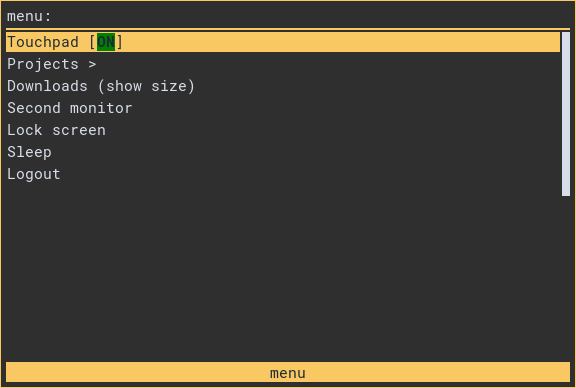
$ rofi -modi mymenu:/path/to/example.py -show mymenu -show-icons
It'll result in
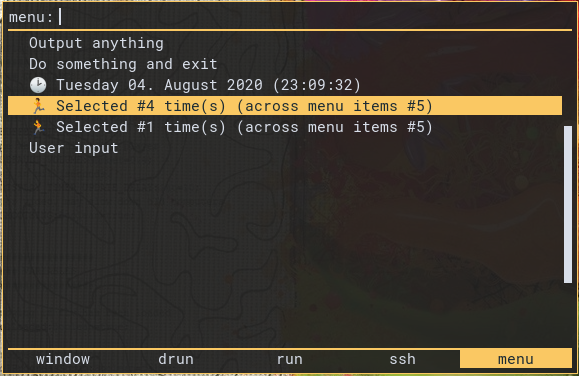
Advanced example
#!/home/user/pyenv/versions/rofi/bin/python
import asyncio
from datetime import datetime
import os

import rofi_menu


class OutputSomeTextItem(rofi_menu.Item):
    """Output arbitrary text on selection"""
    async def on_select(self, meta):
        # any python code
        await asyncio.sleep(0.1)
        return rofi_menu.Operation(rofi_menu.OP_OUTPUT, (
            "💢 simple\n"
            "💥 multi-\n"
            "💫 <b>line</b>\n"
            "💣 <i>text</i>\n"
        ))


class DoAndExitItem(rofi_menu.Item):
    """Do something and exit"""
    async def on_select(self, meta):
        os.system('notify-send msg')
        return rofi_menu.Operation(rofi_menu.OP_EXIT)


class CurrentDatetimeItem(rofi_menu.Item):
    """Show current datetime inside menu item"""
    async def load(self, meta):
        self.state = datetime.now().strftime('%A %d. %B %Y (%H:%M:%S)')

    async def render(self, meta):
        return f"🕑 {self.state}"


class CounterItem(rofi_menu.Item):
    """Increment counter on selection"""
    async def load(self, meta):
        await super().load(meta)
        self.state = self.state or 0
        meta.session.setdefault("counter_total", 0)

    async def on_select(self, meta):
        self.state += 1
        meta.session["counter_total"] += 1
        return await super().on_select(meta)

    async def render(self, meta):
        per_menu_item = self.state
        total = meta.session["counter_total"]
        return f"🏃 Selected #{per_menu_item} time(s) (across menu items #{total})"


class HandleUserInputMenu(rofi_menu.Menu):
    allow_user_input = True

    class CustomItem(rofi_menu.Item):
        async def render(self, meta):
            entered_text = meta.session.get("text", "[ no text ]")
            return f"You entered: {entered_text}"

    items = [CustomItem()]

    async def on_user_input(self, meta):
        meta.session['text'] = meta.user_input
        return rofi_menu.Operation(rofi_menu.OP_REFRESH_MENU)


main_menu = rofi_menu.Menu(
    prompt="menu",
    items=[
        OutputSomeTextItem("Output anything"),
        DoAndExitItem("Do something and exit"),
        CurrentDatetimeItem(),
        CounterItem(),
        CounterItem(),
        rofi_menu.NestedMenu("User input", HandleUserInputMenu()),
    ],
)


if __name__ == "__main__":
    rofi_menu.run(main_menu)
TODO
- documentation of API
- examples
- tests
1 maintainer

Metadata
1 maintainer
Release files for rofi-menu 0.6
For a detailed explanation of source distributions (sdists) and built distributions (wheels), please see the package formats documentation.
Source distribution (sdist)
| File | Size | Uploaded | Provenance | Actions |
|---|---|---|---|---|
| rofi-menu-0.6.tar.gz | 12.3 kB | Without provenance | Details for rofi-menu-0.6.tar.gz |
Built distribution (wheel)
| File | Interpreter | ABI | Platform | Actions Reset |
|---|---|---|---|---|
| rofi_menu-0.6-py3-none-any.whl | Python 3 | none | any | Details for rofi_menu-0.6-py3-none-any.whl |
Total release size: 25.8 kB
Security for rofi-menu 0.6
Provenance
Provenance describes where a file came from. On PyPI, provenance is shared via attestations, which provide a verifiable record of the build or publishing details. View details, limitations and caveats.
No provenance found
None of the files in this release were uploaded with provenance metadata.
A note on package security
PyPI is a repository for distributing packages, not a service for auditing them. While third-party security researchers and our staff do their best to detect and remove malicious packages, PyPI cannot guarantee the quality, security or suitability of any given package.
To learn more about protecting yourself from malicious actors, visit our package security documentation.














