
Rogallo







Introduction
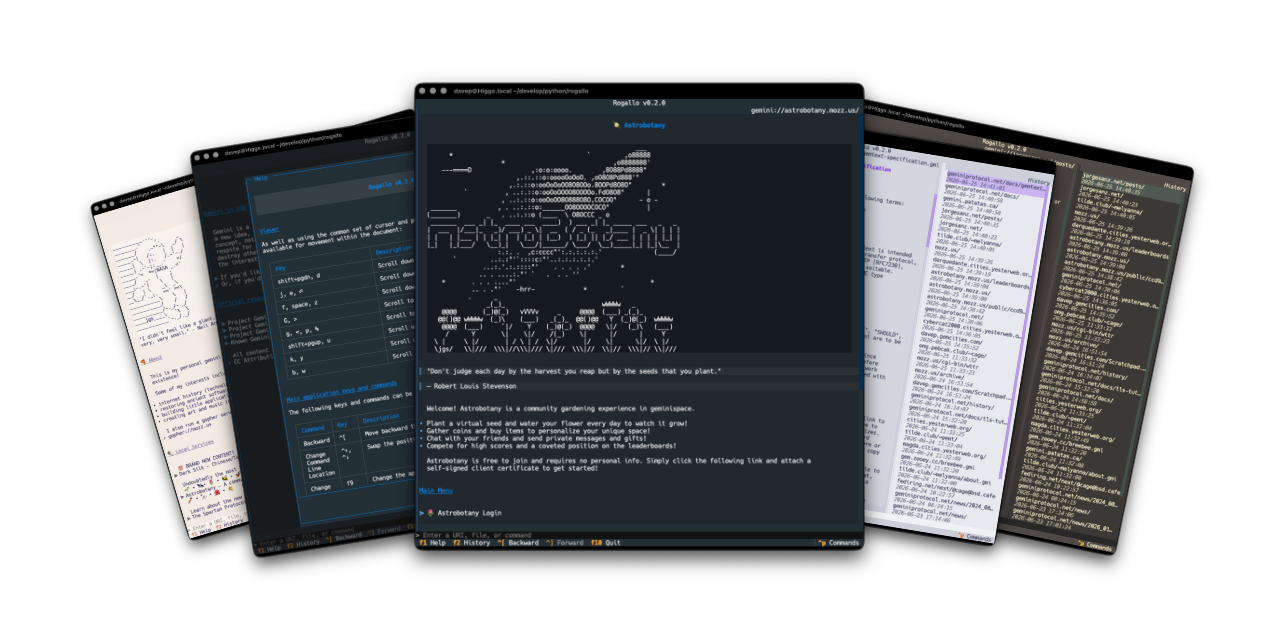
Rogallo is a terminal-based client for browsing Geminispace, Spartanspace, Gopherspace, Nexspace, and Fingerspace. Its key features include:
- Support for the
gemini,spartan,gopher,nexandfingerprotocols - Bookmarks management with search
- Location history tracking with search
- Backward and forward page navigation
- Copy-to-clipboard support for URIs or page content
- Configurable home page
- Full mouse navigation and interaction support
- Built-in source viewer
- Context-sensitive help screens
- Command palette for quick command discovery and execution
- Automatic handoff of unknown MIME types to the operating system
- Optional rendering (on by default) of ANSI escape sequences in pages
- Local Gemtext file viewing
- Built-in theme selection, plus support for user-supplied custom UI themes
- Persistent configuration across sessions
- Fully responsive layout that adjusts dynamically to terminal resizing
- Cross-platform support for macOS, GNU/Linux, Windows, and other operating systems running modern Python
Key features for Gemini protocol support include:
- User input handling (
1xresponses), including masked inputs for sensitive fields- Optional external text editor integration for composing inputs
- In-application generation of self-signed client certificates, with persistent per-capsule management
- Redirection handling (
3xresponses) - Flexible capsule certificate verification for both CA-signed and self-signed certificates
Installing
uv
The application can be installed using uv:
uv tool install rogallo
If you don't have uv installed you can use uvx.sh to
perform the installation. For GNU/Linux or macOS or similar:
curl -LsSf uvx.sh/rogallo/install.sh | sh
or on Windows:
powershell -ExecutionPolicy ByPass -c "irm https://uvx.sh/rogallo/install.ps1 | iex"
Once installed run the rogallo command.
pipx
The application can be installed using pipx:
pipx install rogallo
File locations
Rogallo stores files in an rogallo directory within both $XDG_DATA_HOME
and
$XDG_CONFIG_HOME.
If you wish to fully remove anything to do with Rogallo you will need to
remove those directories too.
Expanding for the common locations, the files normally created are:
~/.cache/rogallo/*-- The document cache.~/.config/rogallo/configuration.json-- The configuration file.~/.local/share/rogallo/*-- The locally-held data.
Getting help
If you need help, or have any ideas, please feel free to raise an issue or start a discussion.
TODO
See the TODO tag in issues to see what I'm planning.
1 maintainer

Release files for rogallo 2.2.0
For a detailed explanation of source distributions (sdists) and built distributions (wheels), please see the package formats documentation.
Source distribution (sdist)
| File | Size | Uploaded | |
|---|---|---|---|
| rogallo-2.2.0.tar.gz | 70.9 kB | Details |
Built distribution (wheel)
| File | Interpreter | ABI | Platform | Reset |
|---|---|---|---|---|
| rogallo-2.2.0-py3-none-any.whl | Python 3 | none | any | Details |
Total release size: 186.7 kB
Release files / rogallo-2.2.0.tar.gz
| Download URL | rogallo-2.2.0.tar.gz |
|---|---|
| Size | 70.9 kB |
| Tags | Source |
|
SHA-256 checksum How to use checksums |
393e20ad20479e5801d4b1f2fc6451112afa01be797a56360c1e68b37f9a5252
|
|
BLAKE2b-256 checksum How to use checksums |
3cef7bdd90c0a820273f9071006f9dd912456edcf23f3acb769801441f002bae
|
| Upload date | |
|
Uploaded using Trusted Publishing? What is trusted publishing? |
No |
| Uploaded via |
uv/0.12.9 {"installer":{"name":"uv","version":"0.12.9","subcommand":["publish"]},"python":null,"implementation":{"name":null,"version":null},"distro":{"name":"macOS","version":null,"id":null,"libc":null},"system":{"name":null,"release":null},"cpu":null,"openssl_version":null,"setuptools_version":null,"rustc_version":null,"ci":null}
|
Release files / rogallo-2.2.0-py3-none-any.whl
| Download URL | rogallo-2.2.0-py3-none-any.whl |
|---|---|
| Size | 115.8 kB |
| Tags | Python 3 |
|
SHA-256 checksum How to use checksums |
b376d27407d7145f25d2acb708f85cc8ce630e65727b80470fd7890a174bc3f1
|
|
BLAKE2b-256 checksum How to use checksums |
9f932aaea59a56b2d82cf9b4635b570823f652cb637711246e6a7533165a9b23
|
| Upload date | |
|
Uploaded using Trusted Publishing? What is trusted publishing? |
No |
| Uploaded via |
uv/0.12.9 {"installer":{"name":"uv","version":"0.12.9","subcommand":["publish"]},"python":null,"implementation":{"name":null,"version":null},"distro":{"name":"macOS","version":null,"id":null,"libc":null},"system":{"name":null,"release":null},"cpu":null,"openssl_version":null,"setuptools_version":null,"rustc_version":null,"ci":null}
|














