
Pressure by Ruby Luminescence (PRL) software to determine pressure in diamond anvil cell experiments

Project description
Smile
Smile: simple tool for microscope USB camera visualization
Contacts
- Yiuri Garino: yiuri.garino@cnrs.fr
Installation: setting up the software for the first time
-
Download and install Anaconda https://docs.anaconda.com/anaconda/install/
-
from anaconda prompt (windows) or terminal (Ubuntu & MAC) add conda-forge channel
conda config --add channels conda-forge
conda config --set channel_priority strict
- create virtual environment with name "Smile" and the necessary libraries
conda create -n Smile spyder spyder-kernels configparser opencv pillow ghostscript
- activate the virtual environment with
conda activate Smile
- launch spyder with
spyder
-
open file Smile_Init.py and run the program. This script will search for USB camera and it will create a default Init_id_n.txt file for each USB camera found, with n the camera id number. Choose the desired camera and rename the corresponding file (i.e. Init_id_0.txt) to Init.txt
-
open file Smile.py and run the program.
Requirements
In case of direct use:
conda install -c conda-forge ghostscript opencv
conda install -c anaconda pillow configparser
Init.txt File
Example:
[Camera]
camera_id = 0

[Graphic]
grid_step = 100
grid_width = 2
grid_color = #000000
line_width = 2
line_color = #ffffff

[Zoom]
x 1 = 1
x 2 = 100
x 4 = 10000

[Settings]
width = 1280.0
height = 720.0
brightness = 0
contrast = 32.0
saturation = 64.0
hue = 0.0
gain = -1.0
To change the pixel to µm conversion ration, change the values in the second colums of the [Zoom] section
- 1st column: "x 1" is the text visualized in the ComboBox
- 2nd column: "1" is the pixel to µm conversion ratio associated to the selction "x 1"
ATTENTION: to update the new values it is necessary to save the Init.txt file AND restart the program
Basic Usage
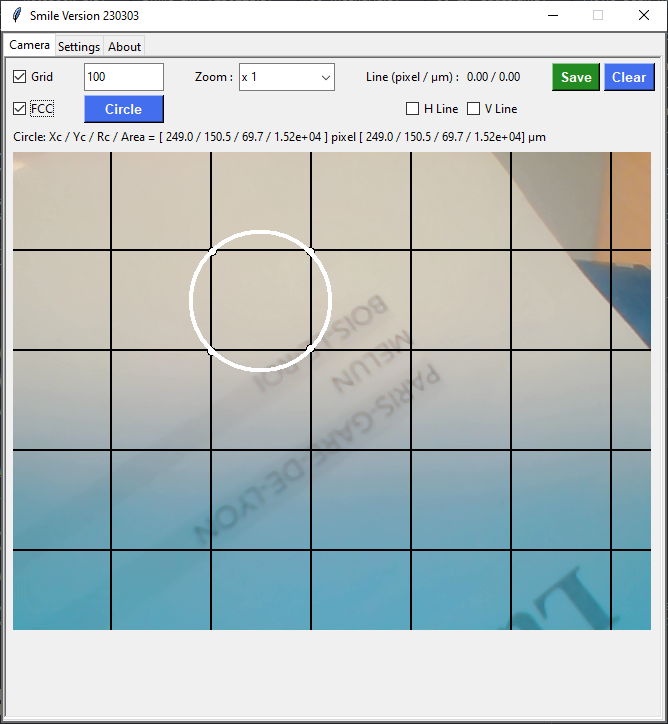
A screenshot of the Camera page is shown here below:
The Grid button shows/hides the grid spaced by the number of pixels displayed to its right.
The Zoom combo box selects the associated pizel to µm conversion
To the right of the Line (pixel/µm) label the size of the drawn line is shown
Below the Line (pixel/µm) label there are the H Line and the V Line buttons used to force the line to be horizontal or vertical
If the FCC checkbutton is not selected the left mouse button draws a line
If the FCC check button is selected, the left mouse button will select and draw the data points and the Circle button will fit and draw a circle on the data points
Below the Circle button the position of the Xc Yc center, the radius Rc and the area of the circle will be displayed in both pixels and µm depending on the zoom selection
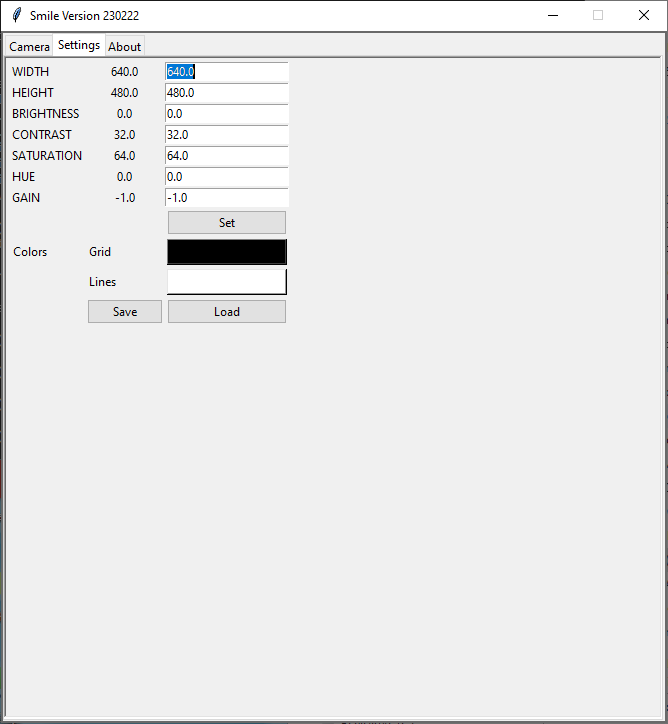
A screenshot of the Settings page is shown here below:
Compiled .exe
A version compiled using pyinstaller under Windos 11 can be found from this link
License
Copyright (c) 2022-2023 Yiuri Garino
License: GPLv3
This program is free software: you can redistribute it and/or modify it under the terms of the GNU General Public License as published by the Free Software Foundation, either version 3 of the License, or (at your option) any later version. This program is distributed in the hope that it will be useful, but WITHOUT ANY WARRANTY; without even the implied warranty of MERCHANTABILITY or FITNESS FOR A PARTICULAR PURPOSE. See the GNU General Public License for more details. You should have received a copy of the GNU General Public License along with this program. If not, see https://www.gnu.org/licenses/.


Download files
Download the file for your platform. If you're not sure which to choose, learn more about installing packages.
Source Distribution
Built Distribution
Filter files by name, interpreter, ABI, and platform.
If you're not sure about the file name format, learn more about wheel file names.
Copy a direct link to the current filters
File details
Details for the file rubycond-0.1.0.tar.gz.
File metadata
- Download URL: rubycond-0.1.0.tar.gz
- Upload date:
- Size: 242.8 kB
- Tags: Source
- Uploaded using Trusted Publishing? No
- Uploaded via: poetry/1.7.1 CPython/3.12.0 Linux/6.5.0-17-generic
File hashes
| Algorithm | Hash digest | |
|---|---|---|
| SHA256 |
d401ed563863cbf084054a261b86b9a51a6f9842bdd6a049b7681e17ae9ad501
|
|
| MD5 |
fd7e0766d490e45bc5f81afeffc90961
|
|
| BLAKE2b-256 |
fac1f3f25328b50d72f03f936e5d0ff76203b1ba1d16b80f61e75062d1e450bd
|
File details
Details for the file rubycond-0.1.0-py3-none-any.whl.
File metadata
- Download URL: rubycond-0.1.0-py3-none-any.whl
- Upload date:
- Size: 244.3 kB
- Tags: Python 3
- Uploaded using Trusted Publishing? No
- Uploaded via: poetry/1.7.1 CPython/3.12.0 Linux/6.5.0-17-generic
File hashes
| Algorithm | Hash digest | |
|---|---|---|
| SHA256 |
b169869a70bad30862fd502b0913fc5b32caf226f3a7259737c75cbea5398a30
|
|
| MD5 |
33f5608503475d1c3e72ed3033f36bd8
|
|
| BLAKE2b-256 |
8d77b58cd42a2a596a31187a7d81c8d6b0b55448266e461349e8b81ae019c7d4
|






