
Python software to determine pressure in diamond anvil cell experiments by Ruby and Samarium luminescence

Project description
Rubycond
Python software to determine pressure in diamond anvil cell experiments by Ruby and Samarium luminescence
Manual
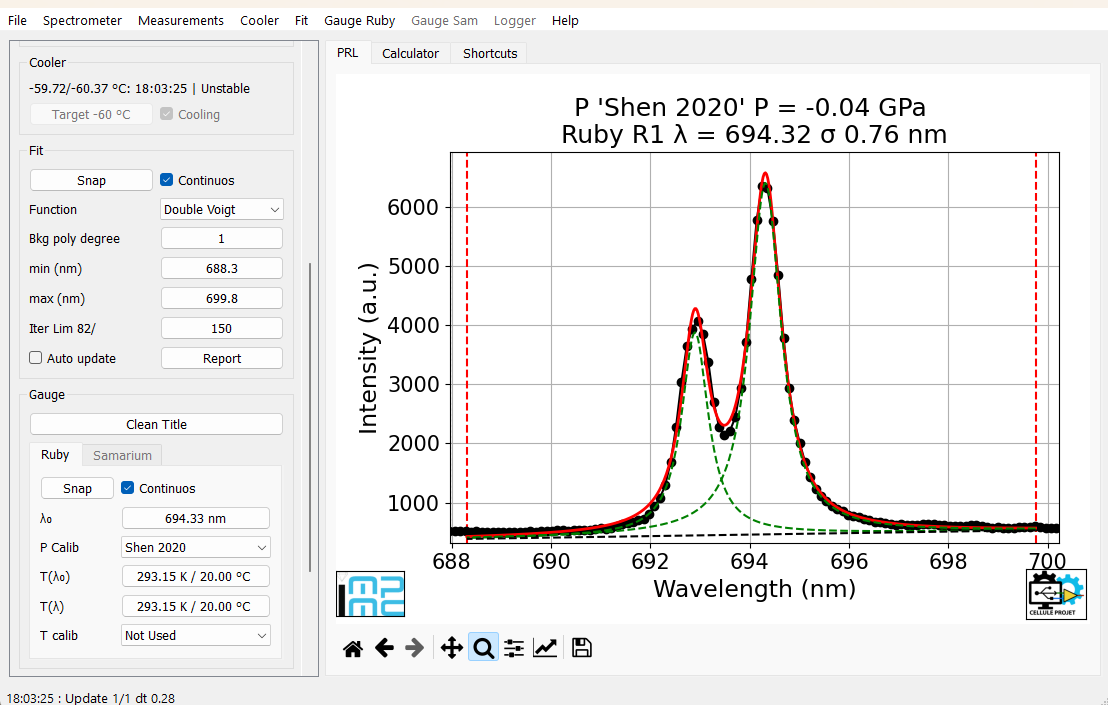
[!IMPORTANT] All controls are available both in the left sidebar and within the menus, with the exception of the items in the Help menu, which are only accessible through the menu bar. The left sidebar can be hidden to maximize the size of the figures.
File
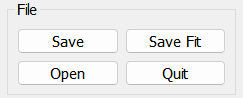
- Save
- Save the data in txt, csv and npy format (wavelenghts, intensity), plus all the accumulations if the Measurement:Accumulation option is selected. Save the header in rtf format, with a resume of the performed analisys. Save the main figure in png format.
- Save Fit
- WIP, not yet implemented
- Open File
- Read data from file using the Rubycond Open File software
- Quit
- Quit the main program
Spectrometer
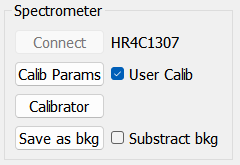
- Calib Params
- Opens the Calibration Parameters window to manually input data, manage calibration files (Open/Save), or edit the default settings. Click Accept when finished to confirm the new values.
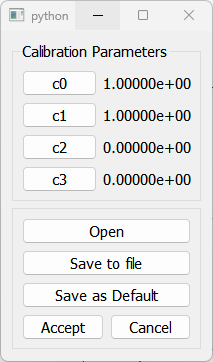
- User Calib
- Select to use the calibration
- Calibrator
- Open the Rubycond Calibrator software
- Save as bkg
- Capture the current spectrum to be used as a background reference
- Substract bkg
- Enable background subtraction to remove the stored reference from the active measurement
Cooler :warning: Available only for Andor spectrometers.
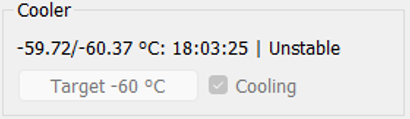
Displays the target cooling temperature and the current temperature.
Measurements
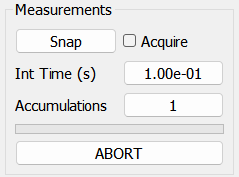
- Snap
- perform a single acquisition
- Acquire
- start a continuos acquisition
- Int Time (s)
- change the acquisition integration time in seconds, default value is 0.1 seconds
- Accumulation
- change the number of accumulations, default value is 1
Fit
[!IMPORTANT] Fit are always performed to the data with Wavelenghts in cm⁻¹.
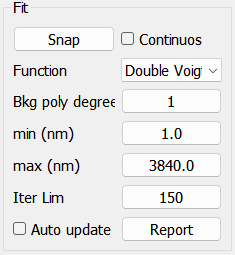
- Snap
- perform a single fit
- Continuos
- start a continuos fitting routine
- Function
- Voigt
- Gauss
- Lorentz
- Double Voigt
- Double Gauss
- Double Lorentz
- Bkg poly Degree
- change the polynomial degree up to 7
- Min (nm)
- Fit range minimum value. Click on the value to change it. If you click on the graph first, the value of the selected point will be suggested automatically.
- Max (nm)
- Fit range maximum value. Click on the value to change it. If you click on the graph first, the value of the selected point will be suggested automatically.
- Iter Lim
- The maximum number of iterations used in the minimization routine. The default value is 150
- Autoupdate
- If not selected the Fit initial condition are automatically evaluated when the Fit range is changed (Fit:Min and Fit:Max), so not taking in account eventual changement in the afterwards acquired signal.
- If selected the Fit results are used as the Fit initial condition in the next Fit.
- Report
- Opens a window with the detailed fit report
Gauge
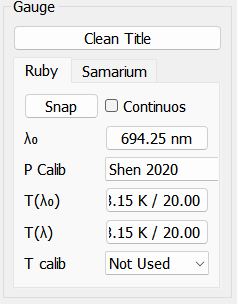
This menu allows to choose the gauge to be used and to change the default values for the reference wavelenghts and temperatures to be used both for Ruby and Samarium Sm²⁺:SrB₄O₇.
- Ruby Cr³⁺:Al₂O₃
- λ₀ (nm) = 694.25
- P Calibration
- Shen 2020
- Mao hydro 1986
- Mao non hydro 1986
- Dewaele 2008
- Dorogokupets and Oganov 2007
- T(λ₀) (K) = 298
- T(λ) (K) = 298
- T Calibration
- Not Used
- Datchi 2004
- Sm²⁺:SrB₄O₇
- λ₀ (nm) = 685.51
- P Calibration
- Rashchenko 2015
- Datchi 1997
Logger
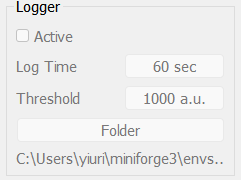
WIP, not yet implemented
Tab Shortcuts
- List of available shortcuts
Available layouts: QWERTY and AZERTY
To switch layouts, uncomment the corresponding line (line 127 or 128). Default is QWERTY.
self.keyboard = 'QWERTY'#uncomment to select
#self.keyboard = 'AZERTY' #uncomment to select
QWERTY Shortcuts
ctrl + Z = Set Fit:Min as cursor
ctrl + X = Set Fit:Max as cursor
ctrl + C = Zoom to fit
ctrl + Q = Rescale to full scale
ctrl + F = Fit snap
ctrl + G = Fit continuos

ctrl + O = Open file
ctrl + S = Save file
AZERTY Shortcuts
ctrl + W = Set Fit:Min as cursor
ctrl + X = Set Fit:Max as cursor
ctrl + C = Zoom to fit
ctrl + Q = Rescale to full scale
ctrl + F = Fit snap
ctrl + G = Fit continuos

ctrl + O = Open file
ctrl + S = Save file
Tab Calc
- Let the user to perform simulations using different gauges, wavelenght, pressure and temperatures for Ruby and gauges, wavelenght and pressure for Samarium using the Ruby and Samarium pressure/wavelength calculator
Install
Use pip to install the program within a virtual environment (strongly recommended).
Here's a short tutorial on installing a virtual environment.
pip install rubycond
To update:
pip install rubycond --upgrade
Supported spectrometers
Ocean Optics and Andor spectrometers. To change spectrometer, uncomment the corresponding line (line 131 or 132). Default is OceanOptics.
self.spectrometer_model = "OceanOptics"
#self.spectrometer_model = "Andor"
Ocean Optics spectrometers
Install the python-seabreeze for the Ocean Optics spectrometers:
conda install -c conda-forge seabreeze
seabreeze_os_setup
Andor spectrometers
Using Andor spectrometers requires the purchase and installation of the official Oxford Instruments Software Development Kit (SDK).
About
Author
Yiuri Garino
Contacts
Yiuri Garino
Silvia Boccato


License
Rubycond: Python software to determine pressure in diamond anvil cell experiments by Ruby and Samarium luminescence
Copyright (c) 2022-2026 Yiuri Garino
Rubycond is free software: you can redistribute it and/or modify it under the terms of the GNU General Public License as published by the Free Software Foundation, either version 3 of the License, or (at your option) any later version. This program is distributed in the hope that it will be useful, but WITHOUT ANY WARRANTY; without even the implied warranty of MERCHANTABILITY or FITNESS FOR A PARTICULAR PURPOSE. See the GNU General Public License for more details.
You should have received a copy of the GNU General Public License along with this program. If not, see https://www.gnu.org/licenses/.
Release notes
Version 0.1.1 Release 240222: First release
Version 0.1.2 Release 240227: Fixed "LMFIT Error: pk_2_gauss" bug when "Double Gauss" fit function is selected
Version 0.2.0 Release 260301: Total program rewrite: migration from Tkinter to Qt5 libraries. Added Andor spectrometers. Version 0.1.2 is still available here.


Download files
Download the file for your platform. If you're not sure which to choose, learn more about installing packages.
Source Distribution
Built Distribution
Filter files by name, interpreter, ABI, and platform.
If you're not sure about the file name format, learn more about wheel file names.
Copy a direct link to the current filters
File details
Details for the file rubycond-0.2.0.tar.gz.
File metadata
- Download URL: rubycond-0.2.0.tar.gz
- Upload date:
- Size: 662.5 kB
- Tags: Source
- Uploaded using Trusted Publishing? No
- Uploaded via: poetry/2.1.1 CPython/3.12.0 Linux/6.8.0-101-generic
File hashes
| Algorithm | Hash digest | |
|---|---|---|
| SHA256 |
656176e2c5f6bd7977f68ebd035da7b07e9f73f9dc8ab392099d005986ebf2fa
|
|
| MD5 |
341fa714bb0fb4ad60742d2780136978
|
|
| BLAKE2b-256 |
3db20c2f784bf31543592c22c2d458e0c62ed38f27446fe2996a9fd19c6c8284
|
File details
Details for the file rubycond-0.2.0-py3-none-any.whl.
File metadata
- Download URL: rubycond-0.2.0-py3-none-any.whl
- Upload date:
- Size: 677.5 kB
- Tags: Python 3
- Uploaded using Trusted Publishing? No
- Uploaded via: poetry/2.1.1 CPython/3.12.0 Linux/6.8.0-101-generic
File hashes
| Algorithm | Hash digest | |
|---|---|---|
| SHA256 |
9694353cd4b676cf766d563fcc2000d0c07e11a5966c7efb734e056e96cdf1bd
|
|
| MD5 |
1852e4d3e379357998e5555fbf6702f2
|
|
| BLAKE2b-256 |
5c5fcb36e64e53cfbc276250cae7d3ec29ae4c1965455b58acfa7f3548d2c06f
|






