
ScadPy




Programmatic CAD in Pure Python. — Documentation
ScadPy provides a fluent, type-safe API for 2D and 3D parametric modeling, built on Shapely and trimesh. Write designs with the conciseness of OpenSCAD and the full power of Python.
Installation
pip install scadpy
Requirements: Python ≥ 3.12.
Quick examples
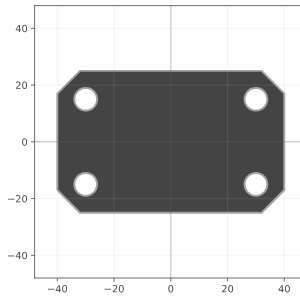
# 2D — chamfered mounting plate
from scadpy import rectangle, circle, text
import numpy as np

PLATE_WIDTH   = 80
PLATE_HEIGHT  = 50
PLATE_THICKNESS = 10
HOLE_RADIUS   = 4
HOLE_MARGIN   = 10
CHAMFER_SIZE  = 8

base  = rectangle([PLATE_WIDTH, PLATE_HEIGHT])
plate = base.chamfer(CHAMFER_SIZE)

for position, normal in zip(base.vertex_coordinates, base.vertex_normals):
    hole_center = position - HOLE_MARGIN * np.sqrt(2) * normal
    plate -= circle(HOLE_RADIUS).translate(hole_center)

plate.to_screen()
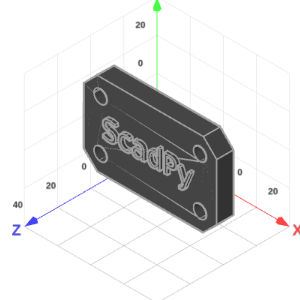
# 3D — extruded mounting plate with label (continues from above)
TEXT_THICKNESS = 2

extruded_plate = plate.linear_extrude(PLATE_THICKNESS)
label = text("ScadPy", size=15).linear_extrude(TEXT_THICKNESS)
extruded_plate |= label.translate(z(PLATE_THICKNESS))
extruded_plate.to_screen()
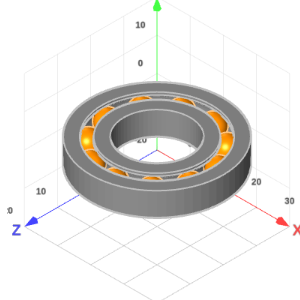
# 3D — parametric ball bearing
from scadpy import circle, rectangle, sphere, x, y, GRAY, ORANGE

BALL_RADIUS    = 3
RACE_RADIUS    = 15
NB_BALLS       = 11
CLEARANCE      = 0.1
RING_HEIGHT    = 7
RACE_THICKNESS = 10

groove  = circle(BALL_RADIUS + CLEARANCE) | rectangle([BALL_RADIUS, RING_HEIGHT])
race    = rectangle([RACE_THICKNESS, RING_HEIGHT]) - groove
bearing = race.radial_extrude(axis=y(), pivot=x(RACE_RADIUS)).color(GRAY)
ball    = sphere(BALL_RADIUS).color(ORANGE)
bearing += ball.radial_pattern(count=NB_BALLS, axis=y(), pivot=x(RACE_RADIUS))

bearing.to_screen()
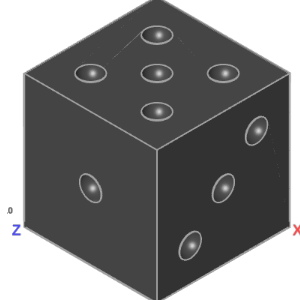
# 3D — dice
from scadpy import cuboid, sphere, x, y, z

SIZE = 20
dice = cuboid(SIZE)
pip  = sphere(SIZE / 12).translate(z(SIZE / 2))

one   = pip
two   = pip.translate([SIZE / 4, SIZE / 4, 0]) + pip.translate([-SIZE / 4, -SIZE / 4, 0])
three = one + two
four  = two + two.rotate(90, z())
five  = one + four
six   = four + pip.translate(x(SIZE / 4)) + pip.translate(x(-SIZE / 4))

dice -= (
    one
    + two.rotate(90, x())
    + three.rotate(90, y())
    + four.rotate(-90, y())
    + five.rotate(-90, x())
    + six.rotate(-180, x())
)

dice.to_screen()
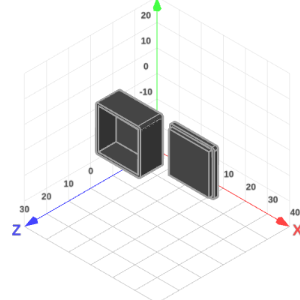
# 3D — storage box
from scadpy import square, x, z

SIZE_OUTER      = 20
SIZE_INNER      = 18
FILLET          = 1
BASE_HEIGHT     = 10
CUT_HEIGHT      = 8
CAP_HEIGHT_OUTER = 1.5
CAP_HEIGHT_INNER = 3
CAP_OFFSET_X    = 25
CUT_OFFSET_Z    = 2

outer_base = square(SIZE_OUTER).fillet(FILLET).linear_extrude(BASE_HEIGHT)
inner_cut  = square(SIZE_INNER).linear_extrude(CUT_HEIGHT).translate(z(CUT_OFFSET_Z))
base       = outer_base - inner_cut

cap_outer = square(SIZE_OUTER).fillet(FILLET).linear_extrude(CAP_HEIGHT_OUTER)
cap_inner = square(SIZE_INNER).linear_extrude(CAP_HEIGHT_INNER)
cap       = (cap_outer | cap_inner).translate(x(CAP_OFFSET_X))

storage_box = base + cap
storage_box.to_screen()
Cheat sheet
Parameters shown in # comments are optional, with their default values.
2D — Shape
from scadpy import *

# primitives
circle(radius=3)                                # segment_count=64
polygon(points=[(-2, -2), (2, -2), (0, 2)])
rectangle(size=[6, 3])
Shape.from_dxf("file.dxf")
Shape.from_svg("file.svg")
square(size=4)

# boolean operations
s = square(size=4);  c = circle(radius=3)
s | c    # union
s - c    # difference
s & c    # intersection
s ^ c    # symmetric difference
s + c    # concat (no merge)

# transforms
s.chamfer(size=0.8)              # vertex_filter=None, epsilon=1e-8
s.color(color=RED)
s.convexify()                    # part_filter=None
s.fill()                         # part_filter=None
s.fillet(size=0.8)               # vertex_filter=None, segment_count=32, epsilon=1e-8
s.grow(distance=0.5)             # part_filter=None
s.linear_cut(axis=x())          # pivot=0
s.linear_pattern(counts=4, steps=x(3))        # counts=[nx, ny], steps=[sx, sy]
s.linear_slice(thickness=2, direction=x())  # pivot=0, part_filter=None
s.mirror(normal=[1, 0])          # pivot=0
s.pull(distance=1.0)             # pivot=0, vertex_filter=None
s.push(distance=1.0)             # pivot=0, vertex_filter=None
s.radial_pattern(count=6)        # angle=360, pivot=0
s.radial_slice(start=0, end=180) # pivot=0, part_filter=None
s.resize(size=[6, None])         # auto=False, pivot=None, vertex_filter=None
s.rotate(angle=30)               # pivot=0, vertex_filter=None
s.scale(scale=[2, 0.5])          # pivot=0, vertex_filter=None
s.shrink(distance=0.5)           # part_filter=None
s.translate(translation=[2, 1])  # vertex_filter=None

# features
s.bounds                         # [min_x, min_y, max_x, max_y]
s.bounding_box                   # → Shape (rectangle)
s.centroid                       # [cx, cy] — geometric centroid
s.is_empty                       # bool

# topology — coordinates & attributes
s.are_vertices_convex            # (n_vertices,)   — convexity mask
s.directed_edge_directions       # (2*n_edges, 2)
s.edge_lengths                   # (n_edges,)
s.edge_midpoints                 # (n_edges,  2)
s.edge_normals                   # (n_edges,  2)
s.ring_types                     # (n_rings,)  — "exterior"|"interior"
s.vertex_angles                  # (n_vertices,)   — interior angles (°)
s.vertex_coordinates             # (n_vertices, 2)
s.vertex_normals                 # (n_vertices, 2) — outward unit normals

# topology — bridges (*_to_*)
s.directed_edge_to_edge             # directed_edge → edge
s.directed_edge_to_vertex           # directed_edge → [start, end]
s.edge_to_vertex                    # edge          → [start, end]
s.ring_to_part                      # ring          → part
s.vertex_to_incoming_directed_edge  # vertex        → directed_edge
s.vertex_to_outgoing_directed_edge  # vertex        → directed_edge
s.vertex_to_neighbor_vertex       # vertex        → [prev, next]
s.vertex_to_part                    # vertex        → part
s.vertex_to_ring                    # vertex        → ring

# extrusions → Solid
s.linear_extrude(height=3)
s.radial_extrude(axis=y(), pivot=x(5))  # start=0, end=360, segment_count=64
s.path_extrude(path)                    # fillet_segments=None, min_fillet_radius=None, intermediate_sections=None, strategy=None

# sweep strategies (for path_extrude strategy= parameter)
scale_sweep(end=3)                      # start=1.0
rotate_sweep(angle=360)                 # start_angle=0.0
resize_sweep(end_size=[2, 4])           # start_size=None
reverse_sweep(strategy=scale_sweep(3))

# export
s.to_dxf_file("output.dxf")
s.to_html_file("output.html")
s.to_screen()
s.to_svg_file("output.svg")
3D — Solid
from scadpy import *

# primitives
cone(radius=2, height=4)         # section_count=32
cuboid(size=[4, 3, 2])
cylinder(radius=2, height=4)     # section_count=32
polyhedron(vertices=vertices, faces=faces)
sphere(radius=3)                 # subdivision_count=4
Solid.from_stl("model.stl")

# boolean operations
a = cuboid(size=[4, 3, 2]);  b = sphere(radius=2)
a | b    # union
a - b    # difference
a & b    # intersection
a ^ b    # symmetric difference
a + b    # concat (no merge)

# transforms
a.color(color=RED)
a.convexify()                    # part_filter=None
a.linear_pattern(counts=4, steps=x(3))        # counts=[nx, ny, nz], steps=[sx, sy, sz]
a.mirror(normal=[1, 0, 0])       # pivot=0
a.pull(distance=1.0)             # pivot=0, vertex_filter=None
a.push(distance=1.0)             # pivot=0, vertex_filter=None
a.radial_pattern(count=6, axis=z())            # angle=360, pivot=0
a.resize(size=[6, None, None])   # auto=False, pivot=None, vertex_filter=None
a.rotate(angle=30, axis=z())    # pivot=0, vertex_filter=None
a.scale(scale=[2, 1, 0.5])       # pivot=0, vertex_filter=None
a.translate(translation=[1, 0, 0])  # vertex_filter=None

# features
a.bounds                         # [min_x, min_y, min_z, max_x, max_y, max_z]
a.bounding_box                   # → Solid (cuboid)
a.centroid                       # [cx, cy, cz] — geometric centroid
a.is_empty                       # bool

# topology — coordinates & bridges (*_to_*)
a.triangle_to_vertex    # triangle → [v0, v1, v2]
a.vertex_coordinates    # (n_vertices,  3)
a.vertex_to_part        # vertex   → part

# export
a.to_html_file("output.html")
a.to_screen()
a.to_stl_file("output.stl")
Roadmap
- Improve documentation
- Richer topology for Shape and Solid
- Richer transformations for Shape and Solid
- Chamfer and fillet on Solid
- New assembly types:
PointCloud2d,Wire2d,PointCloud3d,Wire3d - Better error messages
- More import/export formats
Development
# Create and activate venv
python3 -m venv .venv
source .venv/bin/activate

# Install with dev dependencies
pip install -e .[dev]

# Run doctests & generate documentation & AI skill file
cd docs && make doctest && make html && make skills
AI integration
ScadPy ships a machine-readable skill file (AI_SKILLS.json) that lets AI
assistants understand the full API without reading source code — signatures,
descriptions, parameters, return types, and usage examples, extracted directly
from the source.
License
See LICENSE.md.
1 maintainer

Metadata
1 maintainer
Release files for ScadPy 0.4.15
For a detailed explanation of source distributions (sdists) and built distributions (wheels), please see the package formats documentation.
Source distribution (sdist)
| File | Size | Uploaded | Provenance | Actions |
|---|---|---|---|---|
| scadpy-0.4.15.tar.gz | 492.6 kB | With provenance | Details for scadpy-0.4.15.tar.gz |
Built distribution (wheel)
| File | Interpreter | ABI | Platform | Actions Reset |
|---|---|---|---|---|
| scadpy-0.4.15-py3-none-any.whl | Python 3 | none | any | Details for scadpy-0.4.15-py3-none-any.whl |
Total release size: 693.0 kB
Release files / scadpy-0.4.15.tar.gz
| Download URL | scadpy-0.4.15.tar.gz |
|---|---|
| Size | 492.6 kB |
| Tags | Source |
|
SHA-256 checksum How to use checksums |
552a4a904cbe61404e2d61c952fd7bbe67d055fd4b37d865f91e085709e3ce9f
|
|
BLAKE2b-256 checksum How to use checksums |
19bff24d3631bc68348451ad9241dab774a313742543a3e9336a5622f6522350
|
| Upload date | |
|
Uploaded using Trusted Publishing? What is trusted publishing? |
Yes |
| Uploaded via |
twine/6.1.0 CPython/3.13.7
|
Provenance
Provenance describes where a file came from. On PyPI, provenance is shared via attestations, which provide a verifiable record of the build or publishing details. View details, limitations and caveats.


PyPI Publish Attestation
PyPI verified that this artifact, at this checksum, originated from the publisher listed below.
Signed by GitHub Actions, verified by PyPI on Apr 5, 2026.
Transparency logRelease files / scadpy-0.4.15-py3-none-any.whl
| Download URL | scadpy-0.4.15-py3-none-any.whl |
|---|---|
| Size | 200.4 kB |
| Tags | Python 3 |
|
SHA-256 checksum How to use checksums |
edc1b0312c6cac542472966981eb8bef36b035353e2b45d744dae9b7ba82dd1a
|
|
BLAKE2b-256 checksum How to use checksums |
b99872ca9db57be2ee9199d2c081aea3dee982f616f295decf8745ad02ce4929
|
| Upload date | |
|
Uploaded using Trusted Publishing? What is trusted publishing? |
Yes |
| Uploaded via |
twine/6.1.0 CPython/3.13.7
|
Provenance
Provenance describes where a file came from. On PyPI, provenance is shared via attestations, which provide a verifiable record of the build or publishing details. View details, limitations and caveats.
PyPI Publish Attestation
PyPI verified that this artifact, at this checksum, originated from the publisher listed below.
Signed by GitHub Actions, verified by PyPI on Apr 5, 2026.
Transparency logSecurity for ScadPy 0.4.15
Provenance
Provenance describes where a file came from. On PyPI, provenance is shared via attestations, which provide a verifiable record of the build or publishing details. View details, limitations and caveats.
Full provenance
Both files in this release have been uploaded with provenance metadata.
Attestation for scadpy-0.4.15.tar.gz
PyPI Publish Attestation
PyPI verified that this artifact, at this checksum, originated from the publisher listed below.
Signed by GitHub Actions, verified by PyPI on Apr 5, 2026.
Transparency logA note on package security
PyPI is a repository for distributing packages, not a service for auditing them. While third-party security researchers and our staff do their best to detect and remove malicious packages, PyPI cannot guarantee the quality, security or suitability of any given package.
To learn more about protecting yourself from malicious actors, visit our package security documentation.














