
Scanpath Studio





An interactive workbench for visualizing eye-tracking-while-reading data. Drop in a trial and see the scanpath the way the reader saw it — words at their true on-screen positions, with fixations, saccades, a density heatmap, and animated replay layered on top, all exportable as publication-ready figures.
It is dataset-agnostic (auto-detects EyeLink / Gazepoint / snake-case columns) and ships with a small OneStop demo, so you can try it with zero setup.
Authors: Omer Shubi, Keren Gruteke Klein, Maya Grossman, Ella Lion, Deborah N. Jakobi, David R. Reich, Lena Jäger, and Yevgeni Berzak — Data and Decision Sciences (Technion) and Department of Computational Linguistics (University of Zurich).
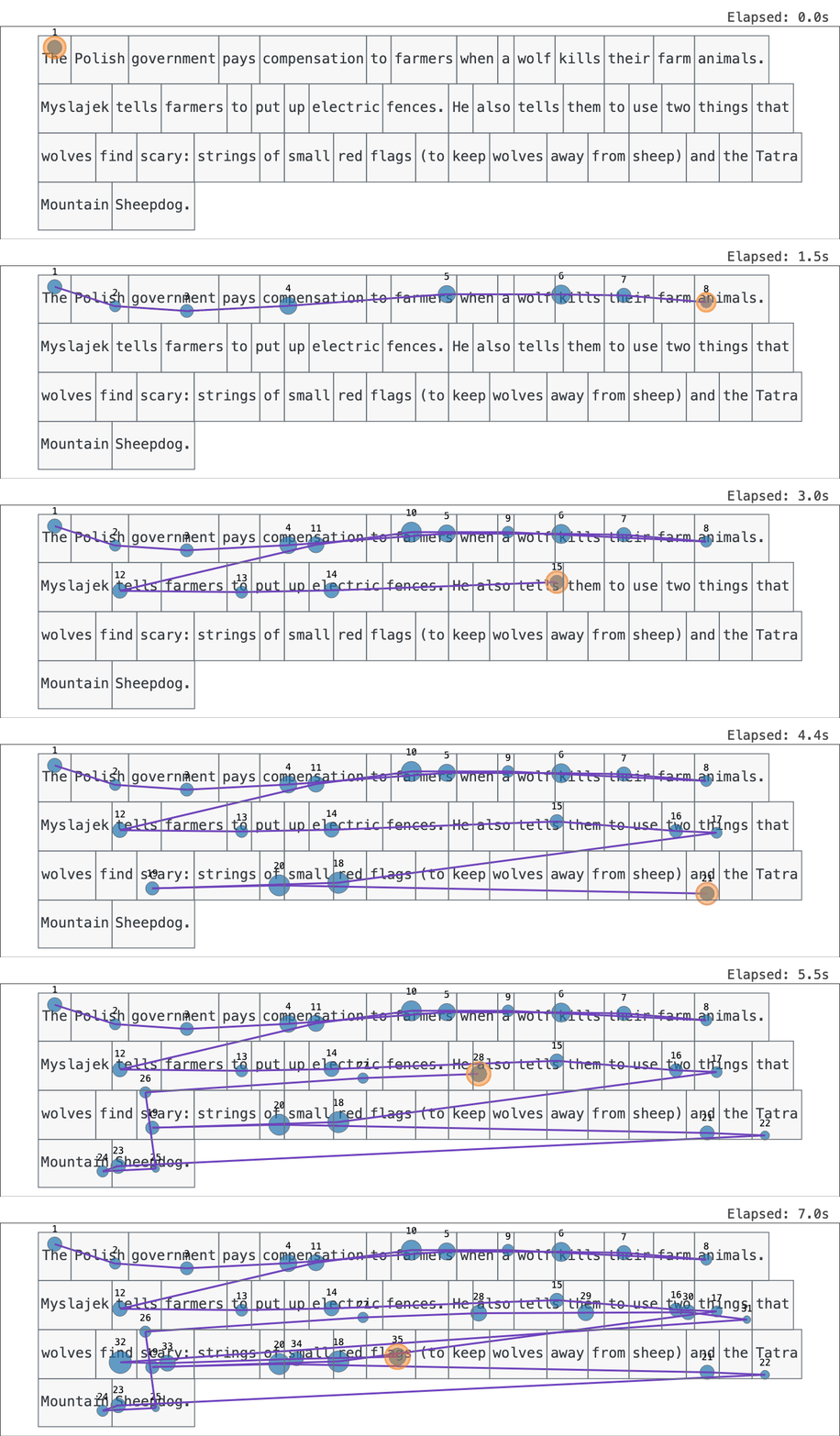
A scanpath replayed fixation by fixation over the text the reader saw.
Try it
Live demo (zero install): https://scanpath-studio.streamlit.app
pip install scanpath-studio
scanpath-studio      # launches the app in your browser
What it does
The scanpath plot is built from layers you toggle independently:
- Text drawn at the exact pixel coordinates the participant saw.
- Fixations sized and colored by any column in your data (duration, GPT-2 surprisal, word frequency, …).
- Saccades, with backward jumps (regressions) standing out.
- Areas of interest (word boxes from your data) and a word-level heatmap (total fixation duration, count, …).
On top of that:
- Animated replay — watch the scanpath unfold at real or scaled speed; export as interactive HTML, GIF, or MP4.
- Compare readings — overlay two trials on one canvas or place them side by side (e.g. ordinary vs. information-seeking, first vs. repeated, L1 vs. L2).
- Critical-span, out-of-text & by-line highlights — mark an answer span, flag fixations outside every word box, or color fixations by text line.
- Triage — star, tag, and annotate trials; save and restore everything as a JSON sidecar.
- Bulk export — one zip of per-trial PNG + SVG figures, plot settings, and tabular data across every filtered trial.
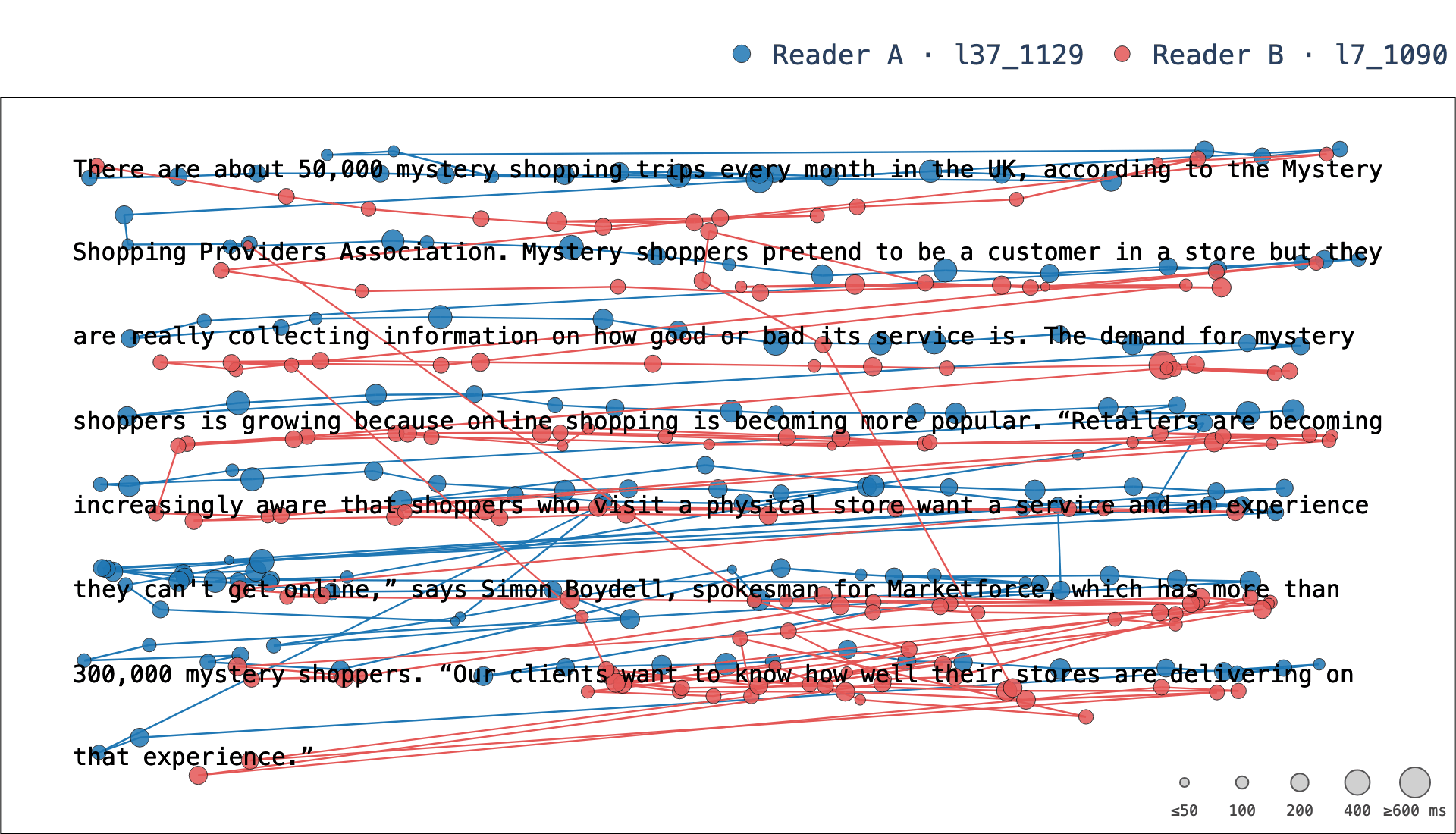
Two readers of the same bundled-demo paragraph, overlaid on one canvas — 305 fixations between them (watch it animated).
The app is organized into three tabs:
| Tab | What's there |
|---|---|
| Scanpath Visualization | The layered scanpath: a Browse by selection row above the plot (trial / text / participant) and, beside it, a right-hand control rail with Animate and Compare toggles plus the per-layer visualization controls (style each scanpath independently). The trial's key info shows as configurable chips above the plot. Below, subtabs: Annotations, Stimulus & Context, Comparisons (trials matching the selected trial on a field you choose), Export (single-trial and bulk — HTML / GIF / MP4 and figures / settings / tabular data), and Share. |
| Corpus Analysis | Three subtabs — Per text, Per reader, and Groups (profile one cohort, or compare two) — the question-oriented analysis views: metric distributions and word profiles, per-text heatmaps pooled over readers, reader summaries, and group differences with effect sizes. |
| Data | Data Management — available datasets, column mapping, stimulus images, participant/trial metadata, data tables, summary statistics, and optional preprocessing. |

Project map
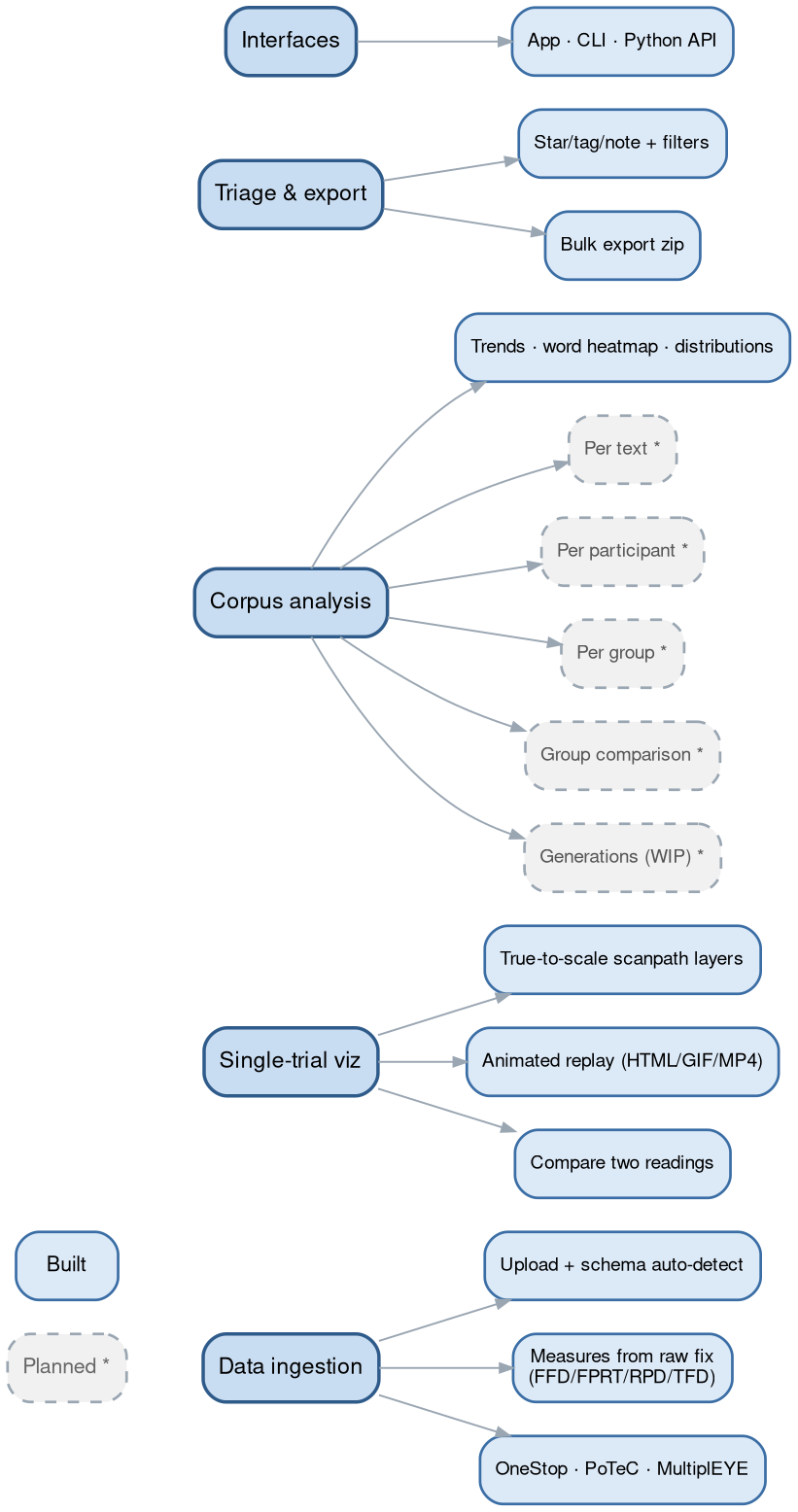
Solid = built, dashed = planned. Planned and in-flight work is tracked in
GitHub Issues. The archive
of everything closed before 2026-08-20 is browsable offline: double-click
tracker/start.command (macOS) or tracker/start.bat (Windows) — or run
python3 tracker/server.py (python tracker\server.py on Windows).
Your data
Upload CSV, TSV, Parquet, or Feather tables for words/AoIs, fixations, and
(optionally) raw gaze. Columns are auto-detected from common EyeLink, Gazepoint,
and snake-case conventions; a sidebar Column mapping panel overrides any
guess. The loader bends to fit real corpora — many files per table (concatenated
with a source_file tag), a single report (words- or fixations-only),
stimulus-level word boxes broadcast across readers, and AoI-sequence fixations
placed at word/character-box centers.
If your data carries only raw fixations, the app computes the canonical per-word measures itself — FFD, FPRT (gaze duration), RPD (go-past), TFD (dwell), plus skips and regressions, following Rayner (1998) and Inhoff & Radach (1998). Pre-aggregated EyeLink columns, when present, take precedence.
A ready-made PoTeC loader (Potsdam Textbook Corpus) exercises that flexible pipeline end to end:
import scanpath_studio as sps

words, fixations = sps.load_potec("data/PoTeC", download=True)  # ~45 MB on first call
fig = sps.plot_scanpath(words, fixations, "0", "b0", canvas_size=(1680, 1050))
Command line & Python API
Everything the app draws is also available headless — same pipeline, same figure.
scanpath-studio render --sample --list-trials              # what's available
scanpath-studio render --sample -o scanpath.html           # interactive HTML
scanpath-studio render --words ia.csv --fixations fix.csv -p p1 -t t3 -o figure.png
scanpath-studio render --sample --animate -o replay.html   # animated replay
import scanpath_studio as sps

words, fixations = sps.load_scanpath_data(
    "ia.csv", "fixations.csv"
)  # paths, globs, or lists; either table optional
sps.list_trials(words, fixations)
fig = sps.plot_scanpath(words, fixations, "p1", "t3")  # every layer toggle is a kwarg
sps.save_figure(fig, "scanpath.png")  # .html / .png / .svg / .pdf
measures = sps.compute_word_metrics(words, fixations)  # FFD / FPRT / RPD / TFD …
HTML export is browser-free; PNG/SVG/PDF/GIF/MP4 go through Kaleido (run
plotly_get_chrome -y once). See scanpath-studio render --help for all flags.
Run from source
git clone https://github.com/lacclab/scanpath-studio.git
cd scanpath-studio
pip install -e ".[test]"          # or: uv sync
streamlit run streamlit_app.py
Tested on Python 3.11–3.14. Run the tests with uv run pytest; see
AGENTS.md for an architectural overview.
Joining the project? CONTRIBUTING.md is the whole of it —
setup, the work tracker (python3 tracker/server.py), the checks that gate CI,
and how two people stay out of each other's way.
Documentation
Full docs — getting started, the Python API, the CLI reference, data format, and
export/troubleshooting — are at https://lacclab.github.io/scanpath-studio/
(built from docs/ with MkDocs Material). Build them locally with:
pip install -e ".[docs]"
mkdocs serve
Citation
A system-demo paper is in preparation — citation TBD. Until then, cite the
software via GitHub's "Cite this repository" button (generated from
CITATION.cff).
If you use the bundled demo data, please cite the OneStop corpus:
@article{berzak2025onestop,
  title     = {{OneStop}: A 360-Participant {E}nglish Eye Tracking Dataset
               with Different Reading Regimes},
  author    = {Berzak, Yevgeni and Malmaud, Jonathan and Shubi, Omer
               and Meiri, Yoav and Lion, Ella and Levy, Roger},
  journal   = {Scientific Data},
  year      = {2025},
  publisher = {Nature Publishing Group},
  doi       = {10.1038/s41597-025-06272-2},
  url       = {https://www.nature.com/articles/s41597-025-06272-2},
}
The bundled demo is a subset of OneStop Eye Movements, used under its original license (docs).
Built with AI assistance
Much of this code was written with AI assistance. That is not the same as bug-free. Cross-check anything you publish against your own pipeline. If something looks wrong, open an issue with the JSON from 💾 Save & restore — it reproduces the exact view.
License
MIT — see LICENSE.
1 maintainer

Metadata
1 maintainer
Release files for scanpath-studio 0.29.0
For a detailed explanation of source distributions (sdists) and built distributions (wheels), please see the package formats documentation.
Source distribution (sdist)
| File | Size | Uploaded | |
|---|---|---|---|
| scanpath_studio-0.29.0.tar.gz | 3.3 MB | Details |
Built distribution (wheel)
| File | Interpreter | ABI | Platform | Reset |
|---|---|---|---|---|
| scanpath_studio-0.29.0-py3-none-any.whl | Python 3 | none | any | Details |
Total release size: 6.3 MB
Release files / scanpath_studio-0.29.0.tar.gz
| Download URL | scanpath_studio-0.29.0.tar.gz |
|---|---|
| Size | 3.3 MB |
| Tags | Source |
|
SHA-256 checksum How to use checksums |
869215ba6822481f00f0509b8108f154bbfbed656c70ef6614207301a8f5f729
|
|
BLAKE2b-256 checksum How to use checksums |
9d38a7e3c30ccea88cd1a604427cfa8babc040bbd8b3db7ec36c9c80c27c9b0f
|
| Upload date | |
|
Uploaded using Trusted Publishing? What is trusted publishing? |
Yes |
| Uploaded via |
twine/7.0.0 CPython/3.13.14
|
Provenance
Provenance describes where a file came from. On PyPI, provenance is shared via attestations, which provide a verifiable record of the build or publishing details. View details, limitations and caveats.


PyPI Publish Attestation
PyPI verified that this artifact, at this checksum, originated from the publisher listed below.
Signed by GitHub Actions, verified by PyPI on Aug 21, 2026.
Transparency logRelease files / scanpath_studio-0.29.0-py3-none-any.whl
| Download URL | scanpath_studio-0.29.0-py3-none-any.whl |
|---|---|
| Size | 3.0 MB |
| Tags | Python 3 |
|
SHA-256 checksum How to use checksums |
238dc5236fb463c2a1324978c35ceed5d3a3dd0a4f57875aae190c59799904f1
|
|
BLAKE2b-256 checksum How to use checksums |
b5e222c4b7adf4e1be3bcef84b9826afc8fc13a17df035e72bf0de6d20bcb484
|
| Upload date | |
|
Uploaded using Trusted Publishing? What is trusted publishing? |
Yes |
| Uploaded via |
twine/7.0.0 CPython/3.13.14
|
Provenance
Provenance describes where a file came from. On PyPI, provenance is shared via attestations, which provide a verifiable record of the build or publishing details. View details, limitations and caveats.
PyPI Publish Attestation
PyPI verified that this artifact, at this checksum, originated from the publisher listed below.
Signed by GitHub Actions, verified by PyPI on Aug 21, 2026.
Transparency log













