
sciwidgets




PySide6 building blocks for scientific desktop apps: parameter sliders and panels described in JSON, Matplotlib plot canvases, DataFrame tables, LaTeX labels, dialogs, and app support (launcher, updates, Help menu), in light and dark mode.
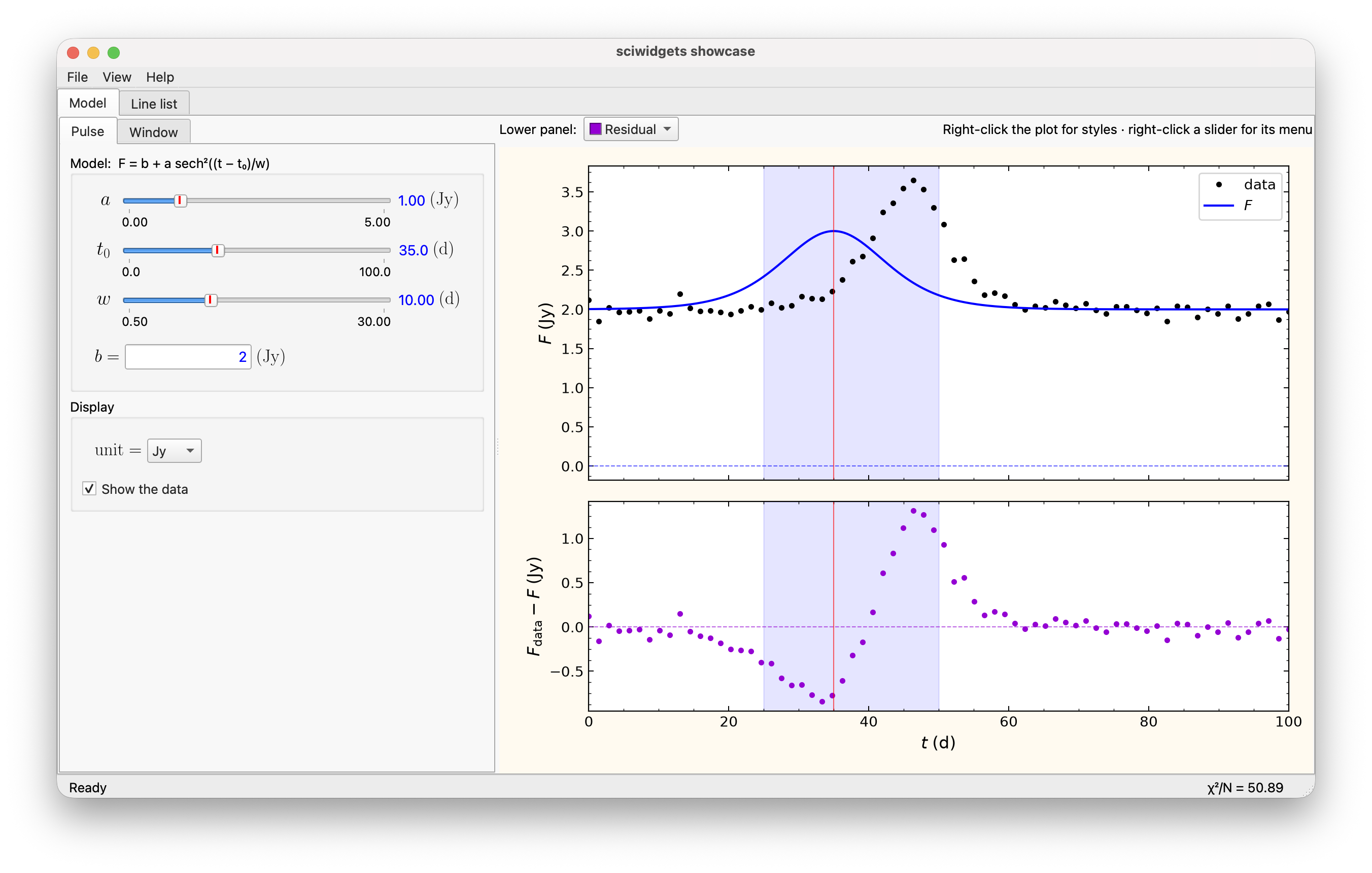
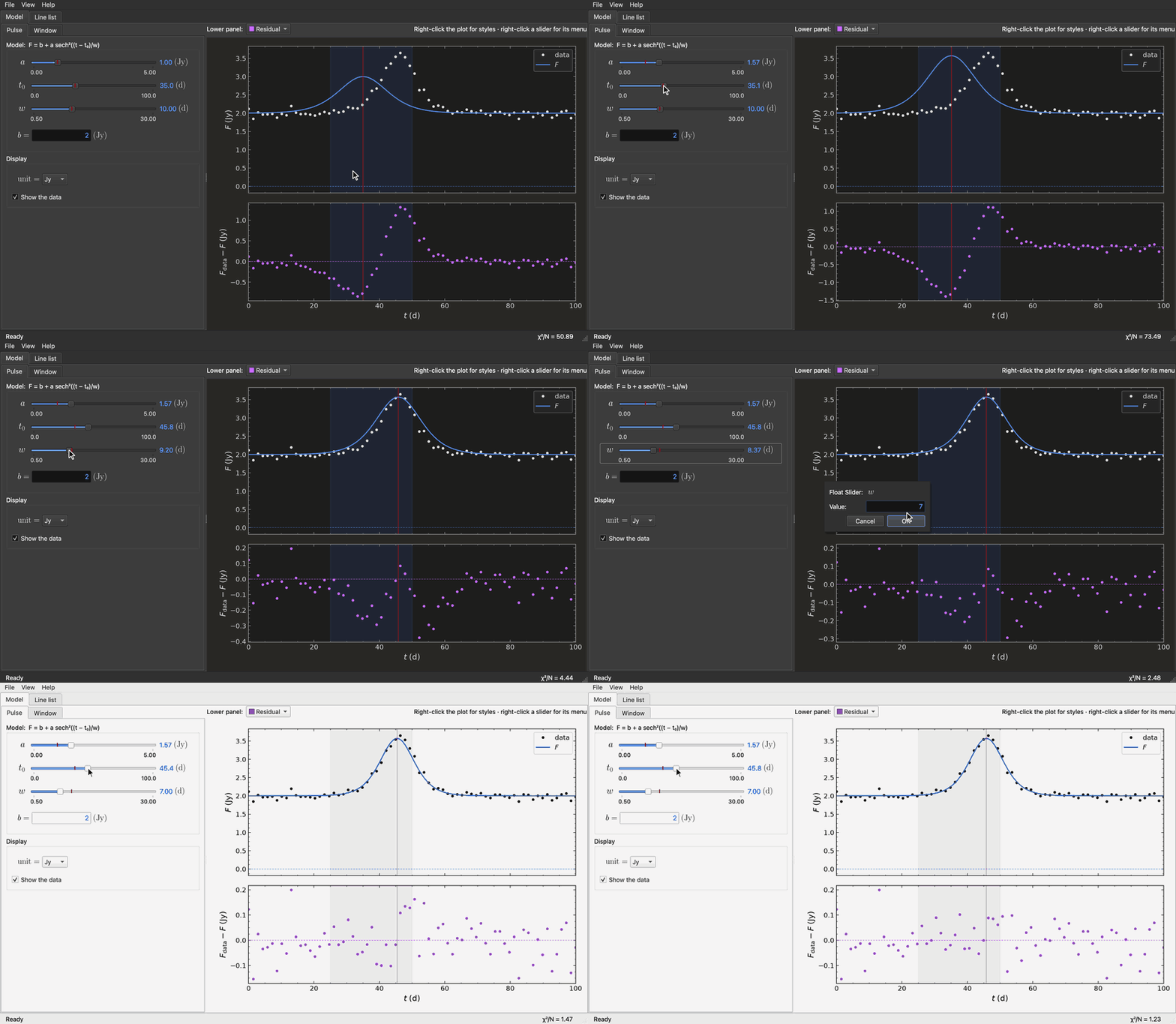
The showcase above is python -m sciwidgets: a panel built from a JSON
description drives the plot, with a line-list table in the second tab and
dark mode in the View menu. Fitting the pulse by eye, a slider's Set Value
dialog, and switching to dark mode:
The widgets were written for Maxwell Bloch Studio and moved into this package so other apps can share them.
Features
- Math labels:
MathLabelrenders LaTeX through Matplotlib and scales cleanly as SVG. It uses your system LaTeX when installed and falls back to Matplotlib's mathtext otherwise. - Sliders: integer, float, array, range and multi-variable sliders with LaTeX names and units, optional range labels, a default-value marker and a right-click menu (save/reset default, set value, ±inf, edit range and format; see it in action).
- Scientific number format:
"{:.3S}"displays values as1.23×10⁴. - Validated input:
NumericLineEditchecks numbers and limits while typing and marks invalid input with a red frame. - Parameter widgets: line edit, combo box and toggle sharing one interface
with the sliders (
get_value/set_value,get_config/set_config) and name/value columns that line up across a panel. - Parameter panels: build groups, columns and tabs of parameter widgets from a JSON-style description, with templates and shared defaults, and read or restore all values as one dict.
- Plot canvas: Matplotlib panels, twins, legends and markers from a description; data by curve id; a right-click style menu for curves, grids and spans whose changes save as plain data.
- Tables: a read-only view of a pandas DataFrame with formats, coloured columns, rich-text headers, sorting, a column chooser and CSV export.
- Dialogs: information, warning, error, question, rich-text and About dialogs.
- Splash screen: your picture with the app name and version drawn on it, sharp on Retina, and start-up messages from anywhere in the app.
- App support: install a double-click launcher, check for and run updates from PyPI, and a shared Help menu with the User Guide and About.
- Light and dark mode: everything follows the system appearance, or
set_color_scheme(app, "dark"); plots and tables get readable dark colours, and exports stay light.
Components
| Import | Contents | Docs |
|---|---|---|
sciwidgets.params (sliders) |
FloatSlider, IntSlider, ArraySlider, FloatRangeSlider, IntRangeSlider, MultiVariableSlider, SliderFeature |
Sliders |
sciwidgets.params (inputs) |
ParameterLineEdit, ParameterComboBox, ParameterToggle, NumericLineEdit |
Parameter widgets |
sciwidgets.panel |
ParameterPage, ParameterTabs, widget_from_spec, register_type |
Parameter panels |
sciwidgets.plot |
PlotCanvas, ScrollableFigure, CurveSelector, CurveCheckBox |
Plot canvas |
sciwidgets.table |
DataFrameModel, DataFrameView (needs pip install "sciwidgets[table]") |
DataFrame tables |
sciwidgets.labels |
MathLabel, set_latex_enabled |
Labels |
sciwidgets.dialogs |
show_information, show_warning, show_critical, show_rich_information, show_about_dialog, ask_question |
Dialogs |
sciwidgets.splash |
SplashScreen, splash_message |
Splash screen |
sciwidgets.app |
AppInfo; launcher.install_app_command, refresh_if_outdated; update.run_update; update_ui.AppUpdates; help.AppHelp (shared Help menu, About with the libraries used) |
App launcher, updates, Help and About |
sciwidgets.window |
MenuBarController, StatusBarController, center_on_screen |
Window helpers |
sciwidgets.style, sciwidgets.colors, sciwidgets.formatting |
apply_sci_style, SciStyle, set_color_scheme, is_dark; dark_variant, dark_fill; value_to_text, pretty_sci_text |
Style, dark mode and formatting |
Installation
pip install sciwidgets
Requires Python 3.10+, PySide6 6.5+, Matplotlib and NumPy (installed
automatically). A LaTeX installation is optional. The table widgets need
pandas: pip install "sciwidgets[table]".
Quick start
import sys

from PySide6.QtWidgets import QApplication, QVBoxLayout, QWidget

from sciwidgets.params import FloatRangeSlider, FloatSlider
from sciwidgets.style import apply_sci_style

app = QApplication(sys.argv)
apply_sci_style(app)  # required, see "Style" below

win = QWidget()
layout = QVBoxLayout(win)

t1 = FloatSlider(
    label="T_1", unit=r"\mathrm{ms}",
    min_val=0.1, max_val=10.0, init_val=1.0, val_fmt="{:.2f}",
    min_limit=0.0, min_limit_inclusive=False,
)
band = FloatRangeSlider(
    label=r"\nu", unit=r"\mathrm{GHz}",
    min_val=6.60, max_val=6.75, init_vals=(6.65, 6.70), val_fmt="{:.3f}",
)
layout.addWidget(t1)
layout.addWidget(band)

t1.valueChanged.connect(lambda v: print("T1 =", v))
band.valueChanged.connect(lambda v: print("band =", v["range"]))

win.show()
sys.exit(app.exec())
Labels and units are written in LaTeX math mode, without the $ signs.
Style
The widgets rely on SciStyle, a Fusion-based Qt style, for part of their
behaviour: clicking a slider groove moves the handle there, disabled sliders
get a flat groove, and invalid numeric input gets a red frame. Apply it once
at startup:
from sciwidgets.style import apply_sci_style

apply_sci_style(app, my_app_style_sheet)  # your own rules are appended
The widgets, plots and tables follow light and dark mode by themselves;
set_color_scheme(app, "light" | "dark" | "system") chooses one, for example
from a View menu.
Signals
valueChanged, defaultChanged and configChanged are emitted only for
user actions (dragging, typing, the context menu, dialogs). Setting values
from code with set_value, set_config and similar methods is silent, so
loading saved parameters never triggers your handlers. Read the new state
with get_value() / get_config() after setting it.
Demos
python -m sciwidgets runs the showcase above. Each subpackage also has a
demo of its own:
python -m sciwidgets.labels
python -m sciwidgets.dialogs
python -m sciwidgets.params
python -m sciwidgets.params.sliders
python -m sciwidgets.window
python -m sciwidgets.panel
python -m sciwidgets.plot
python -m sciwidgets.table
python -m sciwidgets.splash
Versions
Versions follow semantic versioning; what changed in each
is in CHANGELOG.md. Pin a compatible range in your app's
requirements (for example sciwidgets~=0.13.0) and move to a newer version
when you are ready to test it.
Development
From the repo root:
pip install -e ".[dev]"
pytest
The tests run without a window (Qt's offscreen platform) and take a few
seconds. Pushing a tag vX.Y.Z publishes a GitHub Release with that
version's section of CHANGELOG.md.
python tools/screenshots.py retakes the pictures in docs/figures/ from
the demos (--list for the names, --dark to check dark mode). On macOS it
captures the windows with title bar and shadow; the terminal needs Screen
Recording permission. python tools/gifs.py records the animations from
scripted sessions (slider drags, menus, dialogs).
Citing
If you use sciwidgets in published work, please cite it; GitHub's Cite this
repository button gives the reference (from CITATION.cff).
License
MIT License. See LICENSE.
Author
Vahid Anari · GitHub · LinkedIn
Related projects: mbsolver · Maxwell Bloch Studio · linecat · Daftarche
1 maintainer

Metadata
1 maintainer
Release files for sciwidgets 0.13.1
For a detailed explanation of source distributions (sdists) and built distributions (wheels), please see the package formats documentation.
Source distribution (sdist)
| File | Size | Uploaded | Provenance | |
|---|---|---|---|---|
| sciwidgets-0.13.1.tar.gz | 183.2 kB | Without provenance | Details |
Built distribution (wheel)
| File | Interpreter | ABI | Platform | Reset |
|---|---|---|---|---|
| sciwidgets-0.13.1-py3-none-any.whl | Python 3 | none | any | Details |
Total release size: 367.5 kB
Release files / sciwidgets-0.13.1.tar.gz
| Download URL | sciwidgets-0.13.1.tar.gz |
|---|---|
| Size | 183.2 kB |
| Tags | Source |
|
SHA-256 checksum How to use checksums |
1fabf8858da8484124bb0d7395be89956e7bdbf7168c3e4b2f23d72984cb3659
|
|
BLAKE2b-256 checksum How to use checksums |
2b075feb2092330b19f5b2baa5d872d9173b678d2decc3e0c9e5add6cfc079eb
|
| Upload date | |
|
Uploaded using Trusted Publishing? What is trusted publishing? |
No |
| Uploaded via |
twine/7.0.0 CPython/3.13.16
|
Release files / sciwidgets-0.13.1-py3-none-any.whl
| Download URL | sciwidgets-0.13.1-py3-none-any.whl |
|---|---|
| Size | 184.3 kB |
| Tags | Python 3 |
|
SHA-256 checksum How to use checksums |
783ab77562056f73ec9f935a3e2ded647199ce92c379c8d4fa6ddf39139296bb
|
|
BLAKE2b-256 checksum How to use checksums |
c362db92a97ba707b8c68ef62f0addcb51b2705474cb864932fd7b0ef3f90667
|
| Upload date | |
|
Uploaded using Trusted Publishing? What is trusted publishing? |
No |
| Uploaded via |
twine/7.0.0 CPython/3.13.16
|
Security for sciwidgets 0.13.1
Provenance
Provenance describes where a file came from. On PyPI, provenance is shared via attestations, which provide a verifiable record of the build or publishing details. View details, limitations and caveats.
No provenance found
None of the files in this release were uploaded with provenance metadata.
A note on package security
PyPI is a repository for distributing packages, not a service for auditing them. While third-party security researchers and our staff do their best to detect and remove malicious packages, PyPI cannot guarantee the quality, security or suitability of any given package.
To learn more about protecting yourself from malicious actors, visit our package security documentation.














