



Scribe 
Scribe is a speech-to-text CLI and tray app that pipes transcribed text into the focused window. It supports local and cloud-based APIs, batch and streaming workflows.
- Five backends, one interface. Records from your mic and transcribes via Vosk (local, streaming), Whisper (local, batch), Whisper FUTO (local, batch — ACFT-tuned for short dictations), OpenAI (cloud, batch or streaming), or Groq (cloud, batch).
- Four ways to deliver the transcript. Paste into the focused window (default), copy to the clipboard, print to the terminal, or append to a file.
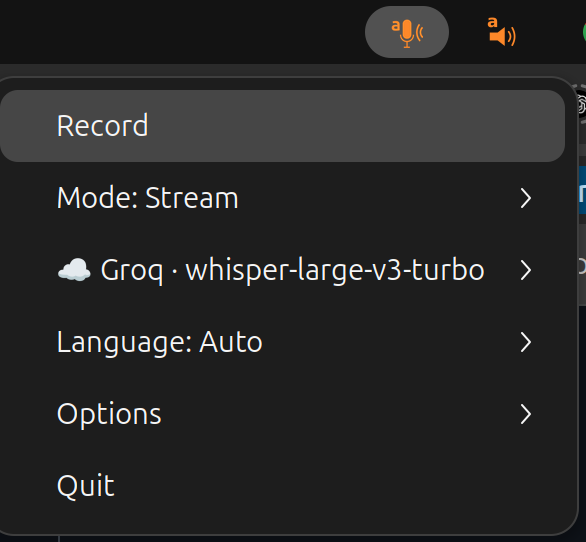
- Tray or terminal. Runs as a system tray icon with a single Record button, or as an interactive terminal TUI — same menu in both.
- Hotkey-friendly. Hooks into your desktop's keyboard shortcuts via
SIGUSR1(toggle recording) andSIGUSR2(cancel), plus built-in global hotkeys on X11 / Windows. - Cross-platform. Tested on Ubuntu (X11 and Wayland), macOS, and Windows; works under Termux for clipboard / terminal output.
Installation
Linux / macOS:
sudo apt-get install portaudio19-dev xclip   # Ubuntu; macOS: brew install portaudio
pip install scribe-cli[all]
export GROQ_API_KEY=YOURAPIKEY                # or OPENAI_API_KEY, or skip and run local
Windows (PowerShell) — no system packages needed; sounddevice bundles
PortAudio and the clipboard is native, so skip the apt/brew step:
py -m venv .venv
.\.venv\Scripts\Activate.ps1          # if blocked: Set-ExecutionPolicy -Scope CurrentUser RemoteSigned
pip install scribe-cli[whisper]        # local Whisper; or [all], or a cloud backend
$env:GROQ_API_KEY = "YOURAPIKEY"        # or OPENAI_API_KEY, or skip and run local
See the installation page for the full per-platform walkthrough (extras, Ubuntu / GNOME tray libs, the Windows quickstart).
Quickstart
scribe
This launches the system tray icon. Press Record, speak, press Stop — the
transcription lands in the focused window. Scribe picks the first backend whose
key / dependency is present, in order groq → openai → whisper-futo →
whisper → vosk. Override the defaults or drop the tray entirely:
scribe --backend whisper --model small   # local, no API key
scribe --frontend terminal               # interactive TUI menu
scribe --mode clipboard                  # copy to clipboard, no keystroke
See the quickstart for more.
Documentation
Full documentation lives at https://perrette.github.io/scribe/:
- Installation & dependencies — PortAudio, extras, Ubuntu / GNOME tray libs, Windows.
- Quickstart — your first dictation.
- Backends in detail — model lists, streaming recipes, vocabulary biasing, the realtime model.
- Output modes & typer backends —
keystroke vs clipboard, Wayland /
eitype,--type-direct. - System tray & global hotkeys —
menu tree, icon states,
SIGUSR1/SIGUSR2. - Desktop entry & autostart (
scribe-install) — GNOME / KDE launcher integration. - Fine tuning & CLI reference — every
scribe --helpflag with examples.
From the same author
A few other open-source tools I maintain.
Scientific writing & data
- texmark — write scientific articles in Markdown and convert them to journal-ready LaTeX/PDF.
- papers — command-line BibTeX bibliography and PDF library manager.
- datamanifest — declarative, reproducible dataset management. (See also the datamanifest.toml format spec and the DataManifest.jl Julia port.)
Speech to Text (dictate) and Text to Speech (read-aloud) tools
- bard — text-to-speech reader.
Compatibility
| OS | Status |
|---|---|
| Ubuntu 24.04 | Primary dev platform (GNOME, X11 and Wayland). |
| macOS | Works. |
| Windows 11 | Tested and working on Python 3.14 (64-bit / win_amd64). Dependencies resolve pre-built wheels; no C toolchain or Python downgrade needed. |
Wayland keystroke injection is convoluted but solved.
1 maintainer

Metadata
1 maintainer
Release files for scribe-cli 1.2.1
For a detailed explanation of source distributions (sdists) and built distributions (wheels), please see the package formats documentation.
Source distribution (sdist)
| File | Size | Uploaded | |
|---|---|---|---|
| scribe_cli-1.2.1.tar.gz | 2.2 MB | Details |
Built distribution (wheel)
| File | Interpreter | ABI | Platform | Reset |
|---|---|---|---|---|
| scribe_cli-1.2.1-py3-none-any.whl | Python 3 | none | any | Details |
Total release size: 4.2 MB
Release files / scribe_cli-1.2.1.tar.gz
| Download URL | scribe_cli-1.2.1.tar.gz |
|---|---|
| Size | 2.2 MB |
| Tags | Source |
|
SHA-256 checksum How to use checksums |
6ebd3a1bfaebfaff078b96a4a41735941fc67474e70ba6a19fb9ad680a0aef3e
|
|
BLAKE2b-256 checksum How to use checksums |
7c789cf66add9c45a8b73d4d352bc3026efa76a2142ac744ea9e30e387655562
|
| Upload date | |
|
Uploaded using Trusted Publishing? What is trusted publishing? |
Yes |
| Uploaded via |
twine/7.0.0 CPython/3.13.14
|
Provenance
Provenance describes where a file came from. On PyPI, provenance is shared via attestations, which provide a verifiable record of the build or publishing details. View details, limitations and caveats.


PyPI Publish Attestation
PyPI verified that this artifact, at this checksum, originated from the publisher listed below.
Signed by GitHub Actions, verified by PyPI on Oct 1, 2026.
Transparency logRelease files / scribe_cli-1.2.1-py3-none-any.whl
| Download URL | scribe_cli-1.2.1-py3-none-any.whl |
|---|---|
| Size | 2.1 MB |
| Tags | Python 3 |
|
SHA-256 checksum How to use checksums |
5b1c373371b14077334ddcd273ab928b4d9abaa41b180e99fa1a627c22e5625c
|
|
BLAKE2b-256 checksum How to use checksums |
65a78e50c96352e7c378fc40d173d2a95960115d5ded00db30f7bc34d6a07f89
|
| Upload date | |
|
Uploaded using Trusted Publishing? What is trusted publishing? |
Yes |
| Uploaded via |
twine/7.0.0 CPython/3.13.14
|
Provenance
Provenance describes where a file came from. On PyPI, provenance is shared via attestations, which provide a verifiable record of the build or publishing details. View details, limitations and caveats.
PyPI Publish Attestation
PyPI verified that this artifact, at this checksum, originated from the publisher listed below.
Signed by GitHub Actions, verified by PyPI on Oct 1, 2026.
Transparency log













