
SEAM: systematic explanation of attribution-based mechanisms for regulatory genomics




This repository contains the Python implementation of SEAM (Systematic Explanation of Attribution-based Mechanisms), an AI interpretation framework that systematically investigates how mutations reshape regulatory mechanisms. For an extended discussion of this approach and its applications, please refer to our manuscript, which is currently in review:
- Seitz, E.E., McCandlish, D.M., Kinney, J.B., and Koo P.K. Uncovering the Mechanistic Landscape of Regulatory DNA with Deep Learning. bioRxiv, October 8, 2025. https://www.biorxiv.org/content/10.1101/2025.10.07.681052v1
Installation:
Standard Install (CPU)
With Anaconda sourced, create a new environment with Python 3.8 or later:
conda create --name seam python=3.9
Next, activate this environment and install SEAM:
conda activate seam
pip install seam-nn
Finally, when you are done using the environment, always exit via conda deactivate.
Note: Some specialized workflows (e.g., the SEAM GUI, certain example scripts, or model-specific pipelines) may require older Python or package versions. Review the installation notes at the top of any relevant script before creating your environment.
Note: GPU access is not required to use SEAM.
pip install seam-nninstalls TensorFlow as a dependency, but GPU acceleration is only used by optional code paths—primarilyAttributer(attribution maps) andClusterer(hierarchical clustering distance matrices).Compiler,MetaExplainer, andIdentifierdo not require a GPU. All GPU-enabled paths fall back to CPU when no GPU is detected; attribution and hierarchical clustering on large sequence libraries are the steps most noticeably slower without one.
GPU Support (Optional)
SEAM uses TensorFlow for GPU acceleration in Attributer and in Clusterer hierarchical clustering (distance-matrix computation). To utilize GPU acceleration, your environment must have a strictly matched combination of Python, TensorFlow, CUDA, and cuDNN.
Installing seam-nn via pip pulls in TensorFlow, but does not guarantee the correct CUDA/cuDNN runtime libraries are installed. If you see the warning Could not find cuda drivers on your machine, GPU will not be used, your GPU is present but the CUDA runtime is missing or mismatched.
Recommended: Python 3.9+ with TensorFlow 2.16+
TensorFlow 2.16+ bundles the required NVIDIA libraries via pip. You do not need to install CUDA via Conda. Use Python 3.9 or later and install GPU-enabled TensorFlow before SEAM:
conda create --name seam-gpu python=3.9
conda activate seam-gpu
pip install "tensorflow[and-cuda]"
pip install seam-nn
On Python 3.9+, pip install seam-nn alone may also enable GPU support (as it pulls a recent TensorFlow), but installing tensorflow[and-cuda] first is the most reliable approach.
Legacy GPU Environments (Python 3.8 or TensorFlow < 2.16)
If you use Python 3.8, pip installs TensorFlow 2.13, which does not support tensorflow[and-cuda]. You must manually install the exact CUDA Toolkit and cuDNN versions that match your TensorFlow version. For example, TensorFlow 2.12–2.14 requires CUDA 11.8 and cuDNN 8.6:
conda install -c conda-forge cudatoolkit=11.8 cudnn=8.6
export LD_LIBRARY_PATH=$CONDA_PREFIX/lib:$LD_LIBRARY_PATH
pip install seam-nn
If cudnn=8.6 is unavailable on your platform, try conda install -c conda-forge cudnn without a version pin. You may need to add the LD_LIBRARY_PATH export to your shell profile or job script so it persists across sessions.
⚠️ Troubleshooting: If you are managing dependencies manually, you must consult the official TensorFlow Tested Build Configurations Table to find the exact CUDA and cuDNN versions required for your specific version of TensorFlow and Python.
You can verify GPU detection with:
import tensorflow as tf
print(tf.config.list_physical_devices('GPU'))
If you have any issues installing SEAM, please see:
- https://seam-nn.readthedocs.io/en/latest/installation.html
- https://github.com/evanseitz/seam-nn/issues
For issues installing SQUID, the package used for sequence generation and inference, please see:
Usage and Requirements:
SEAM provides a unified interface for mechanistic interpretation of sequence-based deep learning models.

The framework takes as input a sequence-based oracle (e.g., a genomic DNN) and requires four key components to perform analysis:
-
Sequence Library (
numpy.ndarray): One-hot encoded sequences of shape (N, L, A), where:- N: Number of sequences
- L: Sequence length
- A: Number of features (e.g., 4 for DNA nucleotides)
-
Predictions/Measurements (
numpy.ndarray): Experimental or model-derived values of shape (N,1), corresponding to each sequence's functional output. -
Attribution Maps (
numpy.ndarray): Mechanistic importance scores of shape (N, L, A), quantifying the contribution of each position-feature pair to the sequence's function. These can be generated using various attribution methods: -
Clustering/Embedding (either):
- Hierarchical clustering linkage matrix (e.g., from
scipy.cluster.hierarchy.linkage) - Dimensionality reduction embedding of shape (N,Z), where Z is the number of dimensions in the embedded space
- Hierarchical clustering linkage matrix (e.g., from
These required files can be generated either externally or using SEAM's specialized modules (described below). Once provided, SEAM applies a meta-explanation approach to interpret the sequence-function-mechanism dataset, deciphering the determinants of mechanistic variation in regulatory sequences.
For detailed examples of how to generate these requirements using SEAM's modules and apply the analysis pipeline to reproduce key findings from our main manuscript, see the Examples section at the end of this document.
SEAM Modules:
SEAM’s analysis pipeline is organized into modular components, with outputs from each stage feeding into the next. The Mutagenizer, Compiler, Attributer, and Clusterer modules generate core data products, which are integrated by the MetaExplainer to characterize each SEAM-derived mechanism. The Identifier module then builds on these outputs to annotate regulatory elements and quantify their combinatorial relationships.
-
Mutagenizer (from SQUID): Generates in silico sequence libraries through various mutagenesis strategies, including local, global, optimized, and complete libraries (supporting all combinatorial mutations up to a specified order). Features GPU-acceleration and batch processing for efficient sequence generation.
-
Compiler: Standardizes sequence analysis by converting one-hot encoded sequences to string format and computing associated metrics. Compiles sequences and functional properties into a DataFrame, with support for metrics such as Hamming distances and global importance analysis scores. Implements GPU-accelerated sequence conversion and vectorized operations.
-
Attributer: Computes attribution maps that quantify the base-wise contribution to regulatory activity. SEAM provides TensorFlow 2 GPU-accelerated implementations of Saliency Maps, IntGrad, SmoothGrad, and ISM. (For TF2, DeepSHAP is not yet optimized for GPU accelerated batch processing across the sequence library and requires external libraries
pip install kundajelab-shap==1andpip install deeplift). -
Clusterer: Computes mechanistic clusters and embeddings from attribution maps to identify distinct regulatory mechanisms. Supports hierarchical clustering (GPU-optimized), K-means, and DBSCAN algorithms, with optional dimensionality reduction (UMAP, t-SNE, PCA) for complementary interpretability.
-
MetaExplainer: The core SEAM module that integrates results to identify and interpret mechanistic patterns. Generates cluster-averaged attribution maps (shape: (L, A) for each cluster) and the Mechanism Summary Matrix (MSM), a DataFrame containing position-wise statistics (entropy, consensus matches, reference mismatches) for each cluster. Also implements background separation and provides visualization tools for sequence logos, attribution logos, and cluster statistics, with support for both PWM-based and enrichment-based analysis.
-
Identifier: Analyzes cluster-averaged attribution maps in conjunction with the MSM to identify such properties as the precise locations of motifs and their epistatic interactions.
Note on terminology: Our API and examples currently use the legacy terminology "MSM" (Mechanism Summary Matrix), which corresponds to the renamed "CSM" (Cluster Summary Matrix) in our bioRxiv preprint. A future update will address this terminology inconsistency.
Examples
Google Colab examples for applying SEAM on previously-published deep learning models (DeepSTARR) and experimental datasets (PBMs) are available at the links below.
Note: Due to memory requirements for calculating distance matrices, Colab Pro may be required for examples using hierarchical clustering with their current settings.
- Local library to annotate all TFBSs and binding configurations
- DeepSTARR: Enhancer 20647 (Fig.2a)
- Local library with 30k sequences and 10% mutation rate | Integrated gradients; hierarchical clustering
- Expected run time: ~3 minutes on Colab A100 GPU
- Local library to reveal low-affinity motifs using background separation
- DeepSTARR: Enhancer 5353 (Fig.TBD)
- Local library with 60k sequences and 10% mutation rate | Integrated gradients; hierarchical clustering
- Expected run time: ~8.5 minutes on Colab A100 GPU
- Local library to explore mechanism space of an enhancer TFBS
- DeepSTARR: Enhancer 13748 (SFig.TBD)
- Local library with 100k sequence and 10% mutation rate | Saliency maps; UMAP with K-Means clustering
- Expected run time: ~3.9 minutes on Colab A100 GPU
- Combinatorial-complete library with empirical mutagenesis maps
- PBM: Zfp187 (Fig.TBD)
- Combinatorial-complete library with 65,536 sequences | ISM; Hierarchical clustering
- Expected run time: ~12 minutes on Colab A100 GPU
- Combinatorial-complete library with interactive mechanism space viewer
- PBM: Hnf4a (Fig.TBD)
- Combinatorial-complete library with 65,536 sequences | ISM; UMAP with K-Means clustering
- Expected run time: ~4.9 minutes on Colab A100 GPU
- Global library to compare mechanistic heterogeneity of an enhancer TFBS
- DeepSTARR: CREB/ATF (Fig.TBD)
- Global library with 100k sequences | Saliency maps: UMAP with K-Means clustering
- Expected run time: ~3.2 minutes on Colab A100 GPU
- Global library to compare mechanisms across different developmental programs
- DeepSTARR: DRE (Fig.TBD)
- Global library with 100k sequences | Saliency maps; UMAP with K-Means clustering
- Expected run time: ~2.7 minutes on Colab A100 GPU
- Global library to compare mechanisms associated with genomic and synthetic TFBSs
- DeepSTARR: AP-1 (Fig.TBD)
- Global library with 100k sequences | Integrated gradients; UMAP with K-Means clustering
- Expected run time: ~3.9 minutes on Colab A100 GPU
Python script examples are provided in the examples folder for locally running SEAM and exporting outputs to file. These examples additionally include ChromBPNet models and attribution methods that are not compatible with the latest libraries supported by Google Colab:
- Local library to analyze foreground and background signals at human promotors and enhancers
- ChromBPNet: PPIF promoter/enhancer (Fig.3)
- Local library with 100k sequences and 10% mutation rate | {Saliency, IntGrad, SmoothGrad, ISM}; Hierarchical clustering
Additional dependencies for these Python examples may be required and outlined at the top of each script.
Complete pipelines, configurations, and processed data for reproducing all analyses and figures from the SEAM manuscript, including additional models beyond DeepSTARR, PBMs, and ChromBPNet, are available on Zenodo.
SEAM Interactive Interpretability Tool:
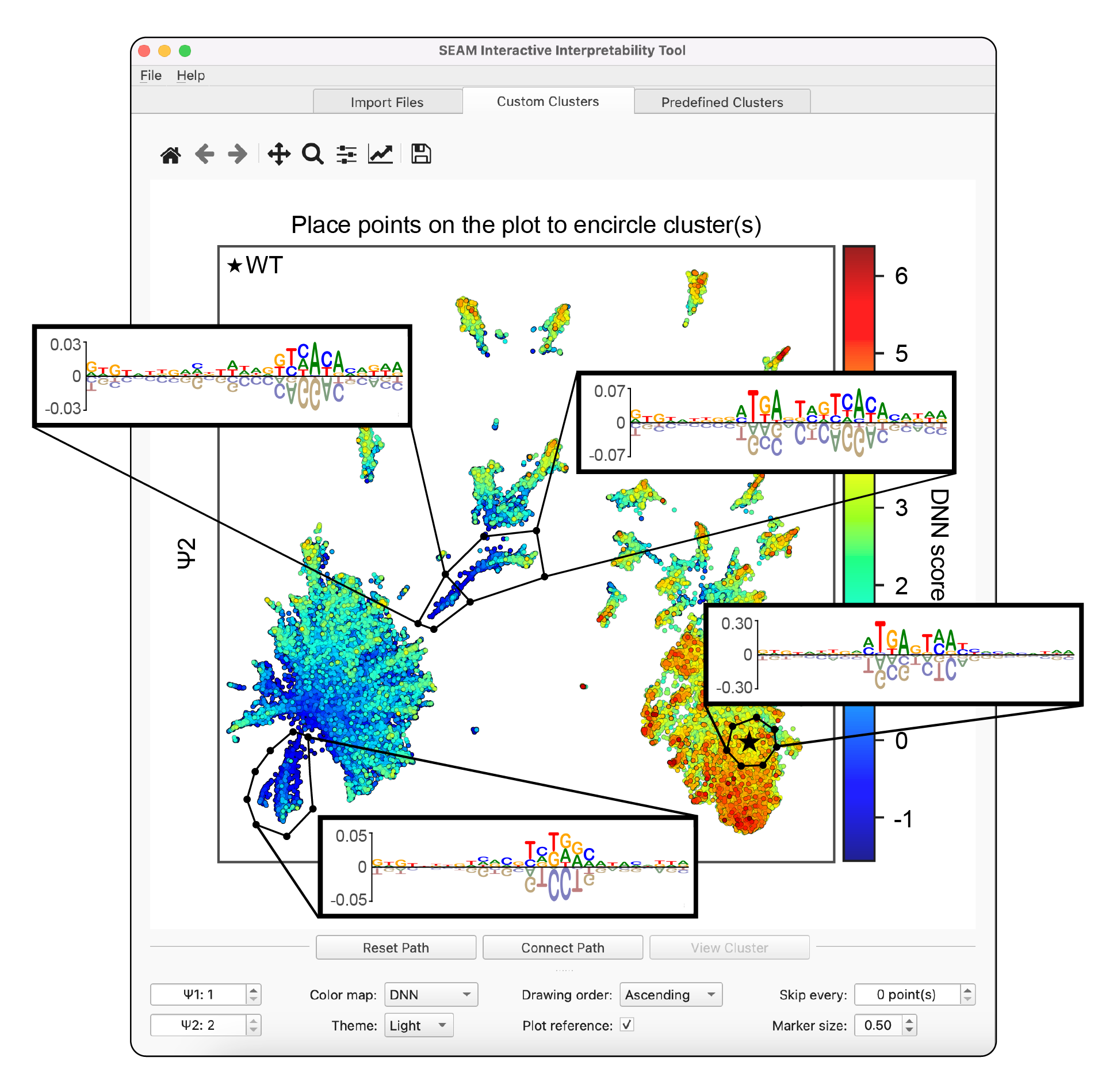
A graphic user interface (GUI) is available for dynamically interpretting SEAM results, allowing users to explore and analyze pre-computed inputs from the e. The GUI can be run using the command line interface from the seam folder via python seam_gui.py with the seam-gui environment activated (see below). The SEAM GUI requires pre-computed inputs that can be saved using the example scripts above. Instructions for downloading demo files for running the SEAM GUI are available in the seam/seam_gui_demo folder. A full walkthrough of the SEAM GUI using this demo dataset is available on YouTube.
SEAM GUI environment requires alternative imports to the default seam environment (above). The seam-gui environment can be installed following these steps:
conda create --name seam-gui python==3.8*
Next, activate this environment via conda activate seam-gui, and install the following packages:
	pip install --upgrade pip
	pip install PyQt5
	pip3 install --user psutil
	pip install biopython
	pip install scipy
	pip install seaborn
	pip install -U scikit-learn
	pip install pysam
	pip install seam-nn
	pip install matplotlib==3.6
To avoid conflicts, matplotlib==3.6 must be the last package installed
Finally, when you are done using the environment, always exit via conda deactivate.
Citation:
If this code is useful in your work, please cite our paper:
@article{Seitz2025.10.07.681052,
	author = {Seitz, Evan and McCandlish, David Martin and Kinney, Justin Block and Koo, Peter},
	title = {Uncovering the Mechanistic Landscape of Regulatory DNA with Deep Learning},
	elocation-id = {2025.10.07.681052},
	year = {2025},
	doi = {10.1101/2025.10.07.681052},
	publisher = {Cold Spring Harbor Laboratory},
	URL = {https://www.biorxiv.org/content/early/2025/10/08/2025.10.07.681052},
	eprint = {https://www.biorxiv.org/content/early/2025/10/08/2025.10.07.681052.full.pdf},
	journal = {bioRxiv}
}
License:
Copyright (C) 2023–2025 Evan Seitz, David McCandlish, Justin Kinney, Peter Koo
The software, code samples and their documentation made available on this website could include technical or other mistakes, inaccuracies or typographical errors. We may make changes to the software or documentation made available on its web site at any time without prior notice. We assume no responsibility for errors or omissions in the software or documentation available from its web site. For further details, please see the LICENSE file.
1 maintainer

Download files
Download the file for your platform. If you're not sure which to choose, learn more about installing packages.
Source Distribution
Built Distribution
Filter files by name, interpreter, ABI, and platform.
If you're not sure about the file name format, learn more about wheel file names.
Copy a direct link to the current filters
File details
Details for the file seam_nn-0.6.6.tar.gz.
File metadata
- Download URL: seam_nn-0.6.6.tar.gz
- Upload date:
- Size: 122.0 kB
- Tags: Source
- Uploaded using Trusted Publishing? No
- Uploaded via:
twine/6.1.0 CPython/3.11.9
File hashes
| Algorithm | Hash digest | |
|---|---|---|
| SHA256 |
1cecc30ec7b3d920b3dc8f8ec95b0dcda84d004ee60b1b3cd01623708cc7acd4
|
|
| MD5 |
e49216b8e62a316377ac4f1d73d9bfdf
|
|
| BLAKE2b-256 |
ecb56941154a471c648ec41a7cde5e1b6803618374a7f6c25933de4d2862d5db
|
File details
Details for the file seam_nn-0.6.6-py3-none-any.whl.
File metadata
- Download URL: seam_nn-0.6.6-py3-none-any.whl
- Upload date:
- Size: 120.5 kB
- Tags: Python 3
- Uploaded using Trusted Publishing? No
- Uploaded via:
twine/6.1.0 CPython/3.11.9
File hashes
| Algorithm | Hash digest | |
|---|---|---|
| SHA256 |
6b5404bb021cc1839cb402abe7aa1e18c3c2c3bb549493daf8864da0971f171f
|
|
| MD5 |
df57db84b79c60481e07992d181d1666
|
|
| BLAKE2b-256 |
039987f4717856fa5604b65a5f42f02b85686dc99f2f288af32d924e678f7bc6
|







