
A secure, Python-based network discovery and mapping tool using SSH-based device interrogation

Project description
Secure Cartography
Secure Cartography is a secure, Python-based network discovery and mapping tool designed for network engineers and IT professionals. It leverages SSH-based device interrogation to automate network discovery, visualize network topologies, and merge network maps across multi-vendor environments.
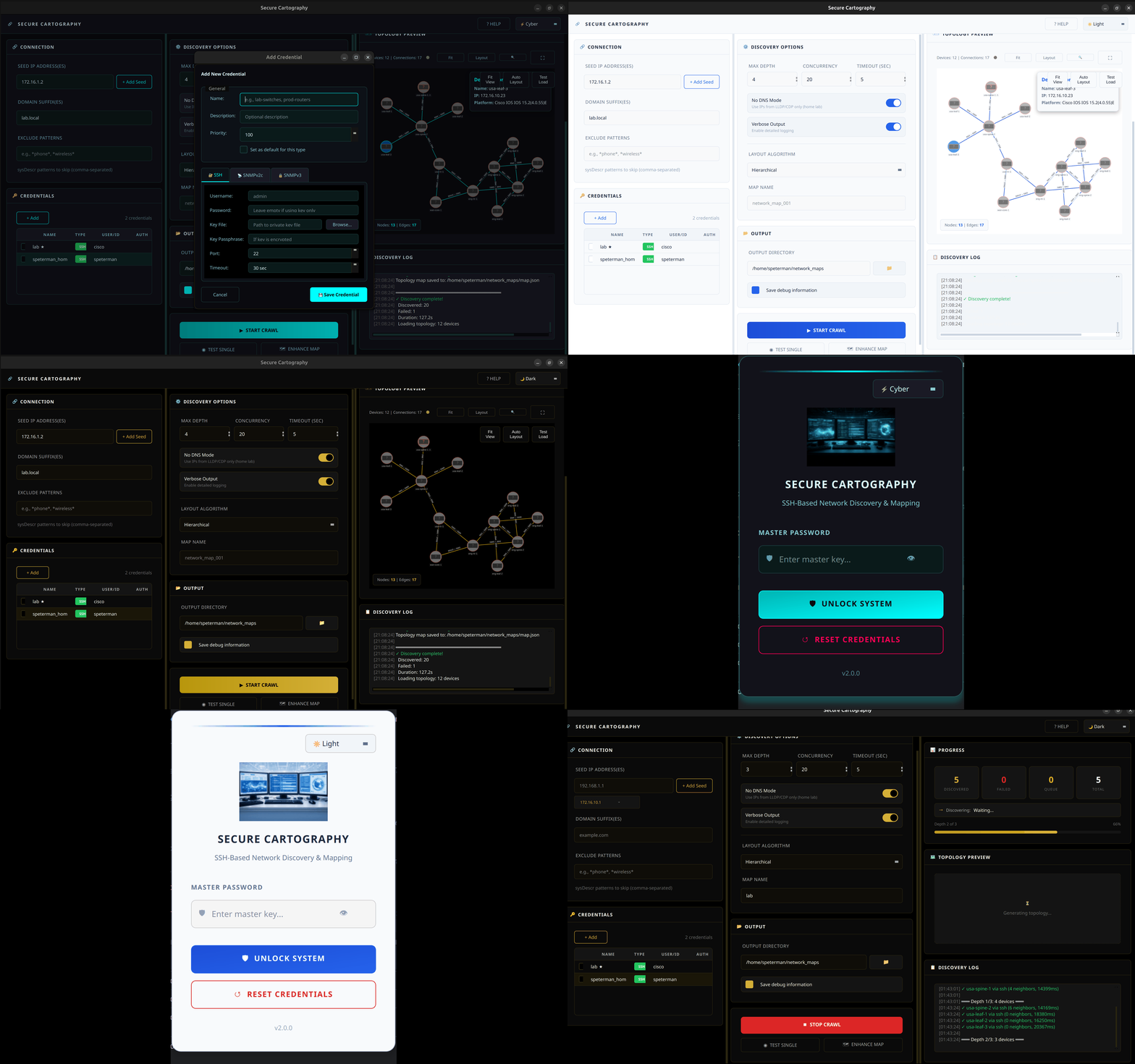
Version 0.7.0 Highlights
- Major Performance Improvements: 10x faster device discovery and processing
- Enhanced Visualization: New interactive Mermaid-based network topology viewer
- Improved Device Support: Added support for Aruba/HP ProCurve switches (non-CX)
- Advanced Logging: Configurable logging levels with improved output formatting
- UI Improvements:
- Quick-access buttons for browsing output folders and files
- Modernized topology merge dialog with interactive preview
- Enhanced dark/light mode support
Quick Start Guide
-
Network Discovery and Mapping
python -m secure_cartography.scart
-
Topology Merge Tool
python -m secure_cartography.merge_dialog
Key Features
Network Discovery
- Multi-threaded SSH-based device discovery with optimized queue management
- Support for multiple vendor platforms:
- Cisco IOS
- Cisco NX-OS
- Arista EOS
- Aruba/HP ProCurve (non-CX)
- Improved device tracking and neighbor discovery
- Real-time progress monitoring with enhanced logging
- Smart platform detection and validation
- Configurable exclusion patterns (e.g.,
othersite-,septo exclude specific sites and IP phones)
Visualization
- Interactive topology viewer with Mermaid diagrams
- Dark/Light mode theme support
- Multiple export formats:
- SVG for high-quality graphics
- GraphML for yEd integration
- Draw.io compatible format
- Multiple layout algorithms:
- Kamada-Kawai (KK) for general topologies
- Circular layout for ring networks
- Multipartite for layered networks
Security
- Master password-based encryption system
- Machine-specific keyring integration
- No plaintext passwords stored
- PBKDF2-based key derivation
- Encrypted credential storage
Map Merging
- Interactive topology preview
- Intelligent topology merging with connection deduplication
- Comprehensive merge logging
- Multiple file support
Installation
From PyPI
pip install secure-cartography
From GitHub
git clone https://github.com/scottpeterman/secure_cartography.git
cd secure_cartography
python -m venv .venv
source .venv/bin/activate  # On Windows: .venv\Scripts\activate
pip install -r requirements.txt
Running the Application
# Run as installed package
scart
merge-dialog

# Or run as module for additional console output
python -m secure_cartography.scart
python -m secure_cartography.merge_dialog
System Requirements
- Python 3.9+
- PyQt6
- NetworkX
- N2G
- Matplotlib
- Cryptography
- PyYAML
- Paramiko
System Compatibility
Tested Environments
- Windows 10 & 11
- Ubuntu 24.04
- Mac OSX (latest as of 12-20-24)
- Python versions 3.9 and 3.12
Known Issues
- Python 3.13: Compatibility issues with Napalm library
External Tool Integration
yEd GraphML (.graphml)

- Multiple automatic layout algorithms
- Advanced grouping capabilities
- Neighborhood analysis
- High-quality vector export
draw.io (.drawio)

- Collaborative diagram editing
- Web-based access
- Multiple export formats
- Custom stencils and shapes
Version History
0.7.0 (Current)
- 10x performance improvement in device discovery
- Added Aruba/HP ProCurve switch support
- New interactive Mermaid-based topology viewer
- Enhanced logging with configurable levels
- Improved UI with quick-access file management
- Better error handling and recovery
0.2.0
- Initial ProCurve support
- Improved device discovery reliability
- Enhanced neighbor discovery
- Added debug logging
- Improved topology mapping
- Better platform detection
Technology Stack
Core Technologies
- Python 3.9+
- PyQt6 for GUI
- NetworkX for graph processing
- Matplotlib for visualization
- Cryptography.io for security
Security Components
- PBKDF2 key derivation
- Fernet encryption
- System keyring integration
- Platform-specific secure storage
Network Interaction
- Paramiko/SSH2 for device communication
- TextFSM for output parsing
- Custom platform detection
- Enhanced interface normalization
Data Storage
- JSON for topology data
- YAML for configuration
- SVG for visualizations
- Encrypted credential storage
Security Architecture
Credential Protection
-
Master Password System
- PBKDF2-derived key generation
- Machine-specific salt
- Secure system keyring integration
-
Storage Security
- Fernet encryption for credentials
- No plaintext password storage
- Platform-specific secure storage locations
-
Runtime Security
- Memory-safe credential handling
- Secure credential cleanup
- Protected GUI input fields
Release history Release notifications | RSS feed


Download files
Download the file for your platform. If you're not sure which to choose, learn more about installing packages.
Source Distributions
Built Distribution
Filter files by name, interpreter, ABI, and platform.
If you're not sure about the file name format, learn more about wheel file names.
Copy a direct link to the current filters
File details
Details for the file secure_cartography-0.7.0-py3-none-any.whl.
File metadata
- Download URL: secure_cartography-0.7.0-py3-none-any.whl
- Upload date:
- Size: 12.8 MB
- Tags: Python 3
- Uploaded using Trusted Publishing? No
- Uploaded via: twine/6.0.1 CPython/3.9.13
File hashes
| Algorithm | Hash digest | |
|---|---|---|
| SHA256 |
64cc7fbdf8636a1ec18a31e707d58140f1d789fe63b5b863bfdc2e3e21879ff4
|
|
| MD5 |
ad587c02f61b3b7ee81204d2f90d8559
|
|
| BLAKE2b-256 |
5784394be962504003591c351b6c5df267f8f1e5b2401396dce03d62a4a76fd1
|






