
Shuffle and Singul agentic API
Connect to your favorite services with a Singul line of code.
This documentation will help you get started with Singul, understand its capabilities, and integrate it into your workflows easily. Whether you're a developer, a security analyst, or an automation engineer — Singul is built for you.
Singul is an API handler that allows you to get or update data in tools like Jira, Outlook, Gmail, Service Now, and more - with a single line of code.
Usage
Run AI Agent: run_agent("action to perform")
from shufflepy import Singul

singul = Singul(
    "APIKEY"
)

singul.run_agent("Handle my emails from yesterday so I don't have to")
Sample functions below. If none of these match, try to use the shuffle.connect() function to run ANYTHING. By default returns the matching translation standard if available, otherwise the raw output.
from shufflepy import Singul

# If you want to use REMOTE singul (shuffler.io / open source Shuffle)
singul = Singul(
	"APIKEY",
	url='https://shuffler.io',
)

singul.cases.create_ticket("jira", title="Title")
singul.communication.send_message("slack", message="Test")
singul.communication.send_message("teams", message="Test")
tickets = singul.cases.list_tickets("jira")


# If you want to run it 100% locally
resp = singul.run("jira", action="list_tickets")
Normal App run control:
singul.run_app(app_id="bc78f35c6c6351b07a09b7aed5d29652", action="repeat_back_to_me", params={"call": "The value to repeat"})
Manual:
# General connect
resp = singul.cases.list_tickets(
	app="jira",
	org_id=os.environ.get("SHUFFLE_ORG_ID"),
	fields=[{
		"key": "max-amount",
		"value": "10"
	}]
)

### Common Use Cases

# General transformer - Transforms from any data into a standard, e.g. "list_tickets"
sourcedata = [{"title": "Tickettitle", "id": "hiya"}]
tickets = singul.transform(sourcedata, "list_tickets") # (coming soon)

* Send emails using **Outlook or Gmail**
* Fetch and manage tickets from **Jira, GitHub, or TheHive**
* Pull alerts from **SIEM or SOAR platforms**
* Automate security investigations
* Trigger workflow actions across tools
* Build lightweight automation using simple APIs

Basic output for `list_tickets`:
```json
[{
  "id": "P-123",
  "title": "Ticket 1"
},
{
  "id": "P-124",
  "title": "Ticket 2"
}]
See default standards - Standards are modifiable, and you will see your own standards on the File page in Shuffle.
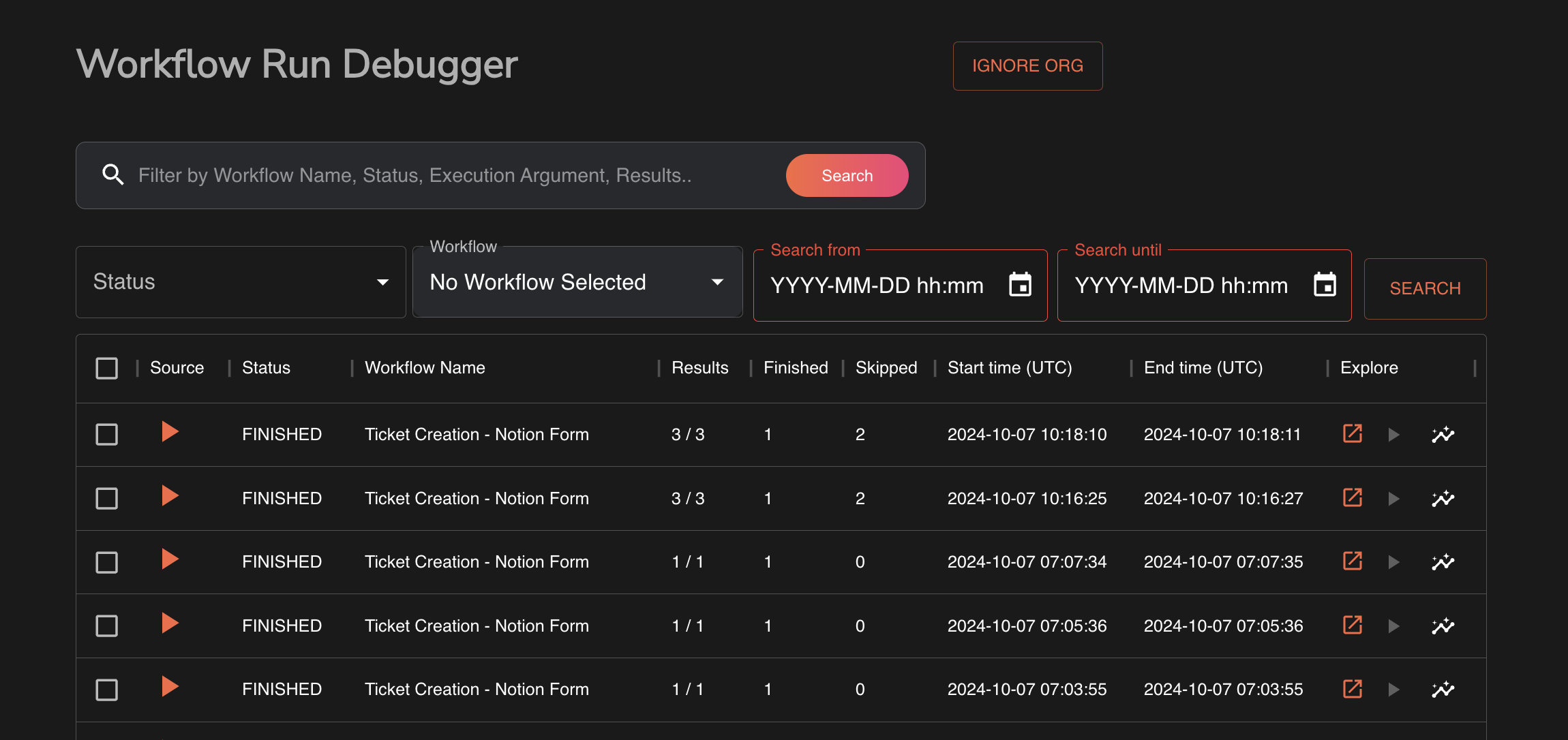
Exploring usage
To look through past executions, see the execution debugger available on /workflows/debug
Available Apps & categories
Local testing
cd build_singul
cp -r ../shufflepy singul
python3 -m pip install -e . --break-system-packages

# You can now import the library locally :)
1 maintainer

Metadata
1 maintainer
Release files for shufflepy 0.2.2
For a detailed explanation of source distributions (sdists) and built distributions (wheels), please see the package formats documentation.
Source distribution (sdist)
| File | Size | Uploaded | |
|---|---|---|---|
| shufflepy-0.2.2.tar.gz | 12.4 kB | Details |
Built distribution (wheel)
| File | Interpreter | ABI | Platform | Reset |
|---|---|---|---|---|
| shufflepy-0.2.2-py3-none-any.whl | Python 3 | none | any | Details |
Total release size: 26.6 kB
Release files / shufflepy-0.2.2.tar.gz
| Download URL | shufflepy-0.2.2.tar.gz |
|---|---|
| Size | 12.4 kB |
| Tags | Source |
|
SHA-256 checksum How to use checksums |
0fb8ca805cc34a984cae99f7a14578f37bee559f67ec67a61569001cfb989abb
|
|
BLAKE2b-256 checksum How to use checksums |
b2ca83e5939d801d7531ab72466da66b8bd3a23af997c33a6f0193e306ca8f43
|
| Upload date | |
|
Uploaded using Trusted Publishing? What is trusted publishing? |
No |
| Uploaded via |
twine/6.0.1 CPython/3.10.10
|
Release files / shufflepy-0.2.2-py3-none-any.whl
| Download URL | shufflepy-0.2.2-py3-none-any.whl |
|---|---|
| Size | 14.2 kB |
| Tags | Python 3 |
|
SHA-256 checksum How to use checksums |
054254cc0f34362a4147744a897f0b0972f0fb3503a2ac125b739009658ea8a7
|
|
BLAKE2b-256 checksum How to use checksums |
6f5fc512c9c0d3ddcf1e128aaeb4dd7cd8876049275e4c7134765e9a5dcb4d1b
|
| Upload date | |
|
Uploaded using Trusted Publishing? What is trusted publishing? |
No |
| Uploaded via |
twine/6.0.1 CPython/3.10.10
|














