
Use Singul to connect to API with a single line of code

Project description
Shufflepy
Connect to your favorite services with a single line of code.
This Library is in an Experimental Phase, released under pypi
Installation
pip install shufflepy
Configuration
from shufflepy import Singul

## If the config is not specified, the library will use `https://shuffler.io` as the default URL. You must specify an apikey.

shuffle = Singul(
	"APIKEY",
	url='https://shuffler.io',
)
Requirements
- An API-key for Shuffle
- Having an active authentication for the service you are trying to connect to in Shuffle, whether in your own instance or in the Shuffle cloud: https://shuffler.io. This will be added to the future Shuffle CLI, and is also doable with the App Authentication API.
- If onprem: A Shuffle instance.
Usage
Sample functions below. If none of these match, try to use the shuffle.connect() function to run ANYTHING. By default returns the matching translation standard if available, otherwise the raw output.
shuffle.create_ticket("jira", title="Title")
shuffle.send_message("slack", message="Test")
shuffle.send_message("teams", message="Test")
shuffle.upload_document("google drive", file_id="x")
tickets = shuffle.list_tickets("jira")
Normal App run control:
shuffle.run_app(app_id="bc78f35c6c6351b07a09b7aed5d29652", action="repeat_back_to_me", params={"call": "The value to repeat"})
Manual:
# General connect
tickets = shuffle.connect(
	app='jira',
	action='list_tickets',
	fields={
		"max-amount": 10
	}
)
# Returns output according to the 'list_tickets' standard
print(tickets)

# General transformer - Transforms from any data into a standard, e.g. "list_tickets"
sourcedata = [{"title": "Tickettitle", "id": "hiya"}]
tickets = shuffle.transform(sourcedata, "list_tickets")

print(tickets)
Basic output for list_tickets:
[{
  "id": "P-123",
  "title": "Ticket 1"
},
{
  "id": "P-124",
  "title": "Ticket 2"
}]
See default standards - Standards are modifiable, and you will see your own standards on the File page in Shuffle.
Exploring usage
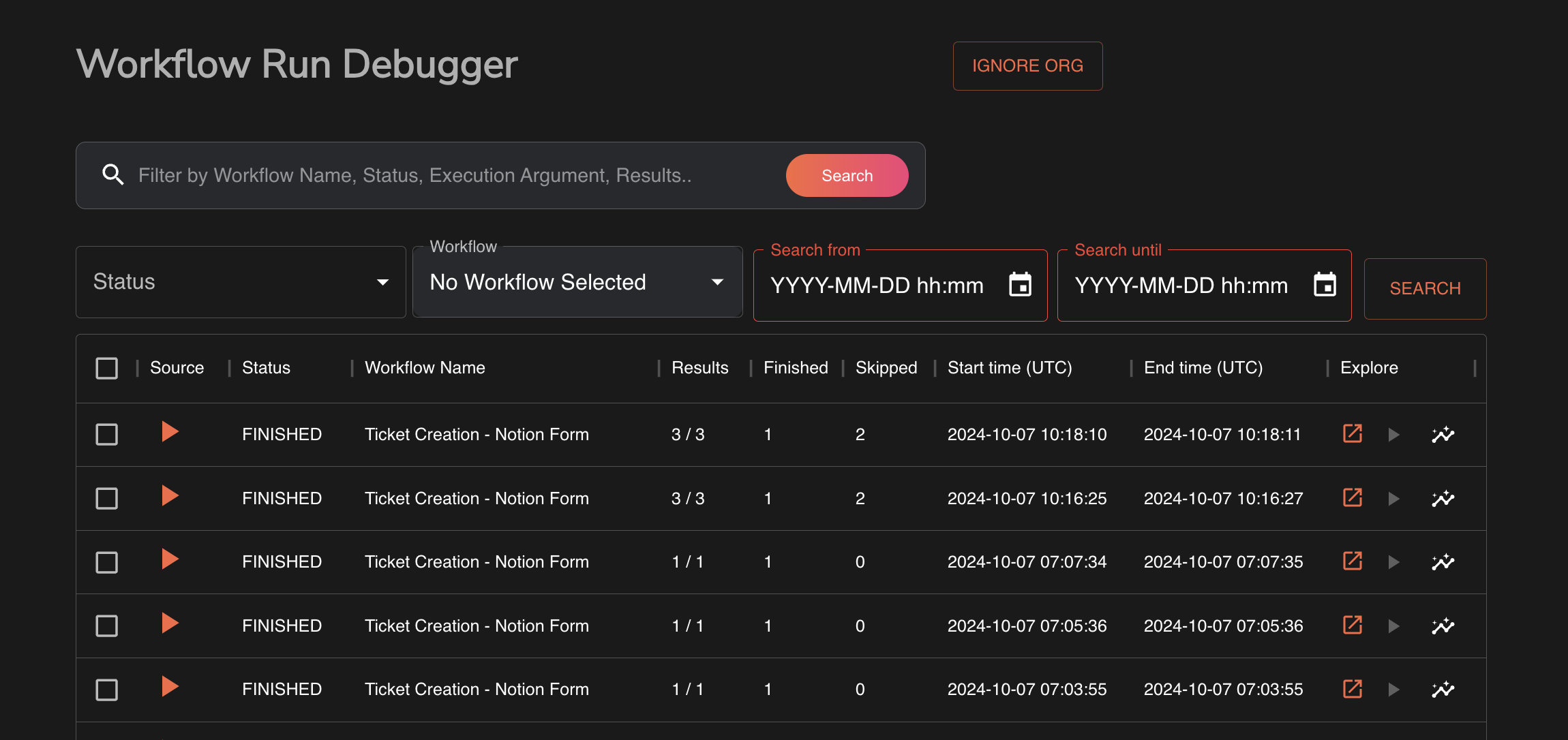
To look through past executions, see the execution debugger available on /workflows/debug
Available Apps & categories
Available Categories (May 2024)
- Ticket management (Cases)
- Communication/Email (Comms)
- SIEM (SIEM)
- EDR/XDR (Eradication)
- Asset Management (Assets)
- Identity (IAM)
- Threat Intel (Intel)
- Cloud Security (Cloud)
Release history Release notifications | RSS feed


Download files
Download the file for your platform. If you're not sure which to choose, learn more about installing packages.
Source Distribution
Built Distribution
Filter files by name, interpreter, ABI, and platform.
If you're not sure about the file name format, learn more about wheel file names.
Copy a direct link to the current filters
File details
Details for the file shufflepy-0.0.5.tar.gz.
File metadata
- Download URL: shufflepy-0.0.5.tar.gz
- Upload date:
- Size: 5.4 kB
- Tags: Source
- Uploaded using Trusted Publishing? No
- Uploaded via: twine/5.1.1 CPython/3.12.8
File hashes
| Algorithm | Hash digest | |
|---|---|---|
| SHA256 |
febf2cc619af011c992ed6ab84049a757c184cff6fe68883d0126f7ba491c30a
|
|
| MD5 |
211cb638b37bd103ff9c0fc22d9fa3f0
|
|
| BLAKE2b-256 |
144eab2f6f10c665e76095738c41d8e1c513c85403bcda52bda759e4c763264b
|
File details
Details for the file shufflepy-0.0.5-py3-none-any.whl.
File metadata
- Download URL: shufflepy-0.0.5-py3-none-any.whl
- Upload date:
- Size: 6.0 kB
- Tags: Python 3
- Uploaded using Trusted Publishing? No
- Uploaded via: twine/5.1.1 CPython/3.12.8
File hashes
| Algorithm | Hash digest | |
|---|---|---|
| SHA256 |
f074c39eb48be00786bf1c92dbf2400587b86792619e1d4e82b7fa1d4cad79ed
|
|
| MD5 |
60c8d02a0fb31891b2682ef72e194c2a
|
|
| BLAKE2b-256 |
eaf95104aebef81a9496b982c95534dd043df83c969ff21b14c8dec43bd5796b
|






