
This release is a pre-release and may not be stable for production use.
signavis (Python wrapper)
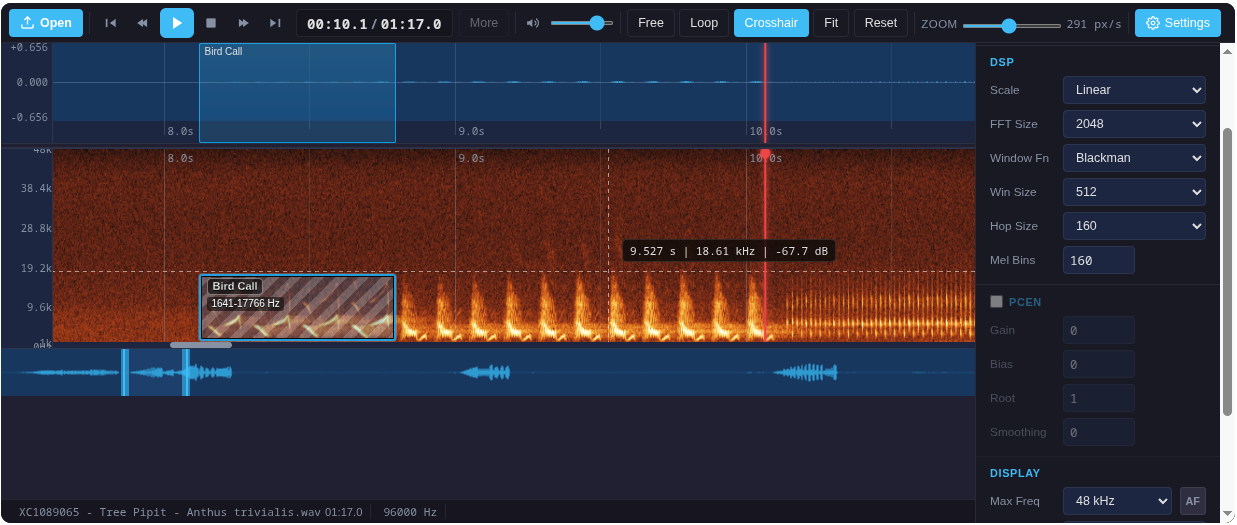


Python package to embed the SignaVis DAW player in Streamlit, Jupyter, Gradio, and any HTML-capable UI. Supports waveform & spectrogram visualization, annotation, and custom player layouts.
Live demo: https://limitlessgreen.github.io/SignaVis/
Installation
pip install signavis
Optional for demos:
pip install "signavis[streamlit]"
pip install "signavis[gradio]"
Example: Load and Display Your Own Audio
You can load your own audio file (WAV, MP3, etc.) and display it as a spectrogram or waveform in any supported environment. Just read the file as bytes and pass it to render_daw_player:
Jupyter Notebook:
from signavis import render_daw_player

with open("your_audio.wav", "rb") as f:
    audio_bytes = f.read()

html = render_daw_player(audio_bytes, viewMode="spectrogram")

# Display in Jupyter:
from IPython.display import HTML
HTML(html)
Streamlit:
import streamlit as st
from signavis import render_daw_player
import streamlit.components.v1 as components

uploaded = st.file_uploader("Choose an audio file", type=["wav", "mp3", "ogg", "flac"])
if uploaded is not None:
    html = render_daw_player(uploaded.read(), viewMode="spectrogram")
    components.html(html, height=620, scrolling=False)
You can use all other options as described above to customize the player.
Quickstart
Embed a DAW player for your own audio in Streamlit, Jupyter, or any HTML UI:
from signavis import render_daw_player
html = render_daw_player(
        audio_bytes,  # bytes (WAV/MP3)
        viewMode="spectrogram",   # 'both' | 'waveform' | 'spectrogram'
        transportStyle="hero",    # 'default' | 'hero'
        showOverview=False,        # Hide overview navigator
        showFileOpen=False,        # Hide file open button
        showStatusbar=False,       # Hide status bar
        labelTaxonomy=[{"name": "Species", "color": "#0ea5e9"}],
        # ...any other BirdNETPlayer option
)
Display in Streamlit:
import streamlit.components.v1 as components
components.html(html, height=620, scrolling=False)
Display in Jupyter:
from IPython.display import HTML
HTML(html)
Player Options
| Option | Example | Description |
|---|---|---|
viewMode |
'spectrogram' |
Show only the spectrogram |
transportStyle |
'hero' |
Large centered play button |
showOverview |
False |
Hide overview navigator |
showFileOpen |
False |
Hide file open button |
showStatusbar |
False |
Hide status bar |
labelTaxonomy |
[{'name': 'Species', 'color': '#0ea5e9'}] |
Custom label presets |
iframe_height |
320 |
Set iframe height (default: 620) |
For all options, see the Web API docs.
Presets & Layouts
The package includes several ready-to-use presets (see demo_streamlit.py):
- Full DAW: All controls, waveform & spectrogram, annotation
- Compact: Minimal controls, no overview/statusbar
- Preview Waveform Hero: Large play button, waveform only
- Preview Spectrogram Hero: Large play button, spectrogram only
- Ultra Compact Hero: Smallest possible embed
You can combine or override any option for your use case.
Advanced: Custom Spectrograms
You can inject your own pre-computed spectrogram data or images:
spectrogram_data: 2D numpy array (nFrames × nMels, float32)spectrogram_image: PNG/JPEG bytes, data-URL, matplotlib Figure, PIL Image, or numpy uint8 array
See the Web API for details.
Demos
Streamlit:
streamlit run demo_streamlit.py
Gradio:
pip install gradio
python demo_gradio.py
Google Colab:

Try the interactive notebook demo directly in your browser—no setup required!
License
GNU AGPL-3.0
1 maintainer

Metadata
1 maintainer
Release files for signavis 1.0.0rc2
For a detailed explanation of source distributions (sdists) and built distributions (wheels), please see the package formats documentation.
Source distribution (sdist)
| File | Size | Uploaded | Provenance | Actions |
|---|---|---|---|---|
| signavis-1.0.0rc2.tar.gz | 1.1 MB | Without provenance | Details for signavis-1.0.0rc2.tar.gz |
Built distribution (wheel)
| File | Interpreter | ABI | Platform | Actions Reset |
|---|---|---|---|---|
| signavis-1.0.0rc2-py3-none-any.whl | Python 3 | none | any | Details for signavis-1.0.0rc2-py3-none-any.whl |
Total release size: 2.1 MB
Security for signavis 1.0.0rc2
Provenance
Provenance describes where a file came from. On PyPI, provenance is shared via attestations, which provide a verifiable record of the build or publishing details. View details, limitations and caveats.
No provenance found
None of the files in this release were uploaded with provenance metadata.
A note on package security
PyPI is a repository for distributing packages, not a service for auditing them. While third-party security researchers and our staff do their best to detect and remove malicious packages, PyPI cannot guarantee the quality, security or suitability of any given package.
To learn more about protecting yourself from malicious actors, visit our package security documentation.














