

between grep and a SIEM


sigwood is a local-first, command-line threat-hunting tool for self-hosters. Point it at
logs you already have - Zeek, Pi-hole/dnsmasq, syslog, or CloudTrail - and it profiles
what's in them, then runs a handful of detectors over them: beaconing, suspicious DNS, port
scans, bulk outbound transfers, out-of-character TLS setups, authentication structure, rare
syslog events, unusual CloudTrail activity, and behavioral patterns in names your Pi-hole
already blocked.
Not a SIEM. Not an agent. Not magic. Nothing to deploy - no database, no daemon, no network, no account. Install it, point it at a directory of logs, read the output. It runs on your own box, over logs at rest, and your logs never have to leave your machine.
Status: stable (
1.1.0). The ten detectors work and are covered by tests; what 1.0 means says which interfaces are now fixed and which are not. Built with heavy AI assistance under human review; the FAQ says how, and the evidence ledger records what has and has not been measured. Feedback is welcome.
Install · Manual · FAQ · Contract · Roadmap · Known issues · Schemas · Prior work · Security
Quick start
pipx install sigwood        # or: pip install sigwood in a venv - see Installation

sigwood /var/log/           # point it at a directory
sigwood /opt/zeek/dns.log   # or a single file
That's it - no config required. Here is the kind of thing a run surfaces (illustrative output, not real network data):
dns - 1 finding · 1 high
Finds domain names that stand apart from the rest, including
machine-generated-looking names of the sort malware uses for disposable
command domains, and large batches of related lookups. You decide how
machine-generated a name must look, and how large a batch of lookups counts.
────────────────────────────────────────────────────────────────────────────────
groups (1)
          names  entropy score  queries  clients
  high       16  2.10-1.85          418        1  k7x2p9qz3f.example

beacon - 2 findings · 2 medium
Finds outbound connections that keep a regular rhythm, a pattern worth checking
for automated check-ins. You decide how strict the rhythm has to be before it
surfaces.
────────────────────────────────────────────────────────────────────────────────
medium  192.168.1.37  →  198.51.100.20:443/tcp    period=3.0m    rhythm=0.624   480 conns
medium  192.168.1.37  →  203.0.113.50:8443/tcp    period=10.0m   rhythm=0.606   144 conns

syslog - 1 finding · 1 medium
Finds rare log patterns and recorded reboots or administrative runs, so changes
on a machine do not disappear into routine logs. You decide how seldom a
pattern must appear to count as rare.
────────────────────────────────────────────────────────────────────────────────
privileged (1)
  medium  Accepted password for root from 198.51.100.20 port 51900 ssh2

-v explains why each finding surfaced
Read top to bottom, that is a story: an internal host making high-entropy lookups under one
throwaway domain, calling out to two external IPs on a fixed schedule, and a root SSH login
from one of those same IPs. A finding means "unusual for your network," not "known-bad" -
it is a lead to look at, not a verdict. Add -v for the evidence behind each score and the
next steps to run it down.
Only have a Pi-hole? That is a complete setup on its own:
sigwood digest /var/log/pihole/pihole.log   # orient: what's in the log
sigwood /var/log/pihole/                    # hunt: DNS clustering over your queries
sigwood dnsblock /var/log/pihole/           # bonus: behavior in names Pi-hole blocked
The usual invocations:
sigwood digest /var/log/messages     # orient first - a fast, factual profile of a file
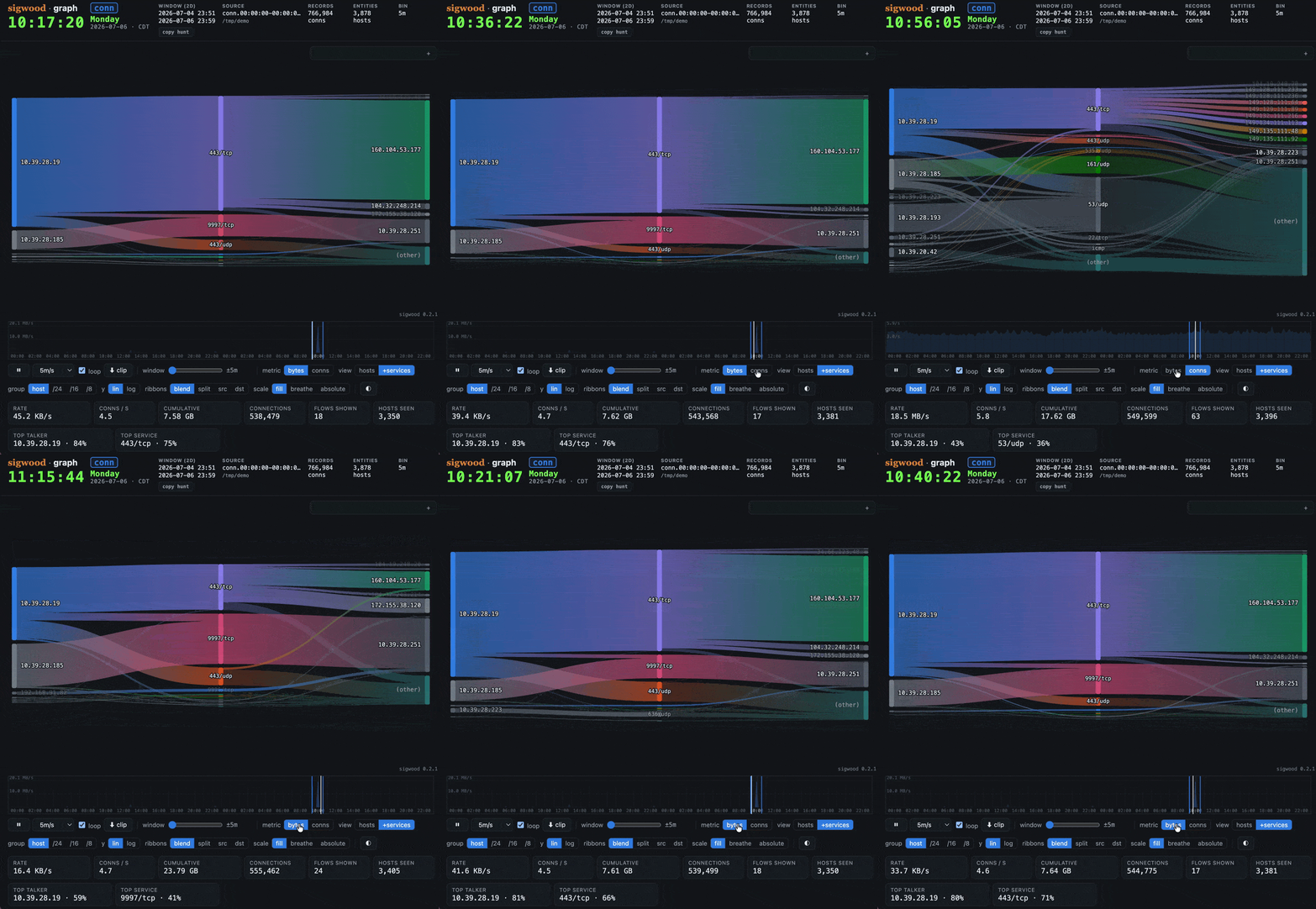
sigwood graph /opt/zeek              # replay the flows as a self-contained HTML artifact
sigwood syslog /var/log              # run a single detector
sigwood init                         # detection-driven setup, writes a config
sigwood hunt                         # run the curated default hunt
No logs handy? The repository includes a small synthetic corpus generator - one compromised host, no real network data - so you can watch it work first:
git clone https://github.com/helixmap/sigwood
cd sigwood
python3 demo/gen_corpus.py                 # writes a synthetic corpus; no network calls
sigwood hunt --config=demo/sigwood.toml    # beacons, a DGA burst, a bulk transfer out, and the syslog trail
The generated logs live under demo/corpus/ (gitignored); the full walkthrough is in
demo/README.md. Here is a
full run against that corpus, followed by the same findings in HTML format:

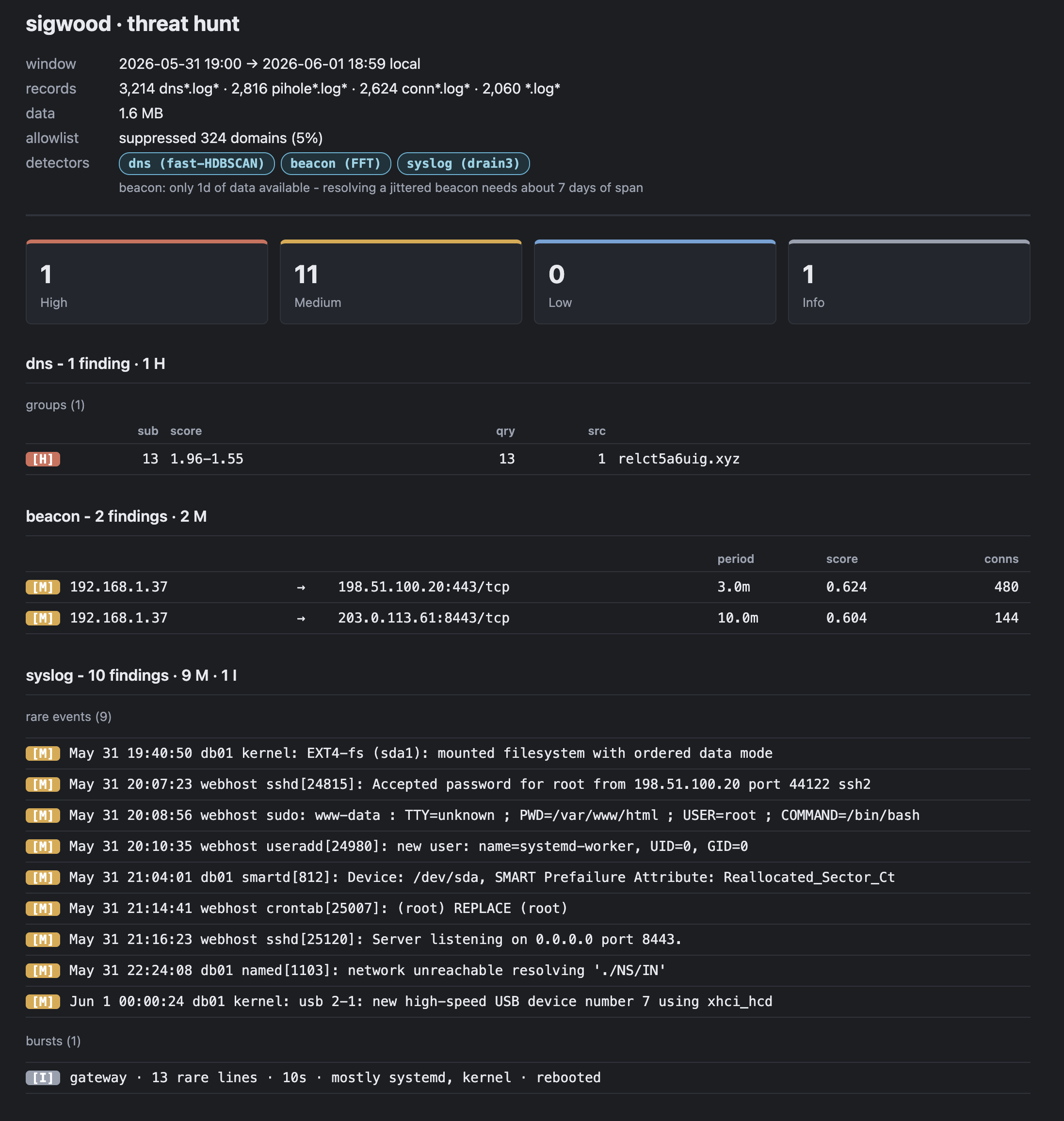
...and the same flows replayed by sigwood graph, one self-contained HTML file:
Installation
One name everywhere: the PyPI distribution, the command, the import package, and the config
section are all sigwood. Requires Python 3.11+.
The recommended install is pipx, which keeps sigwood in its own
isolated environment and on your PATH (and sidesteps the externally-managed-environment
refusal a bare pip install hits on modern distros):
# Debian / Raspberry Pi OS / Ubuntu:  sudo apt install pipx
# Fedora:                             sudo dnf install pipx
# macOS:                              brew install pipx

pipx ensurepath              # once - then reopen your shell
pipx install sigwood
sigwood --help
Prefer uv? uv tool install sigwood does the same job, and a
plain virtualenv also works. Optional extras, upgrades, sudo pip recovery, and the on-disk
footprint are all in the
manual.
What it hunts
| Detector | Surfaces | Method | Source |
|---|---|---|---|
beacon |
periodic C2-style callbacks | FFT over connection timing | Zeek conn.log |
dns |
DGA / tunneling / anomalous lookups | HDBSCAN clustering | Zeek dns.log or Pi-hole |
dnsblock * |
new blocked names, bursts & recurrence | pattern (bounded behavioral) | Pi-hole |
syslog |
rare events & reboots | drain3 templating + rarity | journal, syslog, or Zeek syslog.log |
auth * |
failure concentration, volume, spread & landings | heuristics | journal, syslog, or Zeek syslog.log |
scan |
vertical / horizontal / block / slow port scans | pattern (heuristic) | Zeek conn.log |
exfil |
bulk outbound byte transfer | heuristics | Zeek conn.log |
protocol * |
expected-port mismatch and newly unlabeled payload | expectation | Zeek conn.log |
ssl * |
outbound TLS setup unlike your estate's norm | heuristics | Zeek ssl.log (+ x509.log) |
aws |
per-principal anomalous CloudTrail behavior | statistical (z-score composite) | CloudTrail *.json* (incl. .gz) |
* opt-in: dnsblock, auth, protocol, and ssl are not in the curated default hunt. Run one by
name (sigwood dnsblock /var/log/pihole/), select it with --detect, or run everything with --detect=all.
dns and syslog each answer one question across several source families -
Zeek and Pi-hole for DNS; the live systemd journal, flat rsyslog, and Zeek's own
syslog.log for syslog - and adapt to whichever fidelity they're handed. On a
systemd host syslog prefers the live journal by default.
Run the curated default hunt (sigwood hunt), or just some (sigwood hunt --detect=beacon,dns). Each detector is also its own subcommand: sigwood beacon ~/zeek.
And what it doesn't hunt. sigwood watches up to three flanks - your network, your system logs, and your cloud API activity - whichever of them you actually have, and with no agent on your machines, so some attacker behavior stays out of view however good the detectors get. The roadmap maps both halves onto the MITRE ATT&CK matrix, tactic by tactic: what sigwood sees today, what could narrow each gap, and which gaps it will never close - some because closing them would mean shipping threat-intel feeds or signature packs instead of behavior, others because they sit outside its agentless, behavior-first design. sigwood aims for the top of the pyramid of pain as a design muse, and will not enumerate badness.
Evidence and field validation
The evidence ledger lists what has been measured for every detector, the limits of each result, and what is still owed. To help test sigwood on an environment that did not shape it, use the privacy-bounded field validation kit.
Where it stands
sigwood's North Star is behavior: beacon uses an FFT over connection timing; dns uses
HDBSCAN clustering over per-query behavior; syslog uses drain3 log-templating plus rarity;
aws uses a per-principal z-score composite; auth uses authentication structure across failures,
services, sources, accounts, and hosts. Every run names the technique each detector used, and
-v shows the evidence behind a finding. A finding is a lead, not a verdict - severity marks
what deserves review first, and HIGH is deliberately scarce.
The curated default hunt is a short, reviewed list, and the
evidence ledger records what
each detector has and has not been measured on; dnsblock stays opt-in at 1.0. When it runs,
dnsblock reaches beyond the report window for history, extending file selection over
default_window. With the stock 7d setting, that is a 28-day file-selection aperture - four
times the report span by duration, though the number of files depends on the rotation layout.
If you know RITA (or AC-Hunter), the beacon-hunting goal will look familiar - RITA is excellent at it. sigwood differs in conception: frequency domain, no database, no import step, several log families rather than conn/dns alone, and an orientation verb for logs you have not met yet. If you already run RITA against a dedicated Zeek sensor, keep it - sigwood is for the box where the logs already live.
What 1.0 means
The interfaces are stable. From 1.0, these do not change without a major version:
- the
sigwoodcommand and its verbs:hunt, the ten detector names,digest,graph,era,export,init,allowlist - flag syntax:
--flag=value, and-f=valuefor the short forms - the five output formats stay available and selectable, though
jsonandcsvare the ones carrying machine contracts.jsonis a single object with its ownschema_version(currently 1) that bumps only on a breaking change;csvis a fixed column set. The text, HTML and PDF reports are for reading, and their layout may change. Parse the first two, not the last three. - the config file:
~/.sigwood/config.toml, its[sigwood]section, and the allowlist drop-in naming rules - exit codes: 0 for a clean run, 1 for a failure, 130 on interrupt, 141 on a closed pipe
If you script against sigwood, those are the things to hold onto. Breaking any of them means 2.0.
Detection is not frozen, and should not be. What sigwood reports on a given log will
change between 1.0 releases: thresholds move when measurement says they should, and
detectors get quieter or catch more as they meet real data. Scoring internals,
calibration constants, the exact set of findings from a given corpus, and the internals
of the graph artifact sit outside the stability contract on purpose.
What 1.0 promises about detection is a posture, not a number:
- Defensible defaults. Every detector in the default hunt is there deliberately,
and the reasoning is written down. Four (
auth,dnsblock,protocolandssl) are deliberately not, and that reasoning is written down too. - Every material limit is stated in plain language, in known-issues and at run time where it applies, including the unflattering ones.
- No finding claims more than its evidence supports. Severity is structural, not a score band: timing alone caps at MEDIUM, HIGH requires corroboration from a different kind of evidence, and where a log source cannot supply that, HIGH is unreachable and sigwood says so rather than grading on a curve.
1.0 is not a claim that sigwood is finished, or that its detection is state of the art. It is a claim that the surface is stable enough to build on, and that the limits are written down where you can read them.
Digging deeper
The manual is the deep door: verbs and exit codes, source discovery, windows and time, every detector in depth, output, tuning, and exporters, in the order a hunt runs. The FAQ answers objections, known issues quantifies the rough edges, the contract says what stays stable through 1.x, and CONTRIBUTING covers building from source and adding a detector.
License
MIT. See the MIT License.
1 maintainer

Metadata
1 maintainer
Release files for sigwood 1.1.0
For a detailed explanation of source distributions (sdists) and built distributions (wheels), please see the package formats documentation.
Source distribution (sdist)
| File | Size | Uploaded | |
|---|---|---|---|
| sigwood-1.1.0.tar.gz | 587.3 kB | Details |
Built distribution (wheel)
| File | Interpreter | ABI | Platform | Reset |
|---|---|---|---|---|
| sigwood-1.1.0-py3-none-any.whl | Python 3 | none | any | Details |
Total release size: 1.2 MB
Release files / sigwood-1.1.0.tar.gz
| Download URL | sigwood-1.1.0.tar.gz |
|---|---|
| Size | 587.3 kB |
| Tags | Source |
|
SHA-256 checksum How to use checksums |
44fae3afc2164b1ddbcb9a1af4d4bdaea6cda8741adf1f879a2742b19d86c87e
|
|
BLAKE2b-256 checksum How to use checksums |
de63dc89a6f84110975d2d76f06f3824e3db8c8383f11d8bd8ff7577c0bdc0c1
|
| Upload date | |
|
Uploaded using Trusted Publishing? What is trusted publishing? |
Yes |
| Uploaded via |
twine/7.0.0 CPython/3.13.14
|
Provenance
Provenance describes where a file came from. On PyPI, provenance is shared via attestations, which provide a verifiable record of the build or publishing details. View details, limitations and caveats.


PyPI Publish Attestation
PyPI verified that this artifact, at this checksum, originated from the publisher listed below.
Signed by GitHub Actions, verified by PyPI on Oct 14, 2026.
Transparency logRelease files / sigwood-1.1.0-py3-none-any.whl
| Download URL | sigwood-1.1.0-py3-none-any.whl |
|---|---|
| Size | 634.8 kB |
| Tags | Python 3 |
|
SHA-256 checksum How to use checksums |
6a433935b1780044761328c8cbb40a06a68b524fbac4aa5d2315ccbee8362ca5
|
|
BLAKE2b-256 checksum How to use checksums |
f711f71909c56dc189b420ad0a827a50cea64fca0d796984e72c43555ac650d5
|
| Upload date | |
|
Uploaded using Trusted Publishing? What is trusted publishing? |
Yes |
| Uploaded via |
twine/7.0.0 CPython/3.13.14
|
Provenance
Provenance describes where a file came from. On PyPI, provenance is shared via attestations, which provide a verifiable record of the build or publishing details. View details, limitations and caveats.
PyPI Publish Attestation
PyPI verified that this artifact, at this checksum, originated from the publisher listed below.
Signed by GitHub Actions, verified by PyPI on Oct 14, 2026.
Transparency log













