
Lightweight, local evidence retrieval tools for code and research
Silica locates the source, symbol, page, or passage you and your agents need. Maximum signal, minimum machinery.


Silica indexes the markdown, code, PDFs and office files under one root and serves them to Claude Code, Cursor, Hermes, Codex, OpenCode and every other popular harness, as MCP tools or as shell commands that print the same JSON. A hit is a path, a section, a line, a window of text and the numbers to judge it by. The harness owns the loop.

Three commands, then a question asked the way you would ask any other. The
harness calls silica_search, and the answer carries the file, the page and
the line it came from.
Install
In Claude Code, install the plugin instead: it brings its own server, dense leg included.
uv tool install 'silica-core[mcp]'         # BM25 over documents and their sections (faster, lighter)
uv tool install 'silica-core[mcp,dense]'   # in addition the dense leg: numpy, a static model (still fast, more precise)
The second line adds the dense leg: numpy and a static model2vec model, no
torch and no GPU. It stays inert until the model is named and the sections
are embedded — the last stanza of the Quickstart. Take it when the questions
are paraphrases that share no words with the text; an exact term or an
identifier is answered by the lexical leg either way, and only that leg
reports terms_absent.
pipx works the same. The package and the command are silica-core, the
tools are silica_*.
Upgrading from 0.9 or older: the silica command is silica-core since
0.10.0 (silica belongs to silica-harness). A client registered by an older
silica setup still launches silica mcp, which stops starting once uvx
fetches 0.10.0. Run silica-core setup <client> once and it rewrites that
entry.
Quickstart
In any folder of markdown, code, PDFs or office files:
silica-core init                              # adopt the folder: ignore file, vault.yaml, first index; the MCP server serves adopted folders only
silica-core search "leveled compaction" -k 5  # the best located passages
silica-core setup claude                      # register the MCP server, write the guidance block into ~/.claude/CLAUDE.md

# optional, with the [dense] extra: the dense leg, a static model, nothing leaves the machine
export SILICA_EMBEDDING_MODEL=model2vec/minishlab/potion-retrieval-32M
silica-core index --embed
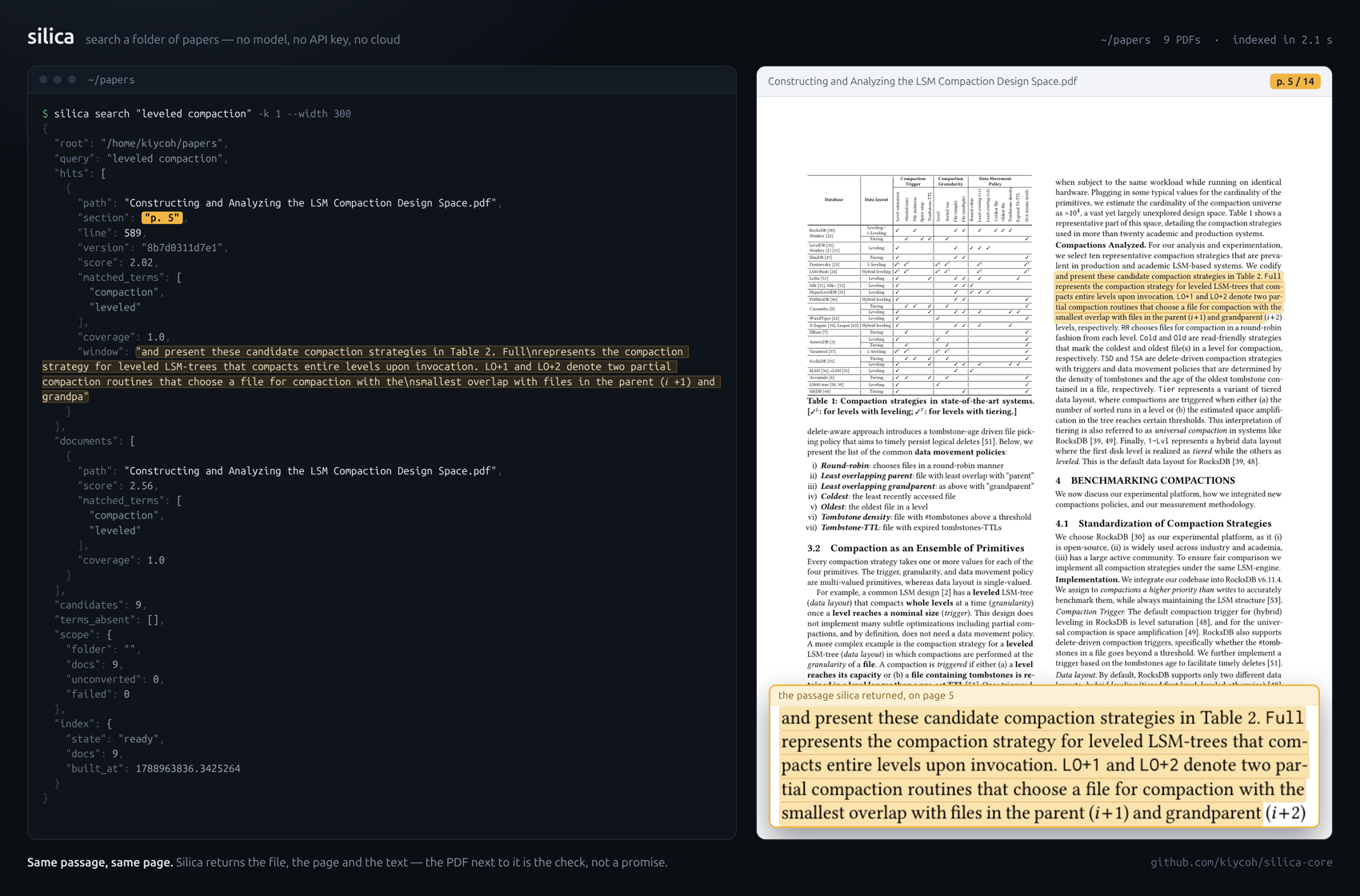
Nine arXiv papers, indexed in 2.1 s. The hit names the file, the page and the passage; the page beside it is the check.
Tools
| Tool | Shell | Returns |
|---|---|---|
silica_files |
silica-core files |
the inventory and what the index did with each file: indexed, changed, excluded, failed, unconverted; with since, only what changed after a time |
silica_search |
silica-core search |
ranked passages: path, section, line, BM25, matched terms, coverage, the query terms absent from the corpus and the corpus's closest spellings of them, what the search could not read, how many as strong matches it did not show (pass the read ones as exclude for the next), and on a converted note whether its original changed since |
silica_read |
silica-core read |
a slice by lines or by heading (a page, in a PDF), the outline, and a version to carry forward |
silica_code_pack |
silica-core code-pack |
an AST context pack for one source file inside a character budget |
silica_write_note |
silica-core write-note |
one atomic write, linted for structure and unresolved wikilinks |
In a source tree every function, method, class and constant is its own unit:
a hit's section is the symbol, span its lines, and
silica_read(path, section=…) serves the body. For a symbol whose name is
known, grep wins; for a question that names none, the search comes first:
the tool description and the block silica-core setup claude writes say so. The
contract, the reply shapes and the acceptance checks are in
TOOLS.md. Nothing needs an API key or a network.
How search says no
A ranked list always has a top, even when the corpus does not answer. Three fields say how much the result is worth:
coverage: the share of the query's idf mass the hit's matched terms carry. Near 1, every rare term matched; near 0, only common words did.terms_absent: query terms that occur nowhere in the corpus.matched_terms: the words this hit actually contains.
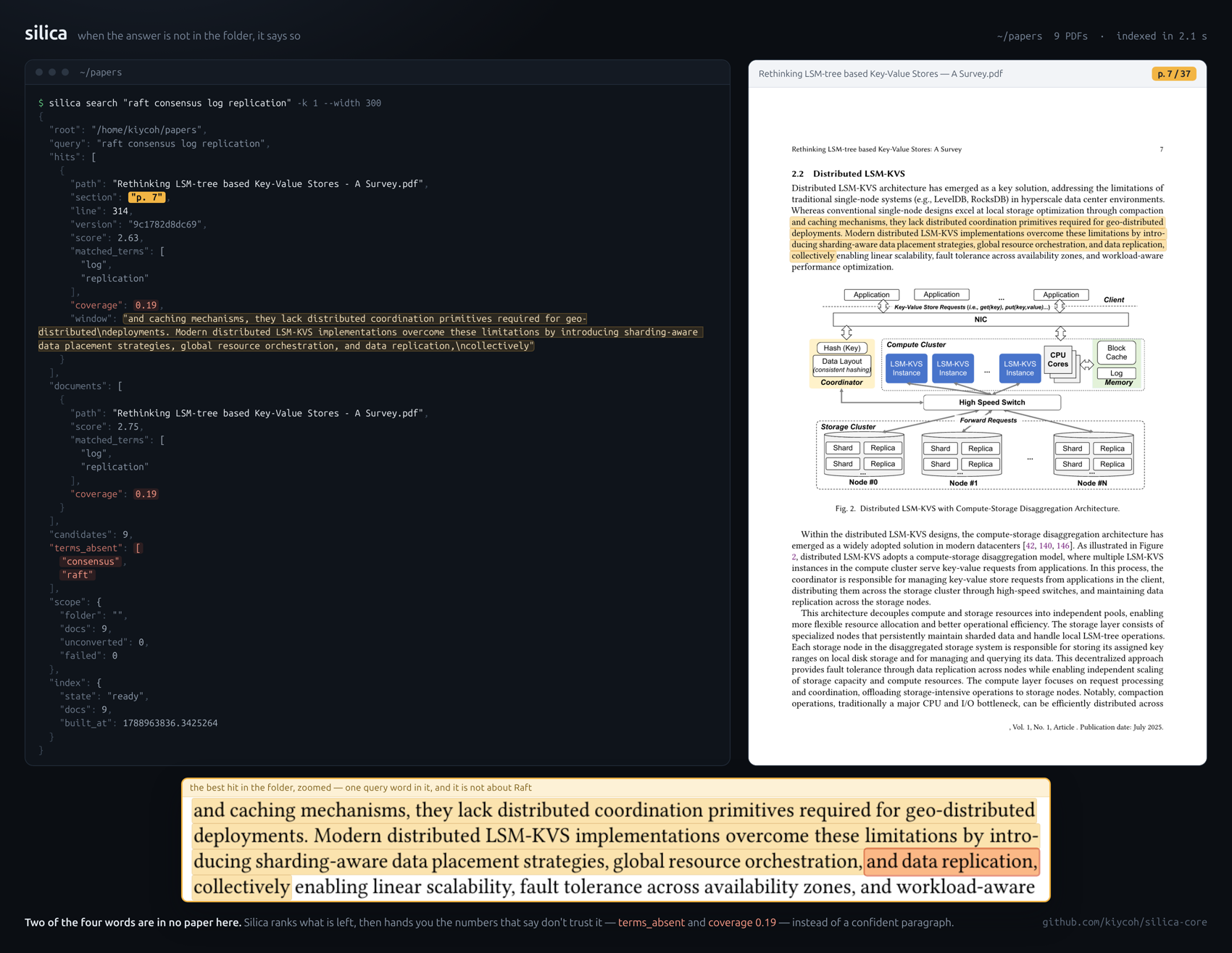
raft consensus log replication over the same nine papers: raft and
consensus occur in none of them, coverage falls to 0.19, and the top hit
is about data replication. On 254 papers the top hit of an answered question
carries 0.69 to 1.00; a question the corpus does not cover, 0.44. Silica
exposes the signals; the harness decides whether to stop, read or rephrase.
What a reply also says (0.12)
Asked in November 2026, nine models named what they need from a knowledge layer; each of these was kept only where a probe on a production model showed the failure it fixes (TOOLS.md has the numbers):
scopecounts every file the search could not read, an office file with no extracted.mdbeside it included, so a folder of.docxno longer reads as silent.- A hit from a converted note carries
source_state:stalewhen its PDF was replaced after the conversion, before the passage is quoted. terms_nearoffers the corpus's closest spelling of an absent word (quitanllu→quitanlu) instead of leaving a misspelt name to read as absent.unseencounts the ranked documents as strong as the weakest shown that were not shown;excludetakes the paths already read and serves the next ones, so a long list is paged instead of re-fetched.silica_files(since=…)lists only what changed after a time, dated: what changed since the last session.
Benchmarks
nDCG@10 on BEIR SciFact · NFCorpus, the same documents and queries for every arm. BEIR's published BM25 baselines are 0.665 · 0.325. Silica's lexical index needs no model; the others serve lexical search from an index that also holds embeddings.
| Mode | Silica | zvec-grep 0.2.2 | ck 0.7.11 |
|---|---|---|---|
| Lexical | 0.662 · 0.311 | 0.649 · 0.297 | 0.630 · 0.289 |
Hybrid, same potion-retrieval-32M embedder |
0.675 · 0.328 | 0.672 · 0.330 |
Code, on the twenty SWE-QA questions zvec-grep publishes for its own benchmark, same embedder, k = 10, scored on the files and symbols the reference answer rests on.
| Arm | file hit@5 · @10 | file MRR | symbol hit@10 | symbol recall | chars returned |
|---|---|---|---|---|---|
| Silica, hybrid | 0.85 · 0.90 | 0.68 | 0.75 | 0.24 | 8,266 |
| Silica, vectors | 0.80 · 0.85 | 0.67 | 0.65 | 0.21 | 6,225 |
| Silica, lexical | 0.65 · 0.75 | 0.47 | 0.45 | 0.14 | 8,194 |
| zvec-grep 0.2.2, hybrid | 0.65 · 0.75 | 0.54 | 0.55 | 0.17 | 7,326 |
| zvec-grep 0.2.2, vector | 0.60 · 0.80 | 0.61 | 0.55 | 0.18 | 6,821 |
| zvec-grep 0.2.2, FTS | 0.45 · 0.60 | 0.36 | 0.45 | 0.11 | 6,690 |
On BEIR the two hybrids tie at the 95% interval: the same vectors rank the same, with no daemon and no vector store. On code, Silica's hybrid file MRR is +0.135 over zvec-grep's hybrid (95% interval +0.01 to +0.27), paired per question. The fusion also gains +0.21 MRR and +0.30 symbol hit over Silica's lexical arm; no reranker or graph expansion is involved.
On this measured scope, Silica is a compact, local, SOTA-competitive retriever: it matches zvec-grep on BEIR and leads the paired SWE-QA code-localization replay with the same embedder.
Retrieval matters only if the agent does less work without losing the answer. These are separate experiments and are not pooled:
| Workload and arm | Runs | Quality | Search used | Turns | Tool calls | Seconds | Warm cost |
|---|---|---|---|---|---|---|---|
| Repository, search-first contract | 20 | Judge 59.7 | 17/20 | 4.7 | — | 24 | $0.197 |
| Repository, same plugin without contract | 20 | Judge 50.6 | 0/20 | 6.5 | — | 28 | $0.180 |
| Documents, resident Silica tools | 12 tasks | 12/12 correct | 12/12 | 3.9 | 2.9 | — | $0.20 |
| Documents, no plugin | 12 tasks | 12/12 correct | — | 5.0 | 4.0 | — | $0.22 |
The repository result is one repetition: turns improve by 1.75 (95% interval 0.55 to 3.05 fewer), while Judge and cost remain inconclusive. The document rows belong to a 144-run study over twelve questions and a 5.5M-token corpus. They establish less work on that workload, not a universal agent claim.
Corpora, intervals, per-task exceptions and reproduction commands are in benchmarks.
Harnesses
silica-core setup <client> writes the registration into the client's own config
and backs up what was there; for claude it also puts a guidance block, when
to search before grep, into ~/.claude/CLAUDE.md. silica-core setup --list
names the clients: claude, codex, cursor, windsurf, zed, cline,
roo, continue, goose, opencode, openhands, gemini, antigravity, dsh,
hermes, openclaw, agent-zero, claude-desktop, lmstudio,
anythingllm and librechat; shell, python and generic print recipes
for anything else. The server serves the folder the client opens in;
--vault DIR or SILICA_VAULT fixes the root.
Every written block, and the Claude Code plugin, run silica-core mcp --retrieval local-hybrid: potion-retrieval-32M in the server process, index and
vectors built in the background at start, the search lexical and dense: warming until they land. Nothing leaves the machine; the one download is
the model, once. npx skills add kiycoh/silica-core installs the skills (the one
that tells an agent when to reach for the tools, and five that explain,
summarize, compare, schematize and diagram from the indexed documents), and
nothing else. Shell recipes,
Docker and the REPL are in public/harnesses.md.
How the Claude Code plugin works
In Claude Code the plugin is all you need: it brings its own server and the
skills. The Install section above and silica-core setup claude
are for other clients; with both, two servers serve the same folder.
Install
It needs uv on PATH, which starts the server.
claude plugin install silica-core --marketplace kiycoh/silica-core
That one step works on Claude Code 2.1.275 or later, and
/plugin install silica-core --marketplace kiycoh/silica-core does the same
inside a session. On an older client, add the marketplace first:
claude plugin marketplace add kiycoh/silica-core, then
claude plugin install silica-core@silica-core.
First run
- Start Claude Code in the folder you want to search.
- Wait for the first start. It is slower than the next ones: uv installs the packages and the server downloads its model, once.
- Press Index above the prompt, or type
/silica-init. Nothing is indexed until you do. - Ask a question about the folder. Claude searches it with
silica_search. Until the vectors are built the search is lexical, and its replies saydense: warming.
Update
Refresh the marketplace, then the plugin. The new version loads in the next session.
claude plugin marketplace update silica-core
claude plugin update silica-core@silica-core
What it runs, reads and downloads
The plugin is an MCP server plus a small mod in hooks/. Neither
one sends your files, prompts or conversation anywhere.
- The server starts with
uv run --frozen --project <plugin folder>. The plugin folder is~/.claude/plugins/cache/silica-core/silica-core/<version>, with the versionclaude plugin listshows. The first time, uv installs the packages pinned inuv.lockfrom PyPI (and a Python build if the machine has no Python 3.11 or newer), and the server downloads thepotion-retrieval-32Mmodel from Hugging Face. Nothing else is downloaded. - Indexing. In a folder that isn't indexed yet, the mod shows an
Index button above the prompt;
/silica-initdoes the same. Either one runsuv run --frozen --project <plugin folder> --extra mcp --extra dense silica-core initin that folder, which writesvault.yamlthere (plus.silicaignorein a code repository) and builds the index under~/.silica. Not here hides the button for that folder. Nothing is indexed until you ask. - Search hints. In an indexed folder, when you ask a question that names
no file or symbol, the mod adds one line asking Claude to try
silica_searchbefore grep. It also adds the search guidance to the system prompt, unless yourCLAUDE.mdalready has it. The mod reads three environment variables,CLAUDE_CONFIG_DIR,HOMEandUSERPROFILE, only to find thatCLAUDE.mdand to skip your home folder. - Docs upkeep. In an indexed folder with a
docs/folder, the mod helps Claude keep the docs in step with the code. It asks; Claude decides, and no write is ever refused.- After a write worth recording (a new file, a manifest, 30 changed lines
in a turn, or a file an ADR lists), Claude gets one reminder: bring
docs/up to date, or say there is nothing to record. - When a turn that wrote under
docs/ends, the mod checks those files for links and code paths that lead nowhere, two ADRs with one number, and an accepted ADR whose Decision changed. Claude fixes what it agrees is a defect or says why it is not; the check asks at most twice a turn. - At the start of an interactive session it reads
docs/adr/anddocs/specs/and runsgit, then shows above the prompt how many records name what is not there and how many have files that changed since./silica-docslists them. - A record whose frontmatter has
implementation:(implemented,partial,pending,draft,droppedorn/a) is held to it:implementedandpartialname a commit or a path inimplemented_in,pendinganddraftname none,partialanddroppedcarry animplementation_note.
- After a write worth recording (a new file, a manifest, 30 changed lines
in a turn, or a file an ADR lists), Claude gets one reminder: bring
On an older Claude Code
The Index button, /silica-init, the search hints and the docs upkeep
come from the mod, which needs Claude Code 2.1.293 or later. An older client
still runs the server and the skills. Index a folder from a terminal opened
in it instead:
uv run --frozen --project <plugin folder> --extra mcp --extra dense silica-core init
When it does not work
-
The silica tools are missing, or Claude Code says it could not connect to
plugin:silica-core:silica-core. The server did not start;/mcpshows its state. The usual causes are uv missing fromPATHand a first install that failed. Start the server by hand in the folder to read the error:uv run --frozen --project <plugin folder> --extra mcp --extra dense silica-core mcp --retrieval local-hybrid
When all is well it prints
serving 5 tools on stdio, waiting for a client; Ctrl+C ends it. -
No Index button. It never shows in your home folder or in
/, which are too large to index whole. After Not here it stays hidden in that folder, and/silica-initstill indexes it. On a client older than 2.1.293, see above. -
What this machine can read.
silica-core doctorchecks the install and the folder:uv run --frozen --project <plugin folder> --extra mcp --extra dense silica-core doctor
Uninstall
claude plugin uninstall silica-core@silica-core
The plugin leaves two things behind:
vault.yaml, and.silicaignorein a code repository, in each folder you indexed;- the indexes in
~/.silica/index/, one folder each.
Delete them by hand. An index deleted while the plugin is still installed is rebuilt the next time its folder is searched.
Notes
- What it reads: markdown,
.txt,.rstand PDFs with a text layer directly, one PDF page per section; DOCX, EPUB, FB2, RTF, XLS and ODF converted with no extra; scanned PDFs, images, PPTX and XLSX throughsilica-core importwith MinerU; audio and video withffmpegplusSILICA_STT_BASE_URL; CSV readable by line, excluded from search. In a source tree the code lane adds source files and theirjson,yaml,toml,cfgandini.silica-core doctorsays which lanes this machine has. - The dense leg: section embeddings that catch a paraphrase sharing no rare word with the answer.
uv tool installstays lexical untilsilica-core index --embed, with the[dense]extra's local model or any OpenAI-compatible/v1/embeddingsendpoint. Text leaves the machine only for a remote endpoint, and only aftersilica-core index --embed --allow-remotegrants that host once. Variables and reply states in TOOLS.md, the ollama recipe in public/harnesses.md. - More surfaces:
silica-core mcp --extendedadds the wikilink tools;silica-core connect(extra[connect]) hosts the bridge the Obsidian plugin dials into, so writes land through the vault API while the app is open;silica-core replruns a small reference agent over the same tools, the one surface that needs a model (SILICA_MODEL). - Not in the core: no memory lane, prompt injection, summaries or undo journal. Undo is git.
License
MIT. See LICENSE.
1 maintainer

Metadata
1 maintainer
Release files for silica-core 0.13.0
For a detailed explanation of source distributions (sdists) and built distributions (wheels), please see the package formats documentation.
Source distribution (sdist)
| File | Size | Uploaded | Provenance | Actions |
|---|---|---|---|---|
| silica_core-0.13.0.tar.gz | 3.9 MB | With provenance | Details for silica_core-0.13.0.tar.gz |
Built distribution (wheel)
| File | Interpreter | ABI | Platform | Actions Reset |
|---|---|---|---|---|
| silica_core-0.13.0-py3-none-any.whl | Python 3 | none | any | Details for silica_core-0.13.0-py3-none-any.whl |
Total release size: 4.2 MB
Release files / silica_core-0.13.0.tar.gz
| Download URL | silica_core-0.13.0.tar.gz |
|---|---|
| Size | 3.9 MB |
| Tags | Source |
|
SHA-256 checksum How to use checksums |
cdf3fe56ea9396f76b33f68b4745496a28ae3a9f756dc5b9de83e245ed3f657c
|
|
BLAKE2b-256 checksum How to use checksums |
9d980e004e1f3147fb266dcca91f0996bbf78228b79ad643274b7cace8911493
|
| Upload date | |
|
Uploaded using Trusted Publishing? What is trusted publishing? |
Yes |
| Uploaded via |
twine/7.0.0 CPython/3.13.14
|
Provenance
Provenance describes where a file came from. On PyPI, provenance is shared via attestations, which provide a verifiable record of the build or publishing details. View details, limitations and caveats.


PyPI Publish Attestation
PyPI verified that this artifact, at this checksum, originated from the publisher listed below.
Signed by GitHub Actions, verified by PyPI on Nov 8, 2026.
Transparency logRelease files / silica_core-0.13.0-py3-none-any.whl
| Download URL | silica_core-0.13.0-py3-none-any.whl |
|---|---|
| Size | 262.5 kB |
| Tags | Python 3 |
|
SHA-256 checksum How to use checksums |
1ce6ef374185894940d1f35186fbbdf988e82e0059cf3f723b0b60ef052e9791
|
|
BLAKE2b-256 checksum How to use checksums |
99c1a8474c78566ccb79e75af2524c286399f5d96e7919a3df3dc57b822c3fb0
|
| Upload date | |
|
Uploaded using Trusted Publishing? What is trusted publishing? |
Yes |
| Uploaded via |
twine/7.0.0 CPython/3.13.14
|
Provenance
Provenance describes where a file came from. On PyPI, provenance is shared via attestations, which provide a verifiable record of the build or publishing details. View details, limitations and caveats.
PyPI Publish Attestation
PyPI verified that this artifact, at this checksum, originated from the publisher listed below.
Signed by GitHub Actions, verified by PyPI on Nov 8, 2026.
Transparency logSecurity for silica-core 0.13.0
Provenance
Provenance describes where a file came from. On PyPI, provenance is shared via attestations, which provide a verifiable record of the build or publishing details. View details, limitations and caveats.
Full provenance
Both files in this release have been uploaded with provenance metadata.
Attestation for silica_core-0.13.0.tar.gz
PyPI Publish Attestation
PyPI verified that this artifact, at this checksum, originated from the publisher listed below.
Signed by GitHub Actions, verified by PyPI on Nov 8, 2026.
Transparency logA note on package security
PyPI is a repository for distributing packages, not a service for auditing them. While third-party security researchers and our staff do their best to detect and remove malicious packages, PyPI cannot guarantee the quality, security or suitability of any given package.
To learn more about protecting yourself from malicious actors, visit our package security documentation.














