
 |
skillsawKeep your skills sharp. A linter for the files that steer AI coding agents. |
|
|
|





Agent instructions behave like code, but most teams still review them like prose. skillsaw gives them a linter. It validates structure across every major AI coding ecosytem, guards against many supply-chain attacks, and applies content and context rules backed by research and frontier lab guidance.
It understands Agent Skills,
Agent Plugins v1, Claude Code
plugins, OpenAI Codex plugins and marketplaces, CLAUDE.md, AGENTS.md,
GEMINI.md, QWEN.md, Cursor, Copilot, Cline, Devin, Kiro, OpenCode, Muse Code,
Grok Build, Google Antigravity, hooks, agent configuration, MCP Registry
server.json publisher metadata,
Vercel skills CLI lockfiles, and eval formats. Safe structural fixes can be applied
automatically; everything else comes with precise, agent-friendly guidance.
Get started | Browse the rules | Read the documentation
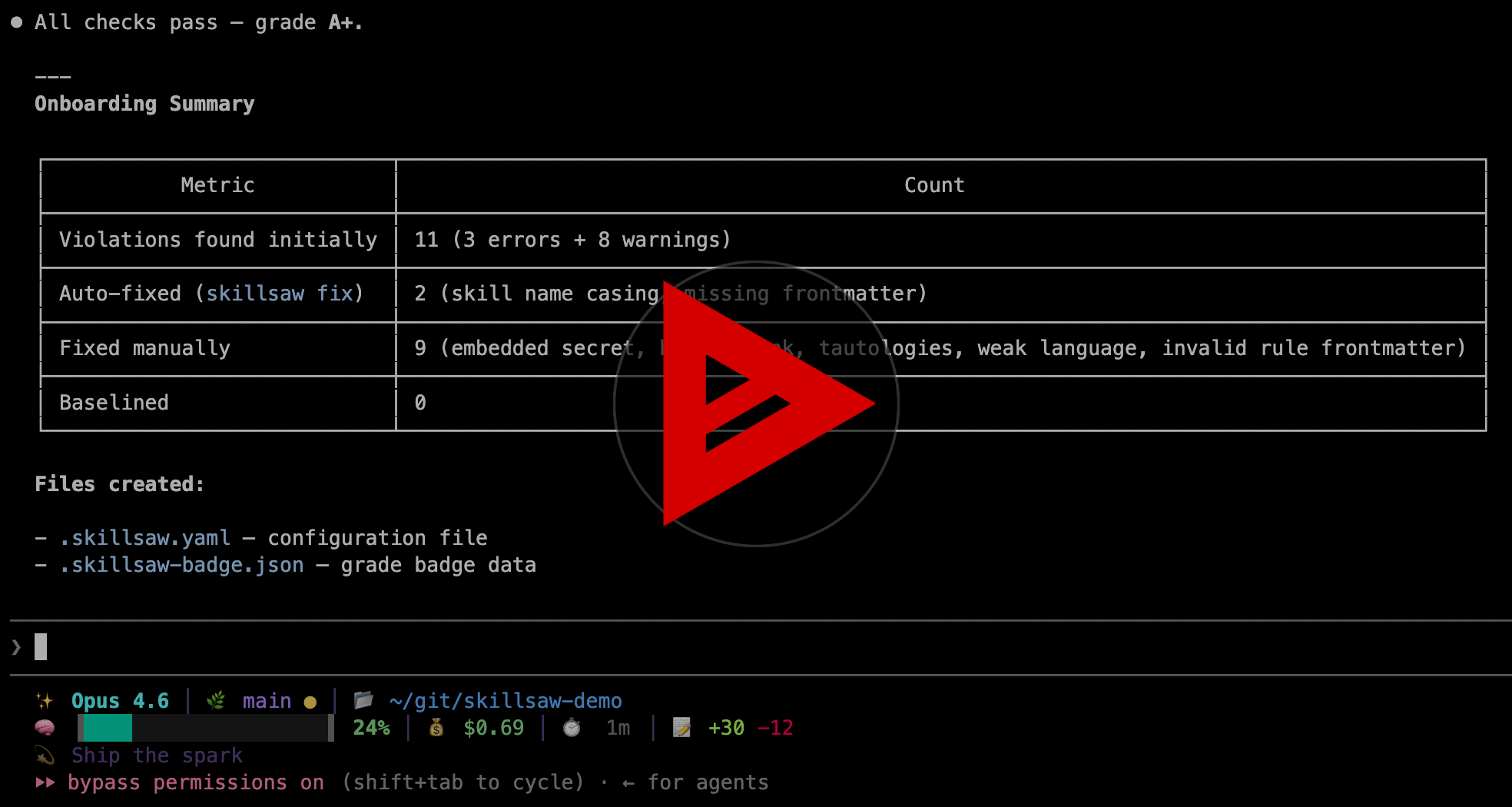
See it work
Watch an AI agent grade, fix, and configure a repository from scratch.
Try it
Paste this into your coding agent to onboard skillsaw now:
Read and follow the instructions at
https://raw.githubusercontent.com/stbenjam/skillsaw/refs/heads/main/skills/skillsaw-onboard/SKILL.md
to onboard this repo to skillsaw.
Or run it yourself. No installation is required with
uvx:
uvx skillsaw tree      # See what skillsaw detects
uvx skillsaw           # Lint the current repository
uvx skillsaw fix       # Apply safe, deterministic fixes
uvx skillsaw baseline  # Accept existing findings and fail only on new ones
For lint --fail-on info, use baseline --include-info to accept existing
INFO findings too. A configured fail-on: info includes them automatically.
What it catches
- Multi-ecosystem structure & compatibility: schema, frontmatter, and manifest validation for Agent Skills (
SKILL.md), Claude Code, OpenAI Codex (project config, plugins & marketplaces), Grok Build (project config, plugins & marketplaces), Google Antigravity (configuration in any customization root —.agents/,.agent/,_agents/,_agent/— itsrules/andagents/prose, plugins, hooks, MCP servers and registries), Agent Plugins v1 (plugin.json,mcp.json), GitHub Copilot & VS Code custom agents (.github/agents/), OpenCode configuration, APM packages, MCP server maps, and MCP Registry metadata. - Content quality & token economy: research-backed rules detecting instruction drift across duplicate files, lost-in-the-middle attention dead zones, cognitive overload, section length violations, weak language, contradictions, and repetitive inline tool-call examples.
- Discovery & repository integrity: unreferenced bundled files, broken internal file references, inconsistent terminology, missing stop conditions, and stale baselines.
- Security & supply chain:
- Dangerous lifecycle hooks: blocks arbitrary remote code execution, download-and-execute (
curl | sh,wget | bash), and script obfuscation (eval) inhooks.jsonand settings. - Prohibited & unvetted MCP servers: enforces strict MCP allowlists across root, plugin, and custom agent configurations.
- Prompt injection & stealth payloads: detects invisible Unicode (ASCII smuggling, zero-width tags, bidi overrides), high-entropy encoded payloads (base64/hex), and hidden instructions in comments and code fences.
- Environment & context security: flags dangerous environment overrides (
LD_PRELOAD,NODE_OPTIONS,PYTHONPATH), unallowlisted dynamic context injection, and embedded credentials. Deterministic autofixes: safe, instant automated fixes for invalid frontmatter, broken headings, missing manifests, unclosed code fences, and schema keys viaskillsaw fix. skillsaw detects repository types automatically and lints multiple formats in the same project. See supported repository types and the complete rule reference for details.
- Dangerous lifecycle hooks: blocks arbitrary remote code execution, download-and-execute (
Built for real workflows
skillsaw works locally, in CI, and inside coding-agent workflows. It provides
line-level findings, explanations for every rule, deterministic autofixes,
baselines for gradual adoption, GitHub and GitLab integration, and text, JSON,
SARIF, HTML, and Code Climate output. Rules are configurable, and projects can
add local rules or install rule plugins. Typo'd or wrong-typed rule options
in .skillsaw.yaml are reported with did-you-mean suggestions instead of
being silently ignored.
| Goal | Documentation |
|---|---|
| Install and run skillsaw | Getting Started |
| Tune rules and exclusions | Configuration |
| Adopt it without fixing everything at once | Baselines |
| Review the security model | Supply Chain Protection |
| Supported ecosystems and tools | Repository Types |
| Add checks to pull requests & CI | CI Integration |
| Understand and apply fixes | Autofixing |
| Convert plugins to Agent Plugins v1 | Porting to Agent Plugins |
| Create project-specific checks | Custom Rules |
| Publish reusable rule packages | Rule Plugins |
| Inspect the typed parse tree | Lint Tree |
| Look up commands and flags | CLI Reference |
| Feed the docs to an AI agent | llms.txt index, llms-full.txt full docs |
Measure the result
Every run produces a letter grade based on weighted violation density. The same data can be rendered as a self-contained report card for a README or project dashboard.
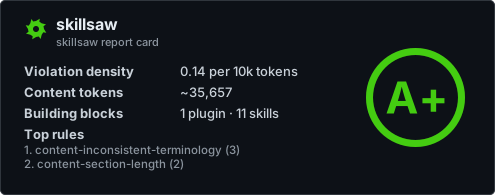
skillsaw's own report card, generated with skillsaw badge --large.
Learn how to generate a grade badge and report card for your project.
Contributing
Contributions are welcome. See CONTRIBUTING.md for the project guidelines and DEVELOPMENT.md for the local setup.
Questions and bug reports belong in GitHub
Issues. For a shareable diagnostic
bundle, run skillsaw feedback in the affected repository and review the ZIP
before attaching it to an issue. Files selected with --include or --config
are copied verbatim, including BOMs and line endings. Selections default to
4 MiB per file and 16 MiB total across distinct ZIP members; use positive byte
values with --max-file-bytes and --max-total-bytes to override these limits.
An oversized selection stops before diagnostic lint and creates no bundle.
These limits cover selected file bytes only, not diagnostic output or total
process memory. skillsaw is licensed under the Apache License 2.0.
Thank you to our contributors
skillsaw is better because people contribute code, bug reports, and ideas. Thank you!
| Contributors | |||
|---|---|---|---|
@alSergey |
@amy |
@btiernay |
@cblecker |
@cgwalters |
@ehelms |
@EmilienM |
@jeffreylo |
@jfchevrette |
@kannon92 |
@nyechiel |
@rajusem |
@skyth3r |
@stbenjam |
@tchughesiv |
@tyraziel |
@zerocodefast |
1 maintainer

Release files for skillsaw 0.20.0
For a detailed explanation of source distributions (sdists) and built distributions (wheels), please see the package formats documentation.
Source distribution (sdist)
| File | Size | Uploaded | |
|---|---|---|---|
| skillsaw-0.20.0.tar.gz | 1.3 MB | Details |
Built distribution (wheel)
| File | Interpreter | ABI | Platform | Reset |
|---|---|---|---|---|
| skillsaw-0.20.0-py3-none-any.whl | Python 3 | none | any | Details |
Total release size: 2.3 MB
Release files / skillsaw-0.20.0.tar.gz
| Download URL | skillsaw-0.20.0.tar.gz |
|---|---|
| Size | 1.3 MB |
| Tags | Source |
|
SHA-256 checksum How to use checksums |
c4ed0c8063c8d54cb2636869ad0031bb00b73d4ee96ed1d8456dbb0900a12c33
|
|
BLAKE2b-256 checksum How to use checksums |
a89f2933233c8cac58fa7f66b766ccaad24720e5b1d037dbacb480dc715e9f3d
|
| Upload date | |
|
Uploaded using Trusted Publishing? What is trusted publishing? |
Yes |
| Uploaded via |
twine/7.0.0 CPython/3.13.14
|
Provenance
Provenance describes where a file came from. On PyPI, provenance is shared via attestations, which provide a verifiable record of the build or publishing details. View details, limitations and caveats.


PyPI Publish Attestation
PyPI verified that this artifact, at this checksum, originated from the publisher listed below.
Signed by GitHub Actions, verified by PyPI on Sep 6, 2026.
Transparency logRelease files / skillsaw-0.20.0-py3-none-any.whl
| Download URL | skillsaw-0.20.0-py3-none-any.whl |
|---|---|
| Size | 1.0 MB |
| Tags | Python 3 |
|
SHA-256 checksum How to use checksums |
202278271de984dd824ce88e3e7754424ea4e1a7b63ef67dd793a22b74dc9588
|
|
BLAKE2b-256 checksum How to use checksums |
b2328d4c2694584f78ce11a83608378e3e72b13be2e75fd2e59e0bf09e1503a3
|
| Upload date | |
|
Uploaded using Trusted Publishing? What is trusted publishing? |
Yes |
| Uploaded via |
twine/7.0.0 CPython/3.13.14
|
Provenance
Provenance describes where a file came from. On PyPI, provenance is shared via attestations, which provide a verifiable record of the build or publishing details. View details, limitations and caveats.
PyPI Publish Attestation
PyPI verified that this artifact, at this checksum, originated from the publisher listed below.
Signed by GitHub Actions, verified by PyPI on Sep 6, 2026.
Transparency log













