
This release is a pre-release and may not be stable for production use.




Run LLMs and AI on Any Cloud
🔥 News 🔥
- [Mar, 2024] Serve and deploy Databricks DBRX on your infra: example
- [Feb, 2024] Deploying and scaling Gemma with SkyServe: example
- [Feb, 2024] Speed up your LLM deployments with SGLang for 5x throughput on SkyServe: example
- [Feb, 2024] Serving Code Llama 70B with vLLM and SkyServe: example
- [Dec, 2023] Using LoRAX to serve 1000s of finetuned LLMs on a single instance in the cloud: example
- [Dec, 2023] Mixtral 8x7B, a high quality sparse mixture-of-experts model, was released by Mistral AI! Deploy via SkyPilot on any cloud: example
- [Nov, 2023] Using Axolotl to finetune Mistral 7B on the cloud (on-demand and spot): example
- [Sep, 2023] Mistral 7B, a high-quality open LLM, was released! Deploy via SkyPilot on any cloud: Mistral docs
- [Sep, 2023] Case study: Covariant transformed AI development on the cloud using SkyPilot, delivering models 4x faster cost-effectively: read the case study
- [Aug, 2023] Cookbook: Finetuning Llama 2 in your own cloud environment, privately: example, blog post
- [June, 2023] Serving LLM 24x Faster On the Cloud with vLLM and SkyPilot: example, blog post
Archived
- [July, 2023] Self-Hosted Llama-2 Chatbot on Any Cloud: example
- [April, 2023] SkyPilot YAMLs for finetuning & serving the Vicuna LLM with a single command!
SkyPilot is a framework for running LLMs, AI, and batch jobs on any cloud, offering maximum cost savings, highest GPU availability, and managed execution.
SkyPilot abstracts away cloud infra burdens:
- Launch jobs & clusters on any cloud
- Easy scale-out: queue and run many jobs, automatically managed
- Easy access to object stores (S3, GCS, R2)
SkyPilot maximizes GPU availability for your jobs:
- Provision in all zones/regions/clouds you have access to (the Sky), with automatic failover
SkyPilot cuts your cloud costs:
- Managed Spot: 3-6x cost savings using spot VMs, with auto-recovery from preemptions
- Optimizer: 2x cost savings by auto-picking the cheapest VM/zone/region/cloud
- Autostop: hands-free cleanup of idle clusters
SkyPilot supports your existing GPU, TPU, and CPU workloads, with no code changes.
Install with pip (we recommend the nightly build for the latest features or from source):
pip install "skypilot-nightly[aws,gcp,azure,oci,lambda,runpod,fluidstack,paperspace,cudo,ibm,scp,kubernetes]" # choose your clouds
To get the last release, use:
pip install -U "skypilot[aws,gcp,azure,oci,lambda,runpod,fluidstack,paperspace,cudo,ibm,scp,kubernetes]" # choose your clouds
Current supported providers (AWS, Azure, GCP, OCI, Lambda Cloud, RunPod, Fluidstack, Paperspace, Cudo, IBM, Samsung, Cloudflare, any Kubernetes cluster):
Getting Started
You can find our documentation here.
SkyPilot in 1 Minute
A SkyPilot task specifies: resource requirements, data to be synced, setup commands, and the task commands.
Once written in this unified interface (YAML or Python API), the task can be launched on any available cloud. This avoids vendor lock-in, and allows easily moving jobs to a different provider.
Paste the following into a file my_task.yaml:
resources:
  accelerators: V100:1  # 1x NVIDIA V100 GPU

num_nodes: 1  # Number of VMs to launch

# Working directory (optional) containing the project codebase.
# Its contents are synced to ~/sky_workdir/ on the cluster.
workdir: ~/torch_examples

# Commands to be run before executing the job.
# Typical use: pip install -r requirements.txt, git clone, etc.
setup: |
  pip install "torch<2.2" torchvision --index-url https://download.pytorch.org/whl/cu121

# Commands to run as a job.
# Typical use: launch the main program.
run: |
  cd mnist
  python main.py --epochs 1
Prepare the workdir by cloning:
git clone https://github.com/pytorch/examples.git ~/torch_examples
Launch with sky launch (note: access to GPU instances is needed for this example):
sky launch my_task.yaml
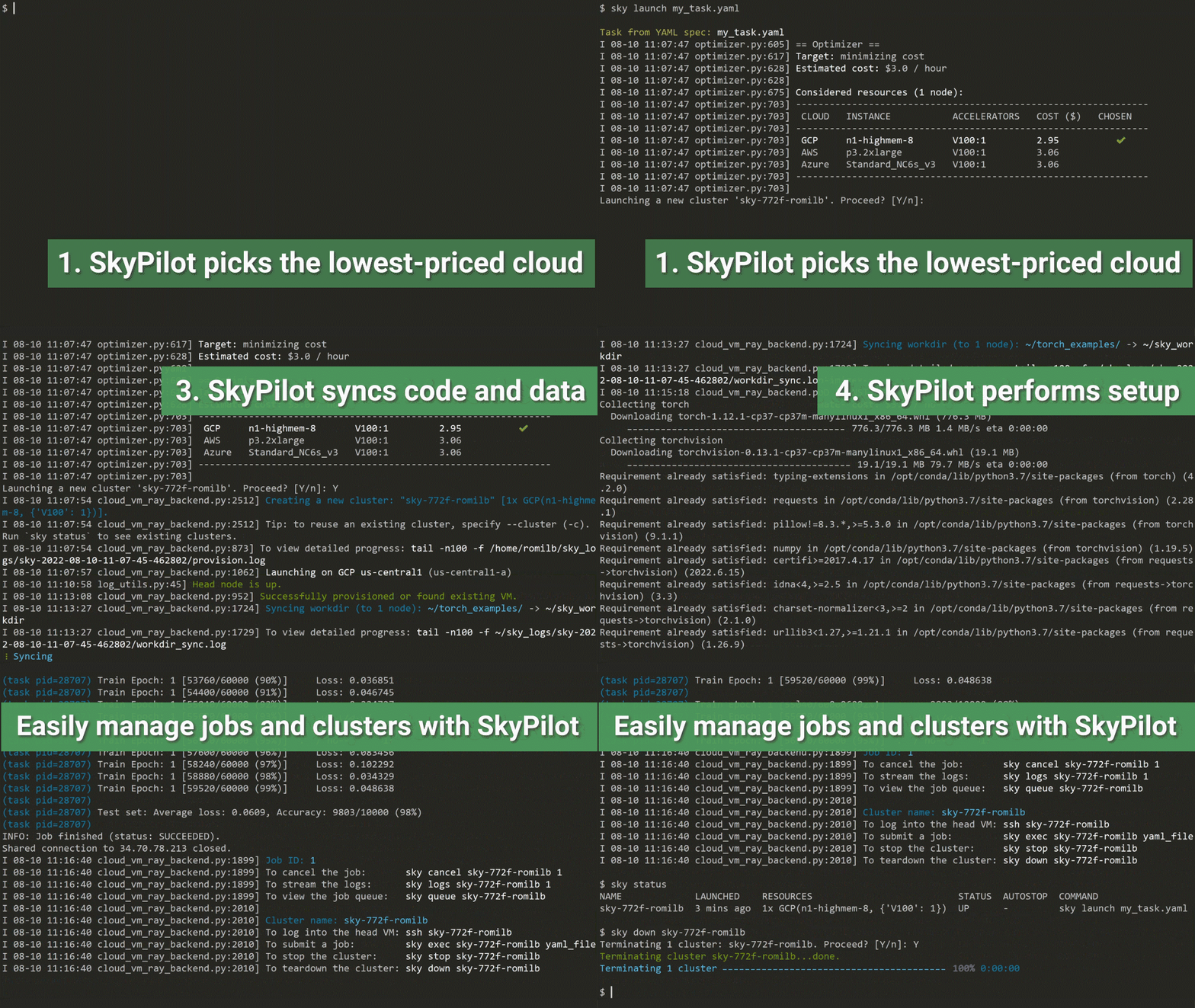
SkyPilot then performs the heavy-lifting for you, including:
- Find the lowest priced VM instance type across different clouds
- Provision the VM, with auto-failover if the cloud returned capacity errors
- Sync the local
workdirto the VM - Run the task's
setupcommands to prepare the VM for running the task - Run the task's
runcommands
Refer to Quickstart to get started with SkyPilot.
More Information
To learn more, see our Documentation and Tutorials.
Runnable examples:
- LLMs on SkyPilot
- Databricks DBRX
- Gemma
- Mixtral 8x7B; Mistral 7B (from official Mistral team)
- Code Llama
- vLLM: Serving LLM 24x Faster On the Cloud (from official vLLM team)
- SGLang: Fast and Expressive LLM Serving On the Cloud (from official SGLang team)
- Vicuna chatbots: Training & Serving (from official Vicuna team)
- Train your own Vicuna on Llama-2
- Self-Hosted Llama-2 Chatbot
- LoRAX
- QLoRA
- LLaMA-LoRA-Tuner
- Tabby: Self-hosted AI coding assistant
- LocalGPT
- Falcon
- Add yours here & see more in
llm/!
- Framework examples: PyTorch DDP, DeepSpeed, JAX/Flax on TPU, Stable Diffusion, Detectron2, Distributed TensorFlow, Ray Train, NeMo, programmatic grid search, Docker, Cog, Unsloth, and many more (
examples/).
Follow updates:
Read the research:
- SkyPilot paper and talk (NSDI 2023)
- Sky Computing whitepaper
- Sky Computing vision paper (HotOS 2021)
Support and Questions
We are excited to hear your feedback!
- For issues and feature requests, please open a GitHub issue.
- For questions, please use GitHub Discussions.
For general discussions, join us on the SkyPilot Slack.
Contributing
We welcome and value all contributions to the project! Please refer to CONTRIBUTING for how to get involved.
3 maintainers


Metadata
3 maintainers
Release files for skypilot-nightly 1.0.0.dev20240407
For a detailed explanation of source distributions (sdists) and built distributions (wheels), please see the package formats documentation.
Source distribution (sdist)
| File | Size | Uploaded | |
|---|---|---|---|
| skypilot-nightly-1.0.0.dev20240407.tar.gz | 802.4 kB | Details |
Built distribution (wheel)
| File | Interpreter | ABI | Platform | Reset |
|---|---|---|---|---|
| skypilot_nightly-1.0.0.dev20240407-py3-none-any.whl | Python 3 | none | any | Details |
Total release size: 1.7 MB
Release files / skypilot-nightly-1.0.0.dev20240407.tar.gz
| Download URL | skypilot-nightly-1.0.0.dev20240407.tar.gz |
|---|---|
| Size | 802.4 kB |
| Tags | Source |
|
SHA-256 checksum How to use checksums |
373af567529969b623c6b1f78686c93fba8bec1364a9438297b54122e370b46b
|
|
BLAKE2b-256 checksum How to use checksums |
5ab6fb1124c32c823d203124ee042ae8fe16b040089d05114d2247f7b6f040a9
|
| Upload date | |
|
Uploaded using Trusted Publishing? What is trusted publishing? |
No |
| Uploaded via |
twine/5.0.0 CPython/3.12.2
|
Release files / skypilot_nightly-1.0.0.dev20240407-py3-none-any.whl
| Download URL | skypilot_nightly-1.0.0.dev20240407-py3-none-any.whl |
|---|---|
| Size | 897.4 kB |
| Tags | Python 3 |
|
SHA-256 checksum How to use checksums |
6b75d63b45c49d10490b828b20d6a86457d2a6686060d6e37f0b16054da8d3cc
|
|
BLAKE2b-256 checksum How to use checksums |
140c8cf74ed412d8c8d2f4d234f771675950e5dcd03352312848df24d9173683
|
| Upload date | |
|
Uploaded using Trusted Publishing? What is trusted publishing? |
No |
| Uploaded via |
twine/5.0.0 CPython/3.12.2
|














