
Simple ONNX operation generator. Simple Operation Generator for ONNX.

Project description
sog4onnx
Simple ONNX operation generator. Simple Operation Generator for ONNX.
https://github.com/PINTO0309/simple-onnx-processing-tools




Key concept
- Variable, Constant, Operation and Attribute can be generated externally.
- Allow Opset to be specified externally.
- No check for consistency of Operations within the tool, as new OPs are added frequently and the definitions of existing OPs change with each new version of ONNX's Opset.
- Only one OP can be defined at a time, and the goal is to generate free ONNX graphs using a combination of snc4onnx, sne4onnx, snd4onnx and scs4onnx.
- List of parameters that can be specified: https://github.com/onnx/onnx/blob/main/docs/Operators.md
1. Setup
1-1. HostPC
### option
$ echo export PATH="~/.local/bin:$PATH" >> ~/.bashrc \
&& source ~/.bashrc

### run
$ pip install -U onnx \
&& python3 -m pip install -U onnx_graphsurgeon --index-url https://pypi.ngc.nvidia.com \
&& pip install -U sog4onnx
1-2. Docker
https://github.com/PINTO0309/simple-onnx-processing-tools#docker
2. CLI Usage
$ sog4onnx -h

usage: sog4onnx [-h]
  --ot OP_TYPE
  --os OPSET
  --on OP_NAME
  [-iv NAME TYPE VALUE]
  [-ov NAME TYPE VALUE]
  [-a NAME DTYPE VALUE]
  [-of OUTPUT_ONNX_FILE_PATH]
  [-n]

optional arguments:
  -h, --help
    show this help message and exit

  -ot OP_TYPE, --op_type OP_TYPE
    ONNX OP type.
    https://github.com/onnx/onnx/blob/main/docs/Operators.md

  -os OPSET, --opset OPSET
    ONNX opset number.

  -on OP_NAME, --op_name OP_NAME
    OP name.

  -iv INPUT_VARIABLES INPUT_VARIABLES INPUT_VARIABLES, --input_variables INPUT_VARIABLES INPUT_VARIABLES INPUT_VARIABLES
    input_variables can be specified multiple times.
    --input_variables variable_name numpy.dtype shape
    https://github.com/onnx/onnx/blob/main/docs/Operators.md

    e.g.
    --input_variables i1 float32 [1,3,5,5] \
    --input_variables i2 int32 [1] \
    --input_variables i3 float64 [1,3,224,224]

  -ov OUTPUT_VARIABLES OUTPUT_VARIABLES OUTPUT_VARIABLES, --output_variables OUTPUT_VARIABLES OUTPUT_VARIABLES OUTPUT_VARIABLES
    output_variables can be specified multiple times.
    --output_variables variable_name numpy.dtype shape
    https://github.com/onnx/onnx/blob/main/docs/Operators.md

    e.g.
    --output_variables o1 float32 [1,3,5,5] \
    --output_variables o2 int32 [1] \
    --output_variables o3 float64 [1,3,224,224]

  -a ATTRIBUTES ATTRIBUTES ATTRIBUTES, --attributes ATTRIBUTES ATTRIBUTES ATTRIBUTES
    attributes can be specified multiple times.
    dtype is one of "float32" or "float64" or "int32" or "int64" or "str".
    --attributes name dtype value
    https://github.com/onnx/onnx/blob/main/docs/Operators.md

    e.g.
    --attributes alpha float32 1.0 \
    --attributes beta float32 1.0 \
    --attributes transA int32 0 \
    --attributes transB int32 0

  -of OUTPUT_ONNX_FILE_PATH, --output_onnx_file_path OUTPUT_ONNX_FILE_PATH
    Output onnx file path.
    If not specified, a file with the OP type name is generated.

    e.g. op_type="Gemm" -> Gemm.onnx

  -n, --non_verbose
    Do not show all information logs. Only error logs are displayed.
3. In-script Usage
$ python
>>> from sog4onnx import generate
>>> help(generate)
Help on function generate in module sog4onnx.onnx_operation_generator:

generate(
  op_type: str,
  opset: int,
  op_name: str,
  input_variables: dict,
  output_variables: dict,
  attributes: Union[dict, NoneType] = None,
  output_onnx_file_path: Union[str, NoneType] = '',
  non_verbose: Union[bool, NoneType] = False
) -> onnx.onnx_ml_pb2.ModelProto

    Parameters
    ----------
    op_type: str
        ONNX op type.
        See below for the types of OPs that can be specified.
        https://github.com/onnx/onnx/blob/main/docs/Operators.md

        e.g. "Add", "Div", "Gemm", ...

    opset: int
        ONNX opset number.

        e.g. 11

    op_name: str
        OP name.

    input_variables: Optional[dict]
        Specify input variables for the OP to be generated.
        See below for the variables that can be specified.
        https://github.com/onnx/onnx/blob/main/docs/Operators.md
        {"input_var_name1": [numpy.dtype, shape], "input_var_name2": [dtype, shape], ...}

        e.g.
        input_variables = {
          "name1": [np.float32, [1,224,224,3]],
          "name2": [np.bool_, [0]],
          ...
        }

    output_variables: Optional[dict]
        Specify output variables for the OP to be generated.
        See below for the variables that can be specified.
        https://github.com/onnx/onnx/blob/main/docs/Operators.md
        {"output_var_name1": [numpy.dtype, shape], "output_var_name2": [dtype, shape], ...}

        e.g.
        output_variables = {
          "name1": [np.float32, [1,224,224,3]],
          "name2": [np.bool_, [0]],
          ...
        }

    attributes: Optional[dict]
        Specify output attributes for the OP to be generated.
        See below for the attributes that can be specified.
        When specifying Tensor format values, specify an array converted to np.ndarray.
        https://github.com/onnx/onnx/blob/main/docs/Operators.md
        {"attr_name1": value1, "attr_name2": value2, "attr_name3": value3, ...}

        e.g.
        attributes = {
          "alpha": 1.0,
          "beta": 1.0,
          "transA": 0,
          "transB": 0
        }
        Default: None

    output_onnx_file_path: Optional[str]
        Output of onnx file path.
        If not specified, no .onnx file is output.
        Default: ''

    non_verbose: Optional[bool]
        Do not show all information logs. Only error logs are displayed.
        Default: False

    Returns
    -------
    single_op_graph: onnx.ModelProto
        Single op onnx ModelProto
4. CLI Execution
$ sog4onnx \
--op_type Gemm \
--opset 1 \
--op_name gemm_custom1 \
--input_variables i1 float32 [1,2,3] \
--input_variables i2 float32 [1,1] \
--input_variables i3 int32 [0] \
--output_variables o1 float32 [1,2,3] \
--attributes alpha float32 1.0 \
--attributes beta float32 1.0 \
--attributes transA int32 0 \
--attributes transB int32 0
5. In-script Execution
import numpy as np
from sog4onnx import generate

single_op_graph = generate(
    op_type = 'Gemm',
    opset = 1,
    op_name = "gemm_custom1",
    input_variables = {
      "i1": [np.float32, [1,2,3]],
      "i2": [np.float32, [1,1]],
      "i3": [np.int32, [0]],
    },
    output_variables = {
      "o1": [np.float32, [1,2,3]],
    },
    attributes = {
      "alpha": 1.0,
      "beta": 1.0,
      "broadcast": 0,
      "transA": 0,
      "transB": 0,
    },
    non_verbose = True,
)
6. Sample
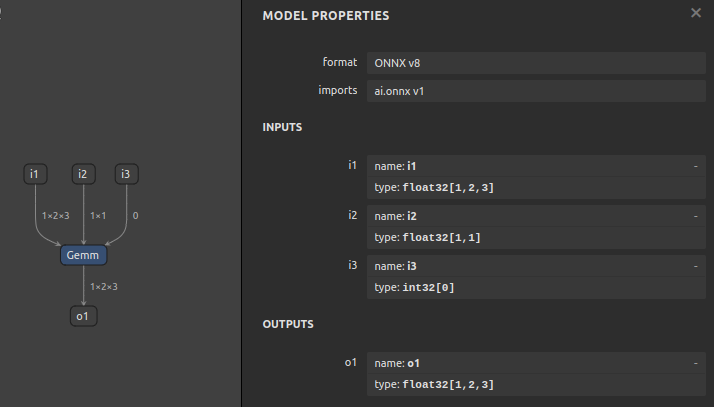
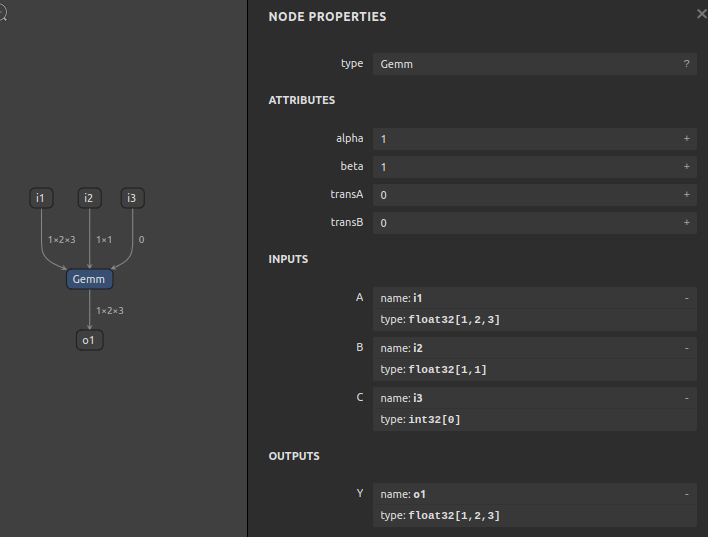
6-1. opset=1, Gemm
$ sog4onnx \
--op_type Gemm \
--opset 1 \
--op_name gemm_custom1 \
--input_variables i1 float32 [1,2,3] \
--input_variables i2 float32 [1,1] \
--input_variables i3 int32 [0] \
--output_variables o1 float32 [1,2,3] \
--attributes alpha float32 1.0 \
--attributes beta float32 1.0 \
--attributes transA int32 0 \
--attributes transB int32 0
--non_verbose
6-2. opset=11, Add
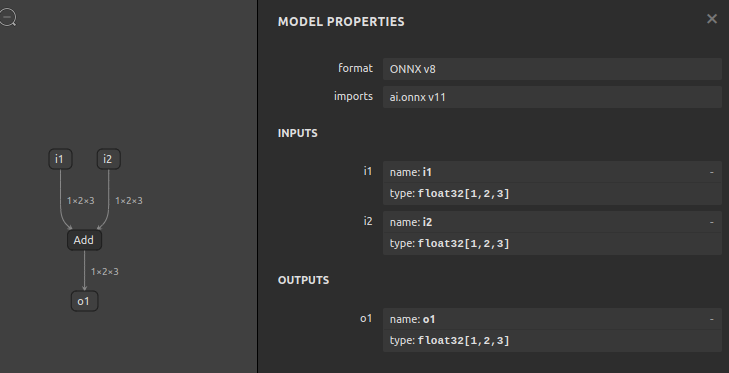
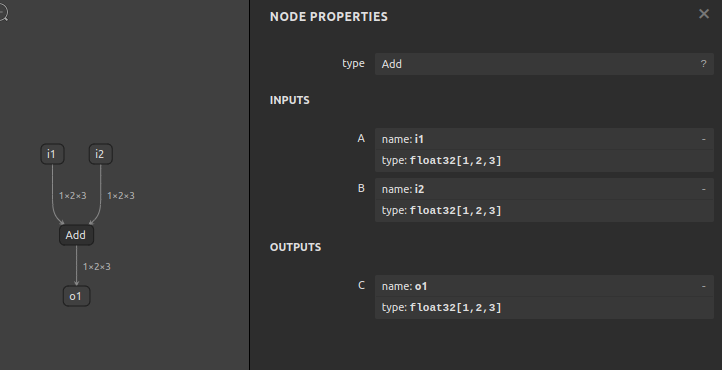
$ sog4onnx \
--op_type Add \
--opset 11 \
--op_name add_custom1 \
--input_variables i1 float32 [1,2,3] \
--input_variables i2 float32 [1,2,3] \
--output_variables o1 float32 [1,2,3] \
--non_verbose
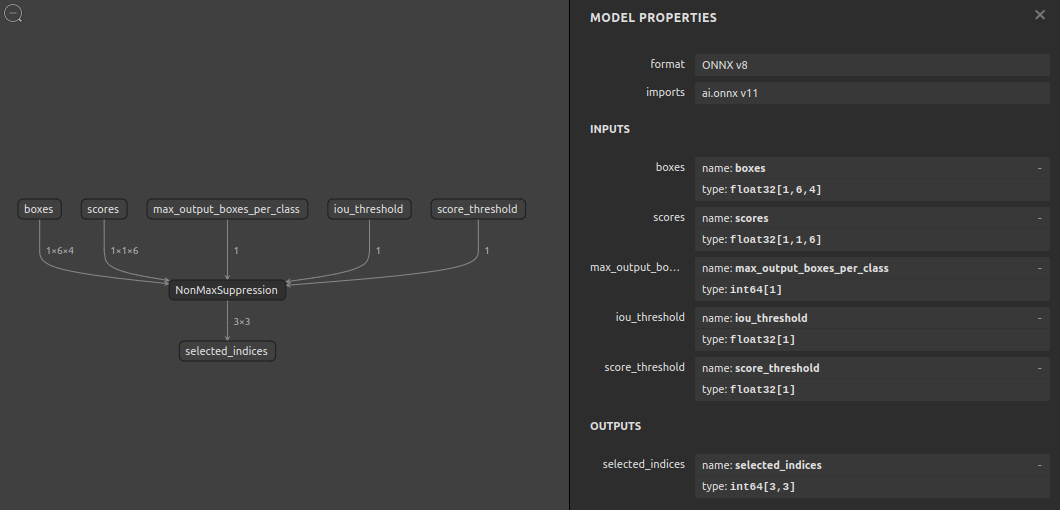
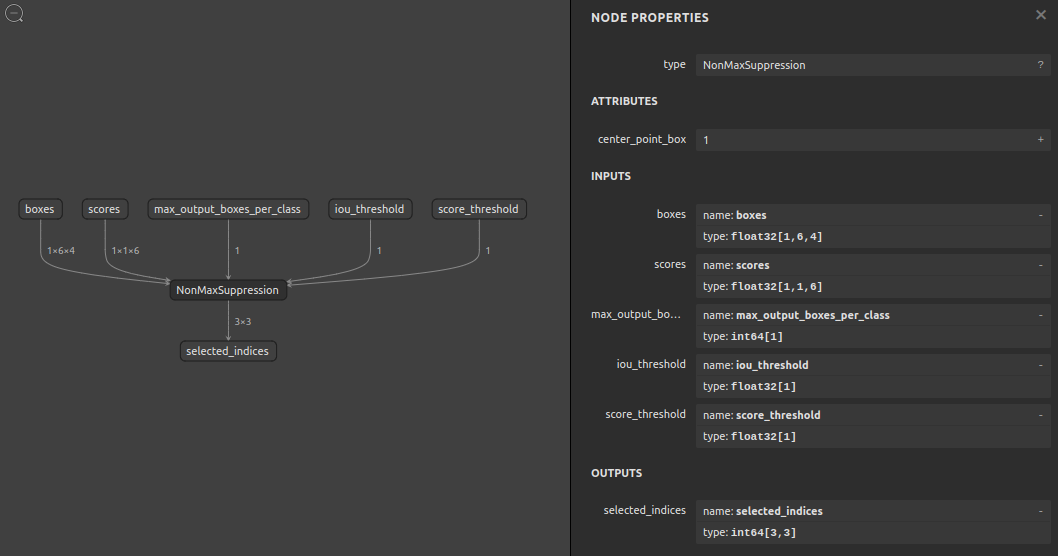
6-3. opset=11, NonMaxSuppression
$ sog4onnx \
--op_type NonMaxSuppression \
--opset 11 \
--op_name nms_custom1 \
--input_variables boxes float32 [1,6,4] \
--input_variables scores float32 [1,1,6] \
--input_variables max_output_boxes_per_class int64 [1] \
--input_variables iou_threshold float32 [1] \
--input_variables score_threshold float32 [1] \
--output_variables selected_indices int64 [3,3] \
--attributes center_point_box int64 1
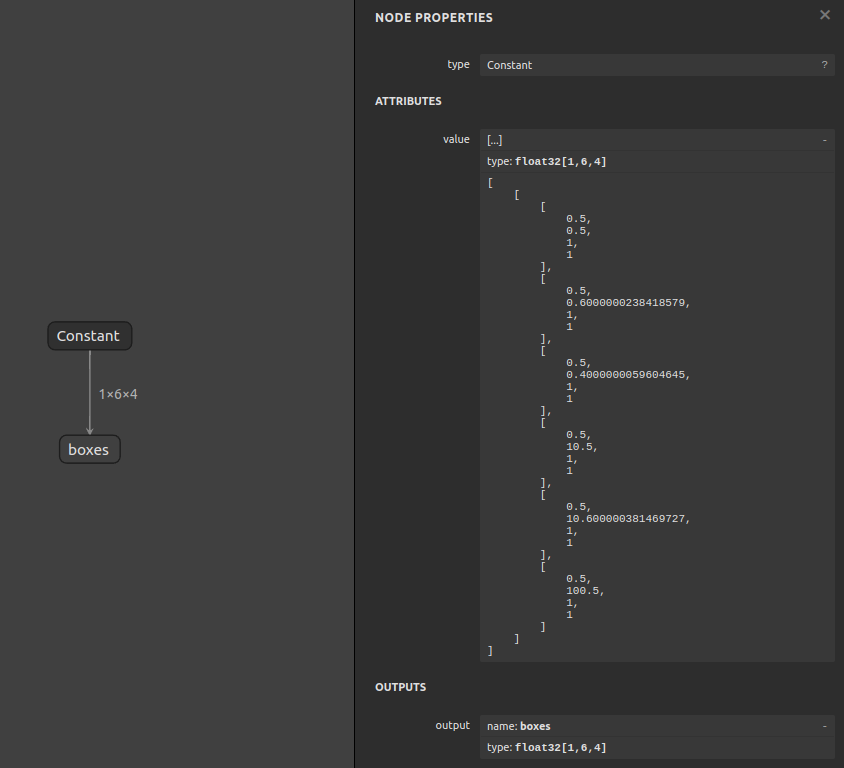
6-4. opset=11, Constant
$ sog4onnx \
--op_type Constant \
--opset 11 \
--op_name const_custom1 \
--output_variables boxes float32 [1,6,4] \
--attributes value float32 \
[[\
[0.5,0.5,1.0,1.0],\
[0.5,0.6,1.0,1.0],\
[0.5,0.4,1.0,1.0],\
[0.5,10.5,1.0,1.0],\
[0.5,10.6,1.0,1.0],\
[0.5,100.5,1.0,1.0]\
]]
7. Reference
- https://github.com/onnx/onnx/blob/main/docs/Operators.md
- https://docs.nvidia.com/deeplearning/tensorrt/onnx-graphsurgeon/docs/index.html
- https://github.com/NVIDIA/TensorRT/tree/main/tools/onnx-graphsurgeon
- https://github.com/PINTO0309/sne4onnx
- https://github.com/PINTO0309/snd4onnx
- https://github.com/PINTO0309/snc4onnx
- https://github.com/PINTO0309/scs4onnx
- https://github.com/PINTO0309/PINTO_model_zoo
8. Issues
https://github.com/PINTO0309/simple-onnx-processing-tools/issues
Release history Release notifications | RSS feed


Download files
Download the file for your platform. If you're not sure which to choose, learn more about installing packages.
Source Distribution
Built Distribution
Filter files by name, interpreter, ABI, and platform.
If you're not sure about the file name format, learn more about wheel file names.
Copy a direct link to the current filters
File details
Details for the file sog4onnx-1.0.14.tar.gz.
File metadata
- Download URL: sog4onnx-1.0.14.tar.gz
- Upload date:
- Size: 10.4 kB
- Tags: Source
- Uploaded using Trusted Publishing? No
- Uploaded via: twine/4.0.1 CPython/3.9.14
File hashes
| Algorithm | Hash digest | |
|---|---|---|
| SHA256 |
e2da77854228cd5866a70b399bdf8e6fe360085d282dfbc0cd0779f2153a51e4
|
|
| MD5 |
51893cb9f2119eed334b63d074e58d0c
|
|
| BLAKE2b-256 |
ecffc34f53a26b06043682c5f63d45cf4e2e23a340314b46dfca1d5dfa25cc31
|
File details
Details for the file sog4onnx-1.0.14-py3-none-any.whl.
File metadata
- Download URL: sog4onnx-1.0.14-py3-none-any.whl
- Upload date:
- Size: 9.2 kB
- Tags: Python 3
- Uploaded using Trusted Publishing? No
- Uploaded via: twine/4.0.1 CPython/3.9.14
File hashes
| Algorithm | Hash digest | |
|---|---|---|
| SHA256 |
ed2dabd69beb75754b2788813a8526775006fc0e6b340648c456570dd85cc8f6
|
|
| MD5 |
ba1226adcc10e1d7bcdd49a99e5b2112
|
|
| BLAKE2b-256 |
20c0de7eb05a0a3574fd626a7f658f0d457dda64ac997c534a5a2b44da98c402
|






