
Simple ONNX operation generator. Simple Operation Generator for ONNX.

Project description
sog4onnx
Simple ONNX operation generator. Simple Operation Generator for ONNX.
https://github.com/PINTO0309/simple-onnx-processing-tools



Key concept
- Variable, Constant, Operation and Attribute can be generated externally.
- Allow Opset to be specified externally.
- No check for consistency of Operations within the tool, as new OPs are added frequently and the definitions of existing OPs change with each new version of ONNX's Opset.
- Only one OP can be defined at a time, and the goal is to generate free ONNX graphs using a combination of snc4onnx, sne4onnx, snd4onnx and scs4onnx.
- List of parameters that can be specified: https://github.com/onnx/onnx/blob/main/docs/Operators.md
1. Setup
1-1. HostPC
### option
$ echo export PATH="~/.local/bin:$PATH" >> ~/.bashrc \
&& source ~/.bashrc

### run
$ pip install -U onnx \
&& python3 -m pip install -U onnx_graphsurgeon --index-url https://pypi.ngc.nvidia.com \
&& pip install -U sog4onnx
1-2. Docker
### docker pull
$ docker pull pinto0309/sog4onnx:latest

### docker build
$ docker build -t pinto0309/sog4onnx:latest .

### docker run
$ docker run --rm -it -v `pwd`:/workdir pinto0309/sog4onnx:latest
$ cd /workdir
2. CLI Usage
$ sog4onnx -h

usage: sog4onnx [-h]
  --op_type OP_TYPE
  --opset OPSET
  [--input_variables NAME TYPE VALUE]
  [--output_variables NAME TYPE VALUE]
  [--attributes NAME VALUE]
  [--output_onnx_file_path OUTPUT_ONNX_FILE_PATH]
  [--non_verbose]

optional arguments:
  -h, --help
        show this help message and exit

  --op_type OP_TYPE
        ONNX OP type.
        https://github.com/onnx/onnx/blob/main/docs/Operators.md

  --opset OPSET
        ONNX opset number.

  --input_variables NAME TYPE VALUE
        input_variables can be specified multiple times.
        --input_variables variable_name numpy.dtype shape
        https://github.com/onnx/onnx/blob/main/docs/Operators.md

        e.g.
        --input_variables i1 float32 [1,3,5,5] \
        --input_variables i2 int32 [1] \
        --input_variables i3 float64 [1,3,224,224]

  --output_variables NAME TYPE VALUE
        output_variables can be specified multiple times.
        --output_variables variable_name numpy.dtype shape
        https://github.com/onnx/onnx/blob/main/docs/Operators.md

        e.g.
        --output_variables o1 float32 [1,3,5,5] \
        --output_variables o2 int32 [1] \
        --output_variables o3 float64 [1,3,224,224]

  --attributes NAME VALUE
        attributes can be specified multiple times.
        --attributes name value
        https://github.com/onnx/onnx/blob/main/docs/Operators.md

        e.g.
        --attributes alpha 1.0 \
        --attributes beta 1.0 \
        --attributes transA 0 \
        --attributes transB 0

  --output_onnx_file_path OUTPUT_ONNX_FILE_PATH
        Output onnx file path. If not specified, a file with the OP type name is generated.

        e.g. op_type="Gemm" -> Gemm.onnx

  --non_verbose
        Do not show all information logs. Only error logs are displayed.
3. In-script Usage
$ python
>>> from sog4onnx import generate
>>> help(generate)
Help on function generate in module sog4onnx.onnx_operation_generator:

generate(
  op_type: str,
  opset: int,
  input_variables: dict,
  output_variables: dict,
  attributes: Union[dict, NoneType] = None,
  output_onnx_file_path: Union[str, NoneType] = '',
  non_verbose: Union[bool, NoneType] = False
) -> onnx.onnx_ml_pb2.ModelProto

    Parameters
    ----------
    op_type: str
        ONNX op type.
        See below for the types of OPs that can be specified.
        https://github.com/onnx/onnx/blob/main/docs/Operators.md

        e.g. "Add", "Div", "Gemm", ...

    opset: int
        ONNX opset number.

        e.g. 11

    input_variables: Optional[dict]
        Specify input variables for the OP to be generated.
        See below for the variables that can be specified.
        https://github.com/onnx/onnx/blob/main/docs/Operators.md
        {'input_var_name1': [numpy.dtype, shape], 'input_var_name2': [dtype, shape], ...}

        e.g.
        input_variables = {
          "name1": [np.float32, [1,224,224,3]],
          "name2": [np.bool_, [0]],
          ...
        }

    output_variables: Optional[dict]
        Specify output variables for the OP to be generated.
        See below for the variables that can be specified.
        https://github.com/onnx/onnx/blob/main/docs/Operators.md
        {'output_var_name1': [numpy.dtype, shape], 'output_var_name2': [dtype, shape], ...}

        e.g.
        output_variables = {
          "name1": [np.float32, [1,224,224,3]],
          "name2": [np.bool_, [0]],
          ...
        }

    attributes: Optional[dict]
        Specify output attributes for the OP to be generated.
        See below for the attributes that can be specified.
        https://github.com/onnx/onnx/blob/main/docs/Operators.md
        {'attr_name1': value1, 'attr_name2': value2, 'attr_name3': value3, ...}

        e.g.
        attributes = {
          "alpha": 1.0,
          "beta": 1.0,
          "transA": 0,
          "transB": 0
        }
        Default: None

    output_onnx_file_path: Optional[str]
        Output of onnx file path.
        If not specified, no .onnx file is output.
        Default: ''

    non_verbose: Optional[bool]
        Do not show all information logs. Only error logs are displayed.
        Default: False

    Returns
    -------
    single_op_graph: onnx.ModelProto
        Single op onnx ModelProto
4. CLI Execution
$ sog4onnx \
--op_type Gemm \
--opset 1 \
--input_variables i1 float32 [1,2,3] \
--input_variables i2 float32 [1,1] \
--input_variables i3 int32 [0] \
--output_variables o1 float32 [1,2,3] \
--attributes alpha 1.0 \
--attributes beta 1.0 \
--attributes transA 0 \
--attributes transB 0
5. In-script Execution
from sog4onnx import generate

single_op_graph = generate(
    op_type = 'Gemm',
    opset = 1,
    input_variables = {
      "i1": [np.float32, [1,2,3]],
      "i2": [np.float32, [1,1]],
      "i3": [np.int32, [0]],
    },
    output_variables = {
      "o1": [np.float32, [1,2,3]],
    },
    attributes = {
      "alpha": 1.0,
      "beta": 1.0,
      "broadcast": 0,
      "transA": 0,
      "transB": 0,
    },
    non_verbose = True,
)
6. Sample
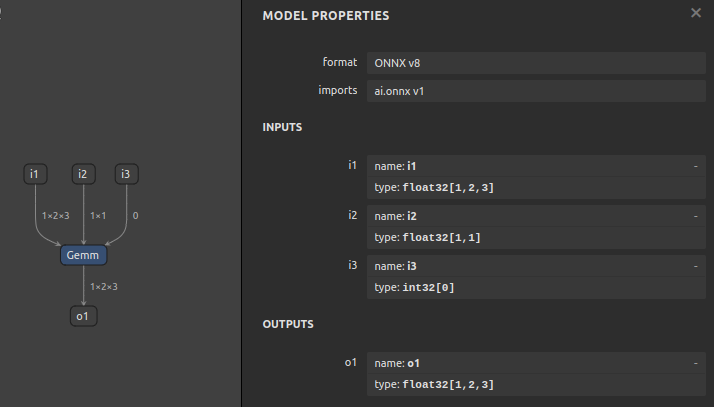
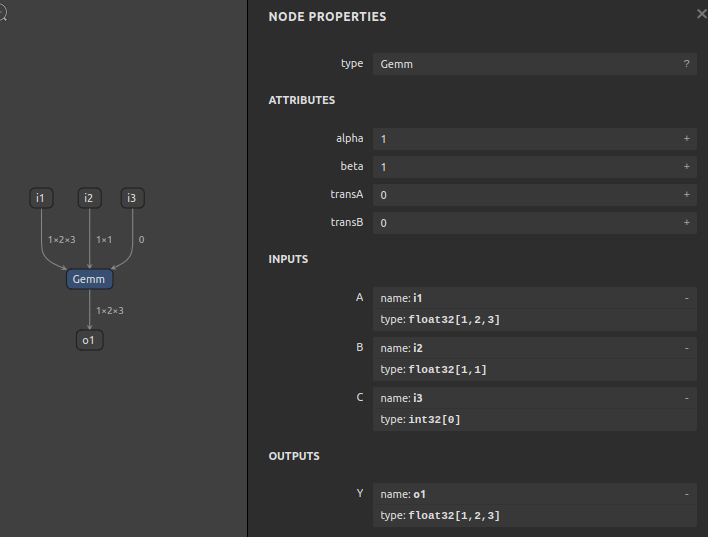
6-1. opset=1, Gemm
$ sog4onnx \
--op_type Gemm \
--opset 1 \
--input_variables i1 float32 [1,2,3] \
--input_variables i2 float32 [1,1] \
--input_variables i3 int32 [0] \
--output_variables o1 float32 [1,2,3] \
--attributes alpha 1.0 \
--attributes beta 1.0 \
--attributes transA 0 \
--attributes transB 0
--non_verbose
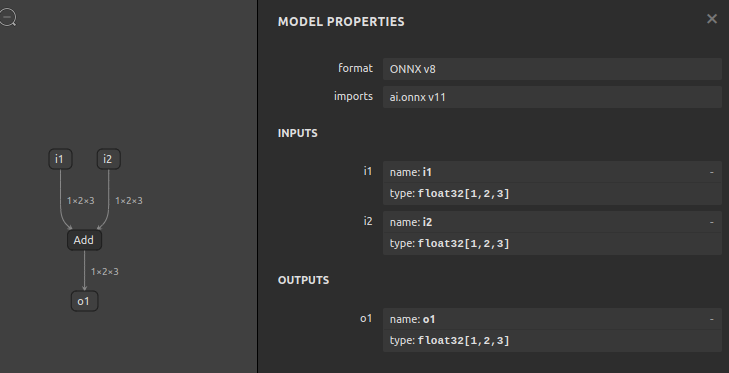
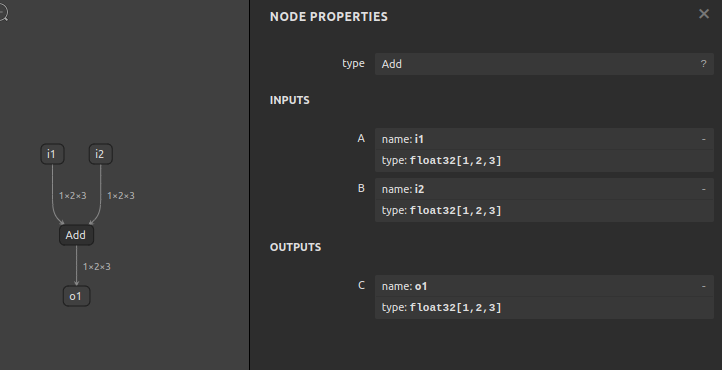
6-2. opset=11, Add
$ sog4onnx \
--op_type Add \
--opset 11 \
--input_variables i1 float32 [1,2,3] \
--input_variables i2 float32 [1,2,3] \
--output_variables o1 float32 [1,2,3] \
--non_verbose
7. Reference
- https://github.com/onnx/onnx/blob/main/docs/Operators.md
- https://docs.nvidia.com/deeplearning/tensorrt/onnx-graphsurgeon/docs/index.html
- https://github.com/NVIDIA/TensorRT/tree/main/tools/onnx-graphsurgeon
- https://github.com/PINTO0309/sne4onnx
- https://github.com/PINTO0309/snd4onnx
- https://github.com/PINTO0309/snc4onnx
- https://github.com/PINTO0309/scs4onnx
- https://github.com/PINTO0309/PINTO_model_zoo
Release history Release notifications | RSS feed


Download files
Download the file for your platform. If you're not sure which to choose, learn more about installing packages.
Source Distribution
sog4onnx-1.0.4.tar.gz
(8.3 kB
view details)
Built Distribution
Filter files by name, interpreter, ABI, and platform.
If you're not sure about the file name format, learn more about wheel file names.
Copy a direct link to the current filters
File details
Details for the file sog4onnx-1.0.4.tar.gz.
File metadata
- Download URL: sog4onnx-1.0.4.tar.gz
- Upload date:
- Size: 8.3 kB
- Tags: Source
- Uploaded using Trusted Publishing? No
- Uploaded via: twine/4.0.0 CPython/3.10.4
File hashes
| Algorithm | Hash digest | |
|---|---|---|
| SHA256 |
e138a5b335482caf512ac0ff619966dc7f858d444c6ee56b63fd21da610d1af8
|
|
| MD5 |
2832cc5676e85eda3949004c1859f3bc
|
|
| BLAKE2b-256 |
30dde0c18affa71ff25bb25d44788f1f57f2545d106ae0558d0b86808ccf429f
|
File details
Details for the file sog4onnx-1.0.4-py3-none-any.whl.
File metadata
- Download URL: sog4onnx-1.0.4-py3-none-any.whl
- Upload date:
- Size: 7.5 kB
- Tags: Python 3
- Uploaded using Trusted Publishing? No
- Uploaded via: twine/4.0.0 CPython/3.10.4
File hashes
| Algorithm | Hash digest | |
|---|---|---|
| SHA256 |
eba1be8530ee0edca2ebb514312b6db4089c04730d9d527a34d94b3010b66d28
|
|
| MD5 |
003c4caafbf033a27235f55fc8e20e28
|
|
| BLAKE2b-256 |
1635092381dcb00d7da5778b6b91becaf96b56aea8053a8d04a2943246f01206
|






