
Simple ONNX operation generator. Simple Operation Generator for ONNX.

Project description
sog4onnx
Simple ONNX operation generator. Simple Operation Generator for ONNX.
https://github.com/PINTO0309/simple-onnx-processing-tools



Key concept
- Variable, Constant, Operation and Attribute can be generated externally.
- Allow Opset to be specified externally.
- No check for consistency of Operations within the tool, as new OPs are added frequently and the definitions of existing OPs change with each new version of ONNX's Opset.
- Only one OP can be defined at a time, and the goal is to generate free ONNX graphs using a combination of snc4onnx, sne4onnx, snd4onnx and scs4onnx.
- List of parameters that can be specified: https://github.com/onnx/onnx/blob/main/docs/Operators.md
1. Setup
1-1. HostPC
### option
$ echo export PATH="~/.local/bin:$PATH" >> ~/.bashrc \
&& source ~/.bashrc

### run
$ pip install -U onnx \
&& python3 -m pip install -U onnx_graphsurgeon --index-url https://pypi.ngc.nvidia.com \
&& pip install -U sog4onnx
1-2. Docker
### docker pull
$ docker pull pinto0309/sog4onnx:latest

### docker build
$ docker build -t pinto0309/sog4onnx:latest .

### docker run
$ docker run --rm -it -v `pwd`:/workdir pinto0309/sog4onnx:latest
$ cd /workdir
2. CLI Usage
$ sog4onnx -h

usage: sog4onnx [-h]
  --op_type OP_TYPE
  --opset OPSET
  --input_variables INPUT_VARIABLES [INPUT_VARIABLES ...]
  --output_variables OUTPUT_VARIABLES [OUTPUT_VARIABLES ...]
  [--attributes ATTRIBUTES]
  [--output_onnx_file_path OUTPUT_ONNX_FILE_PATH]
  [--non_verbose]

optional arguments:
  -h, --help
        show this help message and exit

  --op_type OP_TYPE
        ONNX OP type.
        https://github.com/onnx/onnx/blob/main/docs/Operators.md

  --opset OPSET
        ONNX opset number.

  --input_variables INPUT_VARIABLES [INPUT_VARIABLES ...]
        input_variables can be specified multiple times.
        --input_variables variable_name numpy.dtype shape
        https://github.com/onnx/onnx/blob/main/docs/Operators.md

        e.g.
        --input_variables i1 float32 [1,3,5,5]
        --input_variables i2 int32 [1]
        --input_variables i3 float64 [1,3,224,224]

  --output_variables OUTPUT_VARIABLES [OUTPUT_VARIABLES ...]
        output_variables can be specified multiple times.
        --output_variables variable_name numpy.dtype shape
        https://github.com/onnx/onnx/blob/main/docs/Operators.md

        e.g.
        --output_variables o1 float32 [1,3,5,5]
        --output_variables o2 int32 [1]
        --output_variables o3 float64 [1,3,224,224]

  --attributes ATTRIBUTES
        attributes can be specified multiple times.
        The key name is a string and the delimiter is double-cotation marks.
        Note that double-cotation marks must be escaped with a backslash.
        --attributes {"attribute_name1": value1, "attribute_name2": value2, ...}
        https://github.com/onnx/onnx/blob/main/docs/Operators.md

        e.g. --attributes "{\"alpha\": 1.0, \"beta\": 1.0, \"transA\": 0, \"transB\": 0}"

  --output_onnx_file_path OUTPUT_ONNX_FILE_PATH
        Output onnx file path. If not specified, a file with the OP type name is generated.

        e.g. op_type="Gemm" -> Gemm.onnx

  --non_verbose
        Do not show all information logs. Only error logs are displayed.
3. In-script Usage
$ python
>>> from sog4onnx import generate
>>> help(generate)
Help on function generate in module sog4onnx.onnx_operation_generator:

generate(
  op_type: str,
  opset: int,
  input_variables: dict,
  output_variables: dict,
  attributes: Union[dict, NoneType] = None,
  output_onnx_file_path: Union[str, NoneType] = '',
  non_verbose: Union[bool, NoneType] = False
) -> onnx.onnx_ml_pb2.ModelProto

    Parameters
    ----------
    op_type: str
        ONNX op type.
        See below for the types of OPs that can be specified.
        https://github.com/onnx/onnx/blob/main/docs/Operators.md

        e.g. "Add", "Div", "Gemm", ...

    opset: int
        ONNX opset number.

        e.g. 11

    input_variables: Optional[dict]
        Specify input variables for the OP to be generated.
        See below for the variables that can be specified.
        https://github.com/onnx/onnx/blob/main/docs/Operators.md
        {'input_var_name1': [numpy.dtype, shape], 'input_var_name2': [dtype, shape], ...}

        e.g.
        input_variables = {
          "name1": [np.float32, [1,224,224,3]],
          "name2": [np.bool_, [0]],
          ...
        }

    output_variables: Optional[dict]
        Specify output variables for the OP to be generated.
        See below for the variables that can be specified.
        https://github.com/onnx/onnx/blob/main/docs/Operators.md
        {'output_var_name1': [numpy.dtype, shape], 'output_var_name2': [dtype, shape], ...}

        e.g.
        output_variables = {
          "name1": [np.float32, [1,224,224,3]],
          "name2": [np.bool_, [0]],
          ...
        }

    attributes: Optional[dict]
        Specify output attributes for the OP to be generated.
        See below for the attributes that can be specified.
        https://github.com/onnx/onnx/blob/main/docs/Operators.md
        {'attr_name1': value1, 'attr_name2': value2, 'attr_name3': value3, ...}

        e.g.
        attributes = {
          "alpha": 1.0,
          "beta": 1.0,
          "transA": 0,
          "transB": 0
        }
        Default: None

    output_onnx_file_path: Optional[str]
        Output of onnx file path.
        If not specified, no .onnx file is output.
        Default: ''

    non_verbose: Optional[bool]
        Do not show all information logs. Only error logs are displayed.
        Default: False

    Returns
    -------
    single_op_graph: onnx.ModelProto
        Single op onnx ModelProto
4. CLI Execution
$ sog4onnx \
--op_type Gemm \
--opset 1 \
--input_variables i1 float32 [1,2,3] \
--input_variables i2 float32 [1,1] \
--input_variables i3 int32 [0] \
--output_variables o1 float32 [1,2,3] \
--attributes "{\"alpha\": 1.0, \"beta\": 1.0, \"broadcast\": 0, \"transA\": 0, \"transB\": 0}"
5. In-script Execution
from sog4onnx import generate

single_op_graph = generate(
    op_type = 'Gemm',
    opset = 1,
    input_variables = {
      "i1": [np.float32, [1,2,3]],
      "i2": [np.float32, [1,1]],
      "i3": [np.int32, [0]],
    },
    output_variables = {
      "o1": [np.float32, [1,2,3]],
    },
    attributes = {
      "alpha": 1.0,
      "beta": 1.0,
      "broadcast": 0,
      "transA": 0,
      "transB": 0,
    },
    non_verbose = True,
)
6. Sample
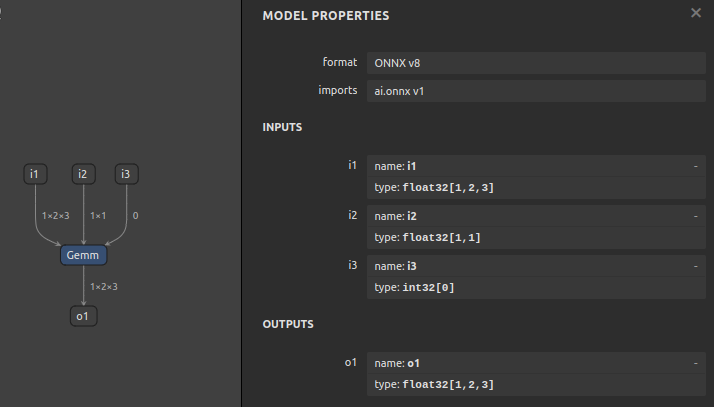
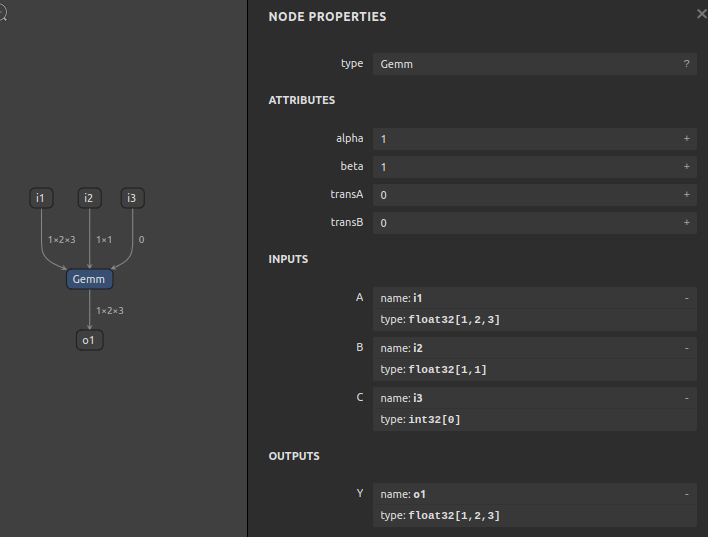
6-1. opset=1, Gemm
$ sog4onnx \
--op_type Gemm \
--opset 1 \
--input_variables i1 float32 [1,2,3] \
--input_variables i2 float32 [1,1] \
--input_variables i3 int32 [0] \
--output_variables o1 float32 [1,2,3] \
--attributes "{\"alpha\": 1.0, \"beta\": 1.0, \"broadcast\": 0, \"transA\": 0, \"transB\": 0}" \
--non_verbose
6-2. opset=11, Add
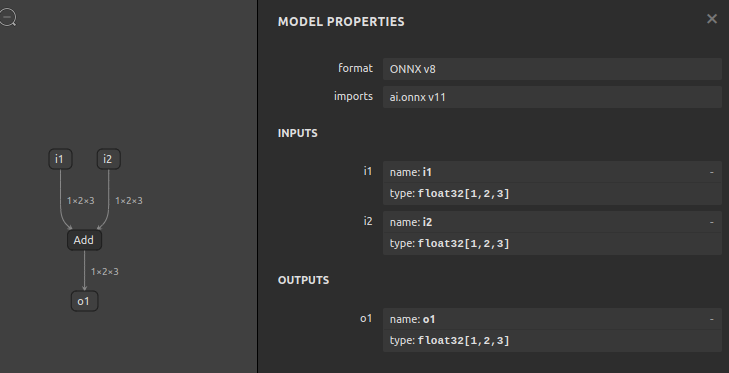
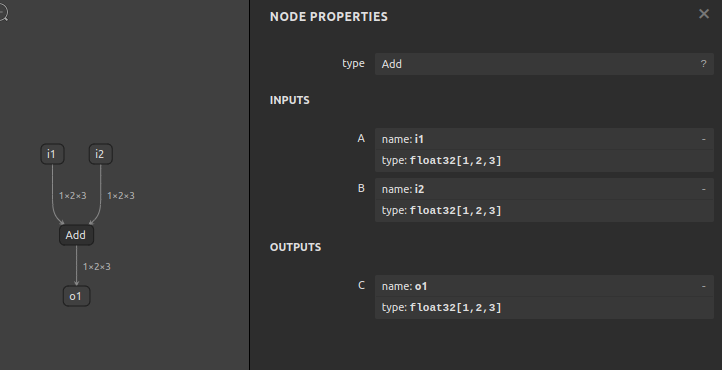
$ sog4onnx \
--op_type Add \
--opset 11 \
--input_variables i1 float32 [1,2,3] \
--input_variables i2 float32 [1,2,3] \
--output_variables o1 float32 [1,2,3] \
--non_verbose
7. Reference
- https://docs.nvidia.com/deeplearning/tensorrt/onnx-graphsurgeon/docs/index.html
- https://github.com/NVIDIA/TensorRT/tree/main/tools/onnx-graphsurgeon
- https://github.com/PINTO0309/sne4onnx
- https://github.com/PINTO0309/snd4onnx
- https://github.com/PINTO0309/snc4onnx
- https://github.com/PINTO0309/scs4onnx
- https://github.com/PINTO0309/PINTO_model_zoo
Release history Release notifications | RSS feed


Download files
Download the file for your platform. If you're not sure which to choose, learn more about installing packages.
Source Distribution
sog4onnx-1.0.2.tar.gz
(8.4 kB
view details)
Built Distribution
Filter files by name, interpreter, ABI, and platform.
If you're not sure about the file name format, learn more about wheel file names.
Copy a direct link to the current filters
File details
Details for the file sog4onnx-1.0.2.tar.gz.
File metadata
- Download URL: sog4onnx-1.0.2.tar.gz
- Upload date:
- Size: 8.4 kB
- Tags: Source
- Uploaded using Trusted Publishing? No
- Uploaded via: twine/4.0.0 CPython/3.10.4
File hashes
| Algorithm | Hash digest | |
|---|---|---|
| SHA256 |
2176492414187c17eb5738ca570f99439f20b1baf85c3421e23207458e60e893
|
|
| MD5 |
711cc008b3436b49fc80c6e8cb53f32e
|
|
| BLAKE2b-256 |
7b848ff2be95d962ebdf01d7d17c5a7adc713169a9d806732ffb87154504206d
|
File details
Details for the file sog4onnx-1.0.2-py3-none-any.whl.
File metadata
- Download URL: sog4onnx-1.0.2-py3-none-any.whl
- Upload date:
- Size: 7.6 kB
- Tags: Python 3
- Uploaded using Trusted Publishing? No
- Uploaded via: twine/4.0.0 CPython/3.10.4
File hashes
| Algorithm | Hash digest | |
|---|---|---|
| SHA256 |
ef19b6fbd307fb5441e6c757a8c8637ad0f8da023aac3f56b8bc9fa465f5442a
|
|
| MD5 |
3e2bc91e811dd6a4ec89998a50a909e0
|
|
| BLAKE2b-256 |
515128f14345f433d84b22b288e6f3cc60a1a5f91728040ba2b8501fb6bc4401
|






